
What’s Changed: Two things hit Grok Imagine on November 12 and 13, 2026. The Imagine tab disappeared for many accounts on the web, Android and iPhone, paid plans included, and The Information reported that SpaceX’s AI division cut about 60 people from the Imagine team. Imagine has not been shut down: xAI’s status page still lists it as working, and image and video requests now run through the normal Grok chat box.
What happened to Grok Imagine is two separate stories that landed on the same day. Overnight into November 13, the Imagine tab vanished from the sidebar for a wave of users.
Later that day, a report in The Information, summarized by Investing.com, said most of the team behind Imagine had been laid off.
The two stories blended together fast, which is how posts like “Imagine is dead” started showing up on r/grok. On the morning of November 14, xAI’s status page showed no active incidents and listed Imagine as Operational.
On accounts without the tab, typing grok.com/imagine into a browser lands on the regular chat home with an Image and Video mode already switched on.
Imagine still works for a lot of people, and the way in has moved into the chat box.
On many accounts that move appears to have broken the tab and the saved library, so I’ll walk through what each half of the news means and how people are getting their creations back.
What Happened to Grok Imagine?
Grok Imagine lost its dedicated tab for many accounts on November 12 and 13, 2026, and on the 13th The Information reported that SpaceX cut about 60 people from the Imagine team. The tool still makes images and video, mostly from the chat box now.
The first complaints came from paying subscribers. In one r/grok thread, a SuperGrok subscriber could not find the Imagine tab in the website’s left sidebar.
Another person in the same discussion found every saved creation replaced by a triangle with an exclamation mark.
Typing the old address does not help on an affected account. On November 14, grok.com/imagine opens the regular chat with an Image and Video mode selected and 17 ready-made templates underneath, from Background removal to Character sprite. The sidebar lists Library, Grok Bot and Projects but no Imagine.
The layoff report followed later on November 13. The order of events bothers me most: the broken tab surfaced hours before the report, and as of November 14 xAI had posted nothing about either one on its status page or release notes.
The quickest fix is opening Grok in Edge, Safari or a private window instead of Chrome, and the full list is further down. If you mainly used Imagine to make pictures of a character, Candy AI lets you design a companion, chat with it and ask it for images.
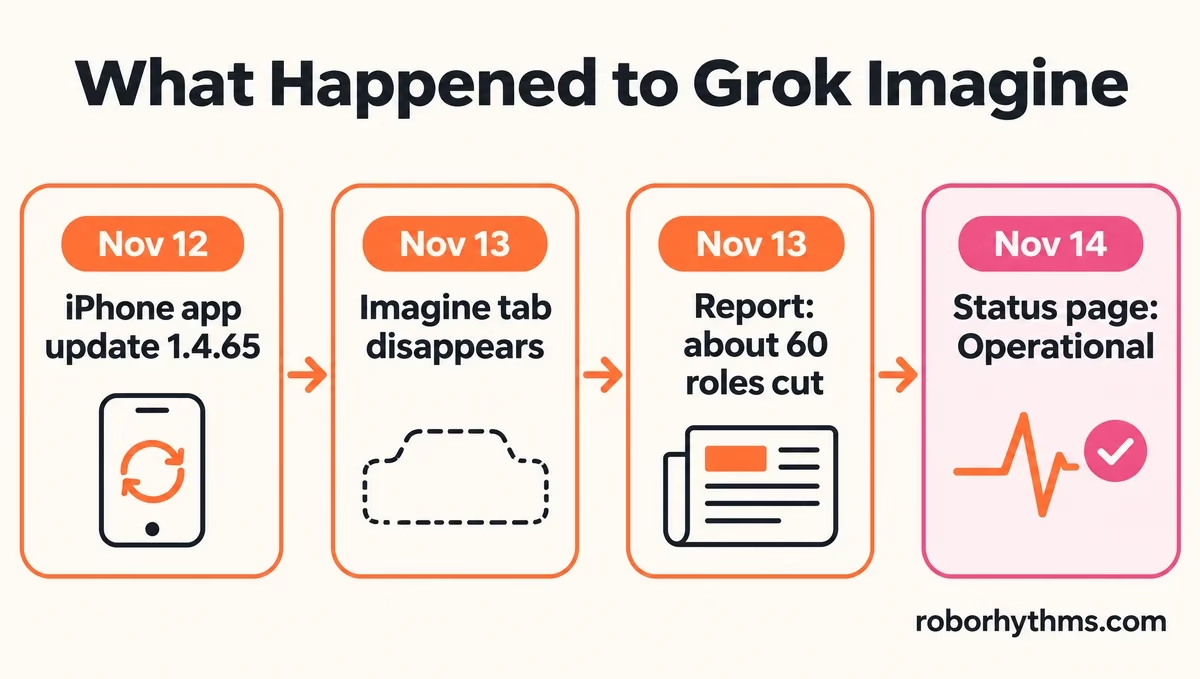
Here is how the week unfolded, in order:
| Date (2026) | What happened | Where it shows |
|---|---|---|
| November 2 | The grok-imagine-image-quality API model retires, and its requests move to Image 2.0 at low quality | xAI release notes |
| November 12 | Grok 1.4.65 for iPhone ships with the note “Improvements to Chat, Voice and Imagine” | App Store listing |
| November 13 | The Imagine tab disappears for many accounts on the web and in the apps | r/grok |
| November 13 | The Information reports about 60 Imagine roles cut, with a small crew left to maintain it | Investing.com, citing The Information |
| November 14 | Status page shows no incidents with Imagine marked Operational, and the Android app gets another update | Google Play listing |
Why Did SpaceX Cut the Grok Imagine Team?
SpaceX cut about 60 Imagine roles to spend on AI coding tools and its Grok Bot agent, according to The Information. Only a small crew is left to keep Imagine running.
The Investing.com summary says SpaceX’s AI division “eliminated roughly 60 roles” from the Imagine team, and that the layoffs “leave only a small crew to maintain the product.”
It adds that management “has prioritized AI coding tools and its autonomous agent product, Grok Bot.” It also notes that video takes far more computing power than text, and that independent benchmarks cited by The Information showed Imagine “trailed leading competing models.”
The money went where SpaceX is building. SpaceX bought xAI in February, and TechCrunch reported the $60 billion Cursor deal closing in August, which put an AI coding startup at the center of the AI division.
My read is that Imagine lost a budget fight inside SpaceX. That is a real loss for subscribers, because for some of them Imagine was the cheapest decent video tool around and the only reason to pay for Grok.
Is Grok Imagine Shutting Down?
Grok Imagine is not shutting down according to anything xAI has published. The pricing page still sells it, the API still serves its models and no notice appears on its status page or release notes, though a skeleton crew means few improvements are coming.
Every official signal on November 14 points the same way. xAI’s pricing page lists Imagine on the $8 Plus plan, and its API page still offers five Imagine models, including grok-imagine-video-1.5.
The gloomiest reading comes from the Chinese tech outlet 36kr, which, according to BigGo Finance, counted about 70 people on the team and said the whole unit was eliminated.
The same BigGo Finance article notes that xAI posted a Palo Alto job for a “Model Engineer, Multimodal Understanding” paying $160,000 to $250,000, an odd hire for a product headed for the bin.
One subscriber sees a replay of how Grok’s 3D companions went, where the service got worse before it was removed.
When xAI retired an Imagine API model on November 2, it posted the notice on September 2 in its release notes, so that page and the status page are the two places to watch.
I expect Imagine to keep running for now and to change very little, since a small maintenance crew rarely ships new models. A real shutdown would put Grok in the same spot as OpenAI, which already shut Sora down.
Is Grok Imagine Down Right Now?
Grok Imagine showed no outage on November 14, when xAI’s status page listed no active incidents and marked Imagine as Operational. The trouble people hit looks like a side effect of a redesigned interface, which now sends the old Imagine page to the chat box.
The status page, now branded SpaceXSI Status, groups Imagine with grok.com, the iPhone and Android apps and Voice, and every one of them read Operational.
As of November 14, Grok’s release notes had not changed since October 3, so whatever changed shipped without a note.
I read a green status board as proof the servers answer, and nothing more. The better test is the chat box itself: if a request in the Image and Video mode returns a picture, generation works and only the tab or library view is broken on your account.
A few other changes landed the same week. In one thread, a subscriber who still had Imagine could only run one request at a time, and another thread reports being asked to choose between two video models.
If your clips look worse than before, the video quality guide explains the usual causes.
How Do You Get the Grok Imagine Tab Back?
You get the Grok Imagine tab back by changing how you open Grok: another browser, a private window, or one sign-in through the Android app brings the tab and library back for many people. None of these fixes is guaranteed, because xAI has not acknowledged the bug on its status page or release notes.
| Symptom | Likely cause | Fix |
|---|---|---|
| Imagine tab missing from the web sidebar | The account landed on the new chat-first layout, or a stuck browser session | Try Edge, Safari or a private window, then the Android sign-in trick |
| grok.com/imagine opens the chat page | The old Imagine page now redirects | Use the Image and Video mode in the chat box |
| Saved creations show a triangle with an exclamation mark | The library failed to load in that browser, most often Chrome | Open the library in another browser, or wait a few hours |
| iPhone history button opens your photo library | Probably the November 12 iPhone update, which changed that button | Reach your saved creations from a browser for now |
| Imagine tab shows, but items are gray or the app crashes | An app-side bug | Update the app and use a browser meanwhile |
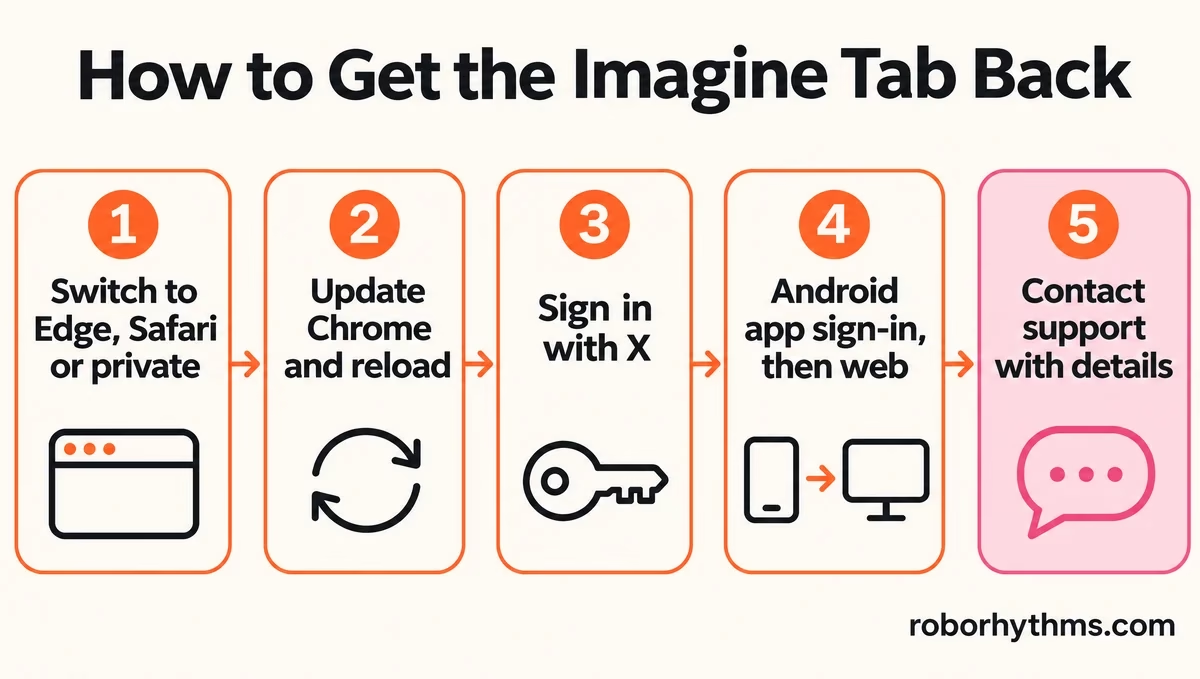
My order runs from the cheapest fix to the slowest one, and I’d stop at whichever step brings the tab back:
- Open grok.com in Microsoft Edge, Safari or a private window instead of Chrome. In one thread, clearing cookies and turning off extensions in Chrome did nothing, while an Incognito window or Edge brought every image back.
- Update Chrome to the latest version and reload grok.com.
- If your Grok account is tied to your X account, sign in with X instead of an email address. In another thread, the one person who tried this got the tab back in Edge only with an X login, while email still redirected to the home page.
- Sign out of Grok on the web, sign in on the Android app, make one image there, then sign in on the web again. That sequence brought back the Imagine link and the library for the one account that described it, so treat it as worth a try rather than a sure fix.
- Contact support with your plan, your dates and what you see. A Super subscriber got access back after support replied with a link.
A support ticket with details gives the agent something to check:
Before: “Imagine is gone, please fix it.”
After: “My Super plan account lost the Imagine tab on the web and in the iPhone app on November 13. grok.com/imagine redirects to the chat page, and my saved creations show warning triangles in Chrome but load in Edge. Please restore Imagine access for this account.”
If the tab is there but generations fail or stall, that is a different problem, and the Grok Imagine not working guide covers it.
Are Your Grok Imagine Creations Deleted?
Your Grok Imagine creations are most likely not deleted. The warning triangles cleared for people who switched browsers or waited, though refreshing a half-loaded Saved page can make most of a library look empty again.
In one thread, the triangles turned back into images a few hours later with no action at all. Another thread warns that refreshing the Saved page can make 99% of saved images disappear from view, which is a display problem until proven otherwise.
On iPhone, one thread notes that after the latest app update the old history button opens the phone’s own photo folder, so your creations will not appear there.
That alone does not mean they are gone, and I always check them in a browser before assuming the worst.
Which Grok Plans Still Include Imagine?
Every paid Grok plan still includes Imagine on xAI’s pricing page, checked November 14, 2026. Plus at $8 lists Imagine, video creation starts at Premium for $30, and Super at $100 adds 1080p, 15-second videos.
The tab vanished on plans of every size, so a plan downgrade does not explain it.
In one thread, someone who subscribed to Super the day before lost the tab the next morning, and an Ultra subscriber in another lost it on one of their accounts.
A support reply posted in r/grok answers with “Grok Imagine is one of the features that varies by plan” and warns it “may take a few days” before a person reviews the ticket. Free accounts get only limited Imagine images and no video, and the free tier history explains how that happened.
If I were paying $100 a month for Super mainly to make videos, I would file a ticket now and keep the reply. A missing feature on a paid plan is a fair refund question. If you are on an older SuperGrok plan, the Grok pricing breakdown shows how it maps to the new plans.
How Do You Save Your Grok Imagine Creations?
You save Grok Imagine creations by downloading them from a browser where your library loads properly. Nothing on xAI’s status page or release notes says what happens to saved creations after a plan ends, so back up before you cancel or switch.
- Open your library in the browser where it shows real thumbnails instead of triangles.
- Download the images and videos you cannot recreate first, then everything else.
- Copy the prompts you used into a note, since a prompt works on any tool you move to.
- Avoid refreshing the Saved page over and over while it is only half loaded.
I keep my own copy of anything I can’t redo, and a week like this is the reason.
What Can You Use Instead of Grok Imagine?
The right Grok Imagine replacement depends on what you made with it. Character pictures move well to companion apps like Candy AI, while video work needs a dedicated video tool.
For character pictures, Candy AI is the pick I hand people first, because the character, the chat and the images live in one place. Its free plan is thin, since Candy’s help center gives free users five messages and one image in total, so treat it as a paid tool from day one.
If your Imagine folder is mostly anime, Nectar AI works the same way with an anime look.
For video, the Grok Imagine alternatives guide covers the tools worth trying. Pick one before you need it, because Imagine’s future depends on a team that no longer exists in full.
Quick Takeaways
- Grok Imagine still runs, and on November 14 the status page listed Imagine as Operational.
- The Imagine tab vanished on November 13 for many accounts, paid ones included, and grok.com/imagine now opens the chat’s Image and Video mode.
- The Information reported about 60 Imagine roles cut with only a small crew left, so expect few new features.
- Try Edge, Safari or a private window first, then the Android sign-in trick, before assuming your creations are gone.
- Download anything you cannot recreate while your library still loads.
