
Bottom Line: Teachable is worth paying for if you sell courses and want a clean, fast setup with EU VAT and native mobile apps included. The Starter plan’s 7.5% transaction fee turns it into a trap above roughly $530 in monthly sales, where the Builder plan starts costing you less. API and webhook access are locked behind the Growth tier at $139 per month, which is the real friction point for anyone wiring Teachable into a custom AI stack.
If you have been course-shopping for a platform that does not need a developer, Teachable will show up in every comparison. It runs roughly 150,000 active customers across 180 countries as of early 2026, inside an online education market Statista projects at $221 billion this year.
That is enough volume that the platform itself has stopped being the interesting variable. What I want to do here is skip the standard “five-star feature tour” and walk you through the parts that decide whether you should pay for it.
The way I see it, every modern course platform sells the same outer surface: clean checkout, mobile app, a video player, some kind of AI helper. What separates the platforms in 2026 is what happens when you push them: the 0% fee tipping point, what the API will and will not do, and how expensive it gets to leave once you have a thousand students inside.
This review is grounded in the current 2026 pricing tiers, the public-record changes Teachable made after retiring its free plan in early 2025, and the operator-side gaps the other reviews on page one of Google quietly ignore. If you already use Beacons AI for your creator monetisation stack and you are now adding paid courses, this is the framework I would use to decide whether Teachable is the right next layer.
Teachable Pricing Tiers and the Starter Plan Trap
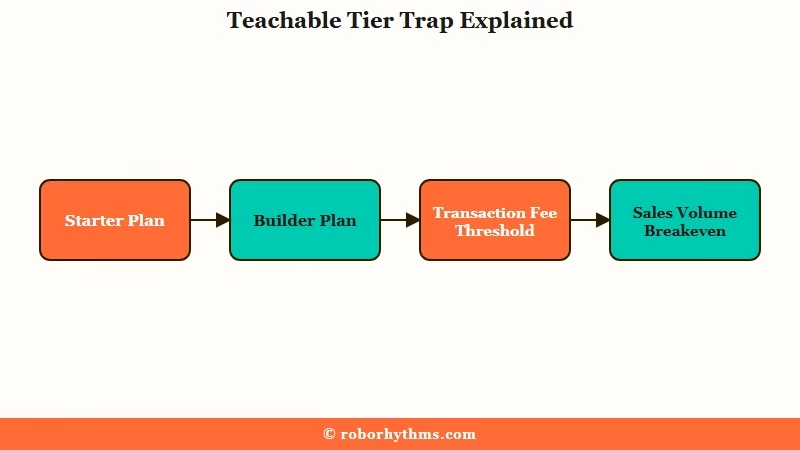
Teachable’s 2026 pricing runs across four tiers starting at $29 per month annual, but the Starter plan’s 7.5% transaction fee makes it the most expensive option once monthly sales clear roughly $530.
The numbers below are 2026 prices on annual billing. Monthly billing adds about 30 to 40 percent on each tier.
| Plan | Price (annual) | Transaction fee | Limits (products / students) | API access |
|---|---|---|---|---|
| Starter | $29 / mo | 7.5% | 1 / 100 | No |
| Builder | $69 / mo | 0% | 5 / 1,000 | No |
| Growth | $139 / mo | 0% | 25 / Unlimited | Yes |
| Advanced | $309 / mo | 0% | 100+ / Unlimited | Yes |
Standard Stripe processing fees (2.9% plus $0.30 per US card transaction) apply across every plan; that is not unique to Teachable.
The line I would put on a sticky note before signing up for Starter: at 7.5% transaction fees, every $100 in course sales costs you $7.50 in platform tax. The Builder plan removes that fee but costs $40 extra per month ($69 minus $29).
The break-even is when 7.5% of your monthly course revenue exceeds $40, which works out to roughly $533 in monthly sales. From what I have seen, most creators hit that line within their first two or three launches and forget to upgrade.
Vague: “What plan should I pick on Teachable?”
Specific: “I expect to launch a $99 course to 30 buyers in the first month and grow to roughly $1,500 monthly recurring by month six. Which Teachable plan is cheapest end-to-end, accounting for transaction fees and Stripe fees?”
The specific question lets you do the math: a 30-buyer launch at $99 each is $2,970 in month one. On Starter that costs you $222.75 in Teachable transaction fees plus $86.43 in Stripe, for $309.18 in fees against $39 in subscription.
On Builder you pay zero transaction fees plus the same $86.43 Stripe plus $89 subscription, totalling $175.43. The Builder plan saves you $133.75 in the first month alone, which already exceeds two months of Builder pricing.
The other pricing reality nobody quite spells out: Teachable retired its free plan in early 2025. There is no permanent free option in 2026.
You can run a 7-day trial or a 30-day trial depending on promotion, but the moment that ends, you are paying. Jeff Cobb of Learning Revolution put the cleaner version of this: “Teachable is a solid platform for selling online courses… it’s only worth using if you already have a marketing stack.”
What You Get in 2026 and What Is Missing
Teachable in 2026 ships native iOS and Android apps on every paid plan, an AI curriculum generator on every tier, Teachable:Pay with automatic EU VAT and US sales tax handling, and lightweight built-in email; the marketing stack is intentionally thin.
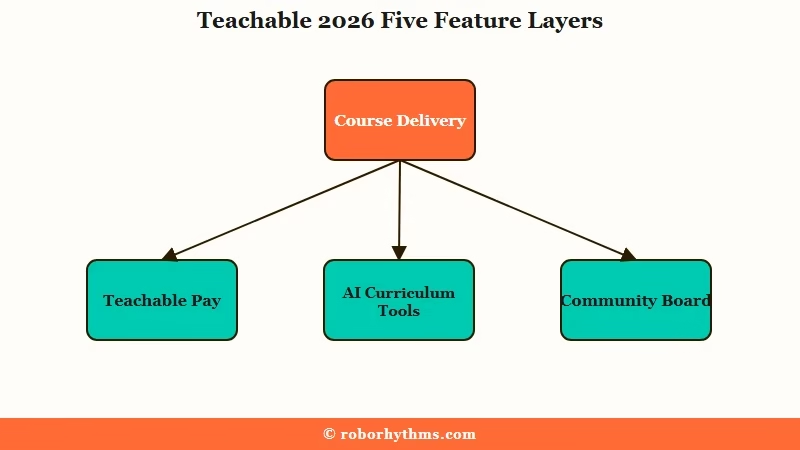
The features that matter for a 2026 creator buying decision land in five buckets. Here is the rough split:
- Course delivery layer (strong). Native iOS and Android student apps with offline viewing on every paid plan. Skool ships an app, Podia does not, and Thinkific charges an extra $199 per month for app access. Teachable’s price-included mobile experience is one of the genuine differentiators left.
- Payments and tax layer (very strong). Teachable:Pay handles US sales tax, GST, and EU VAT compliance across 200+ countries automatically. Apple Pay, Google Pay, Klarna, Afterpay, and Affirm BNPL all work out of the box. For a non-US creator selling to EU buyers, this single feature is often worth the platform tax on its own.
- AI tools (interesting but uneven). The AI curriculum generator can take a one-paragraph idea and spit out a draft outline plus a sales landing page. AI quiz builder and automated subtitle and translation tools are included. AI use is pay-per-use on Starter and Builder and unlimited on Growth and Advanced.
- Marketing and email (intentionally thin). Built-in email is transactional and basic-broadcast only. There is no visual automation builder, no advanced segmentation, no funnel builder. Expect to pair Teachable with a dedicated email platform like the one in our Kit/ConvertKit review or a dedicated CRM.
- Community (basic). The included community feature is a straightforward message board. If you are picking between Teachable and Skool primarily for community, Skool wins on that single axis. Teachable’s community is a “nice to have” that ships with the course tool, not a destination feature.
What surprised me reading the 2026 reviews carefully is how little Teachable has changed at the AI layer beyond marketing language. The “AI curriculum generator” produces decent draft outlines but the quality is well within reach of a single ChatGPT or Claude prompt.
If you are an indie builder who already has a model subscription, the platform AI is a convenience layer worth maybe 20 minutes of your time per course, not a reason to pay.
The API and webhook story is where most 2026 reviews quietly drop the ball. API access is gated to the Growth plan at $139 per month annual.
From what I have seen looking at the docs, the surface covers student enrollment, course unlocks, and basic event subscriptions but is not designed for high-volume programmatic use.
If your plan is to wire Teachable into a custom AI agent that enrolls students based on a separate signup flow, you need to be on Growth and you need to plan around the rate limits, which are not publicly published in a way that lets you size capacity in advance.
Where Teachable Falls Short for Indie Builders
Teachable falls short for indie builders on API depth, on data portability if you outgrow the platform, and on community stickiness compared to dedicated platforms like Skool.
The mainstream Teachable critique has always been on pricing transparency and feature ceilings, but for an operator audience the harder questions are about extensibility and exit cost. Three specifics worth knowing before you commit:
The platform is not SCORM-compliant. If you eventually want to take your course library to a corporate learning management system or to a competitor that requires SCORM packages, you cannot.
Your course IP is portable only by manually downloading every video and rebuilding the structure elsewhere. For solo creators this is acceptable; for anyone planning a B2B course license deal down the road, it is a hard ceiling.
Data export is limited. You can pull a CSV of students and revenue, but video heatmaps, per-lesson progress logs, quiz response data, and engagement signals do not export cleanly. If you are running a cross-platform creator stack and you want to feed student engagement into a downstream analytics pipeline, the gap is real.
Trustpilot’s 1,046-review average sits at 3.1 of 5 with 36 percent five-star ratings and 41 percent one-star ratings. The polarised distribution maps to a recurring pattern in operator reviews: Teachable works extremely well for non-technical creators who fit the happy path (launch a course, sell to email list, do not need integrations) and badly for creators who try to push it past its intended surface. The G2 and Capterra averages are friendlier at 3.9 and 4.2 respectively, which suggests the platform earns its keep for the median buyer but rewards a careful expectation check.
Pros, Cons, and the People Who Should Skip It
Teachable is worth paying for if you are a non-technical creator who needs fast course-to-checkout with international tax handled, and should be skipped by anyone whose roadmap depends on API depth, SCORM compliance, or building a community-first product.
The honest pros, in numbered form:
- Fastest idea-to-checkout in the category. Paul Newham at Email Vendor Selection put it cleanly: “speed and simplicity are Teachable’s biggest strengths.” A first course can be live for paid checkout in under a day, with no developer required.
- EU VAT and international tax handled automatically. Teachable:Pay covers 200+ countries, including the BNPL options most creators do not want to wire up themselves.
- Native mobile apps on every paid tier. Real iOS and Android apps with offline viewing, not just mobile-responsive web. This is a genuine retention edge.
- AI curriculum generator gets you off a blank page. Useful for the structural draft, even if you rewrite most of the content yourself afterward.
- Mature checkout and support for digital downloads, memberships, and coaching. You can sell more than just courses from the same backend.
The honest cons:
- The Starter plan’s 7.5% transaction fee is a tax most creators forget to escape. Builder becomes the cheaper plan once monthly sales clear roughly $530, but Teachable does not prompt you to upgrade.
- No free plan since early 2025. You are paying from day one. Other platforms (Podia, Thinkific) still offer free entry points.
- API and webhook access gated to Growth at $139 per month. Real friction for any indie builder who wants to programmatically wire Teachable into a custom AI agent or signup flow.
- Email and marketing tools are thin. Plan on running Kit, ActiveCampaign, or Beehiiv alongside Teachable rather than treating its built-in tool as enough.
- Not SCORM-compliant and limited data export. Your course IP is portable only by hand, which matters if you are thinking about a B2B license deal or a future migration.
Who should pay for Teachable: solo coaches, course creators selling to email lists, non-technical creators who value speed-to-launch, and anyone selling internationally who does not want to write tax-compliance code. The platform is genuinely good at its core job.
Who should skip: indie builders who plan to use a course platform as a programmatic backend, creators whose primary product is community (Skool wins this axis), anyone needing SCORM-packaged content, and budget-constrained first-time launchers who could start on a free plan elsewhere and migrate when revenue justifies it.
The internal-link logic for your stack: if you are building a course as one revenue stream alongside link-in-bio and digital products, the Beacons vs Linktree breakdown covers the front-end side, and our ManyChat review covers the messaging side. Teachable plugs into both via webhooks once you are on Growth.
Verdict
Teachable is the right platform if you are a course-first creator with a working email list and the patience to upgrade to Builder before your transaction fees eat your margin; it is the wrong platform if you are an indie builder who needs API depth, SCORM compliance, or a community-first product.
My read is that Teachable in 2026 has done the smart thing for its core user: it stopped trying to be every creator’s full marketing stack and leaned into being the fastest, cleanest course-to-checkout on the market. That decision earns the price tag for non-technical creators and frustrates anyone outside that segment.
If you fit the happy path, pay for Builder ($69 per month annual) from day one and skip the Starter plan trap. If you do not fit the happy path, the platform’s ceilings will surface within your first three months and the migration cost will sting.
Teachable is also currently on our research list for a future affiliate program addition (30 percent recurring for 12 months on Impact). The recommendation here is editorial; the partnership is not yet live, so this review earns nothing from clicks to teachable.com. That is worth flagging because most “best course platform 2026” pages out there are not making that distinction.
Frequently Asked Questions
Is Teachable still worth it in 2026?
Yes if you fit the happy-path use case: non-technical creator selling courses or coaching to an email list, wants international tax handled, values speed-to-launch. The Builder plan at $69 per month annual is the right entry point. The Starter plan at $29 looks cheaper but its 7.5% transaction fee makes it the more expensive option above roughly $530 in monthly sales.
What is the difference between Teachable Starter and Builder?
The Starter plan is $29 per month annual with a 7.5% transaction fee, 1 product, and 100 students. The Builder plan is $69 per month annual with 0% transaction fees, 5 products, and 1,000 students. The Builder plan becomes cheaper than Starter once monthly sales clear about $530.
Does Teachable have a free plan?
No. Teachable retired its free plan in early 2025. The platform now offers 7-day or 30-day trials depending on promotion, after which all users pay starting at $29 per month annual on Starter.
Can I use the Teachable API to enroll students from a custom app?
Yes, but only on the Growth plan at $139 per month annual or higher. The API surface covers student enrollment, course unlocks, and event webhooks. Rate limits are not publicly documented in a way that helps you size capacity in advance, which is a real friction point for any indie builder wiring Teachable into a high-volume custom flow.
How does Teachable compare to Skool or Thinkific?
Teachable wins on speed-to-checkout, mobile apps, and EU VAT handling. Skool wins on community-first product design. Thinkific is comparable on course features but charges $199 per month extra for mobile app access. Pick Teachable if courses are the primary product; pick Skool if community is the primary product.
Is Teachable SCORM-compliant?
No. Teachable does not export courses as SCORM packages. Your course content is portable only by manually downloading videos and rebuilding the structure on another platform. This is a hard ceiling if you plan to license your course to a corporate LMS down the road.
