
What’s Changed: Talkie Lab, the iPhone version of Talkie, stopped taking new App Store downloads in late August 2026 and came back on September 14 with an update that retired several features. Since late August a server-side filter has also been answering ordinary messages with “Please change your topic.” This guide covers every failure mode and the fastest fix for each.
You go to open Talkie, and it is gone. The Play Store listing has vanished, or the app you do have crashes on launch, or you tap a character and get nothing but a blank screen. The first thought is that Talkie shut down for good.
It did not. There has been no shutdown announcement, and the disappearing act you are seeing is a recurring pattern that has ended with the app coming back every time so far. Talkie AI not working almost always means the app is stuck mid-update.
Talkie is built by MiniMax, a Shanghai AI company, and it is one of the biggest names in AI companion apps, a category TechCrunch reported was on track to pull in $120 million in 2025.
The app has cycled in and out of the app stores for two years now. It was pulled from the US App Store in December 2024, came back in February 2025 rebranded as “Talkie Lab,” and got yanked from Google Play again between April and May 2026. Talkie Lab then dropped off the App Store for new downloads from late August until September 14, 2026.
The good news is that there is almost always a way back in, and Talkie’s own staff have pointed to it. Let me walk you through why each failure happens and the fastest fix for every version of the problem.
Did Talkie Lab Shut Down on iOS?
No. Talkie Lab, the iPhone version of Talkie, stopped taking new App Store downloads in late August 2026 and came back on September 14, 2026. As of October 3, 2026, it is live as “Talkie Lab – AI Playground,” version 2.61.001, released September 22.
What is Talkie Lab: The name Talkie has used on the Apple App Store since February 11, 2025, after a 2024 removal. The real listing is “Talkie Lab – AI Playground” from the developer SUBSUP PTE. LTD., which also publishes the Android app.
If you cannot find it on your iPhone, search the App Store for “Talkie Lab” and update to the current build before trying anything else. If you are 18 or older and store outages like this one keep cutting you off, Candy AI runs in any browser, so an app store review cannot lock you out of your chats.
The pause was announced in Talkie’s Discord, in a notice one user shared on r/talkie on August 29: “Talkie may be temporarily unavailable for new downloads on the iOS App Store over the next few days while we work with Apple and prepare some product updates and fixes.” If the app was already on your phone, it stayed there and still opened. It only disappeared from App Store search.
A Talkie Discord admin said the app was back early on September 14, as an r/talkie member reported that morning. Talkie Lab’s Japan and Hong Kong App Store listings also carry a September 13, 2026 release date.
When I checked 40 App Store countries on October 3, 2026, Talkie Lab was live in 37 of them. The three gaps were India, Taiwan and mainland China, and in the US store a search for plain “Talkie AI” returned it as the first result.
The update that brought it back also retired features, which is why the app can feel broken even when it loads. Talkie’s September announcement, shared on r/TalkieOfficial, removed the Talkie FM homepage entry and FM creation, the Themed Gacha entry point and the Story Gacha entry on character pages. Challenge and Bilingual modes are also gone for new characters, and Themed Gacha cards you already collected stay under Profile, then My Cards.
Why Talkie AI Keeps Disappearing From the Play Store
Talkie AI keeps disappearing from the Play Store because of recurring policy and compliance reviews, not a shutdown. The app gets pulled, the developer addresses the review, and it returns, sometimes under a different name.
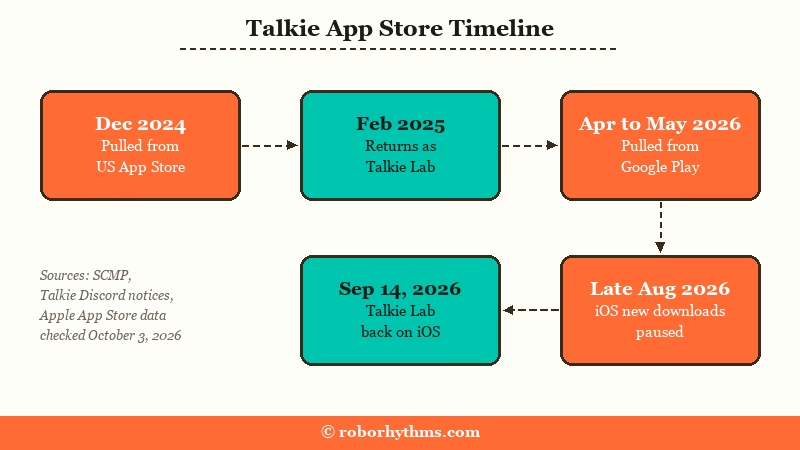
The removals trace back to app store policy compliance and safety reviews rather than the company giving up. When a store flags an issue, the listing comes down while MiniMax works through it, which is why the app vanishes and then reappears weeks later. Users in the community confirm this cycle every time, with the same “it’s back” relief posts.
On Android, the most recent cycle pulled the app from Google Play between April and May 2026 before it came back. The iPhone app went through its own pause in late August 2026, which is the Talkie Lab story above.
The Android listing is live as “Talkie: Creative AI Community” from SUBSUP, at version 2.61.003 since September 24, 2026, with more than 50 million installs.
The way I read it, treating these removals as permanent is the main mistake. A disappearance from the store is almost always a temporary “upgrading” state. Our Talkie AI review covers what the platform offers once you are back in, and whether it is worth the hassle.
Why Talkie Crashes, Goes Blank or Shows an Error
Talkie crashes, goes blank or shows an error for three reasons: a bad update build, a problem on Talkie’s servers, or a block on your account. The message on your screen tells you which one you are facing.
Not every Talkie build is stable. Some past builds have crashed on launch, so if your app died right after an update, you are likely on a bad build rather than facing a real outage. Update to the current build, 2.61.003 on Google Play or 2.61.001 on iPhone as of October 3, 2026, before you retry anything.
The blank or black screen is a separate symptom with the same root cause. When the chat fails to load during one of the developer’s upgrade windows, you get an empty screen where the conversation should be. It clears once the upgrade finishes or once you move to a working entry point.
Here is how to read each failure and what to do about it.
| What you see | What it means | What to do |
|---|---|---|
| App crashes on launch | You are on an unstable build | Update to the current build or switch to web |
| App missing from the store | A store review pulled the listing, or the app is not offered in your country | Search “Talkie Lab” on iPhone or “Talkie: Creative AI Community” on Android, or use talkie-ai.com |
| Blank or black chat screen | Chat failed to load during a server upgrade | Switch to the web version, then wait it out |
| Character image is a blank space | A content flag removed the image | Appeal, then re-upload a compliant image |
| “Network error” or nothing loads, even on Wi-Fi | Talkie’s servers are down; on July 17, 2026 the web version failed too | Wait, and check whether others report it before troubleshooting |
| “Please change your topic” on ordinary messages | A server-side filter change on Talkie’s end | Rephrase once, and leave your Talkie UID in its Discord bug report |
| “Custom internal Error” | A server error during upgrades or after the daily message allowance runs out | Wait for the next daily reset |
| The ad to recall a message never plays | The rewarded ad failed to report back to Talkie | Close the chat for a few minutes, then reopen it |
| A feature you used is gone | Talkie retired it in its September 2026 update | Collected cards are under Profile, then My Cards; existing FMs still play from the character’s details page (swipe down) |
The blank-image one catches people off guard because it looks like data loss. It is the content filter, and I cover the appeal flow for it further down. For the safety questions that come up around these flags, our piece on whether Talkie AI is safe digs into how the platform handles content and data.
“Please change your topic” started blocking harmless messages in late August 2026, and the cause sits on Talkie’s servers. Within a day, a Talkie Discord moderator asked everyone getting it to leave their Talkie user ID in a bug report thread.
On September 2, a follow-up from Talkie’s Discord, shared on r/TalkieOfficial, said the team had “rolled back the relevant changes for now” and asked anyone still affected to leave their UID. Reports kept coming through late September, including a September 28 thread where words like “trembling” were blocked in a safe scene.
If it blocks a harmless message, rephrase it once and file your UID instead of resending it over and over. Users report temporary chat bans of 15 minutes to an hour, one of them for refusing to change the topic. Our guide to what trips the Talkie chat filter covers what it targets.
Login failures usually cluster in the same server upgrade windows that cause blank screens, so try the same account on talkie-ai.com before resetting anything. If Talkie says you are not eligible, that is a separate account-level block, most often by region, and our guide to using Talkie AI without signing in covers what still works.
How to Get Talkie AI Working Again
The fastest way to get Talkie working again is to switch to the official web version at talkie-ai.com, then reinstall the app from its current store listing once it is back. The web portal is the developer-sanctioned fallback during any app outage.
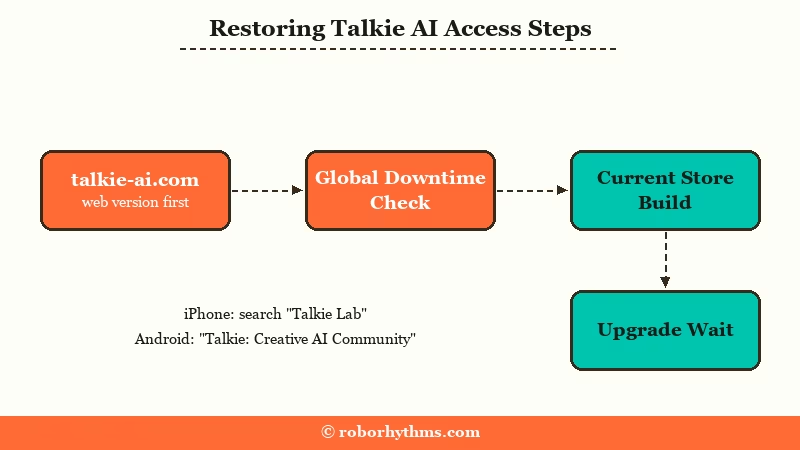
When the app fails, do not waste an hour reinstalling the same broken build. The sequence I would run, in order, is the one that gets people back in:
- Open the official web version at talkie-ai.com. Talkie staff directly recommend it for basic usage whenever the app is down, missing, or failing to load, so try it first.
- Check whether the service is globally down before deeper troubleshooting. A quick status check tells you if the problem is your device or Talkie’s servers.
- If the app seems missing, search its exact listing name, “Talkie Lab – AI Playground” on iPhone or “Talkie: Creative AI Community” on Google Play. If your Play Store does not offer it at all, APKMirror hosts verified copies of the Android app, and the newest build there is the one to install.
- If you are on a bad build that crashes, uninstall it first, then install the current version rather than updating over the top of the broken one.
- If the web version itself is limited, the developers are mid-upgrade, and the honest answer is to wait for the rollout to finish.
The web-first habit is the single biggest time saver here, as this before and after shows.
Before: Talkie is gone from the Play Store, so you spend 40 minutes hunting for the app, trying random mirrors, and getting nowhere.
After: You open talkie-ai.com in your phone browser, log in, and keep your chats going while the app sorts itself out, then reinstall from the store listing once it is back.
If your home browser throws an input error on the web version, switch browsers, since a desktop-to-mobile browser swap clears a lot of those glitches.
What to Do About a Flagged or Blanked Character Image
A blanked character image is a false-flag content removal, and the appeal restores the character but often leaves the image slot empty. You usually have to re-upload the picture yourself.
This one is genuinely frustrating because it hits clean content. Users have had completely PG images, a fully clothed character in baggy clothing in one well-known case, flagged for an “image violation” for no clear reason. The character gets pulled, and even a successful appeal brings it back with a blank space where the picture was.
The catch is that the appeal restores the character, not always the image. So winning the appeal is only half the job, and you should expect to do a manual re-upload to finish it. The chat filter misfires on tame text the same way, which is covered in why the Talkie AI filter is so strict.
Here is the sequence that works:
- Check your notifications for the “image violation” notice so you know which character was hit.
- File an appeal through the app, noting that the image is compliant if it genuinely is.
- Once the appeal succeeds and the character returns, check whether the image slot came back blank.
- Re-upload a compliant image using the creation tools to fully restore the character.
I would not count on the appeal alone to fix the visuals. Treat the re-upload as the real fix and the appeal as the step that gets your character back at all.
When Talkie AI Instability Is Not Worth It
If you are spending more time chasing the app across stores and mirrors than truly using it, the instability has tipped past worth it. A platform that stays online removes the whole problem.
I am not telling anyone to abandon a companion they have built up. The web version and a stable APK genuinely keep Talkie usable through most of these cycles. The way I see it, though, there is a point where rebuilding your access every few weeks stops being worth the trouble, especially if the store removals and crash-prone builds keep stacking up.
If you have hit that point, the realistic move is a platform that does not vanish from the store mid-conversation. If you want a companion that stays online and keeps your characters and memory intact, Candy AI is the one I would try first. It runs reliably on the web without the app-store roulette, and the deep customization holds up across sessions.
For something closer to Talkie’s character-chat feel with steadier uptime, Nectar AI is the other one worth a look. It leans into longer memory and consistent access, which is exactly what the Talkie outage cycle keeps taking away. If you are weighing the two platforms directly, our Talkie AI vs Character AI breakdown covers how Talkie stacks up against the obvious alternative.
Example scenario: On Talkie, a Play Store removal locks you out for days and a bad build crashes the reinstall. On Candy AI, you open the site, your companion is right where you left it, and there is no app-store gatekeeper between you and the conversation.
Quick Takeaways
- Talkie AI not working almost always means the app is mid-update, not shut down, since there has been no shutdown announcement.
- Talkie Lab stopped taking new iOS downloads in late August 2026 and returned on September 14; search “Talkie Lab” on iPhone and “Talkie: Creative AI Community” on Google Play.
- The official fix during any outage is the web version at talkie-ai.com, which Talkie staff recommend directly.
- “Please change your topic” on ordinary messages is a server-side filter problem; rephrase once and leave your UID in Talkie’s Discord bug report.
- If the store-removal cycle keeps costing you access, a steadier platform like Candy AI or Nectar AI removes the problem entirely.
