
What’s Changed: Janitor AI bots have been speaking and acting as your character more aggressively, and many users noticed it spike around the Janitor Plus rollout. The real cause is how JLLM reads your persona and mirrors patterns, not a single broken setting. Fixing it means binding your persona name, trimming what you put in the persona field, and correcting the bot in the first few messages.
If your Janitor AI bot keeps speaking and acting as your character, you are not imagining it and you are not doing anything unusual. This is the single most common complaint on the Janitor subreddit right now, and it got louder after the Janitor Plus update landed.
People describe the same thing: the bot writes a great reply, then suddenly narrates what “you” say and do, hijacking the persona you wanted to play.
The frustrating part is that most of the advice floating around contradicts itself. One person swears by an out-of-character command, the next says that exact command makes it worse. So I went deep on the mechanics behind why JLLM does this, and most of the popular fixes fail for a reason nobody spells out.
Here is what you will walk away knowing: why the bot treats your persona as a blank entity, the one setup mistake that quietly invites puppeting, and a tiered fix order that works whether you are on the free JLLM, a DeepSeek proxy, or Janitor Plus. The fixes are evergreen, so this holds up no matter which model you are running.
What Happens When Janitor AI Speaks for Your Character
Janitor AI speaks for your character because the model predicts and continues whatever pattern it sees in the chat.
If the intro narrates your actions, or your persona field is stuffed with traits, the model reads that as permission to keep writing you.
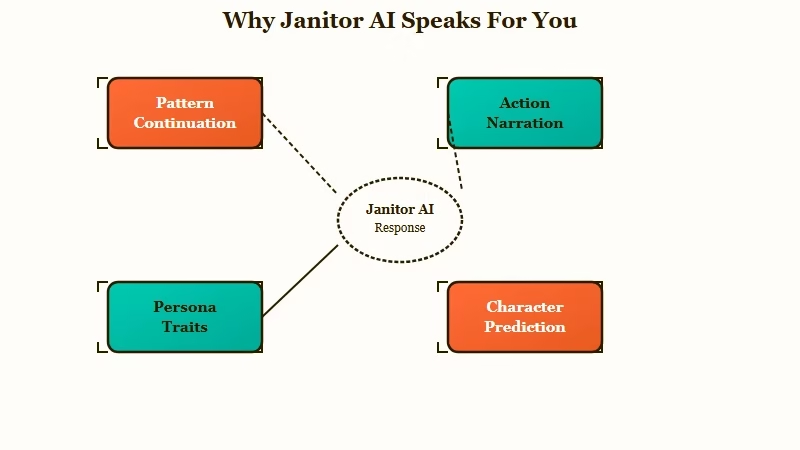
Large language models do not understand roleplay the way you do. They look at the text so far and predict what comes next, and roleplay is full of examples where one writer voices both sides of a scene.
When the bot has nothing concrete from you to react to, it falls back on the most common pattern in its training: keep the story moving by writing everyone, including your character.
The way I see it, this is less a bug and more the model doing exactly what it was built to do, just in a place you did not want it to.
Janitor AI gets enormous traffic, with over 100 million monthly visits according to Similarweb, so the volume of people hitting this same wall is huge. That also means the fixes are well tested by the community, once you know which ones to trust.
Some people get tired of correcting the bot every few turns and move that roleplay to Candy AI, where there are no persona macros to set up.
Why the Macro Trick Everyone Copies Quietly Fails
Most anti-puppeting prompts fail on Janitor because the platform does not convert the {{user}} and {{char}} macros into real names before sending them to JLLM.
The model sees three separate, undefined labels instead of one person.
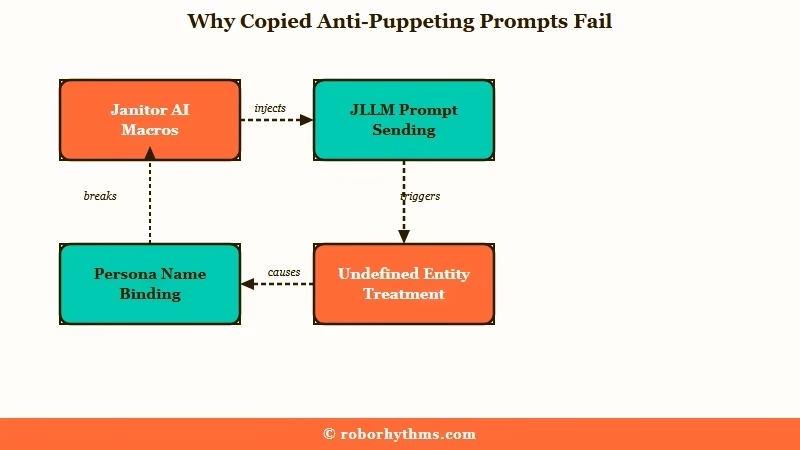
This is the detail that explains so much wasted effort. On many other roleplay frontends, {{user}} is swapped for your persona name in the background, so the model knows who you are.
On Janitor AI, that swap does not reliably happen for the base model, so JLLM treats the literal string {{user}}, the literal string {{char}}, and the actual character names as three different entities it has never been introduced to.
What is a macro: On Janitor AI,{{user}}and{{char}}are placeholders meant to stand in for your persona name and the bot’s name inside the prompt the model receives.
So when you copy a popular jailbreak that says “never speak for {{user}},” the model often has no idea that {{user}} is you. The cleanest fix, and the one I would reach for first, is to bind the names yourself.
Put a line like {{user}} = Mara in your persona field or the advanced prompt, then tell the bot to write only from the character’s side. Once the model knows who Mara is, the rest of your instructions finally have something to attach to.
The Hidden Cause Most Guides Skip
The most overlooked cause is token-length mirroring, where the bot tries to match the length of earlier messages and fills any gap by writing your character.
A long intro plus a one-line reply almost guarantees puppeting.
This one surprised me when I traced it. If the intro message or recent replies run around 500 to 800 tokens, the model treats that as the target length and tries to hit it every turn. When you answer with a single short line, you have left a big empty space and given the bot almost nothing to respond to, so it fills the void the only way it can: by narrating your character’s next moves.
What is token-length mirroring: The model matches the length of recent messages, so a short reply after a long intro pushes it to invent content, often by writing your character.
That is why “just write longer replies” is half-right and half-wrong. Length alone does not help if your reply is a rambling internal monologue about your own character, because that still trains the bot to write about you. What works is giving the bot external material to react to.
Before: “Okay.” (a one-line reply after the bot wrote 600 tokens, so the model fills the gap by writing your character’s next three actions)
After: “Mara crosses her arms and stays by the door. ‘You said you would explain. So explain.’ She does not step closer.” (a concrete action, a line of dialogue, and a clear boundary, which leaves the bot no empty space to fill)
The second version is not much longer, but it hands the bot a question, a posture, and a limit. There is a longer breakdown of this in the guide on Janitor AI over-narration, which shares the same root cause.
How to Fix It at Setup Versus Mid-Chat
The fix splits cleanly into setup-side changes you make before chatting and mid-chat corrections you apply when it slips.
Setup work prevents most cases, and mid-chat retraining handles the rest.
The mistake I see most often is people throwing every trick at the problem at once and never knowing which one worked. A tiered order saves a lot of guessing. Here is the sequence I would walk through, starting with the cheapest fix:
- Check the intro message. If the bot’s opening narrates your character or leans on second-person “you,” it has already set the pattern, and no amount of mid-chat correction fully undoes a broken intro.
- Bind your persona name with
{{user}} = YourNamein the persona field or advanced prompt, and add “write only from{{char}}‘s point of view.” - Trim your persona field to passive physical facts. Putting personality traits there forces the model to perform them, which means writing your character.
- Set a Response Prefill that puts the rule in the bot’s own voice before it starts.
- Edit out any puppeted text, rate that reply one star, and reroll. It usually takes two to six corrected messages for the model to lock onto the new pattern.
That third point is the counterintuitive one. If you write “Mara is brave and sarcastic” in your own persona, the model tries to prove it read that by showing Mara being brave and sarcastic, which means it writes her. Keep traits out of the persona and just play them yourself.
Here is how the two sides compare and where each fix belongs:
| Fix | Where it goes | When to use it |
|---|---|---|
| Bind persona name | Persona field or advanced prompt | Setup, before the first message |
| Trim traits from persona | Persona field | Setup, keep only physical facts |
| Response Prefill | Generation Rules | Setup, skip it on DeepSeek V3.2 |
| OOC command | End of your reply | Mid-chat, when it slips once |
| Edit and reroll | The bot’s message | Mid-chat, to retrain the pattern |
Here are the exact strings I would paste in, using a real name instead of a macro since the model reads names more reliably:
Persona field or advanced prompt (setup):
{{user}} = Mara
Write only from {{char}}'s point of view. Write {{char}}'s actions, thoughts, and dialogue only. Let Mara act for herself.

Response Prefill (Generation Rules):
Understood. I will write only for {{char}} and never speak or act as Mara.

Mid-chat OOC, pasted at the end of a reply when it slips:
[OOC: Focus only on Mara's scene partner. Write that character's actions, thoughts, and dialogue. Do not narrate or speak for Mara.]
One important note on the Response Prefill: if you are running the DeepSeek V3.2 proxy, skip it. That specific model rejects prefilled text and can spit out gibberish or stray code fragments, so it is the one case where this usually-reliable fix backfires.
Stray tokens are not always the prefill’s fault either. GLM models drop their own nonsense word into replies, which is the firmirin glitch rather than anything in your persona.
For everything else, the prefill is one of the strongest setup-side tools you have. The Janitor AI OOC commands guide has more on phrasing these cleanly.
Where the Community Disagrees and What Holds Up
The community splits hard on OOC commands, negative phrasing, and reply length, and the honest answer is that each works only under specific conditions.
Knowing the condition is what separates a fix that sticks from one that backfires.
I want to be straight about the disagreements because glossing over them is why so many guides feel useless. On OOC commands, half the threads call them the gold standard and the other half say the model ignores them after a few messages. Both are right: a short, calm OOC instruction works, but arguing with the bot in OOC or stacking three of them makes the model focus on the OOC chatter instead of the scene.
On phrasing, most experienced bot makers warn that “do not speak for {{user}}” backfires, because the word “for” reads to the model as “give the user the spotlight,” which is the opposite of what you want. Yet a handful of users insist “{{char}} will not speak for {{user}}” works every time for them.
My read is that positive phrasing like “write only {{char}}” is the safer default, and negation is a coin flip that depends on the model.
The fault question splits too. Some blame creators for intros that puppet you, others blame users for lazy one-line replies, and the truth is that both can be true in the same chat.
If you want to go deeper on prompt-level fixes, the Janitor AI roleplay prompt fixes piece covers the wording side in detail. Here is a quick reference for the most common patterns:
| Symptom | Likely cause | Fix |
|---|---|---|
| Bot writes your dialogue and actions | Persona not bound, macro unread | Add {{user}} = Name, write from {{char}} only |
| Slips back after a few good replies | Token-length mirroring, short replies | Give concrete actions, not a long monologue |
| OOC command stopped working | Too many OOC notes, arguing in OOC | One short OOC, then edit and reroll |
| Prefill outputs gibberish | DeepSeek V3.2 rejects prefill | Remove the Response Prefill on that model |
| Got worse after Janitor Plus | Base model drift over recent months | Retrain with edits, or move to a stronger model |
When to Stop Fighting JLLM
You should stop fighting JLLM when you have bound your persona, trimmed traits, and retrained for a full session and the bot still puppets you.
At that point the model is the limit, not your setup.
JLLM is a lighter model, and there is a ceiling to how well it holds a boundary, especially in long chats where memory drifts. Switching to a stronger proxy like DeepSeek or Gemini fixes the worst cases on its own, because those models follow the “write only my character” rule far more reliably.
If your chats keep degrading as they get longer, the Janitor AI memory problems guide explains why the context window is working against you.
If you would rather not babysit prompts at all, this is where a purpose-built companion app earns its keep. Candy AI works as one-on-one texting with a single companion rather than narrated scenes, a format that gives the bot fewer openings to write your character’s actions.
It is a different trade than Janitor, you give up the giant community bot library, but you stop fighting the puppeting on every turn.
For people who mostly hate that the bot forgets who they are halfway through a session, Nectar AI is the other one I would point to, since its cross-session memory keeps your persona consistent past the point where JLLM’s context runs out.
Keep Janitor for its free model and its bots, and treat these as the escape hatch for when the persona control matters more than the library.
Frequently Asked Questions
Why does Janitor AI keep speaking for my character?
Janitor AI speaks for your character because the model continues whatever pattern it sees, and it cannot tell who your persona is when the {{user}} macro is unbound. Short replies and trait-stuffed persona fields make it worse by leaving gaps the model fills.
Do OOC commands really stop the bot from talking for me?
A single short OOC command works for many users, like [OOC: write only for {{char}}, do not narrate my character]. They backfire when you stack several or argue with the bot in OOC, because the model starts focusing on the OOC notes instead of the scene.
Should I switch from JLLM to DeepSeek or Gemini?
If setup fixes do not hold, yes. JLLM is a lighter model that struggles to keep your boundary in long chats, while DeepSeek follows custom rules better and Gemini is widely praised for staying in character. Switching often fixes puppeting on its own.
Does writing longer replies stop the bot from acting as me?
Not by itself. A long reply that is just your character’s inner monologue still trains the bot to write you. What helps is giving the bot external actions and dialogue to react to, so it has concrete material instead of empty space to fill.
Where do I put the fix, the persona field or the prompt?
Put name-binding and “write only from {{char}}” in the persona field or advanced prompt for setup. Use the Response Prefill in Generation Rules for a stronger setup rule, and keep OOC commands for mid-chat corrections.
Why did this get worse after the Janitor Plus update?
The spike lines up with the Janitor Plus launch, but the free base model had been drifting for months before that, with more narration and weaker boundaries. The update did not cause it on its own, so retraining and model choice still matter most.
Quick Takeaways
- Janitor AI writes your character because it continues patterns and cannot identify an unbound persona, so bind
{{user}} = YourNamefirst.
- Keep personality traits out of your persona field, since the model performs any trait you list by writing your character.
- Give the bot concrete actions and dialogue to react to, because short replies trigger token-length mirroring and invite puppeting.
- Use one short OOC command mid-chat, then edit and reroll for two to six messages to retrain the pattern.
- When setup fixes fail after a full session, the model is the ceiling, so move to a stronger proxy or a companion app that holds your persona for you.
