
What’s Changed: Since the September 8, 2026 price rise, a declined SpicyChat renewal can cost you your old price for good. SpicyChat retries a failed payment a few times, then the plan expires, and an expired plan only comes back at the new rate. Fix the card in Manage Subscription and contact support before the plan lapses.
A SpicyChat payment declined at renewal can cost you more than a few days of chat.
If you subscribed before September 8, 2026, you are paying an old rate that SpicyChat only keeps while the plan stays active and the payments go through.
SpicyChat’s own help pages disagree on the step that decides whether you keep it, and that bothers me. Its help article on declined payments suggests cancelling the subscription and repurchasing the plan.
Its pricing FAQ says a new purchase after the plan lapses is billed at the new price, and its card article says you can change the card without cancelling at all.
On True Supporter and I’m All In, the gap is $5 a month, or $50 a year on an annual plan.
This guide covers what happens after a decline, how to save a renewal that is failing, what each decline message means, and how to tell a pending hold from a real charge.
What Happens When a SpicyChat Payment Is Declined at Renewal?
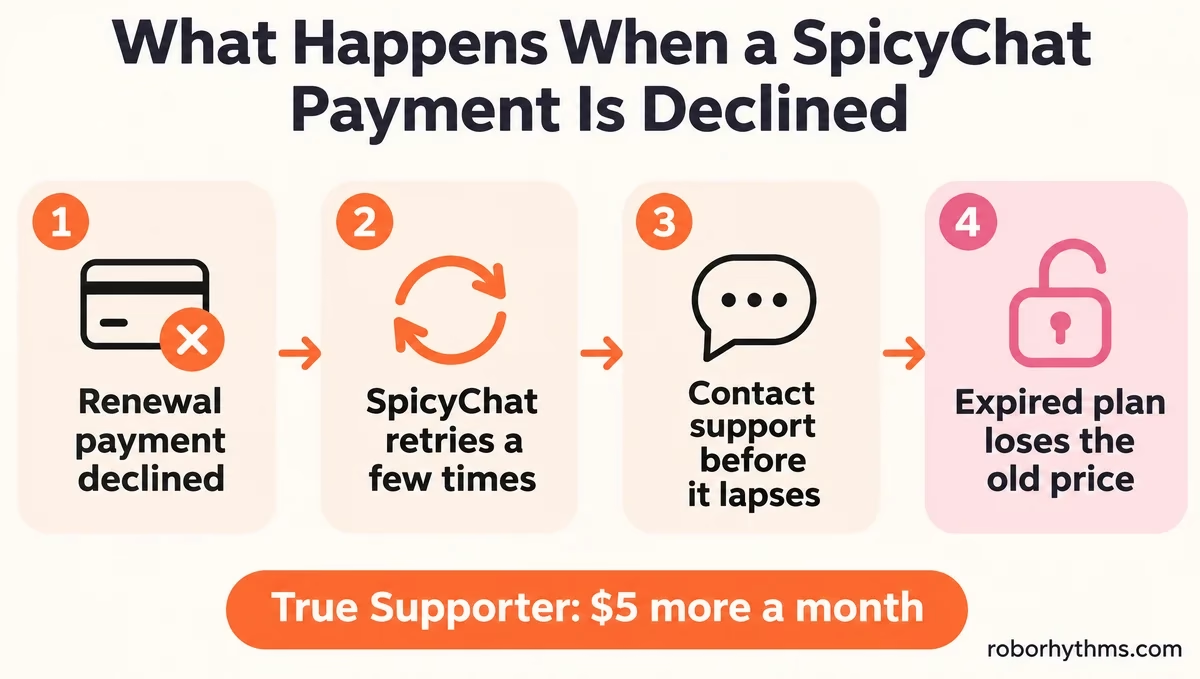
A declined SpicyChat renewal is retried a few times before the plan expires, and the subscription is not cancelled on the first failed attempt.
Once the plan fully expires, SpicyChat cannot restore a pre-September price, so the days between the first decline and the expiry date are the only window you get.
What is a locked price: The rate from before September 8, 2026 that SpicyChat keeps charging an existing recurring subscriber, as long as the plan stays the same and payments go through.
SpicyChat’s September 2026 Pricing Update FAQ defines keeping a price as “Staying on the same plan, with payments going through successfully.”
It says the system will “automatically retry a few times before your subscription expires,” and asks you to contact support “right away” if the payment still fails after two or three attempts.
A SpicyChat staff member wrote in the r/SpicyChatAI thread about this that a plan “is not cancelled on the first failed attempt, there’s a grace period and we send you emails in the meantime.” In that thread, the subscriber who started it says no one contacted them before the plan was cancelled.
None of the 20 articles in SpicyChat’s billing help section gives a grace period length or a retry schedule, so you cannot count the days.
If you would rather not spend the retry window on hold with your bank, Candy AI is the app I tell people to try in the meantime.
On a monthly True Supporter plan the gap is $60 a year, which is enough to get me on the phone with my bank.
| Plan | Monthly, old and new | Annual, old and new | Cost of losing the lock |
|---|---|---|---|
| Get A Taste | $5.00 to $5.95 | $50.00 to $60.00 | $11.40 a year monthly, $10 a year annual |
| True Supporter | $14.95 to $19.95 | $149.95 to $199.95 | $60 a year monthly, $50 a year annual |
| I’m All In | $24.95 to $29.95 | $249.95 to $299.95 | $60 a year monthly, $50 a year annual |
Prices checked on SpicyChat’s September 2026 Pricing Update FAQ, November 16, 2026. The full SpicyChat pricing breakdown covers what each tier unlocks.
Can You Get Your Old SpicyChat Price Back After a Cancellation?
You can keep your old SpicyChat price if the plan has not expired yet, and you cannot get it back once it has.
The pricing FAQ says a cancelled plan can be reactivated “before the end of your current period” at the existing price, and that once it “fully expires, the price can’t be restored.”
So a cancellation notice alone does not end the price. Check the end date on your plan first, because a plan that is cancelled but still inside its paid period is the one case where the old price survives.
How Do You Save a Failing SpicyChat Renewal?
You save a failing SpicyChat renewal by fixing the payment method on the existing plan inside the retry window, then asking support to retry before the plan lapses.
Buying a new plan is the step to avoid, because a new purchase is billed at current pricing.
The order I trust is short:
- Search your inbox and spam folder for SpicyChat’s payment emails, since SpicyChat says it sends them during the retries.
- Sign in on the website, open your profile and select Manage Subscription.
- Update the card there, which SpicyChat’s card article says works “without cancelling and re-subscribing.”
- If your bank blocked the charge, call it and approve charges from NDAI.CC, the name SpicyChat bills under.
- After two or three failed attempts, open a ticket with SpicyChat support while the plan is still active.
A vague ticket wastes the retry window. Say plainly that you want the payment retried on the same plan so the locked price stays.
Before: “My payment got declined and my sub got cancelled. Please fix it.”
After: “My True Supporter plan, monthly, started in March 2026 at $14.95, failed to renew on November 14 with a Do Not Honor decline. It has not expired yet. I have updated my card in Manage Subscription. Please retry the payment on the same plan so I keep my current price. Account email: [your email]. Card: first 6 and last 4 digits only.”
SpicyChat’s help article on declined payments says it never needs your full card number, and that the first 6 and last 4 digits are enough to trace a payment. Never paste the whole number into a ticket or a Discord message.
How Do You Fix a Declined SpicyChat Payment at Checkout?
A declined SpicyChat payment almost always comes from your bank or card issuer, and many banks block adult-content merchants by default.
A call asking the bank to authorise the charge usually fixes it for good, unless the decline message says the bank blocks the whole merchant category.
Payment processors can treat adult content as a risk to the card brand. In 2025, Valve said its payment processors pointed to a Mastercard rule against “illegal or brand-damaging transactions,” TechCrunch reported, while Mastercard said it had required no restrictions.
In one r/SpicyChatAI thread, a subscriber’s bank flagged the site as fraudulent, and they had to ask a family member with a different bank to pay instead.
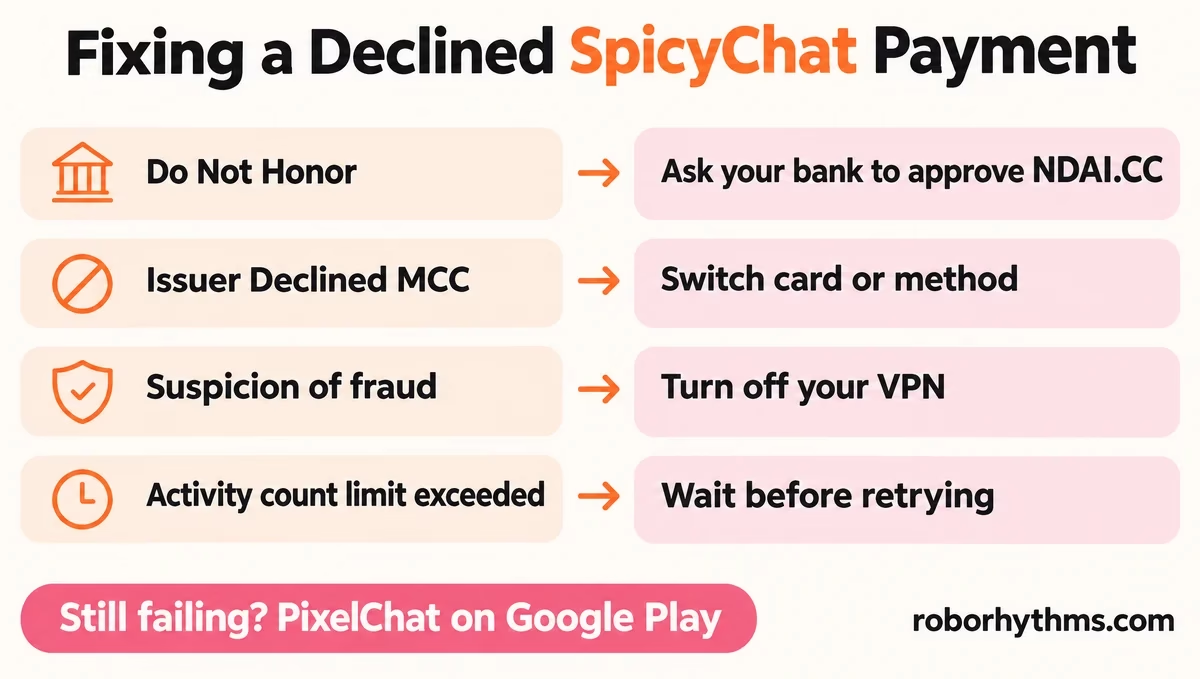
Issuer Declined MCC worries me most, because it is the one a phone call probably will not fix. Here is what each message on SpicyChat’s checkout means, from its help article on declined payments:
| Message you see | What it means | What to do |
|---|---|---|
| Do Not Honor | A generic refusal from your bank | Ask the bank to authorise it, or use another card |
| Issuer Declined MCC | Your bank blocks the merchant category outright | Use a different card or payment method |
| Pick up card | Your bank’s fraud system flagged or froze the card | Call the number on the back of the card |
| Declined by user, no reason given | The processor got no detail | Check the card allows online and international payments |
| Activity count limit exceeded | Too many attempts in a short window | Wait before retrying, or use another method |
| Suspicion of fraud | Fraud prevention was triggered | Turn off any VPN and try again |
Declined by payment gateway means the charge was blocked before it reached your bank, so work through the steps below. Invalid transaction and Merchant ID not found point to checking your details and trying another card, browser or device.
If checkout fails before you even enter a card, that points to a site problem rather than a decline, so check whether SpicyChat is down before calling anyone.
When the message does not tell you enough, work through this list in order:
- Check the card number, expiry date and CVV.
- Make sure the billing address matches your card statement.
- Confirm the card allows online and international transactions.
- Turn off your VPN, and if checkout shows the wrong country’s payment options, set the billing country by hand.
- Clear cache and cookies, which signs you out, and check autofill is not entering an old card.
- Wait a while between attempts, since rapid retries trigger fraud blocks on both the processor’s side and the bank’s.
Why Does a Prepaid Card Fail on SpicyChat at Renewal?
Prepaid Visa, Mastercard and Discover cards work for one SpicyChat purchase but do not support recurring payments, so they usually go through once and fail at renewal.
SpicyChat’s prepaid card article says to use a standard debit or credit card if you want the plan to renew.
Pay by Bank and crypto are one-time payments, so they never renew and show no cancel button.
They also never carry a locked price, because SpicyChat’s FAQ says each one-time purchase is made at current pricing.
Can You Pay for SpicyChat With PayPal?
The SpicyChat website does not take PayPal, so the route SpicyChat’s own support points to is PixelChat, its companion app on Google Play.
A subscription bought there works on SpicyChat as long as you sign in with the same account.
What is PixelChat: SpicyChat’s companion app on Google Play, run by the same company, NextDay AI, where a subscription bought on Android also unlocks SpicyChat on the same account.
A SpicyChat support member confirmed the PayPal route in an r/SpicyChatAI PayPal thread.
SpicyChat’s own help article suggests PixelChat on Android when the website checkout is not working for you, and how the PixelChat billing works explains the setup step by step.
Did SpicyChat Charge You Twice or Is It a Pending Hold?
A pending SpicyChat line after a declined payment is often a temporary authorisation hold, and SpicyChat says these usually clear within 24 to 72 hours.
A completed SpicyChat charge appears on your statement as NDAI.CC, short for NextDay AI, the parent company.
My rule is to wait three days before treating a pending line as money gone. SpicyChat’s article on pending payments says no money has moved when a declined attempt leaves a hold, and that support will check its side if you send the date and amount.
The charge name can vary. A SpicyChat support member wrote in the PayPal thread that purchases appear as “NDAI CHAT,” while SpicyChat’s payment methods article lists NDAI.CC.
If you paid and the plan did not appear, sign out completely and sign back in. SpicyChat’s help article names paying on the wrong account as the most common real cause, which happens when you check out while signed out or signed in to a second account.
A double charge should not happen on a recurring card plan, since SpicyChat says those have safeguards against buying a duplicate. One-time payments can duplicate, and support will merge the two into one plan, or in most cases refund the extra one instead.
Refunds are tight. Card payments qualify within 24 hours of purchase with minimal use, refunds take 5 to 6 business days, and one-time payments such as crypto are not refundable.
How Do You Change the Card on a SpicyChat Subscription?
You change the card on a SpicyChat subscription in Manage Subscription on the website, which swaps the payment method without cancelling, so the plan and its locked price stay as they are.
Any other change to the plan moves you to current pricing.
I would change the card and nothing else while a locked price is on the line. SpicyChat’s FAQ says any plan change ends the lock, including upgrading, downgrading, and switching between monthly and annual billing, and that the old price “won’t come back afterwards.”
To SpicyChat’s credit, that FAQ spells out the lock rules in plain language. Even so, check your first renewal after any change.
In an r/SpicyChatAI thread, a subscriber of more than a year was billed the new price on renewal, while a monthly subscriber in the same thread kept the old one.
How Do You Cancel a SpicyChat Subscription Bought on Google Play?
A SpicyChat plan bought through PixelChat is cancelled in Google Play, not on SpicyChat, and deleting your SpicyChat account does not stop the billing.
In the Play Store, tap your profile icon, then Payments and subscriptions, then Subscriptions, then PixelChat, then Cancel subscription.
A plan bought on the website is cancelled in Manage Subscription. You keep access until the paid period ends, then the account drops to the free tier with nothing deleted, and the premium tier guide covers what you lose on the free tier.
What Can You Use if SpicyChat Keeps Dropping Your Plan?
If SpicyChat keeps losing your plan to declines, fix the card first, because a bank that blocks adult-content merchants will probably block the next companion app too.
If the card is fine and you are done with the hassle, a different app is a reasonable move.
Candy AI is the one I point people to first when they leave SpicyChat. Its monthly plan renews at $13.99 after a $9.99 first month, which is under SpicyChat’s new $19.95 True Supporter price (checked November 16, 2026).
For a free plan to fall back on while the card gets sorted, CrushOn AI is worth a look.
If you do stay, sign in to SpicyChat and check your plan’s end date today. That date is the deadline for every fix in this guide.
Quick Takeaways
- A declined SpicyChat renewal is retried a few times, and the old price is lost for good once the plan fully expires.
- Change the card in Manage Subscription instead of buying a new plan, since a new purchase is billed at the new price.
- Issuer Declined MCC means your bank blocks the merchant category, so switch cards or pay through PixelChat on Google Play.
- A pending NDAI.CC line after a decline is often a temporary hold, which SpicyChat says usually clears in 24 to 72 hours.
- Contact SpicyChat support after two or three failed attempts, while the plan is still active.
