
What’s Changed: SpicyChat doubled the I’m All In context window to 32K tokens in September 2026, on eight supported models so far, while every other tier and model kept its old limit. Memory still fails in long roleplays because the bot can only “see” a fixed number of tokens at once, so the budget fixes below apply at every tier.
Few things kill a good roleplay faster than your character forgetting what happened two scenes ago. You set up a whole arc, and suddenly the bot is treating you like a stranger again.
SpicyChat memory not working is rarely a glitch you can report away. It is a hard limit on how much text the model can hold in its head at once, and once that space fills up, the oldest messages get pushed out to make room for new ones.
What surprised me when I dug into the actual mechanics is how much your own setup works against you. The bigger and more detailed your character, the less room is left for the conversation, so a heavily-written bot can forget faster than a simple one. That is the opposite of what most people assume.
This article breaks down exactly why the memory fails, the token limits behind each tier, the premium features that genuinely help, and the specific settings and tricks that make a SpicyChat character hold onto a long story. You will finish knowing which lever to pull instead of starting over.
If SpicyChat will not load or answer at all, rather than forgetting things, that is an outage or an app problem, and the guide to whether SpicyChat is down covers those checks.
Why SpicyChat Memory Is Not Working
SpicyChat memory is not working because the model has a fixed context window, and when it fills up the oldest messages are dropped first.
Every reply has to fit the character definition, recent messages, and instructions into one token budget. Once that budget is full, older events fall out of the bot’s view permanently.
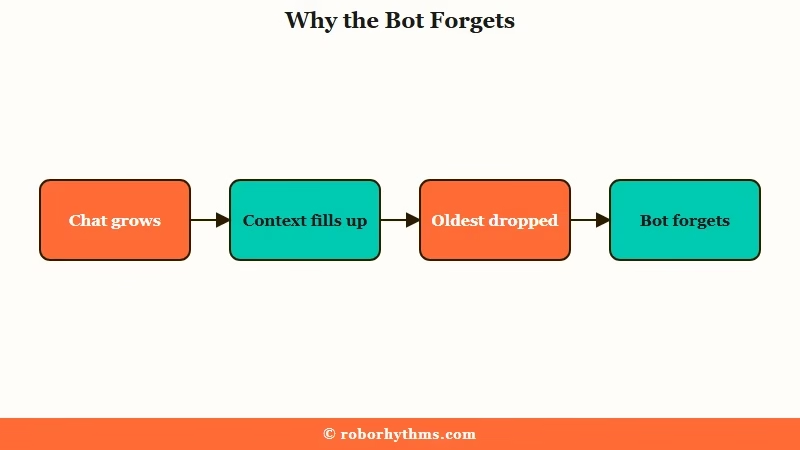
The way I see it, the core confusion is that people picture the bot as having a diary it can flip back through. It does not. It has a single desk, and everything it needs to answer right now has to fit on that desk at the same time.
When the desk is full, something has to go, and the system always drops the oldest chat messages first. The character’s personality stays, but that plot point from fifty messages ago is gone for good unless you stored it somewhere permanent.
This is not unique to SpicyChat, it is how every large language model works. The whole AI companion category runs on the same constraint, and with $120 million in 2025 spent on AI companion apps the memory problem affects a lot of invested users. The platforms that feel like they remember are simply managing that budget well.
How the Context Window Makes Bots Forget
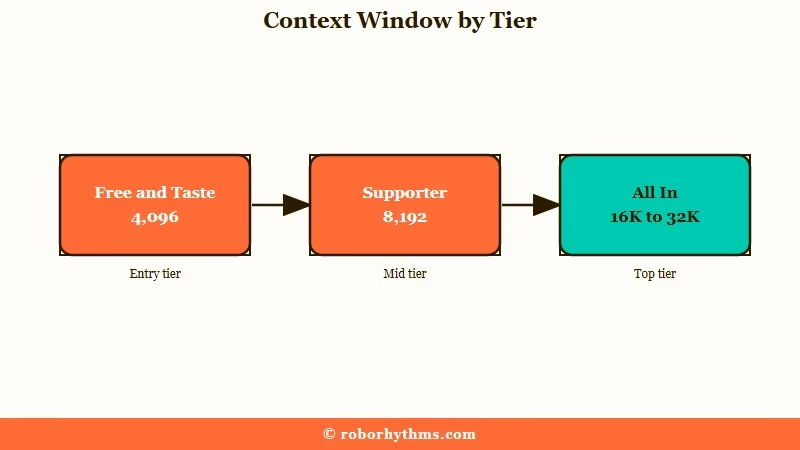
The context window is the total tokens the bot can hold at once, and SpicyChat caps it by tier: 4,096 on the free and Get A Taste plans, 8,192 for True Supporter, and 16,384 for I’m All In, which has risen to 32K on eight supported models since September 2026.
A token is roughly three-quarters of a word. The smaller your tier’s window, the fewer past messages survive before the bot starts forgetting.
What is a token: A token is a chunk of text the model reads, roughly three-quarters of an English word, so 4,096 tokens is around 3,000 words of total working memory.
Here is what those numbers mean in practice. On the free tier’s 4,096-token window, everything has to share that space: the character definition, your persona, the recent messages, and the generation instructions. The chat history gets whatever is left over.
That leftover is smaller than people expect. A free user with a 1,000-token character setup is left with room for only about 20 recent messages before the bot starts dropping the oldest ones.
Upgrading the tier is the blunt fix because it widens the whole desk. The SpicyChat review covers what each tier costs, but raising the token limit only pushes the wall further out.
The top tier got a lot wider in September. SpicyChat announced 32K context for I’m All In on 2 September 2026, starting with the Default and GLAM Arcturus models, and added six more on 8 September: Qwen Plus Character, GLAM 5.1, DeepSeek V4 Pro, DeepSeek V3, DeepSeek V3 XTC and GLAM 4.6.
SpicyChat’s own estimate is that if 16K could keep roughly 100 previous messages in context, 32K could keep around 200, though the real number depends on message length and the size of your character. A SpicyChat moderator added that 32K is for I’m All In only because context memory is tied directly to compute costs, and the token documentation still listed 16,384 tokens for that tier on 11 September. If 32K does not appear after you upgrade, the launch post says to log out and back in, and if the app still shows 4K, SpicyChat support’s 9 September fix was updating to app version 4.1.0 or later.
Why a Bigger Character Makes Memory Worse
A bigger character definition makes SpicyChat memory worse because the definition occupies the context window permanently, leaving less room for chat history.
Personality, scenario, and example dialogue are always loaded, so every extra token you spend describing the bot is a token the conversation cannot use. Lean bots remember more.
This is the counterintuitive part that trips up the most dedicated users. People assume a richer, more detailed character is strictly better, then wonder why their carefully-built bot forgets faster than a throwaway one.
The mechanic is simple once you see it. The character definition never rotates out, it sits on the desk for every single reply. So a 1,500-token character on the free tier is permanently eating more than a third of the entire window before the chat even starts.
What I would do is treat the character definition like carry-on luggage with a strict weight limit. Cut filler adjectives, move world details into a Lorebook instead of the main description, and keep example dialogue tight. Every token you save there is a token your story gets to keep.
Premium Memory Features and What They Do
SpicyChat’s premium tiers add Semantic Memory 2.0 and the Memory Manager, which preserve key details after messages rotate out.
Semantic Memory 2.0 summarizes past messages into compact memories on the two top tiers. The Memory Manager, available on every paid tier, lets you pin specific facts the bot must always see.
Let me break down what each one does, because the names are vague. Semantic Memory 2.0 watches your conversation and condenses important details into short summaries instead of trying to keep full message text, which is how it carries continuity past the context limit.
There is a catch I would want to know about first. Semantic Memory 2.0 processes older conversations in batches of 60 messages, so a recent detail might not be summarized yet if it has not crossed the next batch threshold. It is strong for long-haul continuity, weaker for “you forgot what I said five minutes ago.”
The Memory Manager is the more hands-on tool. Each memory is capped at 250 characters and can be pinned so the bot references it in every prompt, which is perfect for hard facts like names, relationships, or a key plot rule. The tradeoff: pins have their own small token budget, so you cannot pin everything.
To edit or remove what the bot remembers, select the three dots in the corner of the chat, choose Memory Manager, then use the three-dot menu beside any memory to edit, delete or pin it. A deleted memory cannot be restored, and deleting it leaves any old messages that mention it untouched. Editing or deleting a chat message also leaves the memory built from it in place, so if the bot keeps raising a scene you rewrote, edit or delete that memory too.
| Feature | Tiers | What it does |
|---|---|---|
| Context window | All (size varies) | Sets total tokens the bot can hold at once |
| Semantic Memory 2.0 | True Supporter, I’m All In | Summarizes old messages into compact memories |
| Memory Manager | All paid tiers, once a chat has a few messages | Manually pin facts the bot must always see |
| Lorebook | All | Stores up to 5,000 keyword-triggered world entries |
| Director Mode | All | Send instructions the bot reads but does not store |
How to Make SpicyChat Remember Long Term
To make SpicyChat remember long term, trim the character definition, pin key facts in the Memory Manager, build a keyword-triggered Lorebook, and use Director Mode for course corrections.
Combine these so the limited token budget is spent on what matters instead of filler. Active management beats waiting for the bot to remember on its own.
From what I would do first, the most effective moves are the ones that free up or protect context. Here is the sequence I would run through.
- Trim the character definition, move world and backstory details into a Lorebook so they only load when relevant.
- Pin the non-negotiable facts (names, relationships, the current goal) in the Memory Manager, keeping each under 250 characters.
- Build Lorebook entries with strong keywords, since an entry only triggers when its keyword appears in the last 4 messages and then stays active for about 2 turns.
- Use Director Mode with the
/cmdcommand to correct the bot without adding clutter to the chat history. - Periodically summarize the story so far in one message, then start a fresh chat with that summary pinned.
There is a persona trick worth its own mention, because it is the one most people use wrong. Instead of filling the persona with biography, use it for standing instructions the bot should always follow.
Before: persona reads “I am a tall elf ranger with green eyes and a troubled past.”
After: persona reads “Write in short, punchy sentences. Keep actions in asterisks. Never speak for my character.”
The second version hacks the bot’s behavior across every chat because it treats persona lines as high-priority rules.
For more on shaping behavior this way, the SpicyChat persona tips guide goes deeper, and the same budget logic that breaks chats here also drives Janitor AI memory problems on the other big platform.
Here is the quick-reference version of the symptoms and what each one points to.
| Symptom | Likely cause | Fix |
|---|---|---|
| Forgets events from earlier in the chat | Context window full, old messages dropped | Pin key facts, summarize and restart |
| Forgets faster than a simpler bot | Oversized character definition eating tokens | Trim the definition, move detail to Lorebook |
| Ignores a fact you wrote in the Lorebook | Keyword not used in the last 4 messages | Mention the keyword, or pin it in Memory Manager |
| Loses a recent detail on a continued chat | Semantic Memory not summarized yet | Restate it, or pin it manually |
| Repeats the same phrase or loop | Pattern stuck in context | Use Director Mode /cmd to break it |
If You Want a Companion That Remembers by Default
If constant memory management feels like too much work, a companion app built around persistent memory removes most of the babysitting.
Some platforms are designed so the character retains your history automatically rather than making you pin and trim to keep continuity. That is the cleaner path if the roleplay matters more than the tinkering.
The honest tradeoff with SpicyChat is that it gives you a lot of manual control, and manual control means manual work. If you enjoy tuning Lorebooks and pinning memories, it rewards that. If you just want a character who remembers your last conversation, the upkeep gets old.
For a lower-maintenance option I would look at Candy AI, which keeps your companion tied to a single persistent profile so it carries context without the token juggling. If long-term memory is specifically what keeps breaking for you, Nectar AI leans hardest into remembering details across sessions, which is the exact gap SpicyChat’s context window creates.
Neither escapes the underlying token limit that every model has, but they hide more of it from you. If you want to compare the field on this one trait, the AI companions for long-term memory rundown is built around exactly that.
Frequently Asked Questions
Why does SpicyChat forget what happened earlier?
SpicyChat forgets because the model has a fixed context window. When the total tokens fill up, the oldest chat messages are dropped to make room for new ones. The character’s personality stays, but old plot points rotate out unless you pin them.
What is the token limit on SpicyChat?
The context window is 4,096 tokens on the free and Get A Taste tiers, 8,192 for True Supporter, and 16,384 for I’m All In, which has risen to 32K on eight supported models since September 2026. That budget is shared across the character definition, persona, recent messages, and instructions, so chat history only gets the leftover space.
Why does my detailed bot forget faster?
Because the character definition is always loaded into the context window. A larger definition permanently occupies more tokens, leaving less room for chat history. A 1,000-token character on the free tier can cut recent memory to around 20 messages.
Does paying for SpicyChat fix the memory?
Paying helps but does not fully fix it. Higher tiers raise the token limit and unlock Semantic Memory 2.0 and the Memory Manager, which preserve key details. The underlying context limit still exists, so management still matters.
How does the SpicyChat Lorebook work?
A Lorebook stores up to 5,000 world entries that load only when triggered. An entry activates when its keyword appears in the last 4 messages and stays active for about 2 turns. It is capped at roughly 20% of your context window.
What is Director Mode used for?
Director Mode lets you send instructions with the /cmd command that the bot reads but does not store in the chat. It is ideal for course corrections, like breaking a repetitive loop, without wasting context on meta-commentary.
Quick Takeaways
- SpicyChat memory failing in long chats is a context-window limit that no bug report will fix.
- Token limits are 4,096 free and Get A Taste, 8,192 True Supporter, and 16,384 I’m All In, now 32K on eight models, all shared with the character definition.
- A bigger character definition makes memory worse because it permanently eats the token budget, so trim it.
- Pin key facts in the Memory Manager, move world detail to a keyword-triggered Lorebook, and use Director Mode to course-correct.
- If the upkeep is too much, a persistence-focused companion app remembers across sessions with far less manual work.
