
What’s Changed: SpicyChat now runs age checks through a third-party provider in the UK, France, Italy, and 25 US states. When it “fails,” it is often a sync glitch where you already verified but the platform is stuck waiting on a yes-or-no answer. A logout and login clears that case, and the rest come down to your browser, your device, or a hidden retry limit.
If SpicyChat age verification is not working for you, the first thing worth knowing is that it often is not failing at all. In a lot of cases you already passed, and the platform just has not caught up to the result yet.
The age gate rolled out for users connecting from the UK, France, Italy, and 25 US states. It checks your face, falls back to an ID, and hands the whole thing to an outside company before letting you back in.
That handoff is where most of the trouble lives. When the result gets stuck in transit, you see a re-verify prompt, a loading spinner that never ends, or a screen that says you are not verified right after you were.
I will walk through the quick fix for the glitch case, the browser and device causes behind the loops, and how to tell a fixable problem apart from a hard regional block. You will know which one you are dealing with before you waste an afternoon on it.
Why SpicyChat Age Verification Is Not Working
SpicyChat age verification is usually not working because the third-party provider returned a pending “I think so, I’ll check” status instead of a clean yes or no, which leaves your account stuck refreshing every 24 hours.
The check passed, the handshake did not.
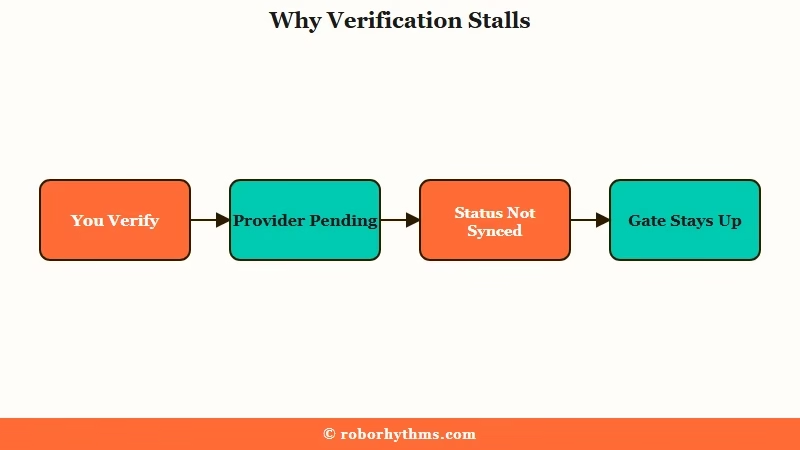
SpicyChat does not run the check itself. It passes you to an outside age-assurance provider, which scans a video selfie, estimates your age, and only asks for a government ID if the selfie is not conclusive.
When that provider answers cleanly, you are in. When it stalls, SpicyChat keeps showing the gate.
A moderator on the platform confirmed this exact behavior. The system waits on a definitive answer, gets a maybe, and loops on a 24-hour refresh until something forces it to recheck.
What is age estimation: A check that guesses whether your face looks over 18 from a short video selfie, used before any ID is requested.
The way I see it, this is good news. A stuck handshake is far easier to clear than a real rejection, and the fix often takes ten seconds.
Why You Are Locked Out Even After Verifying
You can be locked out after a successful verification because your “verified” token never synced back to SpicyChat, so the platform still treats you as unverified.
The provider knows you passed. SpicyChat does not.
This is the most confusing failure because nothing looks broken. One user completed a credit card check, came back the next day, got asked to verify again, and then hit an error saying something was invalid with their account when they tried any method.
The verification worked. The status did not stick.
What caught me off guard in the research was how often the cleanest fix is the simplest one. Logging fully out of SpicyChat and back in forces the platform to re-read your status from the provider, and the re-verify prompt frequently just disappears.
If logout and login does not clear it, the problem has moved from a sync glitch to a device or rate-limit issue, which the next section handles.
How To Fix SpicyChat Age Verification
The fix sequence is logout and login first, then clear your browser, then switch devices, and only then wait out the hidden retry limit before contacting support.
Work them in order, because the early steps are instant and the later ones cost days.
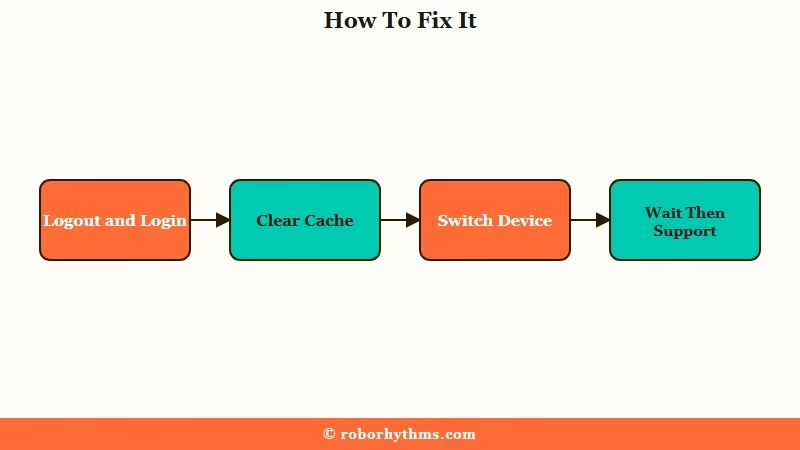
Here is the sequence I would run, fastest first.
- Log out of SpicyChat completely, close the tab, then log back in. This resyncs a stuck “pending” status more often than any other step.
- Clear your browser cache and cookies, disable extensions, and reload. Ad blockers and privacy add-ons frequently break the verification portal and cause a 403 or an endless spinner.
- Try a different browser or a guest window. A clean session rules out a corrupted local state in one click.
- Switch devices mid-flow. If the camera step loops on a laptop, start over and choose the option to finish the photo on your phone, then let the original device complete the check.
- If verification keeps failing, stop for 5 to 7 days. Repeated attempts trip a hidden rate limit on the provider’s side, and only a cooled-down session will go through.
- Still stuck after that, open a support ticket with screenshots of the exact error so the moderation team can clear your account by hand.
Here is the difference the order makes.
Before: You fail the selfie once, retry eight times in five minutes, and now every attempt errors out. You assume the platform is broken.
After: You stop, wait a week to clear the hidden rate limit, clear your cache, and pass on the first try.
| Symptom | Likely cause | Fix |
|---|---|---|
| Re-verify prompt after you passed | Pending status never synced | Log out and back in |
| Endless loading or 403 error | Browser cache or an extension | Clear cache, disable add-ons |
| Camera step loops forever | Single-device handshake failure | Switch to phone for the photo |
| Every retry errors out | Hidden rate limit from retries | Wait 5 to 7 days, then retry |
| Options greyed out | You are already pre-verified | Nothing, you have access |
If your bots also feel off lately, the separate SpicyChat responses got worse guide covers the model side of things.
Technical Glitch or a Geographic Block
A technical glitch can be cleared by you; a geographic block cannot, because it is the law in your region, not a bug.
Telling them apart saves you from chasing a fix that does not exist.
The age gate keys off your IP address, not your account settings. If you connect from one of the mandated regions, you will be asked to verify, full stop. That part is not a malfunction.
Here is the twist I did not expect. Some users in states with no verification law still get prompted, because their internet provider routes the connection through a bordering state that does have one. A person in Illinois can get flagged because their traffic briefly passed through Wisconsin or Indiana.
If you are sure your state does not require verification and you are still blocked, that is the case to take to support rather than retrying. The full legal picture sits in the SpicyChat age verification state blocks breakdown.
For the broader regulatory backdrop, the US Senate’s bipartisan AI chatbot safety legislation is the reason this gate exists at all.
What Happens to Your ID and Selfie
SpicyChat never sees your ID or selfie, and the third-party provider deletes the images within about an hour of confirming your age.
The platform receives a yes or no token, nothing more.
This is the part that should lower the stakes if privacy is what is making you hesitate. The check runs through an age-assurance provider that uses its own backend partners for the document scan, the face match, and any card check. None of that data lands on SpicyChat’s servers.
The provider documentation says the images exist only long enough to return a result, then they are wiped. You are handing a short-lived selfie to a verification company, not posting your license to a chat app.
Here is how the methods stack up so you can pick the one you are comfortable with.
| Method | How it works | If it fails |
|---|---|---|
| Video selfie | AI estimates your age from a short clip | It offers the ID fallback automatically |
| Government ID | Scans an ID and face-matches your selfie | Retry in good light, flat against a dark surface |
| Credit card | Confirms adulthood through a card check | Not offered in the US, France, or Italy |
If the Verification Hassle Has You Looking Around
If the repeated glitches have you reconsidering SpicyChat, a hosted companion app with a smoother onboarding is the alternative I would point you to.
Age checks are industry-wide now, so this is about the experience, not dodging the law.
I still rate SpicyChat for its character variety. When the verification loop has worn me down, Candy AI is the one I would try next, since its sign-up flow and server-side memory feel more polished and it verifies cleanly where the law requires it. The tradeoff is a more curated library in place of SpicyChat’s huge community catalog.
If you mainly want a companion that remembers you between sessions, Nectar AI holds long-term context well. Both are worth a look if the friction has soured the platform for you. For a wider set of options, the SpicyChat alternatives roundup and the honest SpicyChat AI review cover the tradeoffs in more depth.
Frequently Asked Questions
Why does SpicyChat say I am not verified after I already verified?
The provider likely returned a pending status that never synced back. Log out of SpicyChat completely and log back in, which forces the platform to re-read your verified status and usually clears the prompt.
Does SpicyChat store my ID or selfie?
No. SpicyChat never receives your documents. A third-party provider runs the check and deletes the images within about an hour, returning only a yes or no result to the platform.
Why does verification keep failing after several tries?
Repeated attempts trip a hidden rate limit on the provider’s side. Stop trying for 5 to 7 days to let the session expire, clear your browser cache, then attempt it once more.
Can I skip verification with a paid subscription?
No. A paid plan or an age-verified email does not exempt you. If the options appear greyed out, that means you are already pre-verified and can ignore the prompt.
Why am I asked to verify in a state with no such law?
Your internet provider may route your connection through a bordering state that does require verification. If your real location does not mandate it, contact support rather than retrying.
Quick Takeaways
- A re-verify prompt after you passed is usually a sync glitch, so log out and back in first.
- Clear your cache and disable extensions to fix endless loading and 403 errors.
- Switch to your phone for the photo step if the camera loops on a computer.
- Repeated failures trigger a hidden rate limit, so wait 5 to 7 days before retrying.
- SpicyChat never stores your ID, and the provider deletes the images within an hour.
