
The Verdict: Sora 2 wins for raw cinematic quality, synced audio, and 25-second clips at $20 a month bundled into ChatGPT Plus. Runway Gen-4 wins for character consistency across shots, 4K exports, and professional editing tools at $12 to $76 a month. The right pick is the one whose tradeoffs match your workflow, not the one with the bigger headline.
If you have to pick one AI video tool in May 2026, Sora 2 and Runway Gen-4 are the two finalists, and the answer is not the same for every use case.
Sora 2 went broadly available inside ChatGPT in late April after OpenAI shut down the original Sora app on April 26. Runway shipped Gen-4 with its full Aleph editor, motion brush, and 4K export pipeline in March. Both are top-tier, but the differences land in places that decide whether you ship in a week or fight the tool for a month.
I have spent enough time with both to know exactly where each one shines and where each one frustrates a creator who expected something different.
What follows is the head-to-head a working video creator, a marketing team, or a small studio really needs to see, with the exact pricing, the exact clip lengths, and a concrete scenario that shows what the difference looks like in practice.
How Sora 2 and Runway Gen-4 Compare on Price
Sora 2 is bundled into ChatGPT Plus at $20 per month with unlimited 480p and limited 720p generation, while Runway runs a credit-based subscription starting at $12 per month for 625 credits and topping out at $76 per month for unlimited generation.
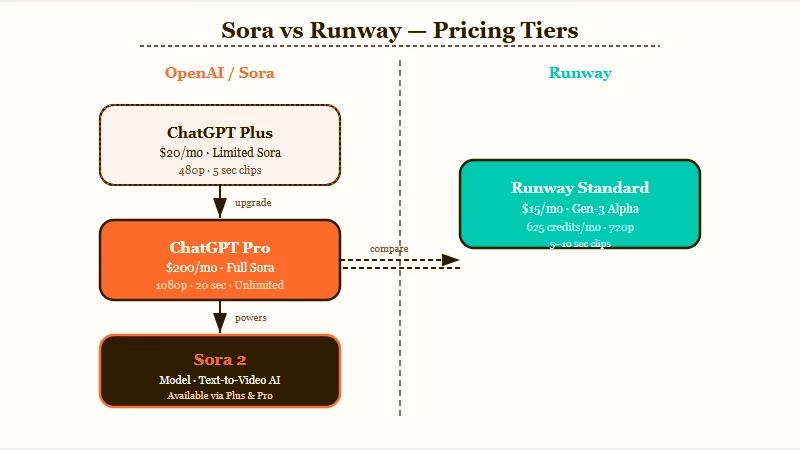
The pricing structures look similar but reward different usage patterns. ChatGPT Plus at $20 gets you Sora 2 with unlimited lower-resolution generation, which is the right shape for prototyping fast and iterating on prompts before committing to a final render.
ChatGPT Pro at $200 per month unlocks 10,000 credits per cycle and 1080p output, which is where serious creators end up.
Runway’s $12 Standard plan gives you 625 credits per month, the $28 Pro plan gets 2,250 credits, and the $76 Unlimited plan turns the credit meter off entirely. Each Gen-4 second costs roughly the same in credits across plans, so the real choice is volume, not unit economics.
| Plan | Sora 2 | Runway Gen-4 |
|---|---|---|
| Entry | ChatGPT Plus, $20/mo, unlimited 480p | Standard, $12/mo, 625 credits |
| Mid | (none) | Pro, $28/mo, 2,250 credits |
| Top | ChatGPT Pro, $200/mo, 10,000 credits, 1080p | Unlimited, $76/mo, no credit cap |
| Output ceiling | 1080p (Pro) | 4K (Pro and Unlimited) |
| API access | Coming via OpenAI | Yes, with Aleph editor integration |
For most creators in 2026, the practical comparison is ChatGPT Plus at $20 versus Runway Pro at $28. At those tiers, Sora 2 is cheaper for unlimited prototyping, Runway Pro is cheaper for any project that needs 4K output or more than 30 seconds of usable clips per week.
For background on where Sora itself stands today, the Sora 2 social video app review covers what OpenAI shipped on the consumer side last quarter, and the Sora shutdown news from March explains why the original Sora app got pulled.
Where Sora 2 Genuinely Wins
Sora 2 wins decisively on three axes: 25-second clip length versus Runway’s 10 to 20 seconds, synced audio generation that lands dialogue and sound effects in one pass, and physics simulation realistic enough to make a tracking shot look filmed.
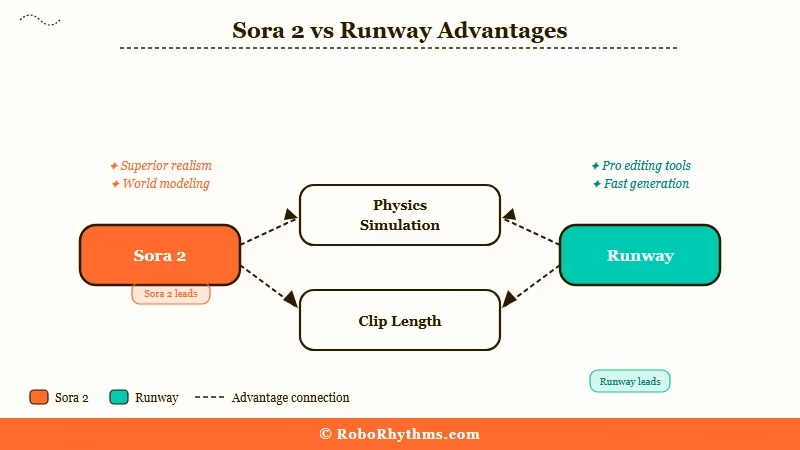
The clip length difference matters more than the headline number suggests. A 25-second clip is enough for a full social media beat, a complete cinematic moment, or a transitional scene.
A 10 to 20 second clip from Runway often forces creators into multi-clip stitching workflows, and stitching is where character consistency starts to break down anyway.
The synced audio is the feature most creators do not realize they need until they ship a Sora 2 clip. Sora 2 generates dialogue, ambient sound, and music in a single pass that matches the visual.
Runway requires a separate Generative Audio step for sound effects and does not auto-sync music or dialogue. For social-first creators producing 30 to 60 clips a week, that one workflow saving is worth more than any single feature comparison in my view.
The physics simulation is the third differentiator and the one that pushes Sora 2 into “broadcast-ready” territory. Tracking shots, reflections, water, fabric, and crowd motion render with a believability Runway has not yet matched. The tradeoff is character consistency, which is where Runway wins.
A concrete scenario that shows the difference:
Example scenario: A creator wants a 20-second clip of a chef walking through a busy kitchen, narrating a recipe over kitchen sound. With Sora 2, one prompt produces the clip with the narration, the kitchen ambient noise, the knife sounds, and the chef’s footsteps in sync. With Runway Gen-4, the same brief requires a video pass, a separate audio pass through Generative Audio, and a manual sync step. Sora 2 ships in 90 seconds. Runway Gen-4 ships in 8 to 12 minutes.
Where Runway Gen-4 Genuinely Wins
Runway Gen-4 wins on character consistency across shots, 4K export support on Pro and Unlimited plans, and 30+ professional editing tools including the Aleph live-action editor, motion brush, director mode, and inpainting.
Character consistency is the one Runway feature that punches above its weight. If your workflow involves the same character appearing in multiple shots, Runway maintains face structure, clothing, and proportions across cuts in a way Sora 2 still struggles with.
For narrative-driven creators (short films, episodic content, branded character work), this is the deciding feature in my experience. Sora 2 produces a more beautiful single shot. Runway Gen-4 produces a more usable sequence.
The 4K export ceiling is the second big win for Runway. Sora 2 caps at 1080p even on the $200 Pro plan, while Runway Gen-4 exports at 4K on Pro and Unlimited plans.
For agencies producing client deliverables, broadcast spots, or any output that lives on a large screen, 4K is non-negotiable.
The Aleph editor and the broader 30-plus tool suite is the third differentiator. Inpainting, outpainting, masking, motion brush, director mode, frame-by-frame editing, color correction, and live-action editing all live inside the Runway interface.
Sora 2 offers Remix, Recut, and Storyboard, which are useful, but they are basic compared to a production-grade editor.
| Comparison axis | Sora 2 | Runway Gen-4 |
|---|---|---|
| Max clip length | 25 seconds | 10 to 20 seconds |
| Audio | Synced, single pass | Separate step |
| Output resolution | 1080p (Pro) | 4K (Pro and Unlimited) |
| Character consistency | Drifts across cuts | Holds across angles |
| Motion controls | Auto from prompt | Motion brush, director mode |
| Editing tools | Remix, Recut, Storyboard | 30+ tools, Aleph editor |
| Audio integration | Built-in | Generative Audio (separate) |
| Best for | Single-shot cinematic | Multi-shot character work |
For a deeper look at where the broader AI video market is heading, the Wan 2.2 vs Veo 3 breakdown covers the open-source side, and the Higgsfield vs Kling comparison covers two of the strongest specialist competitors that pull market share from both Sora 2 and Runway.
Who Should Choose Sora 2
Sora 2 is the right pick for solo creators, social-first publishers, and anyone whose workflow is “one beautiful 20-second cinematic clip with audio, then ship to Reels or TikTok.”
The creator profile that gets the most out of Sora 2 looks like this: prototypes 50+ clips a week, ships single-shot or two-shot scenes (not narrative sequences), needs synced audio without a separate workflow, and treats 1080p as good enough for the platform they publish to.
ChatGPT Plus at $20 is the realistic price point. ChatGPT Pro at $200 is for creators billing video work as a primary income stream.
The Sora 2 sweet spot is the moment when the prompt and the output click. You write 40 words, you get back 25 seconds of beautiful, audible, physics-correct footage. Runway cannot match that flow because Runway is fundamentally a production studio that asks you to do more work to get more control.
Skip Sora 2 if you need 4K output, if your workflow involves the same character across multiple shots, or if you have any kind of brand-style consistency requirement that needs precise color or motion control.
Who Should Choose Runway Gen-4
Runway Gen-4 is the right pick for professional video editors, marketing teams, agencies, and anyone whose workflow involves multi-shot sequences, character continuity, or 4K deliverables.
The Runway profile is more enterprise-shaped. Marketing teams using AI video as a stage in a larger production pipeline.
Agencies producing client deliverables that ship to broadcast or large-screen formats. Independent filmmakers building short narratives where character consistency across cuts is structural to the story.
Runway Pro at $28 is the realistic entry point. Runway Unlimited at $76 is for teams generating 100-plus clips per week or doing daily client work. The Aleph editor and the 30-plus tool suite are the part of the product that justifies the higher price point, and they only pay back if you use them.
Skip Runway Gen-4 if you are a solo creator iterating fast on social-first single-shot content. The credit budget at the lower tiers will run out before you ship.
How to Choose Between Sora 2 and Runway Gen-4 in 60 Seconds
The fastest decision framework is to answer three questions in order, then commit to whichever tool the answers point to without second-guessing.
Here is the decision walk I would run through before opening either pricing page:
- Will your workflow produce single-shot social clips or multi-shot narrative sequences? Single-shot points to Sora 2. Multi-shot points to Runway Gen-4.
- Do you need 4K export this year? Yes points to Runway Gen-4. No keeps Sora 2 in play.
- Do you need synced dialogue or ambient audio in the same pass as the visual? Yes points to Sora 2. No keeps Runway Gen-4 in play.
I would not over-think this. Most creators get tied up comparing 12 features when the answer falls out of two questions. Pick the one whose answer to questions 1 and 2 matches your usual project shape, and use the other one for the edge cases where its strengths apply.
Frequently Asked Questions
Is Sora 2 better than Runway Gen-4?
Neither is universally better. Sora 2 wins on raw cinematic quality, audio sync, and 25-second clip length. Runway Gen-4 wins on character consistency, 4K output, and professional editing tools. The right pick depends on whether your workflow is single-shot social content (Sora 2) or multi-shot production work (Runway Gen-4).
How much does Sora 2 cost in 2026?
Sora 2 is bundled into ChatGPT subscriptions. ChatGPT Plus at $20 per month gets unlimited 480p and limited 720p generation. ChatGPT Pro at $200 per month unlocks 10,000 credits and 1080p output. There is no standalone Sora 2 subscription.
How much does Runway Gen-4 cost in 2026?
Runway runs three tiers: Standard at $12 per month for 625 credits, Pro at $28 per month for 2,250 credits, and Unlimited at $76 per month with no credit cap. Pro and Unlimited unlock 4K output. Standard is capped at 1080p.
Can Sora 2 generate 4K video?
No. Sora 2 caps at 1080p on the ChatGPT Pro plan and 720p on Plus. If you need 4K output, Runway Gen-4 on Pro or Unlimited is the right choice.
Does Runway Gen-4 generate audio?
Runway Gen-4 has a separate Generative Audio tool for sound effects, but it does not auto-sync audio with video during generation. Sora 2 generates synced dialogue, sound effects, and ambient audio in a single pass. For audio-first workflows, Sora 2 saves real time.
Which AI video tool keeps characters consistent across shots?
Runway Gen-4 is specifically noted for maintaining consistent faces, clothing, and body shapes across different angles and cuts. Sora 2 produces stronger single shots but drifts on character details across multi-shot sequences. For narrative or character-driven work, Runway Gen-4 is the safer pick.
According to Statista’s video generation AI market report, the AI video tools market is projected to exceed $12 billion by 2027, which is the demand signal both OpenAI and Runway are pricing against. Both products are good enough to ship with. The difference is workflow fit, not capability.
