
Bottom Line: Sintra AI is worth it for solopreneurs who need structured marketing and admin work done fast, but the 250-credit ceiling every plan shares makes it a poor fit for heavy users. Read the full breakdown before subscribing.
Every Sintra AI review I read before testing the platform sounded like it had been written by someone getting paid on commission. Praise stacked on praise, soft handling of the pricing, and zero mention of the thing that blows up most users in week two.
This is not that review. I spent real time inside Sintra, ran its 12 Helpers through tasks a small business owner would throw at them, and tracked where the wheels came off.
What you will get from this piece is the pricing I saw on the checkout page, the Helpers that pulled their weight versus the ones that felt like glorified ChatGPT prompts, the credit ceiling nobody warns you about, and a clear verdict on who should subscribe and who should keep their $97 for the month.
If you want to try Sintra after reading, that link is fine, but read first.

What Is Sintra AI and How Does Brain AI Work
Sintra AI is an all-in-one workspace that bundles 12 named AI Helpers under one subscription, each configured for a different business function like SEO, copywriting, customer support, or sales.
The pitch is that you are not buying one chatbot, you are hiring a whole team for less than the cost of a single freelance marketer.
Whether that story holds up depends on how you define “team” and how closely you look at the architecture. From what I saw, each Helper is the same underlying model with a different system prompt, persona, and a curated set of Power-Ups attached.
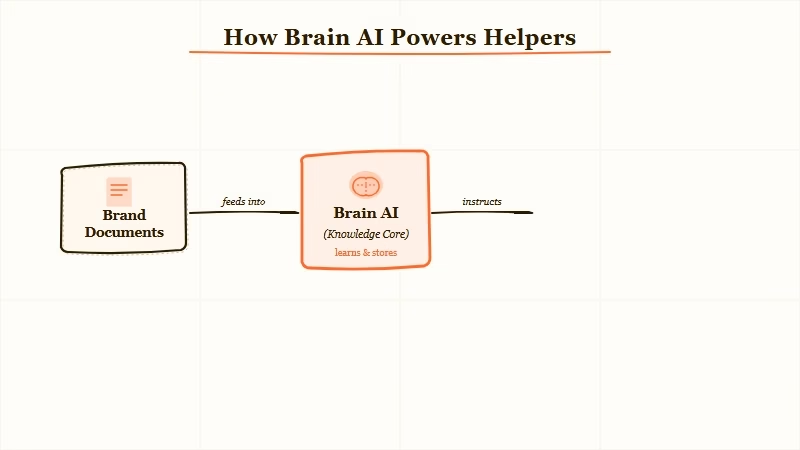
What is Brain AI: Brain AI is Sintra’s shared context layer. You upload your brand docs, tone rules, and product URLs once and every Helper uses that knowledge when it responds.
Brain AI is where Sintra earns its keep. Without it, the 12 Helpers would feel like 12 open ChatGPT tabs. With Brain AI on, Helpers produce output that matches your brand voice on the first try, and you stop re-pasting the same context into every prompt.
That single feature is worth more than most reviews give it credit for. The platform also ships with over 90 Power-Ups, small pre-built workflows like speech-to-text, video script generators, and SEO audits, and supports over 100 languages across all Helpers.
How Much Does Sintra AI Cost?
Sintra AI costs $47 per month for the Pro plan, $67 per month for Business, and $97 per month for Sintra X, with 250 credits included across all three tiers.
The pricing page makes the tiers look like a classic good-better-best ladder, but the catch is in the credits. Every plan, including the $97 Sintra X, hands you the same 250 credits per month. Credits are what get spent when a Helper runs a longer task, triggers a Power-Up, or generates something with an image or video dependency.
Here is how the three tiers break down in practice:
| Plan | Monthly price | What you get | Who it fits |
|---|---|---|---|
| Sintra Pro | $47 | 12 Helpers, Brain AI, limited Power-Ups, 250 credits | Solo founders testing the waters |
| Sintra Business | $67 | Pro features plus multiple workspaces, collaboration, expanded Power-Ups, 250 credits | Two to three person teams with shared brand voice |
| Sintra X | $97 | All Power-Ups unlocked, multilingual suite, advanced features, 250 credits | Operators who already know how they will use the Power-Ups |
What I would recommend is starting on Sintra Pro for one month, running the Helpers you care about most until credits run out, then deciding whether the higher tier unlocks are worth the upgrade.
Sintra does not offer a traditional desktop free trial, there is a free mobile trial but it does not represent the full workflow. Once you have paid for credits, the refund window gets narrower than the homepage suggests, so go in treating the first month as a paid trial rather than a no-risk bet.
You can lock in Sintra’s starter plan from the checkout page.
The 12 Helpers and What Each One Does
Sintra’s 12 Helpers are specialised personas covering marketing, sales, customer support, data, productivity, SEO, copywriting, recruitment, social media, ecommerce, email, and executive assistance.
Here is the full roster, grouped by the job you would hand them:
| Helper | Role | Where it pulls its weight |
|---|---|---|
| Seomi | SEO optimisation | Keyword clusters and on-page suggestions from uploaded URLs |
| Penn | Copywriting | Landing page copy and ad variants once Brain AI has your tone |
| Soshie | Social media | Post calendars and hook variations across platforms |
| Emmie | Email marketing | Welcome sequences and newsletter drafts |
| Cassie | Customer support | Reply templates and FAQ generation |
| Milli | Sales enablement | Outreach scripts and objection handling |
| Buddy | Business development | Market research briefs and partner outreach |
| Dexter | Data analysis | Spreadsheet summaries and trend callouts |
| Commet | Ecommerce support | Product descriptions and abandoned cart copy |
| Scouty | Recruitment | Job descriptions and candidate screening |
| Gigi | Productivity coach | Weekly planning and habit prompts |
| Vizzy | Executive assistant | Schedule triage and email drafting |
From my testing, Penn, Soshie, and Seomi are the three that justify the subscription on their own if you are a content-heavy solopreneur.
Cassie and Emmie are solid but largely replicable with a decent ChatGPT custom GPT. Dexter and Scouty felt the weakest, Dexter kept hallucinating column headers and Scouty drafted job descriptions that read like a stock HR template.
The Credit Ceiling Problem Most Reviews Skip
Sintra gives every plan the same 250 credits per month, which means a heavy user on the $97 Sintra X plan hits the same wall as a solo user on the $47 Pro plan.
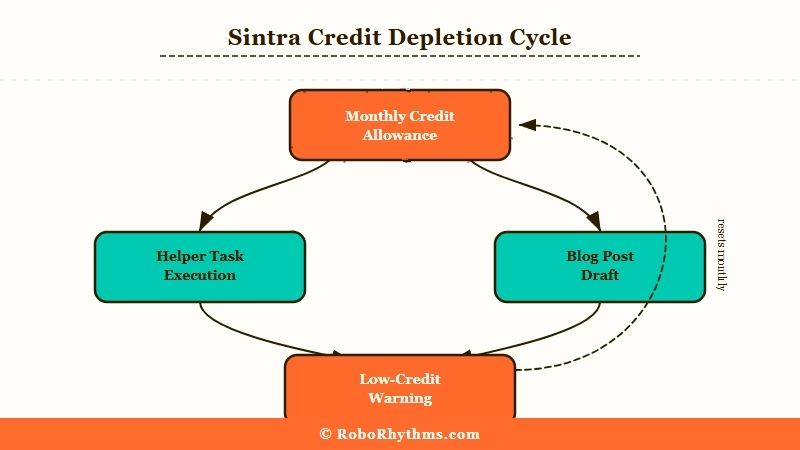
This is the part of the product that I think does the most damage to its trust story. Credits drain faster than users expect.
A single blog post draft that includes SEO research plus a social media cut-down can burn 20 to 30 credits. Running a weekly content workflow for a real small business means most users on Pro will see the low-credit warning by day 18.
The workaround Sintra offers is buying top-up credit packs. That means the headline $47 you agreed to is rarely the bill you pay once you are running real volume. And the refund policy does not cover those top-up purchases, so once you buy them, you own them whether the Helpers deliver or not.
Here is how I would think about the credit ceiling before subscribing:
- List the three Helpers you would use daily.
- Estimate how many credits each task burns based on Sintra’s in-app credit counter.
- Multiply by your real weekly usage.
- If the number comes out over 250, assume you will be buying top-ups or downgrading to fewer tasks.
If your projected usage is above 250, the subscription is not the product you are buying. The top-ups are.
Where Sintra AI Falls Short in Real Use
Sintra’s weak spots are connected-tool coverage, depth in complex workflows, and the gap between its marketing and its ceiling.
The list of connected tools is short. Google Calendar, Google Drive, and social platforms connect, but anything involving a CRM, Zapier, or Make is either clunky or missing.
If your existing stack leans on HubSpot, Pipedrive, or a custom n8n flow, Sintra will sit in a silo, and you will end up copying outputs between tabs.
In my testing, Brain AI could hallucinate. Upload a brand tone doc and a product sheet, and most of the time Helpers respect both.
Occasionally, a Helper will generate output that references a product you do not sell or a policy you never wrote. It is rare enough to be forgivable and frequent enough that you should never ship Sintra output without a human pass.
The “no video” gap is also real. Power-Ups include video script generators, but the platform will not embed, process, or generate video content itself. For a tool that markets itself as an all-in-one employee, that is a notable miss.
Sintra AI vs Building It Yourself with ChatGPT
Sintra AI makes sense when you value the time of not having to wire everything yourself. ChatGPT Teams plus a few custom GPTs works out cheaper if you enjoy the configuration work.
For the same $97 Sintra X price, you could pay for ChatGPT Teams at $25 per user per month, add a Claude Pro subscription at $20, and still have budget left for a small API credit pool. With custom GPTs, you can replicate 8 of the 12 Helpers in an afternoon.
The difference is that with Sintra, someone has done that configuration for you and wrapped it in Brain AI.
If you are the kind of person who has already built your own AI agent or worked through a tutorial to build a phone-based agent, Sintra will feel like you are paying for convenience you did not need.
If that paragraph sounded like a different language, Sintra is probably worth the monthly fee. For a different angle on the same buying question, my Chai Ultra review walks through a similar convenience-versus-cost calculation.
Example scenario: If you want a weekly blog post with SEO keywords, a LinkedIn thread, and three tweets from that one article, on Sintra you type a topic into Seomi, hand the output to Penn for the post, and pass it to Soshie for the social cut. Three chained Helpers, one Brain AI context, maybe 30 credits. On ChatGPT Teams, you would run three separate GPTs, re-paste your brand brief each time, and manually thread the outputs. Both finish in about 45 minutes, Sintra feels smoother, ChatGPT stays cheaper.
From what I’ve seen, Sintra is not a price-per-token play. It is a price-per-hour-saved play.
If 45 saved minutes a week justifies the sub, stay on it. If you would rather reclaim that time and keep the $97, the DIY stack is closer than most reviews admit.
My Sintra AI Review Verdict
My Sintra AI review verdict is that Brain AI earns the subscription for solo operators with a steady content workflow, but the shared 250-credit ceiling means most buyers should start on Pro and upgrade only when a specific Power-Up becomes the bottleneck.
After a month in the product, what I would tell a solo operator is that Sintra earns its keep on the first six weeks if you pair it with a consistent content workflow. The Brain AI layer is the real product. The 12 Helpers are a convenient interface on top of it.
What I would not do is buy the $97 Sintra X plan unless I already know which Power-Ups I will use. The credit ceiling means most of the premium features stay locked behind usage you cannot reach. Start on Pro, use the credits, then upgrade only when a specific Power-Up is the bottleneck.
The broader “AI employee” category has become crowded, with TechCrunch tracking the sector through coverage of Sintra, Lindy, 11x, and others chasing the same solopreneur budget. What I saw inside Sintra matches what users report publicly. Credits run out, desktop trials do not exist, and the connected-tool list is thinner than the marketing suggests.
Pros
- Brain AI removes the context-repasting tax that makes solo ChatGPT use tiring.
- The Helper roster covers 80 percent of solo-business jobs without needing custom GPTs.
- No-code setup under 30 minutes from signup to first usable output.
- Multilingual support across 100+ languages is reliable enough to skip separate translation tools.
Cons
- The 250 credit ceiling is shared across every plan tier, which creates a soft paywall that the marketing does not surface.
- No free desktop trial means the first month is a paid test regardless of how you frame it.
- CRM, Zapier, and Make connections are missing or clunky.
- Occasional Brain AI hallucinations mean outputs always need a human pass before they ship.
You can get started with Sintra on the Pro tier if the pros above outweigh the cons for your workflow.
Who Should Buy Sintra AI and Who Should Skip It
Buy Sintra if you are a solopreneur or two-person team running a content-heavy small business. Skip it if you already have a custom AI stack or need deep CRM connections.
From my testing, the clearest fit is a solo founder or small agency owner doing consistent marketing, sales, and customer support work, who values convenience over configuration time. The Helpers pay for themselves inside 10 hours of saved work per month, which most users hit in the first two weeks.
Skip Sintra if your stack already leans on HubSpot, Pipedrive, or a custom automation flow that needs tight connections. Also skip if you are processing enough volume to blow past 250 credits in week two, you will end up paying for top-ups that the refund policy does not cover. Heavy users on ChatGPT Teams plus Claude Pro will usually get more for less by staying put.
Frequently Asked Questions
Is Sintra AI worth it?
Sintra AI is worth it for solo founders and small teams doing regular content and marketing work who value ready-to-use Helpers over DIY configuration. It is not worth it for heavy users who will hit the 250 credit ceiling or teams needing deep CRM connections.
How much does Sintra AI really cost per month?
Sintra AI costs $47 for Pro, $67 for Business, and $97 for Sintra X, all with 250 credits. Expect to buy top-up credit packs once you run a real workflow, which pushes the effective monthly cost 30 to 50 percent higher than the headline number.
Does Sintra AI offer a free trial or refund?
Sintra does not offer a free trial on its desktop or web platform, only on the mobile app. The 14-day refund policy applies to the base subscription but not to top-up credit purchases, so treat those as non-refundable.
Can Sintra AI replace a human employee?
No, and the marketing oversells here. Sintra saves a solo operator 5 to 15 hours per week on structured, repetitive work, which is closer to replacing a fractional virtual assistant than a full-time hire. Complex judgment calls and relationship work still need a human.
How is Sintra AI different from ChatGPT or Claude?
Sintra packages 12 role-specific Helpers plus Brain AI context storage into one workspace, whereas ChatGPT and Claude are general assistants you configure yourself. The real difference is convenience, not raw capability.
What happens when I run out of Sintra credits?
Helpers stop executing credit-heavy tasks like Power-Up runs and some long outputs, and you are prompted to buy a top-up pack. Top-ups are outside the refund window, so plan credit usage before you commit.
