
TL;DR: SillyTavern plus OpenRouter is the fastest way to run a no-filter roleplay setup without a beefy local GPU. The connection takes about ten minutes, free models cover most use cases, and a one-time $10 credit unlocks a much higher daily ceiling. The model dropdown is where most people get stuck, so the model picks below matter as much as the setup steps.
A wave of roleplayers landed on SillyTavern this spring after Janitor AI’s mandatory ID verification, Character.AI’s age gate, and CrushOn cutting its free daily messages.
The migration is real, and the setup question I keep seeing is the same one: is there a way to do this without buying a $2,000 GPU.
The answer is yes. SillyTavern is the frontend. OpenRouter is the model marketplace. Together, they give you the SillyTavern interface running against free and low-cost models from providers like Google, NVIDIA, and OpenAI, with no local hardware needed.
I will walk through the exact connection sequence, which free models are worth picking, the $10 threshold that changes everything, and the small set of errors that trip up most new users.
This guide assumes you already have SillyTavern installed and running. If you do not, the official SillyTavern installer covers the local install in under five minutes on Windows, Mac, or Linux.
We are starting from a fresh SillyTavern instance with no API connections set up yet.
Why SillyTavern + OpenRouter Beats Both Local LLMs and Hosted Companion Apps
SillyTavern with OpenRouter sits in the gap between expensive local-model setups and rule-bound hosted companion apps, giving you the SillyTavern UI plus pay-per-token access to dozens of models with minimal filtering.
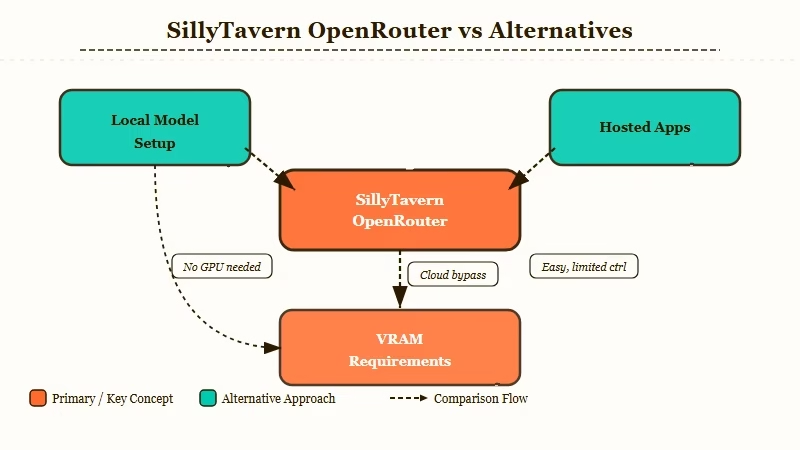
A local SillyTavern setup with KoboldCpp or Ollama is genuinely free once you have hardware, but the hardware is the catch. Running a 70B-class model with reasonable context window needs 24GB+ of VRAM, which puts you in 4090 or 5090 territory before you have generated a single token.
Smaller models that run on consumer cards lose memory and personality consistency the way the older Character.AI free tier does.
Hosted companion apps like Character.AI, Chai, or Janitor AI sit on the other end. The setup is zero, but the filter is heavy, the memory window is small, and recent platform changes (mandatory verification, daily caps) are pushing serious users out.
OpenRouter routes around both. From my own setup, the differences that matter are:
| Free model (ranked for roleplay) | Context | Community verdict |
|---|---|---|
google/gemma-4-31b-it:free | 262K | Best currently-free pick for roleplay. Smartest instruction-follower on the tier and self-aware about cliche AI prose, but it follows prompts so literally that a bad instruction gets repeated every reply. |
nvidia/nemotron-3-super-120b-a12b:free | 262K | Smart with huge context, but has a positive bias and a compulsion to write bulleted lists mid-scene. Run it with reasoning off. |
google/gemma-4-26b-a4b-it:free | 262K | Lighter mixture-of-experts Gemma. Community rates it a clear step below the 31B for prose; same strict template rules. |
nvidia/nemotron-3-nano-30b-a3b:free | 256K | Compact and fast. A fallback for when the bigger models rate-limit, not a first pick. |
nvidia/nemotron-3-ultra-550b-a55b:free | 1M | The most-used free model on OpenRouter, but it is built for agent work and research, not creative roleplay. |
openai/gpt-oss-20b:free | 131K | Skip for roleplay. Heavily filtered, refuses to stay in character, and needs elaborate template surgery to roleplay at all. |
The rest of the current free set (Poolside Laguna, Cohere North Mini Code, Ling 3.0 Flash, the small Nemotron Nanos) are code and agent models; of the fifteen free slugs live today, only about six are worth pointing at a roleplay session at all.
Three community favorites are missing from that table for one reason: they rotated off the free tier. Xiaomi MiMo V2.5 was rated the best free roleplay model outright on r/SillyTavernAI, with DeepSeek-like prose at higher speed, and Kimi K2.6 produced prose users described as too good to be free before its endpoint went paid; the wholesome-leaning GLM series went the same way. If any of them returns with a :free tag, it jumps this ranking, which is exactly why the collection pages below are worth a look before you pin anything.
OpenRouter wins on time-to-first-message for anyone without a 24GB+ GPU. From what I have seen of new users coming from Character.AI’s recent platform purge, this is the path most users settle on.
How to Connect SillyTavern to OpenRouter
Connect SillyTavern to OpenRouter by selecting Chat Completion in the API panel, choosing OpenRouter as the source, pasting an API key generated at openrouter.ai, and clicking Connect.
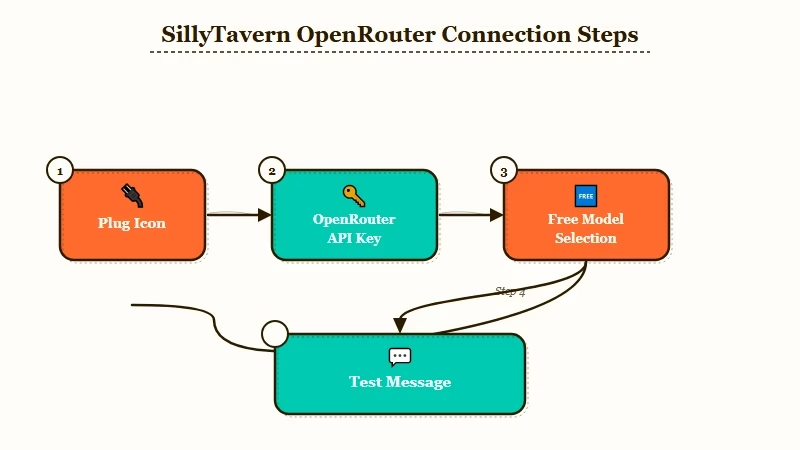
The connection itself takes five clicks once you know where they are. Here is the exact sequence I would walk a new user through, in order:
- Open SillyTavern in your browser at
http://localhost:8000(the default). - Click the plug icon in the top toolbar to open the API Connections panel.
- In the API dropdown, select Chat Completion (not Text Completion, not KoboldAI, this trips up new users).
- In the Source dropdown that appears below, select OpenRouter.
- In a new tab, go to openrouter.ai, sign up for a free account, and click your profile avatar then Keys to generate a new API key. Copy it.
- Back in SillyTavern, paste the key into the OpenRouter API Key field.
- Click Connect. The model dropdown below should populate with available models within a few seconds.
- Pick a model (see the next section for which to start with) and click Test Message to confirm the connection works.
If the model dropdown does not populate after Connect, the API key is wrong or expired. Regenerate one and paste again.
If the test message returns “Insufficient credits,” your account has not been topped up and the model you picked is not in the free tier. Drop down to a model with :free in its slug and try again.
Vague: “Set up OpenRouter in SillyTavern.”
Specific: Plug icon, API = Chat Completion, Source = OpenRouter, paste key from openrouter.ai/keys, click Connect, pick
openrouter/freefrom the model dropdown, click Test Message, expect a “Hello! How can I help you?” reply within five seconds.
Which Free OpenRouter Models Are Worth Picking
OpenRouter’s free tier rotates constantly. As of late July 2026 fifteen models carry the :free tag, Gemma 4 31B is the community’s roleplay pick among them, and the openrouter/free auto-router is the zero-maintenance fallback.
OpenRouter’s free tier is a moving target. Models get added, removed, and rate-limited based on what the upstream provider releases.
As of July 2026 the free lineup looks very different from a year ago. OpenRouter retired the free DeepSeek and Mistral endpoints that most roleplay guides leaned on, so any guide still naming deepseek/deepseek-chat-v3.1:free as the default pick is out of date. If DeepSeek prose is specifically what you want, the paid endpoint costs pennies and our DeepSeek roleplay setup covers the whole flow.
The openrouter/free auto-router is the zero-maintenance choice. Set it once and OpenRouter routes each request to an available free model, filtering the pool for whatever your request needs, such as vision or structured output. The catch its docs bury: it picks from that filtered pool at random, so your character’s voice can change between two messages. Use it for uptime; pin one model when voice consistency matters. Here is the current free set, ranked by what r/SillyTavernAI users actually report for roleplay:
| Free model | Provider | Notes |
|---|---|---|
google/gemma-4-31b-it:free | General-purpose, solid instruction-following, mid-size context | |
google/gemma-4-26b-a4b-it:free | Lighter Gemma 4 variant, faster responses | |
nvidia/nemotron-3-super-120b-a12b:free | NVIDIA | Large mixture-of-experts, strong long-context reasoning |
nvidia/nemotron-3-nano-30b-a3b:free | NVIDIA | Compact and fast, a good fallback when the big models rate-limit |
openai/gpt-oss-20b:free | OpenAI | Open-weight OpenAI model, steady prose, tighter content rules |
Roleplay quality shifts with every lineup change, and the current free set from Google, NVIDIA, and OpenAI leans stricter on content than the retired DeepSeek tier did. The honest move is to check OpenRouter’s roleplay model collection for what the community currently rates highest, then confirm it still carries a :free tag on its model page. The free model collection always shows the live free set.
The most important thing the SillyTavern docs do not say loudly enough: models with :free in the slug are gated by request rate limits, not just credit balance. Hit too many requests in a short window and you get a 429 error even on a fully topped-up account.
This is where the $10 credit threshold matters, and the exact numbers rarely get printed. Under $10 in lifetime credit purchases you get 50 free-model requests a day. One $10 top-up, ever, lifts that to 1,000 a day permanently, and the higher ceiling survives even after your balance drains to zero. Separate from the daily quota, every :free model is capped at 20 requests a minute no matter what you have paid.
Three quirks from community testing that no official page states plainly. A negative balance, even one as small as minus 14 cents from a rounding artifact, locks you out of free inference with a 402 error until you settle it. Cloudflare sits in front of the API and can block a burst of requests that is still under the 20-a-minute cap. And multiple users report persistent 429 errors on free models until prompt tracking is switched on in the account’s privacy settings.
From my experience, that one-time top-up is what turns OpenRouter from “frustrating” to “genuinely usable” for daily roleplay. You are not paying for the free models, the credits sit there as a permanence signal to OpenRouter.
For a fallback that does not require any setup at all, Candy AI is the path I would point friends to who do not want to touch SillyTavern at all.
It will not give you SillyTavern’s customisation depth, but it ships with strong memory and a much smoother first hour.
The Settings That Move the Needle
SillyTavern has dozens of settings, but for OpenRouter free models the four that matter are temperature, max response length, context size, and the streaming toggle.
Most SillyTavern guides walk you through every parameter. Most parameters do not move the needle for a fresh setup. From what I would prioritise on a new connection, this is the order:
- Temperature: 0.85 to 1.0 for creative roleplay. Below 0.7 and the model gets boring, above 1.2 it drifts into nonsense.
- Max response length (tokens): 400 to 600. Free-tier models will sometimes generate 2,000-token monologues if you let them; capping it forces tighter pacing.
- Context size: Match the model’s documented context window. Current free models list their window on the OpenRouter model page, commonly 32K to 128K. Setting context above the model’s window silently truncates from the front, which is what users mean when they say the bot “forgot the start of the conversation.”
- Streaming: Turn it on. SillyTavern feels twice as fast with token streaming, even though total generation time is identical.
Skip the rest of the parameter panel until you have a working session. I have watched new users tweak min-p, top-k, repetition penalty, and presence penalty before they have generated a single message, and the only outcome is a session that does not work at all.
The exception is when you pin one of the ranked models above, because the two families need opposite treatment on the same dials:
- Gemma 4: keep repetition penalty at or below 1.1 and lean on the DRY sampler instead; a 1.5 penalty visibly breaks its prose. Google’s own guidance is temperature 1.0, and for multi-turn chats you must strip the model’s thinking blocks from history before sending the next turn or it falls into cyclical reasoning loops.
- Nemotron 3 Super: turn reasoning mode off for roleplay and add one system-prompt line forbidding lists, or it formats your love scene as bullet points.
If you route to Qwen3 Next through a paid or local setup, the advice inverts: it needs repetition penalty at 1.5 to break its looping habit, which is exactly the setting that ruins Gemma.
Who Is Reading Your Roleplay on the Free Tier
Free inference is subsidized by data: several free endpoints log or train on your prompts, and OpenRouter’s own Zero Data Retention setting excludes most free models rather than protecting them.
Providers run free endpoints because the prompts are worth something. Google states it uses prompts from its free endpoints to improve models unless you are in the EU, UK, or EEA, and the model cards for Kimi and several alpha-tagged free models say plainly that prompts and completions are logged.
OpenRouter offers a Zero Data Retention toggle that restricts requests to providers who guarantee no storage or training. Turn it on and most free models simply stop being available; if no compliant free provider exists for a request, OpenRouter returns an error instead of routing it. Two details worth knowing before you trust that toggle: OpenRouter treats in-memory prompt caching as not-retention, so ZDR does not stop your text sitting in a provider’s RAM, and there is a separate opt-in that trades your data for a 1 percent discount on paid usage.
If your sessions are genuinely private material, the practical answer stays the same as ever: run the model locally and keep the transcript off the network entirely.
Common Errors and How to Fix Them
The four errors that account for nearly every “SillyTavern is broken” post are wrong API selection, expired keys, model rate limits, and context window overrun.
The fixes are short. Here is the lookup table I keep mentally for new SillyTavern OpenRouter users:
| Symptom | Likely cause | Fix |
|---|---|---|
| Empty model dropdown after Connect | Wrong API key or expired | Regenerate key at openrouter.ai/keys, paste, Connect again |
| “Insufficient credits” on Test Message | Picked a paid model on a free account | Switch to a model with :free in the slug |
| 429 errors mid-conversation | Free-tier rate limit | Wait 30 seconds, or top up $10 credits one time for the higher cap |
| Bot “forgets” recent messages | Context size higher than model supports | Drop SillyTavern context size to match the model’s window |
| Test Message returns nothing | Source dropdown set to OpenAI instead of OpenRouter | Re-select OpenRouter in Source dropdown, click Connect |
| Filter refusal on free models | Some OpenRouter models do apply light filters | Switch to a different free model, since filter behavior varies by provider |
The way I see it, three of those six are first-five-minutes errors and the rest are edge cases. If you hit one of the first three, do not start tearing through Reddit threads, fix the dropdown and the key first.
For longer-term reliability, Pew Research found that AI tool adoption among consumers continues to climb fast, which is why platforms keep tightening rules. SillyTavern + OpenRouter is the path that does not get rule-changed out from under you.
Frequently Asked Questions
Is OpenRouter really free for SillyTavern?
OpenRouter has a genuine free tier for specific models tagged with :free in their slug. The catch is rate limits: 50 requests a day until you top up $10 in credits once, after which the daily quota becomes 1,000 permanently.
Does SillyTavern work without a powerful GPU?
Yes, when you connect it to a remote API like OpenRouter, all model inference runs on remote servers. Your machine only needs enough resources to run a browser and the lightweight SillyTavern frontend.
Which OpenRouter free model is best for roleplay?
Among models free right now, the r/SillyTavernAI community rates Gemma 4 31B highest for roleplay, with Nemotron 3 Super the big-context alternative. The overall community favorite, Xiaomi MiMo V2.5, rotated off the free tier; grab it if it comes back. The openrouter/free auto-router is the hands-off alternative, at the cost of a consistent character voice, since it picks a model at random per request.
Can I use OpenRouter free models indefinitely?
Yes, with the caveat that any specific free model can be deprecated, rate-limited, or removed at any time. Plan for the model lineup to shift every two to three months and keep two backup picks ready in your favourites list.
Does SillyTavern keep my conversations private?
Conversations stay on your local machine inside SillyTavern. The prompts you send to OpenRouter pass through OpenRouter and the underlying model provider, and several free endpoints log or train on them; OpenRouter’s Zero Data Retention setting excludes most free models. Local-only setups via Ollama or KoboldCpp are the only fully private path.
What if OpenRouter blocks roleplay content?
Free model filter behavior varies by provider. Some are lightly filtered, while Google and OpenAI variants apply stricter content rules and may refuse unfiltered roleplay. If one model refuses, switch to another provider’s free model or check the roleplay collection.
