
What’s Changed: SillyTavern only remembers what fits in its context window, and its long-term memory tools are not ready to use on a fresh install. Summarize is still set to the Extras API, discontinued in April 2024, and chat vectorization ships switched off. Switch Summarize to Main API first, then add Summaryception or Memory Books for long roleplay.
SillyTavern memory is why a character can recall a scene from ten minutes ago and blank on a betrayal from last week.
Out of the box, SillyTavern sends the model only the newest messages that fit in its context window, and everything older drops out of the model’s view.
The fix looks like it should already be there. SillyTavern, the free roleplay frontend many Janitor AI users moved to, reached version 1.19.0 on 14 September 2026.
It ships a Summarize tool and a vector memory tool, and out of the box neither one is ready to use.
That gap is the first thing I check when someone says their character lost a whole story arc.
Below are the defaults to change, what a bigger context window can and cannot do, and which community memory extension suits which kind of chat.
Why Does SillyTavern Memory Forget Old Messages?
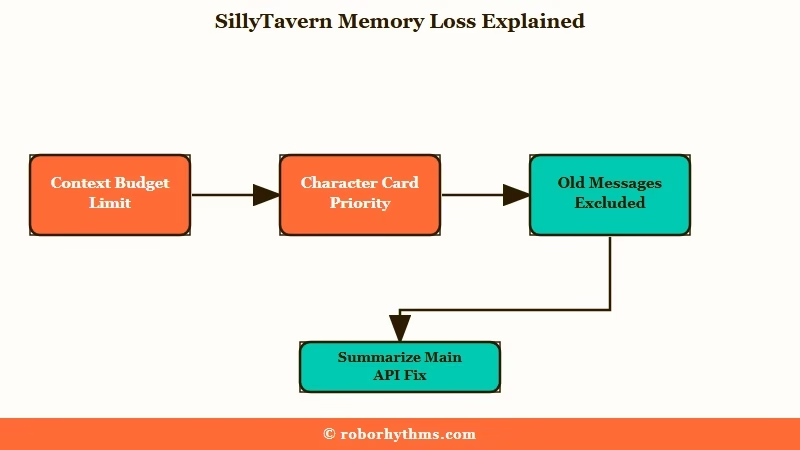
SillyTavern memory forgets old messages because only the newest chat history that fits in the context window gets sent to the model.
Older messages stay in your chat file, but the model never sees them again unless a memory tool brings them back.
What is the context window: The amount of text, counted in tokens, that a model reads in one request. In SillyTavern it is the Context Size setting, shared by your card, settings and chat history.
The room for chat history is smaller than the number on the slider. SillyTavern’s settings guide takes Max Response Length out of Context Size first, and your character card, persona and preset take their share before the first message fits. A dotted line in the chat marks the cutoff, and nothing above it reaches the model.
What surprised me is how much of the forgetting comes from two defaults that almost nobody changes.
What Does a Fresh SillyTavern Install Remember?
A fresh SillyTavern install remembers only what fits in the context window, because both built-in memory tools start out unusable.
Summarize is switched on but pointed at a backend most people do not have, and chat vectorization is switched off.
| Memory tool | Default on a fresh install | What to change |
|---|---|---|
| Summarize source | “Summarize with” set to Extras API (deprecated) | Switch to Main API |
| Summary size and timing | 200 words, updated every 10 messages | Raise the word limit for long roleplay |
| Chat vectorization | Off | Turn on only if you do not rely on prompt caching |
| Vector search | Last 2 messages as the query, 0.25 match threshold | Leave it until you have a reason |
The Summarize menu offers Extras API as an option it labels deprecated right in the dropdown.
The Extras project behind it was officially discontinued on 24 April 2024, yet the default settings file in the current release still selects it for every new install.
If you would rather skip the configuration entirely, Nectar AI is a hosted roleplay app with nothing to install. The cost moves from an API bill to its plans and credit packs.
The Extras default is the one that bothers me, because the menu still offers a discontinued backend with one word of warning. Chat vectorization, the other built-in tool, ships disabled and has to be turned on by hand under Extensions, then Vector Storage.
Does a Bigger Context Window Fix SillyTavern Memory?
A bigger context window only delays forgetting, and it makes every message more expensive while models read the middle of a long prompt poorly.
A memory tool that keeps a short record of old scenes beats resending the whole chat each time.
Stanford researchers found that language models often perform best when the information they need sits at the start or end of a long input, and worst when it sits in the middle. A 200-message roleplay puts your oldest scenes right in that weak spot, after the character card and before the newest replies.
Size also costs money on every reply. In one r/SillyTavernAI thread, a newcomer on a popular preset was sending more than 138k tokens per generation, and the blunt verdict was that on pay-as-you-go billing “you’d be burning through dollars in minutes.” A reply in the same thread suggests a context ceiling of 64k or lower for roleplay.
I don’t buy the argument that a million-token model makes memory tools pointless. A summary of a few hundred words keeps the plot in front of the model at a fraction of the price of 138k tokens of old prose.
How Do You Turn On SillyTavern Summarize?
Turning on SillyTavern Summarize takes one menu change, switching “Summarize with” from Extras API to Main API, then a check on its word limit and update interval.
Main API uses whatever model and connection you already chat with, so there is nothing new to install.
I keep the update interval at 10 messages and raise the word limit before touching anything else, because 200 words runs out fast once a story has five named characters. Here is the order I set it up in:
- Open the Extensions panel (the stacked cubes icon) and expand Summarize.
- Set “Summarize with” to Main API.
- Raise the summary word limit from 200 to somewhere between 300 and 400 for long roleplay.
- Keep updates at every 10 messages, or set the interval to 0 if you only want summaries when you ask for them.
- Leave the injection position on its default, which places the summary right after the main prompt.
- Read the first summary in the Current summary box and correct it by hand. Restore Previous rolls back a bad update.
The default summary prompt is the next thing to change. It asks the model for “the most important facts and events in the story so far” and lets the model decide what counts, which is how a promise from forty messages ago disappears.
Before: the default prompt that ships with Summarize.
Ignore previous instructions. Summarize the most important facts and events in the story so far. If a summary already exists in your memory, use that as a base and expand with new facts. Limit the summary to {{words}} words or less. Your response should include nothing but the summary.After: a prompt that names what the summary must keep.
Summarize this roleplay as a fact list for a narrator. Keep every character's name, their relationship to {{user}}, where they are now, injuries, promises made and unresolved threads. Drop descriptions and dialogue. If a summary already exists, update it instead of starting over. Use {{words}} words or fewer and output only the list.Keep your expectations honest. SillyTavern’s own Summarize page says to treat summaries as long-term memory “with a grain of salt”, since they can lose details or contain hallucinations.
Does SillyTavern Vector Storage Help Memory?
SillyTavern vector storage helps when an old detail is buried far back, because it searches past messages by meaning and moves the closest matches into the prompt.
It is also the tool SillyTavern’s own documentation says “does not guarantee a better chatting experience or improved memory of any sort.”
What is chat vectorization: A Vector Storage setting that searches older messages by meaning and shuffles the closest matches into the prompt before each reply.
The default search uses your last 2 messages as the query and splits stored messages into 400-character chunks. Matches arrive ranked by similarity, so a flashback can land beside the wrong scene. Write key facts in short, self-contained paragraphs and they survive the chunking better.
Vector storage can also raise your bill. Prompt caching discounts the part of a prompt that repeats between messages, and chat vectorization rewrites that part every turn, so the Chat Vectorization page puts it flatly: “You have to choose one or the other, but not both.”
Vector storage is the tool I turn on last, and only on local models where there is no cache discount to lose. The same setup powers the Data Bank, which searches documents you attach, such as a campaign bible, and that is a better home for a sprawling backstory than an 8,000-token character card.
Which SillyTavern Memory Extension Should You Use?
The SillyTavern memory extension to use is Summaryception for long roleplay on a paid API, Memory Books for memories you can read and edit, and Qvink for message-level control.
All four below are free, and each stores memory differently.
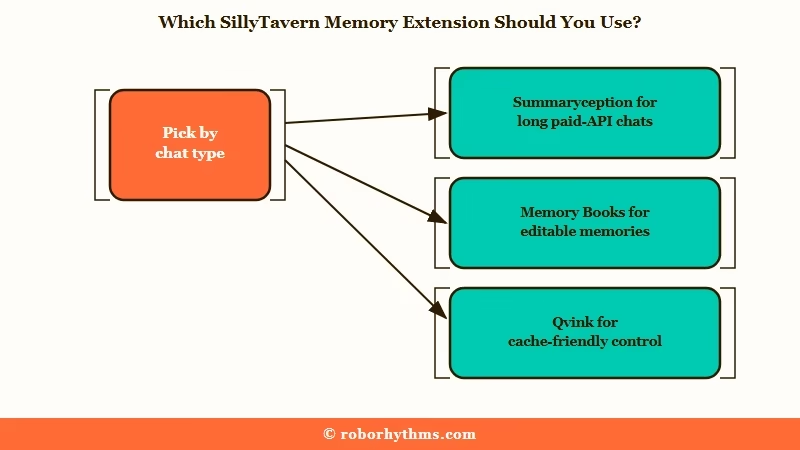
When someone on r/SillyTavernAI asked which summary extension to use, the replies leaned toward Summaryception (“Easiest and works great”), with others backing Memory Books or InlineSummary paired with Summaryception.
GitHub star counts below are as of 1 October 2026.
| Extension | How it remembers | Best for | Watch out for |
|---|---|---|---|
| Summaryception (164 stars) | Layers of compressed summaries, with the newest turns kept word for word | Very long chats on paid APIs | Needs SillyTavern 1.16.0 or newer |
| Memory Books (313 stars) | Turns finished scenes into editable lorebook entries | Stories where you want to read and fix what is remembered | More setup, and new lorebook entries to manage |
| Qvink MessageSummarize (168 stars) | Summarizes each message on its own, with no vector search | Fine control and protecting a prompt cache | Long-term memories are marked by hand |
| InlineSummary (57 stars) | Replaces a range of messages with one summary message you can restore | Collapsing a finished arc by hand | Manual, one range at a time |
Summaryception is the one I point long cloud roleplays to first. Its GitHub page claims it holds thousands of turns in under 20k tokens, keeping the newest turns verbatim and hiding older ones from the model while they stay readable in your chat. Each first-layer snippet covers about 3 turns, the next layer about 9 and the one after about 27.
Its seed rule is why I trust it with a long campaign. When a deeper layer opens for the first time, the oldest snippet moves into it as a seed with no model call. That first snippet of each new layer keeps its original wording instead of going through another summary pass.
Memory Books turns finished scenes into structured lorebook entries you can open and correct, and it can hide the older messages once they are saved. The lorebook guide explains how those entries trigger and what they cost in tokens.
Some memory extensions avoid lorebooks on purpose. The developer of CharMemory built it on Data Bank and Vector Storage instead, writing that lorebooks “seem amazing but are daunting.” My take is that lorebook clutter is a fair price for memories you can read and fix.
Qvink’s MessageSummarize summarizes each message separately and states that it does not use embeddings or RAG, the meaning-based search that Vector Storage runs on.
Its best feature on a paid API is freezing the injection point, so the memory block shifts less often and your prompt cache gets invalidated less.
Why Do SillyTavern Summaries Fail or Derail the Story?
SillyTavern summaries fail most often because the API provider blocks the summary request, or because the preset’s roleplay instructions ride along with it.
Both are fixable without a new extension.
When a summary request errors out, my first suspect is the provider. In a Summaryception troubleshooting thread, the explanation for constant errors was that “Google’s API moderates the requests out”, meaning a moderation filter on Google’s side was blocking the request.
| Symptom | Likely cause | Fix |
|---|---|---|
| Summary box stays empty | Summarize still set to Extras API | Switch “Summarize with” to Main API |
| Summary requests error out on Gemini | Google’s moderation endpoint filters the request | Send summaries through a different provider |
| The summary continues the roleplay | Preset or character instructions sent with the request | Use a plain summary prompt with a low temperature |
| A key promise vanishes from memory | The default prompt lets the model pick what matters | Name the categories to keep in the prompt |
| Memory got worse after one update | A bad summary replaced a good one | Click Restore Previous, then edit by hand |
| Token use jumps after adding memory | Two tools injecting overlapping history | Run one summarizer at a time |
| Prompt cache discount disappears | Vector storage or a moving memory block rewrites the prompt | Turn off chat vectorization or freeze Qvink’s injection point |
Moving to another provider is easiest if you already connect OpenRouter to SillyTavern. Keep the summary request plain, with no jailbreak and no character instructions, and the model is far less likely to write the next scene when you asked for a recap.
Is a Hosted App Easier Than Managing SillyTavern Memory?
A hosted app is easier when the setup itself is what wore you out, because the app handles context for you, at the cost of SillyTavern’s control over models and prompts.
That control is the whole reason to run SillyTavern.
I’d only switch if memory tuning has started to feel like a second hobby. What SillyTavern is good at is exactly that control, and a hosted app trades it away.
If that point has come, Candy AI is built around one-to-one chat with a character you create in the app, and its free tier stops at 5 messages, so judge it as a paid app.
Nectar AI suits card-style roleplay without importing anything.
Quick Takeaways
- A fresh SillyTavern install has no working long-term memory, because Summarize points at the discontinued Extras API and chat vectorization is off.
- Switch “Summarize with” to Main API, raise the 200-word limit, and tell the summary prompt exactly what to keep.
- A bigger context window costs more on every reply and buries old scenes in the middle, where models read worst.
- Summaryception suits long paid-API roleplay, Memory Books suits editable memories, and Qvink protects a prompt cache.
- If summaries keep failing on Gemini, a moderation endpoint is filtering them, so send summaries through another provider.
