
TL;DR: Service firm automation without AI agents covers about 60% of what most professional services admins handle. The five workflows every firm should ship first are intake, document generation, recurring client emails, internal reporting, and founder admin. None of them need a multi-agent framework. They need plumbing, plus one cheap LLM call where it earns its keep.
Service firm automation without AI agents is where the real money sits in 2026, and almost nobody is shipping it. Law firms, accounting practices, recruiting agencies, consultancies, and marketing shops all have the same five workflows screaming for automation.
None of them need a multi-agent orchestration layer with a vector database and a reasoning loop.
The pattern was laid out in detail by an automation builder on r/AI_Agents who has shipped projects for 30+ professional services founders. The grunt work in every firm is the same five tasks.
The fix is plumbing. APIs talking to other APIs, with maybe one LLM call sitting in the middle to draft a paragraph or classify an email.
The economics are unforgiving for anyone overcomplicating this. The first project for most firms costs less than one month of an admin’s salary and replaces about 60% of what that admin handles day to day.
The admin does not get fired. They get promoted into client work because the firm suddenly has the budget and the breathing room.
What follows is the five workflows worth shipping, in the order most firms get the biggest return. I will also lay out the tool stack worth building on, and the one place where an AI agent earns its keep instead of being a $5,000-a-month resume bullet point.
Why AI Agents Is the Wrong Mental Model
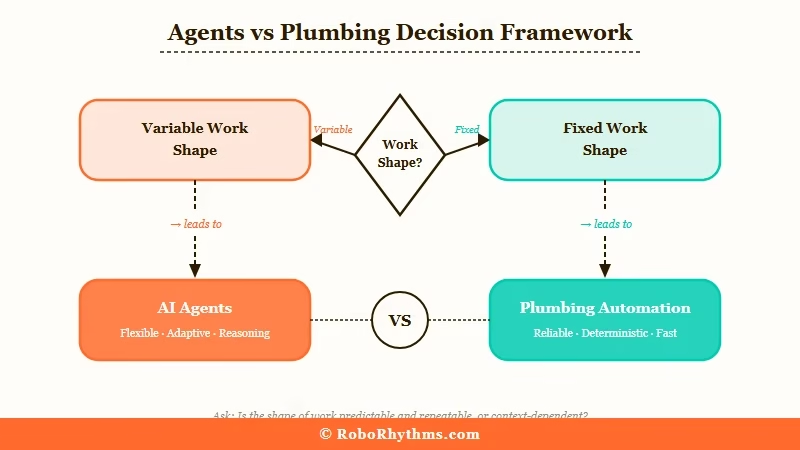
Service firm automation without AI agents wins because the work is deterministic, repetitive, and high-volume.
Agents are a fit when the task requires reasoning across an unpredictable problem space. Most service firm grunt work is the opposite: forms, templates, schedules, and reports that follow the same shape every single time.
The mental model that gets founders into trouble goes like this. They read AI Twitter for an afternoon and decide they need a multi-agent system with a vector database, a memory layer, a reasoning loop, and probably LangChain.
They look at the cost, the complexity, and the hiring problem, and they do nothing. The grunt work continues, and three months later they are still personally chasing late invoices.
The way I see it, the framework hype has cost more service firm owners more time than it has saved. The simpler version of automation has been possible since 2015: form to CRM, calendar to email, spreadsheet to template.
The tools are mature, the integrations are dense, and the cost is closer to a month of admin salary than to a custom AI agent build. We have building automation without LangChain for anyone wondering why so many builders are walking back from the framework approach.
Stanford’s AI Index report tracks how much of enterprise AI spend is going to actual production deployment versus pilot experiments that never ship. The gap is wide, and most service firms are sitting in the pilot ditch. Plumbing-first automation is what gets you out.
The Five Workflows Every Firm Should Automate
The five service firm workflows most automation projects ship first are intake, document generation, recurring client emails, internal reporting, and founder admin work.
They show up in every project for a reason. Each one is touched by 2-5 humans, runs on a predictable schedule, and is built on data that already lives in tools with mature APIs.
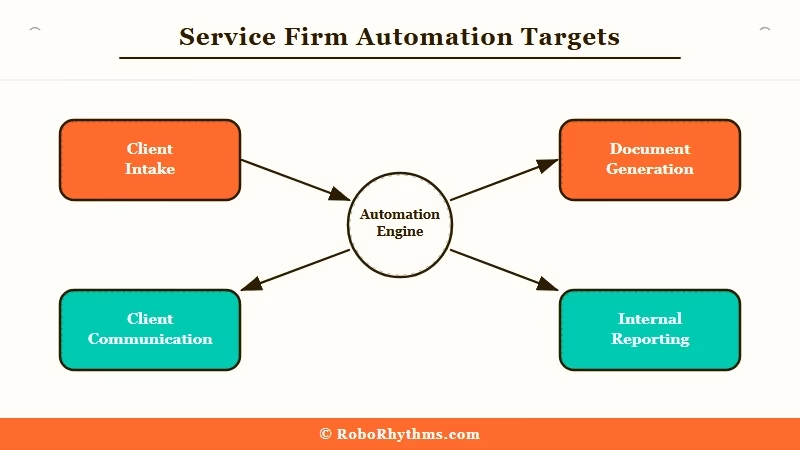
Here is how I would rank them by ROI for a 5-to-30-person firm:
- Intake. Lead form fills, CRM record creation, calendar booking, confirmation email, and the spreadsheet drop for the partner to review. This usually has 4-5 humans touching it. A 30-line script ties everything together.
- Document generation. Engagement letters, NDAs, statements of work, proposals, retainer agreements. Most firms have a paralegal or admin manually editing a Word template per client. A form-to-PDF flow saves 5-10 hours per week per admin.
- Recurring client communication. Status updates, quarterly filing reminders, contract renewal nudges, “haven’t heard from you in 30 days” follow-ups. The workflow watches a date column and triggers the right template at the right time.
- Internal reporting. Weekly partner meetings, monthly billing summaries, the Friday morning founder pipeline report. The numbers can pull themselves and assemble the report. Your junior person stops being a human ETL pipeline.
- Founder admin work. Timesheets, expenses, late invoices, follow-ups to silent prospects, manual pipeline updates. The workflow handles the boring 80%, escalates the judgment calls.
The order matters. Intake usually has the highest leverage because every new client touches it, and every new client is also where firms leak the most revenue.
Document generation pays back fastest because it removes a single, named bottleneck: the admin retyping the same paragraph for the hundredth time. Founder admin work has the highest emotional payoff but is the messiest to build, so I would save it for project two or three.
How to Build the Intake Workflow Without an Agent
The intake workflow runs on plumbing, not reasoning. A form, a calendar, a CRM, an email service, and a spreadsheet. Every one of those tools has an API or webhook, and the workflow’s only job is to move data between them in the right order with one small LLM call summarising the lead.
What I would build first is the intake flow in Make.com’s visual workflow builder, since it gives you a real-time execution view that lets you debug as the data flows through. The same shape works in n8n if you prefer self-hosted.
The build looks like this:
- Trigger. Lead fills a Tally or Typeform on the firm’s site. Webhook fires.
- CRM record. Create or update the contact in HubSpot, Pipedrive, or Salesforce. Tag with source and timestamp.
- Calendar booking. Send the lead a Cal.com or Calendly link prefilled with their info. If they pick a slot, write the booking into the workflow’s state.
- Confirmation email. Send a templated email with the meeting details and a one-paragraph summary of what to bring.
- LLM call (the only AI step). Pass the form responses to a single Claude or GPT call with a tight prompt: “Summarise this lead in 3 bullet points for a partner reviewing 20 leads tomorrow morning.” Cost per lead: roughly 2 cents.
- Spreadsheet drop. Append a row to the partners’ review sheet with the summary, the calendar slot, and a link to the CRM record.
That is the whole workflow. No agent, no vector database, no reasoning loop.
The LLM call is doing one tiny job that traditional code cannot do well, which is summarising free-text form responses in a way a partner will scan in five seconds.
Before: A Tally form drops a CSV row that nobody reads. The partner gets a Slack ping with the lead’s name and email and ends up clicking through six tabs to figure out who they are.
After: The partner gets a row in the review sheet that reads “Founder of a 12-person Brooklyn-based recruiting firm, looking for help streamlining intake and reporting, mentioned a $50K-$80K annual budget, available for a 30-min call Thursday at 2pm EST.” The decision takes 10 seconds.
For the cost discipline that separates a working build from a runaway-expense build, RoboRhythms’ piece on routing through cheap code covers the framework: send everything that can be deterministic through deterministic code first, only escalate to an LLM when nothing cheaper will do the job. The intake workflow above costs 2 cents per lead because that rule is baked into the design.
How to Build the Document Generation Workflow
Document generation runs on a template, a form, a PDF library, and a signature service. Engagement letters, NDAs, SOWs, retainer agreements, and proposals all have the same shape: a Word doc with placeholder fields, a few client-specific paragraphs, and a signature line at the bottom.
The workflow fills the placeholders, generates a PDF, sends it for signature, and files the signed copy automatically.
The build sequence:
- Form intake. A short internal form (Typeform, Tally, or a Make.com form) collects the client name, project scope, timeline, fees, and any clauses to include or skip.
- Template fill. A Google Doc or Word template with
{{client_name}}and{{scope}}style placeholders. The workflow does a find-and-replace pass to fill them. - Optional LLM step. For non-standard clauses (custom liability language, specific deliverables for a unique project), pass the scope to one Claude call with the prompt: “Draft a 2-paragraph scope-of-work clause for the following project, in the firm’s standard formal voice. Use plain English. No legalese fluff.”
- PDF export. Convert the filled doc to PDF. Apryse, PDFShift, or the Google Docs export API all work.
- Signature service. Pipe the PDF to DocuSign, HelloSign, or PandaDoc with the client’s email pre-filled.
- Filing on signature. When the signature webhook fires, drop the signed PDF into the right Google Drive folder and update the CRM record with a “signed” timestamp.
What I would recommend for any firm shipping this for the first time is starting with one document type, not all five. Engagement letters are the highest-volume document at most firms, so start there.
Get it working end to end, then migrate the next document type once the first one has been running clean for two weeks.
When You Need an AI Agent in the Mix
An AI agent earns its keep when the workflow has to make context-dependent judgment calls or operate across an unpredictable problem space.
Most service firm work is not that. The five workflows above are deterministic, but there is a real category of work where an agent is the right tool, and conflating the two is part of why this debate gets confused.
Where I would use an agent:
| Task type | Plumbing handles | Agent justified |
|---|---|---|
| Form to CRM to email | Yes | No |
| Drafting a custom legal clause | LLM call inside plumbing | No |
| Triaging a 200-message client inbox by urgency, topic, and required action | Yes (LLM classifier) | Borderline |
| Researching a prospective client across 15 sources, weighing them, and drafting a pre-call brief | No | Yes |
| Negotiating a contract back and forth via email autonomously | No | Yes (and risky) |
| Filing taxes by reasoning across receipts, IRS rules, and prior years | No | Yes (and you should not) |
The sniff test: if the work has a fixed shape and the variability is only in the data, plumbing handles it. If the work has variable shape and requires the system to choose between paths based on what it sees, an agent earns its budget.
Our walkthrough of the OpenAI Agent Builder covers the legitimate agent build, for the cases where one is genuinely warranted.
The catch is that “I need an agent” is almost always the wrong starting question. The right question is: “Is there a deterministic version of this workflow that handles 90% of the cases and only escalates the messy 10%?” That question turns most agent projects into plumbing projects, which is why most builders who started in the agent camp now ship plumbing for service firms.
Make.com vs n8n vs Hand-Rolled Python
Make.com is the right pick for visual no-code workflows under 30 nodes. n8n is the right pick for self-hosted teams who want code-level control. Hand-rolled Python wins when the workflow is custom enough that no platform’s abstractions fit.
The choice depends on who is going to maintain it after you ship.
Here is how the three options compare for service firm automation:
| Criteria | Make.com | n8n | Hand-rolled Python |
|---|---|---|---|
| Best for | Founders or non-engineers shipping their first workflow | Technical teams who want self-hosted control and code escape hatches | Engineers building one-off custom workflows the platforms cannot model |
| Cost | Free tier 1,000 ops/month, paid from $9/month | Free self-hosted, cloud from $20/month, 30% recurring affiliate available | VPS ~$10/month plus engineer time |
| Visual debugging | Best in class, real-time execution view | Strong, slightly less polished than Make | Whatever logging you build |
| Integrations | 2,000+ pre-built apps | 400+ pre-built nodes plus custom code | Whatever you wire up |
| Maintenance burden | Lowest, the platform handles the runtime | Medium if self-hosted, low if cloud | Highest, you own everything |
For most service firms shipping their first three workflows, Make.com’s visual builder is what I would recommend. The free tier covers a low-volume firm, and paid tiers stay cheap until you hit serious scale. The real value is the visual execution view, which lets a non-engineer founder watch the workflow run in real time and debug without reading logs.
For technical teams who want to self-host, n8n’s open-source workflow builder is the obvious choice. The 400 pre-built nodes cover most service firm integrations, and the code-level escape hatches let you drop into JavaScript or Python whenever the visual abstraction is hiding something you need to see.
Many builders end up settling on plain Python with a thin API wrapper for exactly this reason: framework abstractions kept hiding things they needed to see, and direct API calls are more verbose, but you know exactly what is happening.
RoboRhythms’ piece on Langchain losing developers covers the broader version of that argument.
Frequently Asked Questions
How much does service firm automation cost to ship?
Most first projects run between $3,000 and $8,000 to build, plus tool subscriptions of $20 to $100 per month. That is less than one month of an admin’s loaded salary, and the workflow replaces about 60% of what that admin does.
Do I need to fire anyone after automating?
No. Every builder I have spoken to keeps the admin and reassigns them to client work. The firm gets back the budget that was sitting in grunt work, but it gets back even more from the admin doing higher-value work. Firing rarely makes sense.
Why not just use ChatGPT for all of this?
ChatGPT is the LLM call inside the workflow, not the workflow itself. It does not connect to your CRM, your calendar, your email, or your filing system on its own. The plumbing is the part that ties those tools together. ChatGPT or Claude is one box inside the plumbing.
What about HIPAA, attorney-client privilege, or other compliance constraints?
For sensitive industries, self-hosted n8n on a VPS you control plus an LLM provider with a business associate agreement is the standard answer. Make.com is fine for anything below the regulated threshold. For attorney-client work, run the LLM on your own infrastructure or use a provider with appropriate legal terms.
How do I know which workflow to automate first?
Pick the one that is touched by the most humans on a recurring basis. For most service firms that is intake. For some heavy-templating firms (law, accounting), document generation is the bigger lever. Start with whichever workflow has the most predictable shape and the highest weekly volume.
Can a non-technical founder build this themselves?
For Make.com, yes, with patience. The first workflow takes a weekend if you are reasonably comfortable with software. Workflows two through five go faster because you reuse the same pattern. For n8n self-hosted or hand-rolled Python, you will want a developer.
