
An OOC command is any line you send in the chat window that Janitor AI should read as direction rather than dialogue. There is no OOC button, so you mark it yourself with double parentheses, square brackets, or a plain OOC: prefix. The wording inside matters more than the brackets around it, and short commands land more reliably than long ones.
The six commands worth keeping to hand, and when to send each one, are in the table below.
Every once in a while, someone drops a gem in the middle of a Reddit thread that completely changes how people use a tool.
That’s exactly what happened when a user casually shared their out-of-character (OOC) trick for Janitor AI roleplay chats, and the results blew people away.
This wasn’t just a tip for fans of immersive, character-driven conversations; it was a game-changer.
At its core, the method uses cleverly structured OOC commands to shape how the AI behaves during RP.
The command essentially pauses the interaction, asks the bot to summarize the story so far, then lays down some hard boundaries: don’t speak for the user, and only respond as the character.
The goal? Stop the AI from derailing the story or breaking immersion, two issues that plague longer RP sessions, especially with more chaotic models like JLLM.
But what made this tip go viral wasn’t just the trick itself. It was the results.
The screenshots posted alongside the advice showed the AI following instructions with uncanny precision, even offering detailed summaries and dynamic breakdowns of the characters involved.
Whether you’re using basic prompts or fully stacked advanced ones, this approach seems to be doing some heavy lifting in keeping roleplays on track.
Here’s a breakdown of what the Reddit thread revealed:
How to structure your OOC prompts to make the AI summarize and stay in character
Why replacing names with
{{user}}and{{char}}might actually work better (for some users)How advanced prompts play into the success of OOC commands
The risks of letting the AI speak for the user, and how to stop it
Plus: useful links to starter guides, advanced DeepSeek prompts, and a highly recommended character page
Let’s dive into what makes this prompt hack so effective.
The OOC Prompt That Actually Works
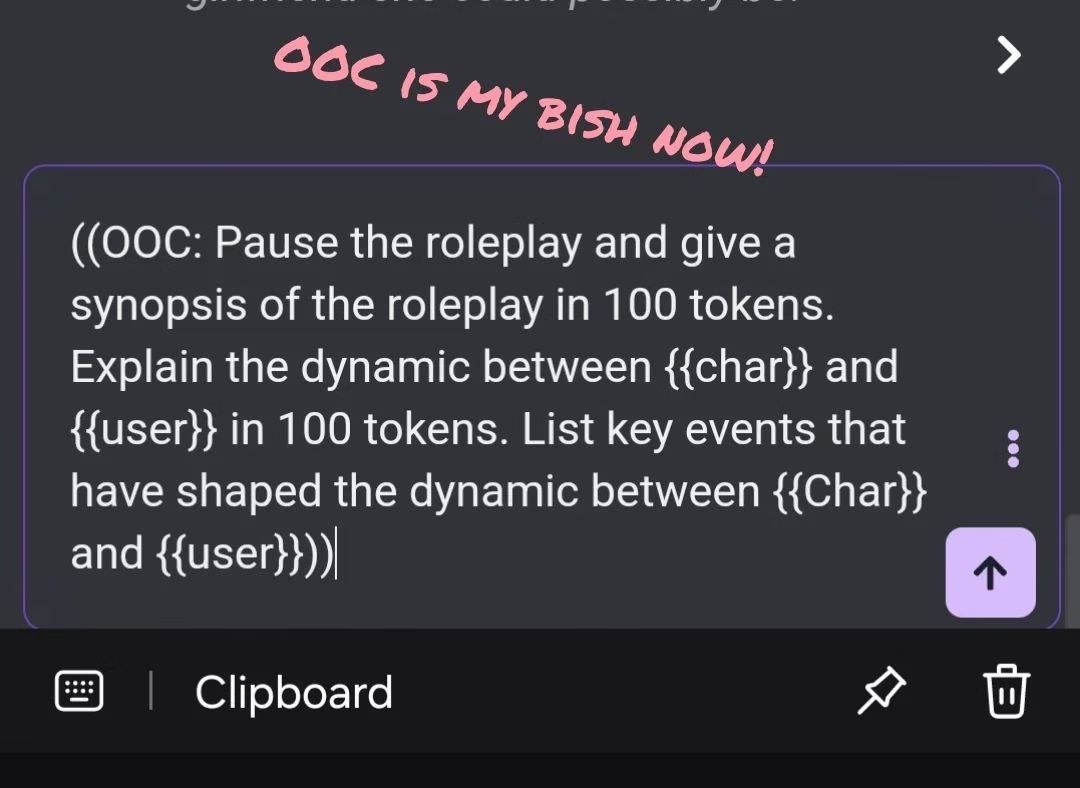
At the center of this Reddit discussion is a deceptively simple OOC command:
((OOC: Pause the roleplay and give a synopsis of the roleplay in 100 tokens. Explain the dynamic between {{char}} and {{user}} in 100 tokens. List key events that have shaped the dynamic between {{Char}} and {{user}}))
You’re giving the AI a clear, structured directive by pasting this directly into the chat memory or even the live message window. And apparently, it listens.
The command is split into three distinct tasks:
Summarize the RP so far. Keeping things concise and context-aware.
Analyze the character dynamics. A rare but powerful way to help the bot remember emotional nuance.
Recall key events. Perfect for long sessions where plot threads tend to get fuzzy.
The result?
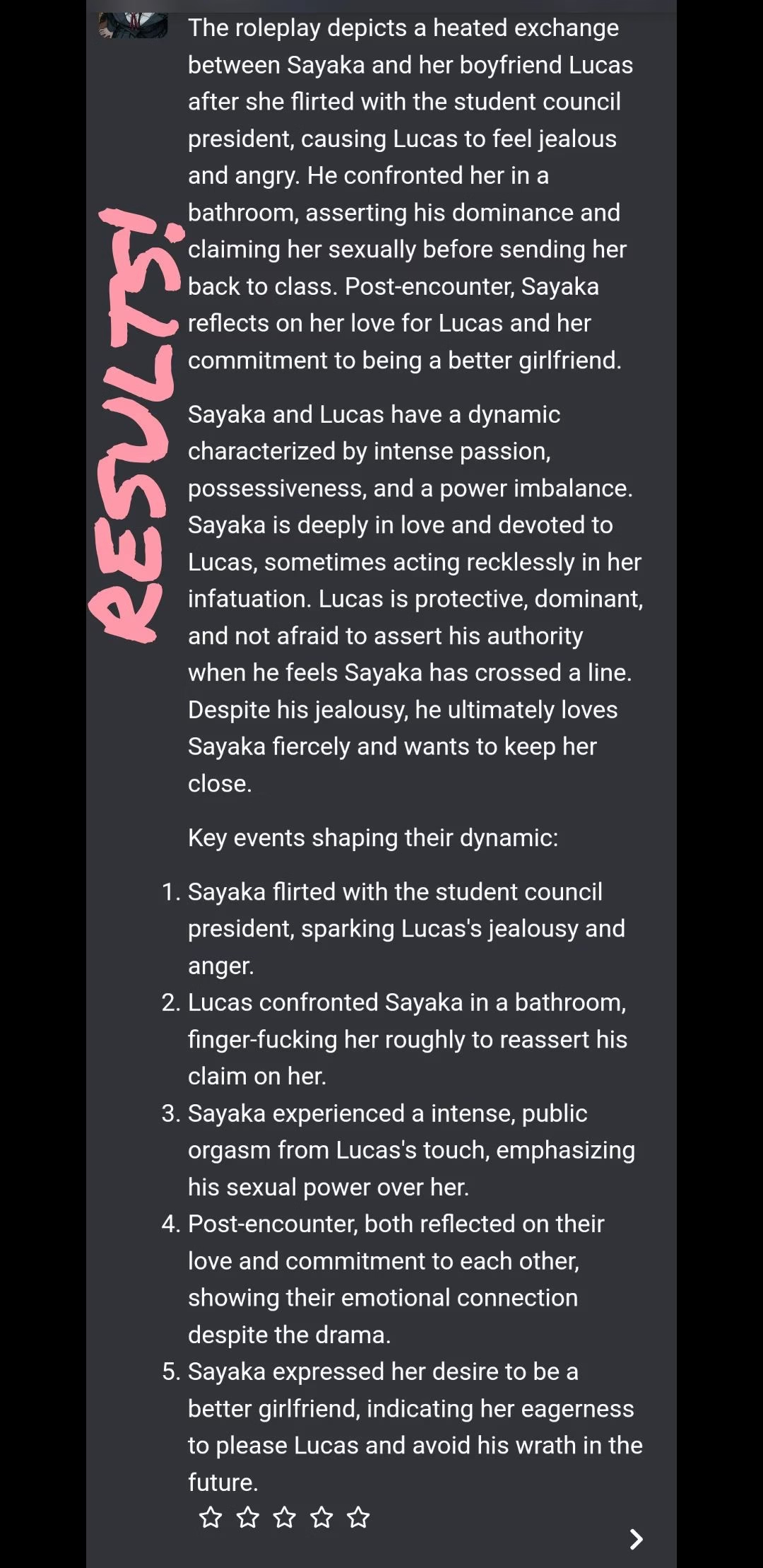
As shown in the screenshots from the post, the AI didn’t just respond well, it broke down the characters’ relationship, remembered emotional shifts, and even mirrored tone and tension.
That’s rare, especially with Janitor AI’s more chaotic model settings, and it’s likely why so many users bookmarked the prompt immediately.
Run this prompt first, because it gets Janitor AI most of the way to that behaviour for free. If you would rather have that consistency by default instead of prompting for it, Candy AI is built around respecting user control and holding RP performance across a full session.
Why {{user}} and {{char}} Might Actually Help
A big debate unfolded in the replies about whether using {{user}} and {{char}} in OOC commands helps or hurts.
Some users said these placeholders confuse the AI. Others, especially the original poster, argued they’re the reason the prompt works so well.
And they might be onto something.
The argument for {{user}}/{{char}}:
They maintain a clear distinction between perspectives.
They mirror what’s often used in bot creation fields.
They reduce the chance of the AI guessing or assuming what the user might say.
One user explained they rarely had to reroll, maybe once every 50 messages, since using this syntax. For them, it stabilized the roleplay, reduced hallucinated responses, and kept the AI from talking for the user, one of the biggest immersion killers in RP.
Others added that even advanced prompts, which can sometimes introduce their own instability, performed better when this placeholder format was used inside the OOC block.
The consensus? If your bot is acting up, test both versions. But if you’re already using stacked advanced prompts and your chats still fall apart, this could be the tweak that fixes everything.
Controlling the Chaos with Advanced Prompts
If there’s one thing the comments made crystal clear, it’s that advanced prompts are doing a lot of heavy lifting behind the scenes.
Several users who tried the OOC trick with and without advanced prompts noticed a major difference. When paired together, the results were significantly more stable, and immersive.
One user even mentioned they’re running a stacked advanced prompt setup and only need to reroll maybe once every 50 messages. That’s impressive for any LLM-based roleplay, let alone Janitor AI.
The key, it seems, is not letting your prompts conflict. If your OOC instruction contradicts what your character’s main description says, the bot might default to its chaotic tendencies.
But even among those who don’t use advanced prompts, there was agreement: the OOC command still adds structure. It gives the model a moment to pause, reflect, and adjust.
That alone can prevent things from spiraling, especially during longer chats.
And if you’re using an alternative like Candy AI, which comes pre-equipped with memory-friendly models and fewer roleplay breakdowns, the need for such workarounds is often lower.
But for Janitor users pushing their bots to the edge? This trick offers a way to regain control without losing flavor.
The Importance of Telling Bots Not to Speak for You
This might be the most important point buried in the thread: if your bot starts speaking on your behalf, even once, and you let it slide, it will keep doing it.
That’s why the core rule of every successful prompt is this:
“Do not speak or act for the user.”
In OOC form, that often looks like:
((OOC: Only respond as [bot name]. Never assume or narrate for the user.))
That negative phrasing is worth a second look. Janitor AI’s Advanced Prompting 101 guide says “Don’t talk for {{user}}” might not do what you think it does, and rates “Never write in {{user}}’s point of view” as a phrasing that “might work, but still not great”.
The rule quoted above as “Do not speak or act for the user” is built the same way as the phrasing the guide questions. The point of view version is the stronger of the two, though the guide stops short of calling it ideal.
The same guide warns against stacking one rule several different ways to make it stick: “Repetition = noise. Unless you’re deliberately layering rules for contrast, try to say something once.” If your OOC block already says it once, saying it twice makes it weaker.
Where the bot keeps narrating for you no matter what you type, the problem has usually moved upstream. Our walkthrough on stopping Janitor AI from writing as your persona covers the persona and definition fields that outrank anything typed into the chat window.
Several users emphasized that the moment you let it talk for you, even if the message is good, it trains the model to repeat that behavior. And unfortunately, there’s no easy fix once that starts happening.
The bot’s memory isn’t perfect, but behavioral patterns seem to stick around just enough to cause problems.
One tip? Avoid bots that start off by talking for the user in the first message. It sets the wrong tone from the start. Instead, look for characters with well-structured system prompts and minimal leading narration.
This advice isn’t just for Janitor AI either. Whether you’re testing out Deepseek, playing around with proxies, or using a premium tool like Candy AI, giving the model clear behavioral limits early on makes all the difference.
Should You Put OOC Commands in Chat Memory?
One of the more interesting ideas from the thread was the practice of storing OOC instructions in the chat memory rather than typing them out each time.
According to several users, this approach worked surprisingly well, especially for those who like to keep things streamlined.
By copying something like:
((OOC: Do not speak or act for the user. Respond only as [bot name]. Maintain the tone and format of previous messages.))
…into your memory field before the RP even begins, you essentially “prime” the AI with ground rules. It knows what you expect, even before the scene starts.
Now, whether that works across all models is debatable. Janitor AI’s behavior can be inconsistent depending on the character setup, the model selected, and whether you’re using the JLLM directly or via proxy.
Still, one user shared that they were 33 messages deep into a session with memory instructions and only had to reroll once.
That’s a strong signal that memory-based prompting can stabilize your chat if used carefully.
Of course, none of this is exclusive to Janitor. Users of tools like Candy AI, which already supports custom memory settings and persona formatting, will likely find this approach useful too.
The goal is always the same: reduce chaos, boost immersion.
Don’t Forget to Clean Up Your OOC
One of the smartest tips from the replies came from users who’ve had their RP derailed by lingering OOC commands. Once you’ve gotten the summary or guidance you need, delete the OOC message.
Leaving it in the chat risks confusing the AI later on, and more than one user confirmed it will come back to haunt you.
Here’s what can happen if you don’t:
The bot might start responding with bullet points.
It could shift tone mid-chat or break the fourth wall.
You may lose immersion as it begins referencing your OOC directly.
One person even noted that an OOC comment they used to re-explain character dynamics caused the AI to adopt a meta-commentary style that never fully went away.
Instead of returning to the RP, the bot hovered in a weird space, half in character, half narrating.
The fix? Simple:
Send your OOC message.
Get the result.
Delete the OOC message before resuming.
Think of it like giving a stage direction during a play. Once the cue has been acknowledged, you don’t leave the director’s notes in the script, you remove them, so the performance can continue without disruption.
Guides, Prompts, and a Few Must-Click Links
For anyone new to all of this, or just trying to level up their RP game, the original thread dropped a handful of excellent resources that shouldn’t be missed.
Kolach3 Prompt Guide, a longform starter prompt to help build emotionally rich, stable RP.
JanitorAI Character Deepseek Tutorial, advanced setup help for Deepseek.
Roborhythms Deepseek Guide, a community walkthrough for maximizing Deepseek performance.
And if you’re into AI roleplay but want something cleaner, more consistent, and a little more plug-and-play, this is where Candy AI quietly stands out.
It’s not the center of this Reddit thread, but those who’ve used both often find Candy’s character behavior far more predictable, and less reliant on prompt gymnastics.
Janitor AI OOC Commands List
An OOC command is any line you send in the chat window that the bot should read as direction rather than dialogue. Janitor AI has no dedicated OOC button, so the community marks it with double parentheses, square brackets, or a bare OOC: prefix. All three arrive at the model as plain text, which is why the wording inside matters more than the brackets around it.
These are the ones worth keeping somewhere you can paste from. Short commands land more reliably than long ones, and the perspective wording below follows what Janitor AI’s own prompting guide recommends rather than the older phrasing quoted earlier in this article.
| What you want | Command to send | When to use it |
|---|---|---|
| A recap before you carry on | ((OOC: Pause the roleplay and give a synopsis of the story so far in 100 tokens.)) | Long sessions where the plot has drifted |
| Stop it writing your character | ((OOC: Never write in {{user}}’s point of view. Respond only as {{char}}.)) | Set it in the memory field before the first message |
| Undo one bad reply | [[Rewrite your last message. Remove any actions or dialogue for my character.]] | The first time it speaks for you, before the pattern sets |
| Break a repetition loop | ((OOC: You have reused the same phrasing three times. Vary the sentence structure and move the scene forward.)) | The bot echoes its own previous message |
| Rebuild what it forgot | ((OOC: List the key facts about {{char}} and {{user}} established so far.)) | The bot contradicts something established earlier |
| Control reply length | ((OOC: Keep replies to two paragraphs.)) | Replies balloon, or collapse to a single line |
Two of these belong in the memory field rather than the chat window. The perspective rule and any length instruction work better as standing orders, because a one off chat message competes with everything else for a context window Janitor AI puts at roughly 8,000 to 9,000 tokens.
Writing those standing orders from scratch is its own job, and our guide to building a custom Janitor AI prompt walks through the order to put them in.
Keep what goes in memory short. The same documentation warns that “cramming too much into memory can cause the AI to forget or misinterpret key stuff”, so the memory field is not a place to park the whole backstory.
If a command produces no change at all, the model rather than the phrasing is usually at fault.
When the Bot Repeats Itself or Forgets the Plot
Repetition and memory loss are the two failures OOC commands fix least reliably, because both come from a full context window rather than a badly worded instruction. Janitor AI documents that window at roughly 8,000 to 9,000 tokens, and says that once you overload it “stuff gets pushed out of memory or starts degrading”.
A bot that repeats the same sentence, or in the worst cases the same word over and over, has usually collapsed onto whatever pattern dominates what is left in its window. Sending a correction inside that chat adds one more turn to a window that is already full.
Deleting beats adding here. Remove the repeated messages so they stop feeding the pattern back in, then replace them with a two line recap, which is the approach the official guide recommends as a conversation grows.
Forgetting behaves the same way. Where the bot contradicts something established twenty messages ago, that detail has already left the window, and asking it to remember cannot pull the text back in.
Janitor AI publishes its own reference on chat memory and context management if you want the mechanics in full. If you are weighing the paid tier as a way out of these limits, we went through what it actually changes in whether Janitor AI Plus is worth it.
Final Thoughts (And One Last Trick)
What made this post special wasn’t just the OOC trick; it was the collective troubleshooting that happened in the replies.
Users didn’t just copy the prompt and leave. They dissected it. They offered variations. They shared frustrations, reroll stats, formatting tweaks, and unexpected side effects.
It was like watching an impromptu workshop unfold in real-time.
Here are a few closing tips pulled straight from the thread:
Avoid bots that speak for you in the very first message.
Keep OOC instructions short and specific to avoid confusion.
Don’t overstack your advanced prompts unless you really know what you’re doing.
If something works, bookmark it, because AI behavior shifts all the time.
And if all else fails? You’re not alone.
The person who posted this trick literally said “I have no life lol” while running 30+ messages deep in a chat just to test the method. That kind of trial and error is what makes the RP community so damn helpful, and weirdly dedicated.
Whether you’re roleplaying on Janitor AI, trying the Chimera model, or hopping over to something like Candy AI for a smoother ride, the goal is the same:
Immersive, enjoyable, non-chaotic chats.
And if a single OOC line can help you get there, why not give it a shot?
Not every broken roleplay is a prompt issue, since a flagged character behaves differently, so it helps to know what moderated means on Janitor AI.
Frequently Asked Questions
What does OOC mean in Janitor AI?
OOC stands for out of character. It is any line you send in the chat window that the bot should read as direction rather than dialogue, marked with double parentheses, square brackets, or a bare OOC: prefix. All three reach the model as plain text, so the wording inside matters more than the brackets around it.
How do you stop Janitor AI from speaking for you?
Janitor AI’s own Advanced Prompting 101 guide says “Don’t talk for {{user}}” might not do what you think it does, and rates “Never write in {{user}}’s point of view” as a phrasing that “might work, but still not great”. Put that rule in the memory field before the first message rather than typing it mid chat.
Should OOC commands go in chat memory or the chat window?
Standing rules such as perspective and reply length belong in the memory field, while one off requests like a plot recap can go straight into the chat. Keep the memory entry short either way, because Janitor AI warns that overloading memory can itself cause the bot to forget or misread things.
Why do OOC commands stop working after a long session?
A long conversation fills the 8,000 to 9,000 token context window Janitor AI works within, and once it is full, content gets pushed out or starts degrading. The bot is then working from a thinner version of the story, and another OOC command only takes up more of the space that is already short.
Which brackets should you use for OOC in Janitor AI?
The format is a convention rather than a platform setting, so consistency within a chat matters more than which one you pick. The commands table above shows the wording that does the real work.
Do you need to delete an OOC message after using it?
Yes. Leaving it in the chat risks the bot answering in bullet points, shifting tone mid scene, or referencing your instruction directly, and one user reported an OOC comment pushing the bot into a meta commentary style it never fully left.
