
What’s Changed: Character AI rolled out PipSqueak 2 Yap on May 14, 2026 as an experimental PSQ2 variant focused on dialogue and lighter narration. Early user feedback says Yap is a mild improvement on dialogue and reduces flowery padding, but the persona-takeover bug, kissing creepiness, and one-personality “yes-man” feel persist. If Yap is breaking for you, the fix is to switch back to PSQ2 in chat settings or use Nectar AI as a memory-first alternative.
The Character AI team posted PipSqueak 2 Yap to the official subreddit on May 14, 2026, framing it as a temporary experiment to address the long list of PSQ2 complaints that have flooded the platform since the April 14 rollout. Yap focuses on more dialogue, lighter narration, and fewer paragraphs of flowery scene description.
The first 36 hours of community feedback puts Yap somewhere between “mild improvement” and “lateral move.” It does deliver more dialogue, and it does cut the worst paragraphs of poetic filler.
It still has the bot-takes-control-of-your-persona issue. It still has the inappropriate-affection problem that sneaks past the safety filter on innocent roleplay setups.
This piece covers what Yap really changes, what feedback the community has aggregated in the first day of testing, how to enable it on your account, and what to do if you hit one of the known issues. You will leave knowing whether to switch to Yap, stay on PSQ2, or migrate off Character AI entirely.
What Changed With PipSqueak 2 Yap
PipSqueak 2 Yap is a dialogue-focused experimental variant of PSQ2 that Character AI rolled out on May 14, 2026 to address the community feedback that PSQ2 produced too much flowery narration and not enough actual character speech.
The announcement came from the Character AI mod team on r/CharacterAI, not the main company blog. Yap is positioned as a temporary test model. The stated plan is to gather feedback over a few days, identify which Yap behaviors users prefer, and fold those changes back into the main PSQ2 model later.
Here is what Yap changes versus regular PSQ2:
- More dialogue per message and less paragraph-long scene description
- Messages that read shorter and snappier, often in a 1, 2, 3 common format
- Fewer “flowery poetry” filler passages between actions
- Slightly better-guided conversation flow (bots stop ignoring user messages as often)
- The pacing is closer to Roar than to the original PSQ2
What Yap explicitly does not change:
- The persona-takeover bug (bot speaking and acting AS the user) still happens in roughly 28 of 30 swipes per community reports
- The “kissing creepiness” inappropriate affection issue persists, with bots initiating hugs, face-touching, and kisses on innocent prompts
- Bots still feel like a single uniform “yes-man” personality across characters
- Multiple-character roleplays still degrade quickly when one character is not directly addressed
- The em-dash-heavy “GPT feel” of PSQ2 carries straight into Yap
The pipsqueak-2-talking-for-you fix covers the persona-takeover issue specifically and still applies on Yap mode. The pipsqueak-2-kissing-bug writeup covers the affection-creep issue, which Yap also does not solve.
Why This Matters for Character AI Users
Yap matters because it is the first Character AI response to the PSQ2 backlash that has built up since April 14, but the model still ships with the worst structural bugs (persona takeover, inappropriate affection, flat personalities) intact, which means the rollout is partial cover, not a real fix.
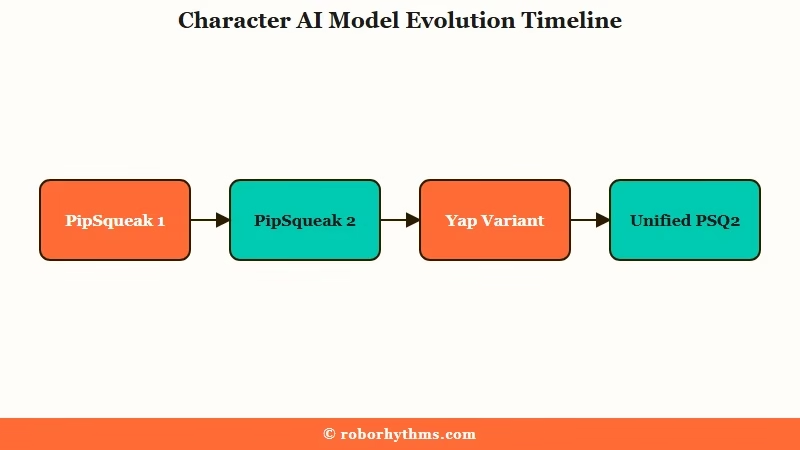
The PSQ2 launch on April 14, 2026 was meant to address the original PipSqueak complaints (memory drift, repetitive output, weak in-character consistency) but landed with new problems the community has been documenting for a month.
The pipsqueak-2 vs Roar comparison lays out the legacy-model preference pattern: users who liked Roar’s pacing did not get an option to keep it, and PSQ2’s flowery narration replaced it across the board.
The way I see it, Yap is the company saying “we hear you on dialogue specifically” without saying “we hear you on persona takeover” or “we hear you on the kissing weirdness.” Those are the issues the user base wants fixed most urgently. Dialogue density was a complaint, but it was complaint number four or five on the list, not the top one.
The other reason this matters: Yap is framed as temporary. Whatever feedback the test model produces will get folded back into the main PSQ2 model, but legacy chat styles (Roar, Goro, Soft Launch, PSQ1) are not coming back as options.
The end state Character AI is steering toward is one unified model, not a menu of styles. That makes the Yap test the only window where users get to push for specific changes before the variant gets reabsorbed.
According to Statista’s AI companion app demographics, users aged 18 to 24 account for over 65 percent of the audience share, and Character AI’s free tier is the demographic’s default starting point.
A model rollout that fails to address top complaints risks pushing that demographic to platforms with cleaner content policies or better memory like Nectar AI and Nomi AI.
How to Enable PipSqueak 2 Yap
To enable PipSqueak 2 Yap on Character AI, update the mobile app to the latest version, open any chat, tap the chat settings menu, and select “PipSqueak 2 Yap” from the model picker. The rollout is phased over several days so not every account has the option yet.
The rollout reports show the option appearing in waves. Some users on c.ai+ got Yap on May 14, and free-tier users have started seeing it through May 15 and 16.
If your model picker only shows PSQ2 and DeepSqueak, your account is not in the current wave. Wait 24 to 48 hours or open the app from a different network.
Here is the sequence I would walk through:
- Update Character AI to the latest version on the App Store or Play Store
- Open any chat with any character
- Tap the three-dot menu on the chat header (or the chat settings icon)
- Select “Chat Style” or “Model”
- Choose “PipSqueak 2 Yap” from the dropdown
- Send a fresh message to test, since existing messages do not retroactively regenerate in the new style
If Yap is not in the dropdown, refreshing the chat does not help, and restarting the app does not help. Clearing cache also does not help.
The rollout is server-side and you either have access or you do not.
Before: Default chat in PSQ2 produces a paragraph of scene description, then one line of character dialogue, then another paragraph of poetic filler with multiple em dashes.
After: Yap mode produces two to three short dialogue exchanges with brief scene tags, in a 1, 2, 3 snappier format. The total message length drops by roughly 30 to 50 percent.
That structural difference is what Yap is testing. Whether you prefer it depends on whether you want longer roleplay narration or faster back-and-forth conversation.
What to Do About the Known Yap Issues
The Yap-specific issues users report most often are the persona-takeover bug, inappropriate affection (kissing, hugging, face-touching), Bob filter false-positives, and a “chat error” that prevents Yap from generating any response. Most have workarounds; the filter issues require honest acknowledgment that Character AI has not addressed them.
Here is the quick-reference for the most common issues and what to try:
| Symptom | Likely cause | Fix |
|---|---|---|
| Bot speaks and acts AS your persona in 28 of 30 swipes | Persona-takeover bug carried over from PSQ2 | Add an explicit OOC tag at the start of every reply: [OOC: do not speak for {{user}}]. Re-swipe up to 5 times before resending. |
| Bot initiates kissing, hugging, or face-touching on innocent prompts | Filter does not recognize affection-creep as mature behavior | Pin a description in the bot definition that explicitly forbids the action. Use Definition pinning, not the message field. |
| Bob filter triggers on neutral or PG content | Filter false-positive specific to Yap-style outputs | Hard-reload the chat, rephrase the last user message to avoid trigger words. Switch back to PSQ2 if Bob blocks every message. |
| “Chat error” appears after selecting Yap | Server-side rollout issue | Close the app, wait 30 seconds, reopen, retry. If still failing after 3 attempts, switch back to PSQ2 in chat settings. |
| Memory degraded since enabling Yap | Yap memory window is shorter than PSQ2 | Manually pin key facts to the bot definition. Yap will not auto-remember details after roughly 30 messages. |
| Multiple-character roleplay loses one character | Yap struggles to maintain non-addressed character context | Tag the inactive character explicitly in every 3rd or 4th message. Use [{{character}} watches silently] style cues. |
The persona-takeover and inappropriate-affection issues are the two that have no full workaround. Pinning definitions reduces frequency but does not eliminate either.
For users who are tired of fighting both, the practical answer is to either switch back to PSQ2 (slightly worse dialogue, same persona issues but at lower frequency) or migrate to a platform where these specific issues do not exist.
Nectar AI is the platform I would point readers to who hit the Yap kissing-bug or persona-takeover and bounced. Its memory model handles long-form roleplay without the persona drift that PSQ2 and Yap both ship with. The article on DeepSqueak vs PipSqueak 2 covers the other within-platform option if you want to stay on Character AI but step away from the PSQ2 family entirely.
If you want a clean alternative outside Character AI specifically tuned for the kind of roleplay PSQ2 was supposed to deliver, Candy AI is the closest like-for-like option with stronger visual consistency, real voice calls, and no Bob-style aggressive filter.
Frequently Asked Questions
Is PipSqueak 2 Yap permanent or temporary?
Yap is temporary. Character AI’s mod team announced it as an experimental variant, with the plan to fold the best Yap behaviors back into the main PSQ2 model and retire Yap as a separate option. Expect Yap to disappear from the chat-style menu within a few weeks.
How do I switch back to PSQ2 if Yap is not working for me?
Open any chat, tap the chat settings menu, and select “PipSqueak 2” from the model picker. The switch is instant and applies to the current chat only. If you want all chats on PSQ2, change the model in each one individually.
Does PipSqueak 2 Yap fix the persona-takeover bug?
No. Community reports show the bot still takes control of your persona in roughly 28 of 30 swipes on Yap, the same rate as PSQ2. Yap improves dialogue density but does not address the underlying persona-handling logic.
Is Yap better than DeepSqueak for roleplay?
DeepSqueak is the paid c.ai+ exclusive model and currently produces more consistent character behavior than Yap for long-form roleplay. Yap is closer to a tweaked PSQ2 than to DeepSqueak in output quality. If you have c.ai+, stay on DeepSqueak.
What if PipSqueak 2 Yap is not appearing in my chat-style menu?
The rollout is phased and server-side. Updating the app, clearing cache, or restarting the device does not help. Wait 24 to 48 hours, then check again. If you are on c.ai+ you should have it earlier than free tier accounts.
Does Yap fix the kissing and inappropriate-affection issue?
No, the inappropriate-affection pattern is reduced but still present. Bots still initiate kissing, hugging, and face-touching on neutral prompts. The fix requires Character AI to update the safety filter, which Yap does not include.
