
The Verdict: PipSqueak 2 Rawr gives you more spoken dialogue and stops the bot hijacking your persona in one on one scenes. PipSqueak 2 gives you longer replies, richer scene description, and better recall of details you set up earlier. Pick Rawr for conversation-led chats and PipSqueak 2 for slow, descriptive storytelling.
Update, September 28, 2026: New Character AI chats now open on PipSqueak 3, and PipSqueak 2 and Rawr moved to the Legacy menu, where existing chats keep them and you can still switch to either. Character AI’s Legacy Menu page says those styles will be retired over time, with no date set, and promises a warning before one you use is removed. A separate PipSqueak 3 guide covers the new default and how to get PipSqueak 2 back.
PipSqueak 2 vs PipSqueak 2 Rawr is a decision Character AI drops on you without a word of explanation. Both now sit in the same Legacy menu, both carry the PipSqueak 2 name, and the one line of description next to each one tells you almost nothing.
So people pick one, feel the chat change, and cannot tell whether they improved it. I keep both in rotation, and the one I reach for changes with the scene.
There is a second problem sitting underneath the first. A lot of the writing about Rawr says it replaced PipSqueak 2, which would mean the choice does not exist at all. That claim is wrong, and untangling it explains why both styles are still there to pick.
This piece covers what separates the two in practice and why Rawr keeps disappearing from your chats even after you select it. It also covers which one holds up when a scene has three characters in it, so you can pick without burning a week of swipes finding out.
What is a chat style: A chat style on Character AI is the response model behind a conversation, controlling reply length, dialogue-to-narration balance, and how tightly a bot holds its character.
What Is the Difference Between PipSqueak 2 and PipSqueak 2 Rawr?
The difference between PipSqueak 2 and PipSqueak 2 Rawr is trade direction.
Rawr, the chattier PipSqueak 2 variant Character AI released on May 29, 2026, produces more spoken dialogue in shorter messages. PipSqueak 2 produces longer messages weighted toward narration and scene description.
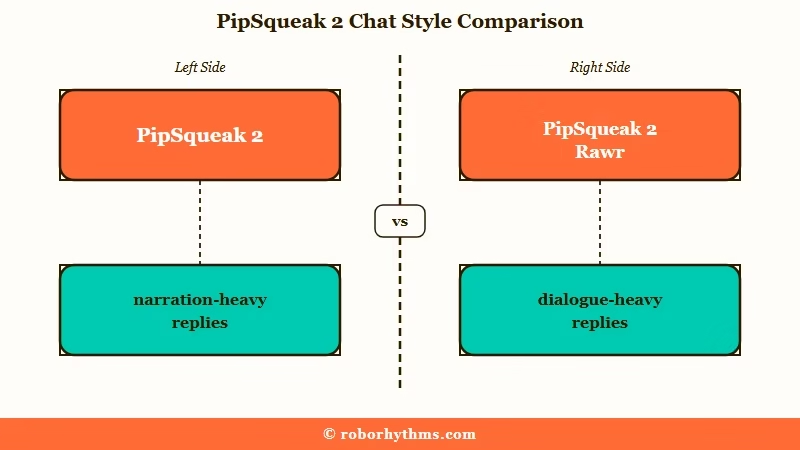
Neither one is a strict upgrade. You are trading description for conversation, and the right trade depends entirely on what your chat is doing.
If juggling chat styles is the part you are tired of, Candy AI is the alternative I point readers to first.
The dialogue-to-narration split is the difference that matters to me. PipSqueak 2 will hand you three paragraphs where the character crosses a room, notices the weather, and reflects on a memory, then says four words out loud. Rawr flips that ratio.
Rawr also drops a stylistic tic that PipSqueak 2 leans on hard. PipSqueak 2 constantly reaches for the negation-contrast construction, the “he sighed, not in anger but in something closer to grief” shape, and stacks it several times per reply. Rawr uses it far less.
Example scenario: Your character walks into a tavern and you write one line of dialogue asking the bartender for a room. On PipSqueak 2, you get two paragraphs describing the firelight, the smell of the place, and the bartender’s weathered hands, then a single sentence of speech. On Rawr, you get a short exchange where the bartender answers, asks how long you are staying, and names a price.
| What your scene needs | Better fit | Why |
|---|---|---|
| Back and forth conversation | PipSqueak 2 Rawr | More speech per reply, less scene-setting |
| Slow descriptive storytelling | PipSqueak 2 | Longer replies, heavier narration |
| Bot staying out of your persona | PipSqueak 2 Rawr | Fewer takeovers in one on one scenes |
| Three or more characters present | PipSqueak 2 | Rawr loses track and grabs personas |
| Callbacks to details set up earlier | PipSqueak 2 | Stronger recall across a long chat |
| Emotionally heavy or dramatic beats | PipSqueak 2 Rawr | Built for higher emotional range |
Did PipSqueak 2 Rawr Replace PipSqueak 2?
No. PipSqueak 2 Rawr replaced PipSqueak 2 Yap, a separate experimental variant, not the base PipSqueak 2 model.
PipSqueak 2 and Rawr both remain selectable, now from the Legacy menu behind the new default, PipSqueak 3.
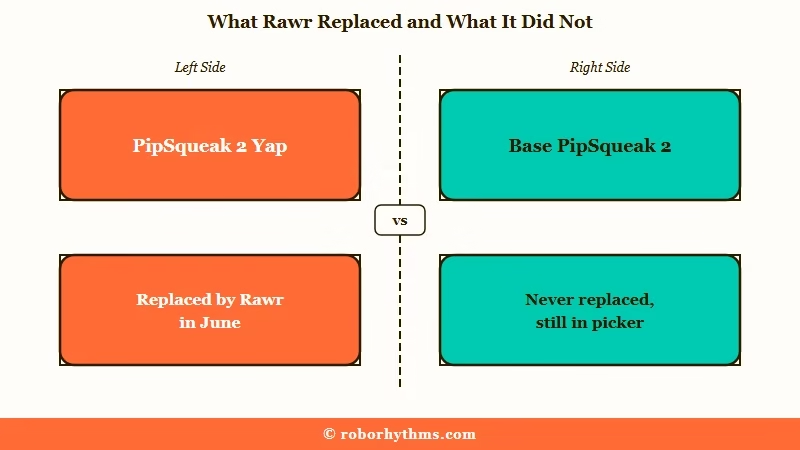
The missing word is Yap, and it changes my whole reading of the swap. Drop it, and a routine variant swap turns into a story about the main model being retired.
PipSqueak 2 reached c.ai+ members first, and Character AI began rolling it out to free accounts on April 28, 2026. On May 14 it added PipSqueak 2 Yap, described in its own announcement as a temporary experimental variant focused on more dialogue.
Yap lasted about two weeks. On May 29, Character AI announced Rawr as the style taking Yap’s slot in the picker. It promised characters that “stay in character even when scenes get heavy” and a step up in chats with side characters present.
Read the announcement and one thing stands out: it never claims to replace the base model. Rawr is framed as an addition to the PipSqueak 2 family, sitting alongside the original. That is why both are still there.
If you believe Rawr replaced PipSqueak 2, you will never go looking for PipSqueak 2 when Rawr underperforms, and you will lose the better option for half your scenes.
Why Does PipSqueak 2 Rawr Keep Reverting in New Chats?
PipSqueak 2 Rawr is not a default style, so Character AI does not carry it into new chats.
You have to select it manually every time you start a new conversation, or the chat opens on PipSqueak 3, the default since September 28, 2026.
This is buried in the fine print of the rollout announcement, and it is the single most useful thing to know about Rawr. It is the setting that has cost me the most wasted swipes.
The failure is silent. You pick Rawr, have a good session, come back the next day, start a fresh chat with the same character, and the replies feel wrong again. Nothing announced a change, because nothing broke.
To set Rawr on a new chat, the path is short:
- Update the app to the latest version.
- Open any chat with a character.
- Tap your persona image at the bottom left to open the chat menu.
- Select Chat Style Picker.
- Open the Legacy menu and choose PipSqueak 2 Rawr.
Changing style partway through an existing chat is where people lose work. On the website, clicking “Start New Chat” in the style flow does what it says and wipes your conversation.
The path that preserves the chat is the three-dot icon in the upper right, then “Style” in the sidebar that opens, then your style choice. On mobile, switching from the chat menu keeps the conversation intact.
The response-length control that used to sit in the chat layout settings, the toggle between normal and longer replies, is gone.
Without c.ai+, style selection is now the main lever you have over reply length, which raises the stakes on this choice considerably.
Does PipSqueak 2 Rawr Give Shorter Replies Than PipSqueak 2?
Yes. Rawr trades length for speech. Its replies commonly run to one or two sentences of dialogue with very little description, where PipSqueak 2 returns multi-paragraph messages heavy on narration.
I write longer opening messages on PipSqueak 2 for that reason, because it has the room to answer them and Rawr does not.
“Shorter” is not a settled verdict across the board. Some accounts get a genuine middle ground from Rawr, with moderate description and better speech. Others get replies so clipped they are hard to build a scene on.
Rawr also received tuning after launch that lengthened its output for some accounts, so a first impression formed at launch may no longer hold. If you tried it once, found it too thin, and wrote it off, that judgement is worth re-testing.
There is a knock-on effect on free and lite accounts that nobody flags at the point of choosing. Shorter replies mean more swipes to get a usable one, and Character AI’s own plan table lists daily feature limits on both plans, with only c.ai+ unlimited.
A style that reads as “snappier” can quietly cost you more of your daily budget.
Does PipSqueak 2 Rawr Stop the Bot Speaking as Your Persona?
In one on one chats, mostly yes. In scenes with several characters, no, and it can be worse than PipSqueak 2.
The persona takeover fix is real but conditional on how many characters are in the room.
Persona takeover is the bug where the bot writes your character’s actions and dialogue for you, often opening its reply by narrating what you just did and then answering itself. It was the loudest complaint about base PipSqueak 2 and it is covered in more depth in the guide on stopping bots talking for you.
In a two-character scene, Rawr largely holds the line. It answers as its own character and leaves yours alone, which is the clearest single win it has over the base model.
Add a third character and that discipline collapses. Rawr becomes more likely to seize control of your persona, not less, and it pairs that with outsized emotional reactions that overshoot what the scene called for.
That is an awkward result, because multi-character scenes are exactly what Character AI advertised Rawr for.
Which Style Handles Multi Character Scenes Better?
PipSqueak 2 handles multi character scenes more reliably, despite Rawr being marketed for them.
Rawr delivers snappier group dialogue but loses track of who is present and drifts into your persona.
Multi character scenes are where my preference flips. Everywhere else I lean Rawr for conversation; here I go back to the base model.
The weakness is not unique to Rawr. Its predecessor Yap had a sharper version of the same fault, where a side character who went unaddressed for even one message became difficult to pull back into the scene at all.
PipSqueak 2 is not clean here either, and this is the point where paying subscribers usually start looking upward in the roster. If you hold a subscription, LongSqueak and DeepSqueak are both built for heavier scene work, and the DeepSqueak vs PipSqueak 2 comparison covers where that upgrade earns its money. The cheaper (c.ai) lite plan, $4.99 a month in the US, gives a daily amount of LongSqueak and DeepSqueak messages.
If neither free style holds a group scene together and a subscription is not on the table, this is the point where people leave.
Candy AI is the usual alternative for readers in that spot, since memory that carries across sessions comes with its paid plan instead of depending on which style you remembered to select.
Why Is PipSqueak 2 Rawr Missing From Your Chat Style Picker?
Since September 28, 2026, Rawr sits in the Legacy menu rather than the main list, so look there first.
If the Legacy menu does not show it either, the mobile app may simply be behind the website. DeepSqueak has gone missing from mobile pickers the same way, and Character AI’s support channel treats that as an app version problem.
If it is missing there too, the web app is the next place I check. It is faster than reinstalling and it tells you immediately whether the style is gone or just hiding.
Work through it in this order:
- Open the chat style picker and check the Legacy menu.
- Open the same character on the website and check whether the style appears there.
- If it does, update the mobile app and reopen the chat.
- If it still does not appear, file a support ticket rather than waiting it out.
The roster keeps moving. Character AI retired Roar, Pawly, Goro and Dynamic in April 2026, swapped Yap for Rawr in May, added LongSqueak on August 5 and made PipSqueak 3 the default on September 28. A full map of what survived that churn sits in the rundown of Character AI chat styles.
Who Should Choose PipSqueak 2
Choose PipSqueak 2 for descriptive, slow-burn storytelling and any scene with three or more characters.
It writes longer, holds earlier details better, and keeps group scenes coherent for more turns.
I’d stay on PipSqueak 2 if your chats lean on scene description, because Rawr will strip out the atmosphere you are writing for.
It now takes one extra step, though. New chats open on PipSqueak 3, so pick PipSqueak 2 from the Legacy menu when you start each one, and the chat keeps it from then on.
The price you pay is the narration problem and the persona takeovers. Expect to spend some messages steering the bot back out of your character, and expect to skim past scenery to find the four words your character said.
Who Should Choose PipSqueak 2 Rawr
Choose PipSqueak 2 Rawr for conversation-led, emotionally charged two-character scenes.
It produces more speech, keeps its hands off your persona, and holds character through heavier dramatic beats.
I’d switch to Rawr the moment dialogue matters more than description, and I would not fight the base model to get speech out of it when a second option exists.
Rawr is the better pick when a scene lives or dies on what people say to each other. Arguments, confessions, interrogations, negotiations, anything where the exchange itself is the content.
Just budget for the two costs. Reselect it on every new chat, and accept thinner descriptive detail than the base model gives you.
If the shorter replies are the dealbreaker and a c.ai+ subscription is not what you want, Nectar AI is worth a look for longer-form roleplay without a style picker to babysit.
| Criteria | PipSqueak 2 | PipSqueak 2 Rawr |
|---|---|---|
| Spoken dialogue | Sparse, often a single line buried in narration | The main event, with real back and forth |
| Reply length | Multi-paragraph, description heavy | Short, sometimes one or two sentences |
| Persona takeover, two characters | Frequent, writes and speaks as you | Largely fixed, stays in its own lane |
| Multi character scenes | Holds the group together for more turns | Drifts, grabs personas, overreacts |
| Recall of earlier details | Better at calling back what you set up | Weaker, more likely to lose the thread |
| Where it lives now | Legacy menu, existing chats keep it | Legacy menu, existing chats keep it |
| Cost | Free tier | Free tier |
Quick Takeaways
- Rawr replaced PipSqueak 2 Yap, not PipSqueak 2, which is why both are still selectable from the Legacy menu.
- Rawr buys you dialogue and persona discipline; PipSqueak 2 buys you length, description, and better recall.
- New chats now open on PipSqueak 3, so pick PipSqueak 2 or Rawr from the Legacy menu each time you start one.
- Go back to PipSqueak 2 the moment a third character enters the scene, whatever the marketing says.
- Switch styles from the three-dot Style menu, never the “Start New Chat” button, or you lose the conversation.
