
What’s Changed: Perchance AI Character Chat is a free, no-login chat page that keeps every character and conversation in your browser. Characters forget because long-term memory ships switched off, and retrieved memories plus lorebook entries share about 450 tokens of a 6,000-token budget. Turn long-term memory on, rewrite lore as one-sentence facts, and export your data often.
Perchance AI Character Chat is the free roleplay page at perchance.org that pitches itself as a Character.AI alternative, with no sign-up, unlimited messages and unlimited AI images.
For a tool that costs nothing it holds up well, and it is still where I send people who want to test a character idea for free.
It also forgets in a way that feels random. A character that quoted its lorebook, the list of background facts you give it, can insist later in the same chat that one of those facts does not exist. A backstory you wrote with care fades out of its replies too.
Nearly all of that traces to product decisions in the generator’s public code, and the model takes the blame for them. Most of those decisions have a setting or a habit that works around them.
Below is how memory and lore decide what the AI sees, the settings that help a character remember, and fixes for three common errors.
The last section covers backing up your chats before your browser deletes them.

Why Does Perchance AI Character Chat Forget Things?
Perchance AI Character Chat forgets because everything must fit a recommended budget of 6,000 tokens, retrieved memories and lore get only 7.5% of it, and long-term memory is switched off on a default character.
What is a token: A token is a small chunk of text the model reads, roughly three quarters of an English word on average.
Perchance’s text plugin sets its ideal context at 6,000 tokens, and a comment in the plugin’s public code calls that “just a recommendation” that “will increase over time.” The character description, recent messages, summaries, lore and your reminder note all have to share it.
Is Long-Term Memory Off by Default in Perchance AI?
Yes. The “Extended character memory” setting defaults to “Long-term memory disabled,” and while it is off the character neither saves memories nor searches them.
The setting sits in the character editor’s advanced options and only appears while “summarize oldest messages” is selected. Its tooltip says turning it on lets a character “remember stuff from waaaay back in the chat history,” at the cost of slower replies.
A developer comment in the code adds that disabling it “also disables memory usage,” so a default character works only from recent messages, summaries and lore. Perchance’s own Memories and Lore guide still says a character with summaries enabled “will automatically start to create” memories once a chat gets long, which describes behavior a default character does not have.
The fix is the first switch I flip on any character I plan to keep: open the editor, show the advanced options, and set Extended character memory to “Long-term memory enabled.” Memories stay inside one thread, though, and the tooltip says characters “can’t recall details from other chat threads.”
Memory that lives in one thread on one browser is the price of free with no account. Nectar AI is built for people rebuilding characters they made elsewhere, and it keeps them on an account with group chats included.
How Small Is the Perchance AI Context Budget?
The Perchance AI context budget is small enough that long chats lose detail fast: old messages get summarized or deleted, and long character descriptions get cut once they pass about 1,800 tokens.
When a chat outgrows the budget, older messages get compressed. A setting called “Method for fitting messages within model’s context limit” offers two choices: “summarize oldest messages,” the default, or “ignore oldest messages (not recommended).”
The second deletes old messages in chunks a fifth the size of the budget and leaves an “[earlier messages in this chat were removed]” marker behind.
Long descriptions get trimmed too. Once the combined character instructions pass 30% of the budget, the generator’s code cuts them to 3,000 characters, then 2,000, 1,000 and finally 500.
The trim logs a warning that reads “Character descriptions being trimmed due to large combined length.” I keep my descriptions well under that line for exactly this reason.
Why Does the Perchance Lorebook Stop Working After a While?
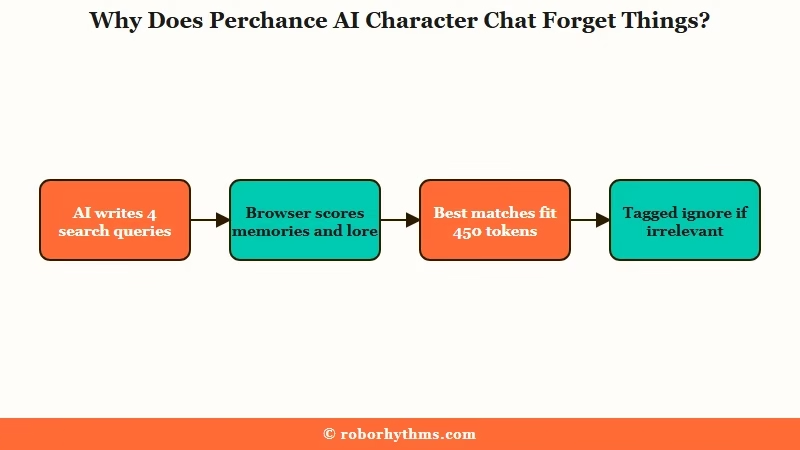
The Perchance lorebook stops working because lore competes with memories for about 450 tokens and wins a place only by matching the AI’s own search queries. Whatever gets in reaches the model with an instruction to ignore it if it looks irrelevant.
Before each reply, the AI writes up to four “memory search queries” about the scene, and you can see them under the brain icon on any message.
Your browser then turns each query and each lore entry into numbers with a small embedding model, bge-base-en-v1.5, and scores how closely they match, counting the first query three times as heavily as the rest.
The best matches survive, and the code trims the rest until memories and lore fit inside 7.5% of the 6,000-token budget, which works out to 450 tokens. Trimming removes whole entries, so a single entry of 300 words or more never fits, no matter how relevant it is.
What does get in arrives with a warning label. The prompt introduces it as “random things/facts/happenings/memories that may or may not be relevant” and tells the model to “COMPLETELY IGNORE this stuff if it’s not relevant.” Each lore line also carries its own tag, “Fact (ignore this if it’s irrelevant).”
That matches the failure in this r/perchance lorebook thread, where lore worked for the first 15 messages and then the AI said a fact from the book did not exist. The likely culprit is drift: as a story moves on, the search queries chase the current scene, and background facts lose the scoring contest to whatever is happening now.
Turning long-term memory on makes that contest tighter, since memories draw from the same 450 tokens. I accept the trade on long stories anyway, because a remembered event does more work than a lore line about it.
If you want to set the lore budget yourself, SillyTavern’s lorebooks expose it as a setting.
How Do You Make Perchance AI Character Chat Remember More?
You make Perchance AI Character Chat remember more by enabling long-term memory, keeping descriptions short, writing lore as one-sentence facts, and putting must-follow rules in the reminder note, the last thing the model reads.
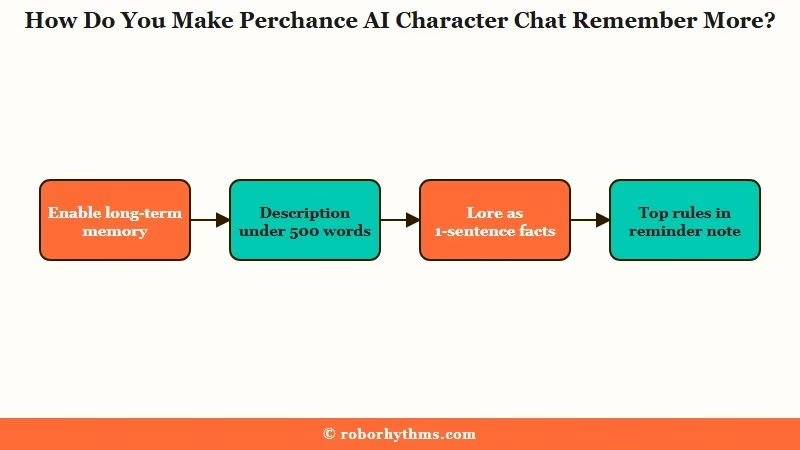
Here is the order I work through on any character that keeps losing the plot:
- Enable long-term memory. In the advanced character options, set Extended character memory to “Long-term memory enabled.”
- Leave summaries on. Keep “summarize oldest messages” selected, since the other setting deletes old context in chunks.
- Keep the description under 500 words. The official docs put the ideal under 500 words and send everything else to the lorebook.
- Write lore as self-contained facts. Use one or two sentences per entry, a blank line between entries, and the character’s name instead of “he” or “she.”
- Reload lore in existing chats. After editing a lorebook URL, type /lore, show the hidden options and click reload, because old threads keep the old entries.
- Put your top rules in the reminder note. Keep it to one to three rules that must hold in every reply.
- Pin key facts by hand. Type /lore followed by a fact to add an entry, or /mem to open the memory editor.
- Check the brain icon. If the search queries miss the point of the scene, your lore will miss with them.
The reminder note sits in the strongest spot in the prompt. The prompt ends with “REMINDER for writing [name]’s messages” followed by your note, directly before the task line, so it is the last thing the model reads before it writes.
Stanford researchers found that model performance “is often highest when relevant information occurs at the beginning or end of the input context,” and drops when it sits in the middle. A rule in the reminder note gets the end position on every reply.
The biggest lore fix is splitting paragraphs into separate facts, because the docs warn that “the AI sees entries in isolation.” Here is one entry rewritten that way.
Before: Mira grew up in Saltmere’s harbor district with her brother Tomas, who taught her to sail before he joined the navy. She still carries his brass compass, never lets anyone touch it, and has an academy rival named Elena.
After:
Mira grew up in the harbor district of Saltmere.

Mira's brother Tomas taught her to sail before he joined the navy.

Mira carries Tomas's brass compass and never lets anyone touch it.

Elena is Mira's rival from the naval academy.
The first version is one long entry that loses the scoring contest whenever the scene is about anything other than Mira’s childhood. The second gives the search four small targets, and each fits inside the 450-token slot with room to spare.
| Symptom | Likely cause | Fix |
|---|---|---|
| Forgets events from early in a long chat | Long-term memory is off by default | Set “Long-term memory enabled” in advanced options |
| Denies a fact that is in the lorebook | Entry too long, or it lost the relevance contest | Split it into one-sentence facts |
| Lorebook edits never show up | Old threads keep the old entries | Type /lore, show hidden options, click reload |
| Personality fades or flattens | Description trimmed past the budget | Cut it under 500 words and move extras to lore |
| Breaks a rule you wrote | Rule buried in the description | Move it into the reminder note |
| Knows nothing from your other chats | Memories stay inside one thread | Copy key memories over with /mem |
Why Did Perchance AI Character Chat’s Writing Get Worse?
Perchance does not name the model behind its free text plugin, so a change in writing style reaches your chats with no public explanation, and the fixes come down to steering each reply.
Characters point at a generic model called “perchance-ai,” and nothing on the generator page names what runs underneath. The complaints in a recent r/perchance thread are purple prose and the same few lines of dialogue on repeat, down to every male character getting named Artur.
One reply in the same thread grants that the newer model is “more stable” than one that “used to just get stuck in an infinite loop,” which counts for something on a free tool. These steering habits get most of the old voice back:
- Edit the first replies into the voice you want. The model copies the style already in the chat, so two or three hand-edited replies carry forward.
- Ask for what you want instead of banning what you don’t. In another r/perchance thread, a single “submissive” trait word steered a whole scene, and “don’t pour water” lands about the same as “pour water.”
- Put one style rule in the reminder note. “Write in plain sentences with no metaphors” works better at the end of the prompt than buried in the description.
- Regenerate bad replies instead of answering them. Every reply you keep becomes style the model copies.
- Steer a single reply with /ai. Typing /ai followed by an instruction, such as “/ai keep it short and plain,” shapes only the next message.
My own reminder notes carry one style rule at a time. A note with five rules asks the model to juggle all of them on every reply, and one clear rule is far easier to follow.
How Do You Fix Common Perchance AI Character Chat Errors?
Most Perchance AI Character Chat errors trace to three causes: a stuck verification check, a chat list that hides older threads when you use folders, and share links broken by an ampersand.
| Error | What it means | Fix |
|---|---|---|
| “Verifying…” in the top right | The Cloudflare check has not passed, so the AI cannot reply | Keep the tab in front, reload, pause blockers |
| “show all threads” button missing | Chats inside folders crowd out the list check | Use chat search, or move old chats into a folder |
| “the file specified by the URL does not exist” | An ampersand broke the share link, or the file was quarantined | Change the ampersand to “and” before the “~” |
Why Is Perchance AI Stuck on Verifying?
Perchance AI gets stuck on “Verifying…” when a Cloudflare Turnstile check in a small top-right box has not passed, and the AI cannot write a reply until it does.
The box is an embedded page titled “AI Text Plugin Verifier,” and the text plugin reloads it if it is not ready after 15 seconds.
The source of the verifier page carries a fix dated August 24, 2026 for an overlay that “never resolves,” with a note that browsers throttle timers in hidden frames to about one wake a minute.
I treat a stuck box as a browser problem first, and I never clear site data to fix it, because that deletes every chat. Work through these in order:
- Keep the Perchance tab in front and give it 15 to 30 seconds.
- Reload the page if the box sits there for more than a minute.
- Pause ad blockers and privacy extensions for perchance.org, since they can block the verification frame.
- Try again without a VPN.
- Switch browsers. In one Edge report, desktop Edge stuck on Verifying while the same chat worked on a phone.
If the whole site fails to load instead, the Perchance not working guide covers 521 errors and outages.
Why Did the Show All Threads Button Disappear?
The show all threads button disappears when your folders hold many recent chats, because the main list checks only your 100 newest chats across all folders before deciding whether to show it.
The sidebar shows 50 chats at a time. At the top level, the chat list code loads the 100 most recent chats from every folder, keeps only the ones outside folders, and shows the button only if more than 50 remain.
A folder full of active chats eats into those 100 slots, so the button vanishes even though older top-level chats still exist. Inside a folder, the list loads every chat, which is why the button keeps working there.
- Use the chat search box, which loads every thread and ignores folders.
- Move older top-level chats into a folder.
- Run an export if you want proof nothing is lost, since the file holds every thread.
Why Does a Perchance Character Share Link Say the File Does Not Exist?
A Perchance share link says the file does not exist when the character’s name contains an ampersand, because the unencoded “&” cuts off the part of the link that points to the file.
Share links follow the pattern perchance.org/ai-character-chat?data=Name~file.gz, so a character called Game Master shows up as Game_Master before the “~”. The share-link code reads only the part after the last “~” to find the file, and a comment in it calls the name part a readability touch that “doesn’t affect stored data at all.”
An “&” ends the data parameter early, so a name like “Ren & Kaito” leaves the link pointing at nothing. The chat then reports that “the file specified by the URL does not exist” and points you to perchance.org/quarantined-files.
Rename the character to “Ren and Kaito” before sharing, or edit a broken link and change “&” to “and” before the “~”. If the name has no ampersand, check the quarantine page, because every shared file goes through a moderation system on upload.
That system can also refuse a share outright with a “disallowed_content” error. The error itself suggests stating in the description that the character is 18 or older, since “the moderation system can make mistakes if there is ambiguity.”
Where Does Perchance AI Character Chat Save Your Chats?
Perchance AI Character Chat saves everything in your browser’s storage on one device, so clearing site data, chatting in a private window, or running low on disk space can wipe every character and chat.
The chat says so in its own sidebar: “Your chat data is stored privately in your browser (not on a server), so if your site data/cache is cleared, your chats and characters will be lost.” Nothing syncs between your phone and your laptop, because the chat keeps no copy on a server.
Once you have three or more chats or 30 messages, Perchance asks the browser to keep its storage persistent. Even when the browser agrees, the notice warns that it “may still delete your data without notice if your device’s storage space is critically low.”
I export before every big edit to a character and once a week otherwise. A full backup takes four steps:
- Click the export button.
- Choose “All characters and chats.” The other options are “All characters, no chats,” “Specific characters” and “Specific chats,” which takes the chat IDs shown in the bottom-right of each chat card.
- Save the file outside the browser, such as a cloud drive.
- Restore it, or move to a new device, with the import button.
The import button also takes Tavern PNG cards, so SillyTavern character cards open in Perchance too. When an export file grows huge, the docs suggest exporting the chats and characters you want one at a time, clearing your data, and importing them back. Do that only after you confirm each export opens.
Your messages still leave the device. Each one goes to Perchance’s text server at text-generation.perchance.org to produce the reply, so keep real names and private details out of your roleplay.
Is Perchance AI Character Chat Worth Using?
Perchance AI Character Chat is worth using as a free, no-account roleplay sandbox on one device, and worth outgrowing once you want memory that follows you across chats and devices.
Few tools this capable cost nothing and skip the sign-up, and the public code means anyone can check how it works. Community forks such as AI Character Chat Extended add a context meter and multi-character tools, but independent users build them, so back up before importing your data into one.
The trade is your time. Every fix above is manual upkeep, and memory still stops at the edge of one thread on one browser.
If you would rather keep a companion on an account instead of in one browser, Candy AI is the one I point people to first. Its free tier is five messages, so plan on paying if you stay.
For a wider look, AI companions with long-term memory compares how the paid apps handle memory.
Quick Takeaways
- Long-term memory is off on a default Perchance character, so switch on “Long-term memory enabled” before any chat you plan to keep.
- Memories and lore share about 450 tokens of a 6,000-token budget, which is why long lore entries vanish from replies.
- Write lore as one-sentence facts that name the character, and reload lore with /lore after editing a lorebook URL.
- Put the rules that must hold in the reminder note, the last thing the model reads before it writes.
- Export everything regularly, because your chats live only in this one browser.
