
TL;DR: OpenClaw’s default settings run expensive because Opus handles everything and sessions never reset. Five targeted fixes cut most bills by 60-90%: tiered model routing, session resets, heartbeat config fixes, skill auditing, and running one agent at a time.
Someone in r/openclaw posted that they were spending $47 a week on API calls. They were doing nothing unusual: no multi-agent orchestration, no complex workflows.
Just a personal assistant handling calendar checks, email drafts, and reminders. The fix took ten minutes. Their next week cost $6.
That gap is not a mystery or an edge case. It shows up constantly in the community. The same five problems appear in nearly every expensive setup, and all of them are fixable without rebuilding anything from scratch.
At this point, diagnosing an expensive OpenClaw setup is a repeatable checklist.
The problem is not OpenClaw itself. According to a cost analysis by Lumadock, a single-agent setup running background automations should cost between $6 and $25 a month. If you are paying more than that, at least one of these five things is the reason.
Here are the five fixes, in order of impact:
- Switch to a tiered model config (accounts for 60-70% of total savings)
- Reset sessions before heavy work (40-60% reduction on its own)
- Audit skills for silent token drains (eliminates invisible background spend)
- Fix heartbeat config (removes the largest single passive cost)
- Run one agent until it is stable (avoids 3.5x coordination overhead)
This guide covers the exact config changes for each one and a cost baseline for what your setup should realistically cost.

Why OpenClaw Gets Expensive by Default
OpenClaw gets expensive by default because three cost drivers compound silently: the model tier, session token accumulation, and heartbeats running on the wrong model.
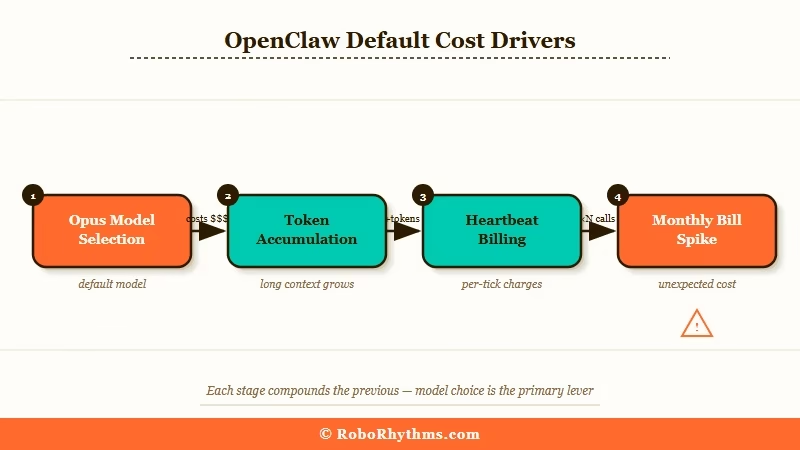
The core mechanic is straightforward. Every API call costs input tokens plus output tokens. What most people miss until they see their first bill is that input tokens includes the full conversation history on every single call.
A 40-turn session does not send 40 messages to the API. It sends the first message 40 times, the second message 39 times, and so on. The math is brutal. Long sessions compound in ways that catch people off guard.
Layer on top of that the default model selection. Claude Opus costs $15 per million input tokens. Gemini Flash costs $0.30. That is a 50x price difference. For most tasks people run their agents on, the output quality difference is negligible.
Running Opus for a calendar check is the same category of waste as flying business class to a meeting that could have been a phone call.
The third driver is heartbeats. OpenClaw’s heartbeat system fires regularly to keep agents active. If your heartbeat is configured to use a premium model, it can generate $50-150 per month on its own, before you’ve done anything useful.
These three factors working together are why someone running simple automations ends up with a $47 weekly bill. Each one is fixable in isolation. All three together is a 90% reduction.
If you want to understand how these cost patterns emerge from the architecture, the OpenClaw pipeline breakdown explains exactly how context stacks at each stage.
Tiered Model Routing Cuts Most Bills by 50 to 80 Percent
Tiered model routing is the single biggest cost lever in OpenClaw, and it takes one config file change to implement.
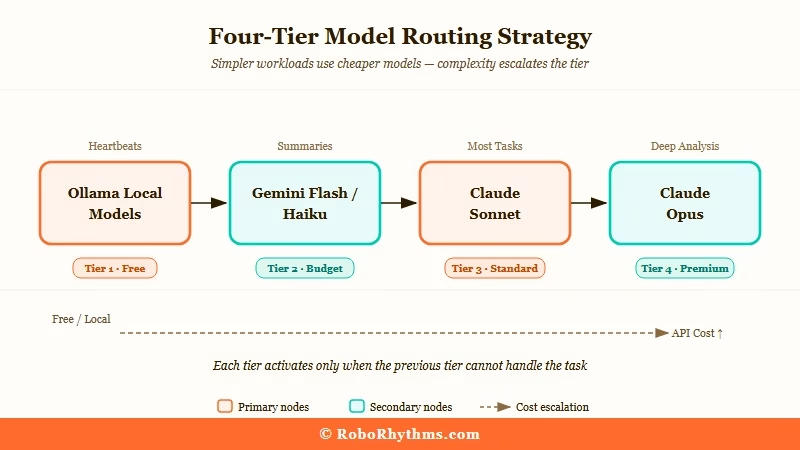
The principle is matching model capability to task complexity. Routine operations get the cheapest model that can handle them. Complex reasoning gets the premium model only when the quality difference matters.
In practice, that means about 5-10% of tasks justify Opus. The other 90% do not.
Here is how I’d structure the tiers:
| Tier | Models | Use This For |
|---|---|---|
| Free/Local | Ollama (Qwen 2.5, Llama 3.2) | Heartbeats, status checks, routing |
| Budget | Gemini Flash, Claude Haiku | Summaries, classification, short drafts |
| Mid-tier | Claude Sonnet, GPT-4o Mini | Most tasks, tool calls, multi-step reasoning |
| Premium | Claude Opus, GPT-4.5 | Deep research, complex code, long chains |
The config change itself takes about two minutes. Add this to your config file:
{ "ai": { "model": "claude-sonnet-4-5-20250929", "fallback_model": "claude-haiku-4-5-20251001" } }
Then add one line to your SOUL.md: Only use Opus when I explicitly request deep analysis or complex code generation.
Before / After:
Before: Opus handles a morning briefing cron. Cost: ~$0.80 per run, ~$24/month just for that one task.
After: Sonnet handles the briefing. Opus only fires when you explicitly type "deep analysis." Cost: ~$0.06 per run, ~$1.80/month.
From what I've seen in the community, this single change accounts for 60-70% of the total savings people report. If you do nothing else on this list, do this one.
One more note worth making: if you're running sub-agents for background research or drafting tasks, give them the cheapest model available.
Research from Haimaker shows that routing 80% of volume to budget models like MiniMax M2.5 ($0.30/1M tokens) while reserving premium models for final output cuts bills by 60-90% without meaningful quality loss on most workflows.
How Session History Silently Multiplies Your Costs
Session token accumulation is an exponential cost multiplier, not a linear one, and the fix is one command typed before any heavy task.
This is the one that surprises people most when they understand the math. In a 40-turn conversation, your first message gets billed 40 times.
At the end of a week-old session, even a short one-line question is carrying thousands of tokens of history on every API call. You are paying for conversations from three weeks ago on every new request.
The fix is one command: /new
Type it before starting any heavy task. Your agent does not lose its memory. SOUL.md stays. USER.md stays. MEMORY.md stays. All persistent files remain intact.
What you are clearing is the conversation buffer, not the agent's long-term context. The agent still knows who you are, what your preferences are, and what projects you're running.
Three users in r/openclaw reported cutting monthly costs by 40-60% from this habit alone. One described it as "closing and reopening a chat window. The person on the other end still knows who you are."
For background cron jobs, use the --session isolated flag so each scheduled run starts clean:
Without isolated session: carries full accumulated history:
openclaw run "check my calendar for tomorrow"
With isolated session: starts fresh, only loads persistent files:
openclaw run --session isolated "check my calendar for tomorrow"
If you want to see how much context your current session is carrying before committing to a long run, openclaw session_status shows a token count breakdown.
How to Spot Skills That Burn Money in the Background
Skills installed from ClawHub without vetting are one of the most common causes of unexplained cost spikes, with some looping silently and burning $20-30 per month with zero visible output.
ClawHub has over 13,000 skills. Most of it is useful and fine. The problem is that no gate stops a badly written or malicious skill.
VirusTotal has flagged hundreds of ClawHub entries as actively harmful, including infostealers and remote access tools packaged as productivity automations.
From what I've seen, even non-malicious skills cause real budget problems. Specific patterns worth knowing about:
Skills that loop silently on a cron and produce no output but make API calls on every cycle
Skills that inject themselves into every conversation, padding the context window permanently
Skills that override parts of your config without notifying you
Skills that crash silently and leave your agent in a broken state that only surfaces a few messages later
The rule worth having: if you cannot read and understand the skill's source code in five minutes, do not install it. Shell access or network access beyond what the task obviously requires is a red flag.
The faster alternative is ClawTrust, which provides managed OpenClaw hosting with a vetted skill environment. Skills available through a managed setup have been reviewed before they reach your agent, which eliminates this entire category of cost problem without you needing to audit every installation manually.
To check what is currently running on your setup:
openclaw skills list --show-crons
Any skill with a cron entry should be examined. Confirm it uses an appropriate model tier, confirm it produces visible output, and confirm the frequency is reasonable.
A skill running every 15 minutes makes 2,880 API calls per month. Even at budget model rates, ten of these running simultaneously adds up.
Heartbeat Config Is Usually the Biggest Passive Cost
Heartbeats on default settings are frequently the largest single line item in an unoptimised OpenClaw budget, consuming $50-150 per month for status checks that could cost near zero.
The heartbeat system is useful. The problem is that out-of-the-box configurations often use mid-tier models for heartbeats, and heartbeats fire constantly.
A heartbeat running every 30 seconds on Claude Sonnet generates roughly 1.7 million input tokens per day before your agent does a single useful thing.
There are two fixes. The first is moving heartbeats to the cheapest model you have: a local Ollama model, Gemini Flash, or Claude Haiku. The second is disabling the default heartbeat entirely and replacing it with an explicit cron that fires only when there is actual work to do.
{ "agents": { "defaults": { "heartbeat": { "every": "0", "model": "local/qwen2.5" } } } }
Setting "every": "0" disables the continuous heartbeat. You then configure a cron check that runs every few minutes, uses your cheapest available model, and escalates to a premium model only if it detects actual queued work or an anomaly.
Running a local Ollama model for this makes heartbeats cost near zero.
For anyone still deciding whether the self-hosting complexity is worth it versus a simple VPS setup, the Mac Mini vs VPS cost comparison covers the hardware side of this equation well.
Why Running Multiple Agents Multiplies Your Bill
Multi-agent setups cost roughly 3.5 times more than equivalent single-agent workflows due to context duplication at each handoff point.
This is the fix people resist most. The usual motivation behind adding a second agent is that the first one is not working reliably. A fresh agent feels like a solution. It is not.
Here is the math: two agents do not cost twice as much as one. They cost significantly more because every time one agent hands off a task to another, the context gets duplicated at the handoff.
Research from Lumadock puts the overhead at roughly 3.5x the token consumption of a single-agent setup doing the same tasks. A setup costing $30/month with one agent often runs $80-100/month with two agents handling the same workload.
The rule: do not add a second agent until the first one has been stable and useful for at least two weeks. If agent 1 is not working, agent 2 will not fix it. It adds a second failure surface with its own context window and its own idle token consumption.
Once an agent is genuinely working well, specialised sub-agents for specific high-value tasks are worth considering. Each new agent should have a tight tool allowlist containing only the tools it needs.
Every tool definition gets sent as input tokens on every API call, even tools that are never used. A 20-tool agent costs meaningfully more per call than a 3-tool agent doing the same job.
This connects to the broader learning curve with OpenClaw that the hype vs reality guide covers; the people posting impressive overnight results have spent weeks tuning one agent before adding complexity.
What OpenClaw Should Cost When Set Up Correctly
A properly configured single-agent OpenClaw setup costs $6-50 per month for most personal and small business users, depending on workflow volume.
Here is what realistic spending looks like across usage levels:
Usage Type Before Optimisation After Optimisation Main Fix Applied Light personal use $40-50/month $6-13/month Model tier + session resets Active daily use $80-150/month $15-35/month All five fixes combined Multi-agent workflows $200-400/month $40-80/month Model routing + coordinator summarisation Managed hosting N/A Fixed monthly rate ClawTrust handles all optimisation
One important limitation worth knowing: OpenClaw has no native hard spend cap. There is no setting that stops API calls when you hit a budget limit.
For a true ceiling, you need either a proxy layer like LiteLLM configured with budget limits on virtual keys, or a managed hosting platform like ClawTrust where cost controls are built into the infrastructure.
The self-managed approach requires ongoing attention. Managed hosting trades configuration overhead for a predictable monthly number.
For context on how the broader AI agent landscape compares on cost, the best AI agent tools comparison for 2026 covers what other tools charge at equivalent capability levels.
Frequently Asked Questions
The most common questions about OpenClaw costs cover model selection, session management, and whether self-hosting or managed infrastructure makes more sense.
How much should OpenClaw cost per month?
A well-configured single-agent setup costs $6-25 per month for light to active personal use. Multi-agent setups with mixed model routing typically run $25-80/month. Anything above $100/month on a personal setup means at least one of the five issues in this guide is still present.
Is Opus ever worth using in OpenClaw?
Opus is worth it for genuinely complex multi-step reasoning, long code generation tasks, and situations where Sonnet makes consistent errors on a specific task type. For routine work including email drafts, calendar checks, reminders, and summaries, Sonnet delivers equivalent output at 10-15% of the cost.
Does the /new command clear my agent's memory?
No. The /new command clears the conversation buffer only. SOUL.md, USER.md, MEMORY.md, and all skill files stay intact. Your agent still knows your preferences, ongoing projects, and past decisions. You're resetting the chat window, not the long-term context.
How do I find skills that are burning money silently?
Run openclaw skills list --show-crons to see all skills with scheduled jobs. Any cron-based skill should be checked for model tier, visible output, and a sensible run frequency. A skill firing every 15 minutes makes 2,880 API calls per month, so the model tier it uses matters significantly.
What is the difference between self-hosted OpenClaw and managed hosting?
Self-hosted OpenClaw requires you to manage model config, session hygiene, skill auditing, and cost monitoring yourself. Managed hosting handles these optimisations at the infrastructure level and charges a fixed monthly rate instead of variable API costs. For users who want OpenClaw's capabilities without the configuration overhead, managed hosting removes the cost unpredictability entirely.
Is there a hard spend cap in OpenClaw?
OpenClaw has no built-in hard spend cap. To create one, you need a proxy layer like LiteLLM with budget limits on virtual keys, or a managed platform with built-in cost controls. API provider dashboards have spend alerts but those are notifications, not hard stops.
