
TL;DR: OpenClaw is safe when you understand what you are giving it access to. The platform itself is not the risk. The risk is ClawHub skills, which can request broad tool permissions, make outbound calls you never approved, and store OAuth tokens without encryption. If you run self-hosted OpenClaw, a compromised skill has access to every credential and file your agent can reach. Vet skills carefully before installing. For non-technical users, a managed option like ClawTrust pre-vets skills and runs them in a sandbox. This guide shows you exactly how to check before you install.
The short answer is yes, with caveats, and those caveats matter a lot.
I have been running OpenClaw for several months. The platform itself is well-engineered. The architecture is clean, the permission model is documented, and the core agent loop does what it says on the box. None of that is the safety story you need to hear.
The story you need to hear is about ClawHub, the skill marketplace where anyone can publish a skill, and what happens when you install one without reading its tool manifest. Because the agent does not know the difference between a legitimate skill and a malicious one.
It executes whatever the skill asks it to do, using whatever tools you granted it access to.
That is not a bug. It is the design. And it means your safety posture depends almost entirely on what you choose to install, not on OpenClaw itself.
I have seen users in the OpenClaw community forums describe credential exposure, unexpected file writes, and outbound data calls they never authorized, all from ClawHub skills that looked fine at first glance.
A Fast Company report on what happened when an AI agent got unchecked access to email systems is a useful reminder that even sophisticated users can get burned. The agent did exactly what it was told. The problem was that “what it was told” included deleting emails.
This guide covers the four biggest risks in detail, gives you a practical vetting checklist, and explains when managed hosting is the right call.

What ClawHub Is and Why It Changes the Risk Profile
ClawHub is OpenClaw’s skill marketplace, and it operates on an open-publish model. Anyone can submit a skill. There is no mandatory security review.
This is not inherently bad. Open marketplaces drive innovation fast. The problem is that most users treat ClawHub like an app store with Apple-style review standards, when it is closer to a GitHub repo you found via a forum post. The trust level should be calibrated accordingly.
Each skill is a structured package that tells OpenClaw what tools it needs. Those tools can include file system access, web browsing, bash execution, email sending, and more. When you install a skill and run it, the agent uses those tools on the skill’s behalf.
If the skill’s author wrote legitimate code, that is fine. If the skill’s author embedded a web call that sends your file contents to an external endpoint, the agent executes it without complaint.
It has no reason to flag it. Exfiltrating data via a web tool call is functionally identical to fetching documentation via a web tool call from the agent’s perspective.
Understanding this is the foundation of everything else in this guide. Before you dig into the specifics, the OpenClaw pipeline breakdown gives useful context on how the agent loop processes skill instructions.
The Four Real Risks in Self-Hosted OpenClaw
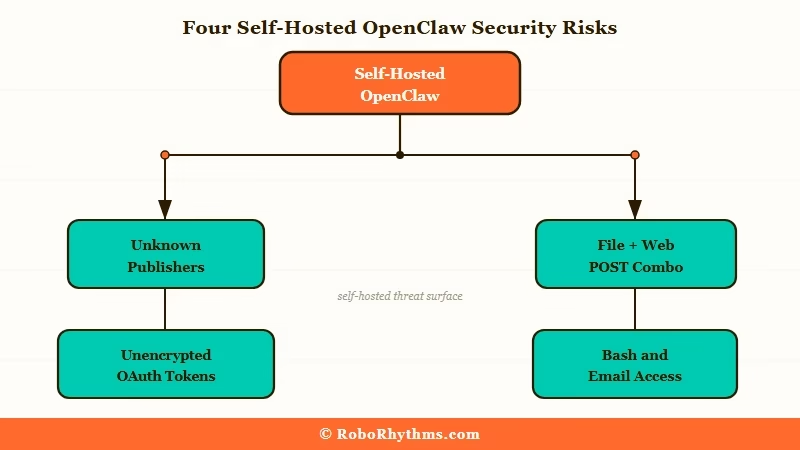
Self-hosted OpenClaw runs with your local credentials. A compromised skill does not need to escalate privileges because you already granted them.
Let me be specific about each risk, because “ClawHub is risky” is too vague to act on.
Risk 1: Data Exfiltration via Web Calls
Skills that request web tool access can make outbound HTTP calls to any endpoint. A malicious skill can read files from your file system (if you granted file access), serialize their contents, and POST them to a remote server. The agent executes this as a normal step in the workflow. No warnings appear.
The tell is in the tool manifest: does the skill request both file access and unrestricted web access? That combination, for a skill that has no obvious reason to need both, is a red flag.
Risk 2: Overly Broad Tool Definitions
Some skills are not malicious, just poorly scoped. They request broad tool permissions because the developer was being lazy or future-proofing for features they never built. A note-taking skill that requests bash execution access does not need that permission for any legitimate reason.
Overly broad permissions are dangerous even without malicious intent. If the skill has a logic error or gets manipulated by a prompt injection attack downstream, the blast radius is larger than it needed to be.
Risk 3: Gateway Skills and Unencrypted Token Storage
Gateway skills are OAuth connectors that link OpenClaw to external services: Gmail, Google Drive, Notion, Slack, and similar platforms. They store authentication tokens locally, and by default, that storage is not encrypted.
On a shared machine or any machine that is later compromised, those tokens are accessible as plaintext. Depending on what the connected service allows, a stolen token can mean persistent access to your email or documents well after you think you have revoked it.
Risk 4: Unknown Publishers with No Version History
This is a soft signal, not a technical one, but it correlates strongly with the other three risks. Skills from unknown publishers with a single version, no changelog, and no community discussion are the highest-risk installs. Legitimate skill developers update their work. Malicious or abandoned skills often sit at v0.1 forever.
Cross-check the publisher’s ClawHub profile before installing anything.
How to Vet a ClawHub Skill Before Installing
Read the tool manifest first. Every skill ships with one. It tells you exactly what the skill is asking permission to do.
Most users skip this step entirely. That is the core problem. Here is the process I use for every skill I consider installing.
The Vetting Checklist:
- Open the skill’s ClawHub page and locate the tool manifest (usually under “Technical Details” or a similar tab).
- List every tool the skill requests: file system, web, bash, email, database, and any external API connectors.
- Ask whether each tool is necessary for what the skill claims to do. A grammar checker that requests bash access has no legitimate reason for it.
- Check the publisher’s profile. How many skills have they published? Do those skills have reviews or community posts? Is there any external presence (GitHub, forum posts, documentation)?
- Check the version history. Skills with multiple versions and a changelog are lower risk. Single-version skills with no history need stronger justification.
- Search the OpenClaw community forums for the skill name. Any reported issues will surface there first.
- If the skill requests gateway access (OAuth connectors), check whether it stores tokens locally or uses a managed credential vault.
Vague vs. Specific: What This Looks Like in Practice
Vague approach: “I installed the skill because it had good ratings.”
Ratings on ClawHub are thin. Five reviews is not meaningful signal for a skill that runs with file access and bash permissions.
Specific approach: “I opened the tool manifest. The skill requests file read, web GET, and web POST. It is a research aggregator. File read makes sense. GET makes sense for fetching pages. POST is the flag. I checked the source code link in the manifest and confirmed the POST calls go to the skill’s own aggregation API, not a third-party endpoint. The publisher has 12 skills, all with changelogs. I installed it.”
That is the level of review that actually changes your risk posture.
Self-Hosted vs Managed Hosting and What You Are Actually Trading
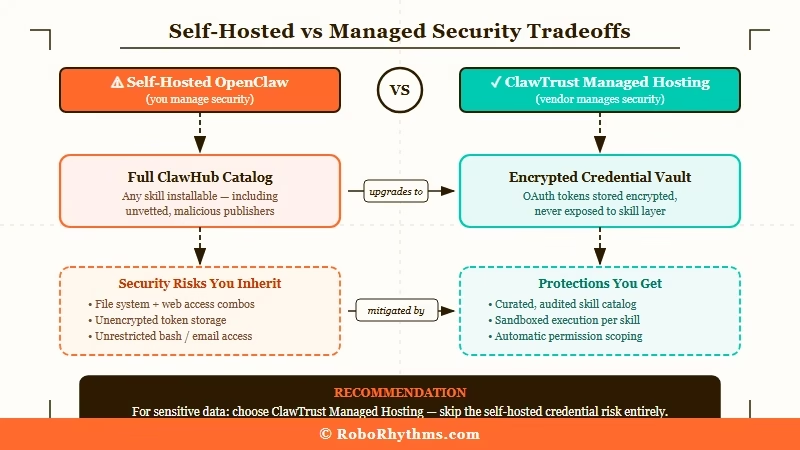
Self-hosted OpenClaw gives you full control and zero intermediary cost. Managed hosting like ClawTrust gives you pre-vetted skills and sandboxed execution in exchange for a monthly fee.
Neither is universally better. The right choice depends on your technical comfort level and how much you care about the tradeoff.
With self-hosted OpenClaw, every skill runs with your local credentials. If you gave the agent access to your file system, email, and web tools, a compromised skill has access to all of it. You are the security layer. That is fine if you are technically capable of reading tool manifests and assessing risk. It is not fine if you are installing skills at speed without review.
The OpenClaw cost guide covers the financial side of self-hosted versus managed approaches in more detail, but the short version is that self-hosted OpenClaw’s main cost is your time and attention on security.
ClawTrust takes a different approach. They pre-vet every skill before it appears in their catalog, run skills inside isolated execution environments, and handle credential storage with encryption. For non-technical users who want to use OpenClaw without becoming security reviewers, that is a meaningful value proposition.
The tradeoff is that ClawTrust’s catalog is smaller than the full ClawHub marketplace, because skills that do not pass their review do not get listed. Whether that is a limitation or a feature depends on how you use OpenClaw.
Here is a comparison of what you get with each approach:
| Factor | Self-Hosted OpenClaw | ClawTrust Managed |
|---|---|---|
| Skill selection | Full ClawHub catalog | Pre-vetted subset |
| Security review | You do it manually | Done for you |
| Execution environment | Your local machine | Sandboxed |
| Credential storage | Local, unencrypted by default | Encrypted vault |
| Technical requirement | Moderate to high | None |
| Cost | API costs only | Monthly subscription |
| Best for | Technical users who vet carefully | Non-technical users |
What Happens When You Skip the Vetting Step
Skipping the vetting step means you are trusting a stranger’s code with everything your agent can access. Most of the time nothing bad happens. When something does happen, the damage can be significant.
I want to be concrete about what “significant damage” looks like in practice, because abstract warnings do not change behavior.
Scenario 1: A productivity skill with broad file access and unrestricted web POST contains a single function that serializes your Documents folder and sends it to an external endpoint. You installed it six weeks ago. You do not know it happened.
Scenario 2: A gateway skill connects OpenClaw to your Gmail. It stores the OAuth token as plaintext in a local config file. Six months later your machine is compromised by an unrelated piece of malware. The attacker now has persistent Gmail access because the token was never revoked. You do not know it happened.
Scenario 3: A skill with bash access has a logic error. A downstream prompt injection attack, where a webpage the agent visits contains instructions embedded in its content, triggers the bash tool in a way the skill developer never intended. The agent executes those instructions because it cannot distinguish between legitimate skill logic and injected instructions.
None of these are hypothetical. The third scenario in particular, prompt injection via web content, is a documented attack vector for any agent that browses the web with bash or file write access available.
The first-week hype vs reality guide covers this and other operational lessons that new OpenClaw users miss in the early days.
Safe Installation Checklist for Every ClawHub Skill
Use this checklist before installing any ClawHub skill. It takes five minutes and substantially reduces your risk.
Before installation:
- Read the full tool manifest. Note every tool requested.
- Cross-reference each tool with the skill’s stated purpose. Flag any mismatch.
- Check the publisher’s ClawHub profile and version history.
- Search the forums for any reported issues with this skill or publisher.
- If the skill uses OAuth connectors, check where tokens are stored and whether encryption is documented.
After installation but before running:
- Review any configuration settings the skill exposes. Overly permissive defaults are a signal.
- Run the skill once with a non-sensitive task and monitor the agent’s action log. Look for unexpected tool calls.
- Check outbound network activity during the test run if you have a tool to do so.
Ongoing:
- Review the skill’s changelog when updates are released. Breaking changes in the tool manifest deserve fresh vetting.
- Periodically audit which skills are installed and revoke those you no longer use.
One operational note: if you have configured permanent memory setup for your OpenClaw agent, skills with memory access can read and write to that memory store. Include memory tool access in your vetting review for any skill you install.
Frequently Asked Questions
The most common questions about OpenClaw safety cover ClawHub skill risks, credential exposure, and whether managed hosting is worth it.
Is OpenClaw itself dangerous to use?
No. The OpenClaw platform is well-designed. The risk comes from what you install on top of it via ClawHub, not from the core platform. OpenClaw gives you a capable agent framework. What that agent does depends on which skills you install and what tools you grant them.
Can a ClawHub skill steal my passwords?
Yes, if you give it file access and your passwords are stored in plaintext files. A skill with file read permissions can access any file your agent is allowed to read. If your agent has broad file access and you store credentials in plaintext files, that is a real exposure. Use a dedicated credential manager and grant file access only to specific directories.
How do I know if a skill is making outbound calls I did not approve?
Check the tool manifest for unrestricted web POST access, then monitor the agent’s action log during a test run. Any outbound calls the skill makes will appear in the log. If you see POST calls to unfamiliar endpoints, treat that as a red flag and uninstall the skill immediately.
Is ClawTrust worth it for a non-technical user?
For most non-technical users, yes. If you are not comfortable reading tool manifests and assessing whether a skill’s permissions are appropriate for its stated purpose, you need someone to do that work for you. ClawTrust pre-vets skills and runs them in sandboxed execution environments. That is a real service that removes a real risk. The ClawTrust site explains what their review process covers.
Can I use ClawHub skills safely on a shared machine?
Shared machines raise the risk of gateway skill token exposure significantly. If multiple users have access to the machine, any plaintext OAuth tokens stored by gateway skills are accessible to all of them. On a shared machine, use managed hosting like ClawTrust or avoid gateway skills entirely.
What is prompt injection and should I worry about it?
Prompt injection is a real attack vector for agents that browse the web. If your agent visits a webpage that contains instructions embedded in the content, the agent may execute those instructions as if they came from you. The risk is highest for agents with bash or file write access. Limit those permissions to skills where they are strictly necessary, and review the action log after any web browsing session.
Quick Takeaways – OpenClaw is safe. ClawHub skills are the variable. – Any skill with file, bash, or unrestricted web access deserves a full manifest review before installation. – Self-hosted OpenClaw means you are the security layer. A compromised skill has access to everything your agent can reach. – Gateway skills store OAuth tokens locally without encryption by default. This is a risk on shared or potentially compromised machines. – Unknown publishers with single-version skills and no community presence are the highest-risk installs. – ClawTrust pre-vets skills and sandboxes execution. For non-technical users, it is the lowest-friction safe option. – The five-minute vetting checklist above is not optional if you care about what your agent has access to.
