
If you star the OpenClaw GitHub repository, there’s a real chance you received one this week. A notification. A fake issue posted by an account with no history, claiming you’ve been selected to receive $5,000 in “CLAW” tokens.
A link that looked like openclaw.ai. None of it was real.
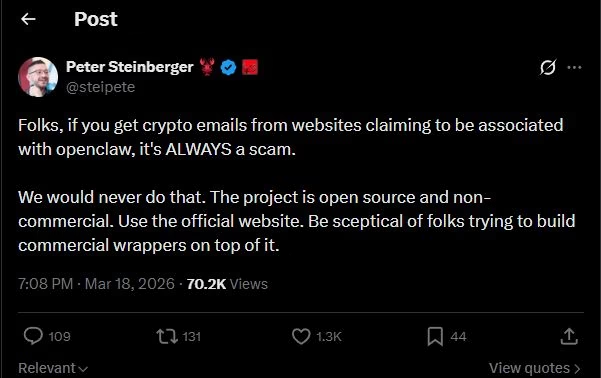
Peter Steinberger, the developer behind OpenClaw, posted a warning on X this week that cut straight to the point:
“Folks, if you get crypto emails from websites claiming to be associated with OpenClaw, it’s ALWAYS a scam.”
He added that the project is open source and non-commercial, and that any outreach promising token rewards should be treated as fraudulent.
This is the third crypto-related fraud campaign to hit the OpenClaw community in 2026 alone. And from what I’ve seen in the OX Security report published today, the tactics have gotten meaningfully sharper each time.
Here’s the full picture of what happened, how the malware works, and what you need to do if you’ve interacted with anything claiming to offer OpenClaw tokens.
What Is the OpenClaw GitHub Phishing Scam?
The OpenClaw GitHub phishing scam is a wallet-draining attack where fraudsters impersonated the project on GitHub, targeting developers with fake $5,000 CLAW token airdrop offers that led to a cloned website designed to empty their crypto wallets.
What is OpenClaw: An open-source autonomous AI agent for local file and browser management, created by Peter Steinberger. Launched November 2025, it reached 250,000 GitHub stars in early 2026.
The campaign was first disclosed on March 19, 2026, when OX Security published its findings. Threat actors created a cluster of throwaway GitHub accounts and used them to post issue threads inside repositories they controlled.
From those threads, they tagged hundreds of developers who had starred the OpenClaw repository.
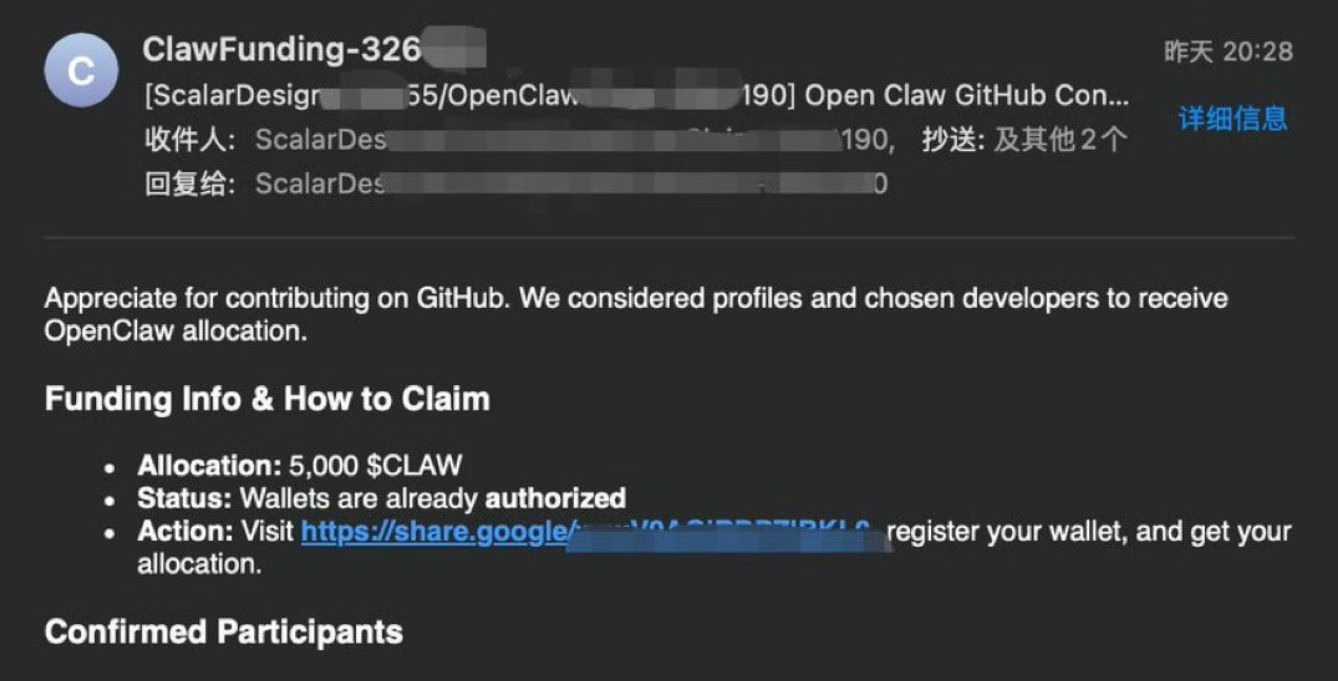
The pitch was consistent: you’ve been selected for a $5,000 $CLAW token airdrop, click the link to claim it. The link ran through a Google redirect to mask the real destination, then dropped users at token-claw[.]xyz, a pixel-perfect clone of the real openclaw.ai homepage.
The only difference was a “Connect your wallet” button that doesn’t exist on the legitimate site.
How Victims Were Selected
The scam was not random spam. Targeting GitHub stargazers specifically shows the attackers understood where the OpenClaw audience lives.
Developers who star a project on GitHub are already engaged with it, which makes them more likely to believe an official-looking outreach message. That’s a smarter targeting layer than most airdrop scams bother with.
The fake accounts were created in the week before March 19 and deleted within hours of going live, suggesting the campaign was designed to move fast before detection.
OX Security confirmed no victims at the time of the report, but the infrastructure remains active.
How the Wallet Drainer Works

The wallet drainer works by loading obfuscated JavaScript named eleven.js the moment a user connects their wallet, which immediately extracts addresses, balances, and transaction histories and sends them to an attacker-controlled server.
Once a developer connected their MetaMask, WalletConnect, or any supported wallet extension, the malicious JavaScript file activated. OX Security deobfuscated the code and found three specific components:
- A “nuke” function that deletes all wallet-theft data from the browser’s local storage after execution, wiping the forensic trail
- A command-and-control communications layer tracking user actions through named states: PromptTx, Approved, and Declined
- A real-time data relay sending wallet addresses, transaction values, and usernames to the attacker’s server at watery-compost[.]today
The attacker’s Ethereum address, 0x6981E9EA7023a8407E4B08ad97f186A5CBDaFCf5, showed zero transactions at the time of publication.
The nuke function may have been why: it was built to prevent any trail from forming if the attack succeeded.
What the Attack Actually Looks Like
The sequence is worth understanding precisely, because it moves fast:
What you receive: A GitHub notification from an account created days ago. The issue reads: “You’ve been selected as an early OpenClaw contributor. Claim your $5,000 $CLAW token reward here.” The link goes through a redirect to token-claw[.]xyz.
What you should do: Close the notification. Report the issue as spam in GitHub. Block the account. Do not click the link, do not visit the site, do not connect any wallet.
| Infrastructure element | Details | What to do |
|---|---|---|
| Phishing domain | token-claw[.]xyz (cloned openclaw.ai) | Block at network/firewall level |
| C2 server | watery-compost[.]today | Block at network/firewall level |
| Malicious script | eleven.js (obfuscated wallet drainer) | Do not execute; flag in browser dev tools |
| Attacker wallet | 0x6981E9EA7023a8407E4B08ad97f186A5CBDaFCf5 | Monitor for any outbound transactions from your wallet to this address |
The Full OpenClaw Crypto Scam History

OpenClaw has been targeted by four separate crypto-related attacks since its January 2026 rebrand, ranging from fake Solana tokens to a supply chain poisoning of its official skills marketplace.
The pattern matters as much as any individual incident. This is not a one-off.
The project’s rapid growth made it a target, and scammers have cycled through increasingly technical methods each time.
| Date | Campaign | Impact | Outcome |
|---|---|---|---|
| Jan 2026 | Fake $CLAWD Solana token | Peaked at $16M market cap, crashed 90% | Steinberger publicly denied involvement; token collapsed |
| Feb 2026 | ClawHavoc (341 malicious skills on ClawHub) | Atomic macOS Stealer targeting wallets, SSH keys, browser logins | Removed after Koi researchers disclosed the campaign |
| Feb 2026 | ClawJacked vulnerability (CVE-2026-25253) | Remote WebSocket hijack of local AI agents | Patched in version 2026.2.25 within 24 hours |
| Mar 19, 2026 | GitHub phishing ($CLAW airdrop) | Wallet drain malware; no confirmed victims | Domains still active; fake accounts deleted |
The January 2026 $CLAWD incident started with a trademark dispute. Anthropic sent Steinberger a notice that the original project name, Clawdbot, was too close to Claude.
During the brief gap between abandoning the old handles and securing the new OpenClaw accounts, scammers moved in. They seized the abandoned X and GitHub accounts and used them to promote a Solana token.
The token hit $16 million in market cap before Steinberger could publicly respond. When it collapsed 90%, ruined traders directed their anger at him personally.
His statement on X: “I will never do a coin. Any project that lists me as coin owner is a scam. We would never do that. The project is open source and non-commercial.”
The ClawHavoc Supply Chain Attack
The ClawHavoc campaign, disclosed by researchers at Koi, was a different kind of threat. Attackers uploaded 341 malicious skills to ClawHub, the official OpenClaw skills marketplace.
Most of those files attempted to install a macOS malware variant called Atomic Stealer, which targets crypto wallets, browser logins, SSH keys, and system keychains. Some installed reverse shells.
This is a supply chain attack, the kind that’s particularly dangerous because it exploits user trust in an official channel.
According to Koi’s research, 335 of the 341 malicious skills were specifically designed to compromise Apple hardware.
How ClawJacked Exploited the WebSocket Gateway
The ClawJacked vulnerability, identified by Oasis Security, was the most technically significant of the four incidents. It exploited three gaps in OpenClaw’s core WebSocket gateway:
- Browsers don’t block cross-origin WebSocket connections to localhost
- The gateway had no rate limiting on password attempts
- New device registrations from localhost were auto-approved without user confirmation
Oasis described the scope plainly: the vulnerability existed in the core system, with no plugins, marketplace components, or user-installed extensions required to trigger it.
A developer who visited a malicious website while running OpenClaw locally could have their entire agent taken over remotely. OpenClaw released version 2026.2.25 on February 26, 2026, fixing it within 24 hours of disclosure.
How to Tell If You Were Targeted
You were targeted if you received a GitHub issue notification from an unknown account referencing CLAW tokens or any OpenClaw-branded crypto reward in the past week.
If you received any such notification, work through this list:
- Check GitHub notifications for issues from accounts with no prior commit history or followers
- Search your email for “CLAW tokens”, “OpenClaw airdrop”, or “token-claw”
- Open your wallet app and review connected sites, looking for any approval you don’t recognise
- In MetaMask, go to Settings > Connected Sites and revoke anything unfamiliar
- If you use macOS and have installed skills from ClawHub, audit them against the official verified list
- Update OpenClaw to version 2026.2.25 or later to close the ClawJacked gap
OX Security’s report noted the attack accounts were removed quickly. The short window of exposure reduces the likelihood that many developers connected wallets before the infrastructure was flagged.
That said, the phishing domains are still live as of March 19, 2026. Block them if you run any developer tooling on your network.
Is OpenClaw Still Safe to Use?
OpenClaw is still functional, but it carries documented security risks, and I’d think twice before running it on any machine where a funded crypto wallet is accessible.
The project’s security posture has improved quickly. The ClawJacked vulnerability was patched within 24 hours. The malicious ClawHub skills were removed.
Steinberger has been transparent and fast on each incident. None of that erases the fact that this is a project that went from launch to 250,000 GitHub stars in under six months, which outpaced its security infrastructure significantly.
The GitHub phishing campaign reported today is external fraud, not a flaw in OpenClaw itself. It exploits the brand’s recognition rather than a weakness in the code.
Steinberger can’t stop scammers from cloning a website and targeting his user base. What he can do is be clear about what’s real, and he has been.
If you’re going to use OpenClaw, keep these rules:
- Run the current version (2026.2.25 minimum)
- Never install skills from ClawHub without verifying the publisher against the official repository
- Do not run OpenClaw on a machine where a funded crypto wallet is signed in
- Treat every unsolicited message promising tokens or airdrops as a scam, regardless of how official it looks
The broader point is this: any fast-moving open-source project with this kind of adoption growth is going to attract bad actors.
The ClawHavoc campaign, the ClawJacked vulnerability, the $CLAWD token, and now the GitHub airdrop scam are all consequences of the same thing. Popularity is a target. How you respond to that is what matters.
From what I’ve seen of Steinberger’s handling of each incident, the response has been honest and technically competent. That’s worth something.
But it doesn’t change the security calculus for a developer who keeps a production wallet on their main machine.
Takeaways:
- A GitHub phishing campaign targeting OpenClaw stargazers launched this week, promising $5,000 in fake CLAW tokens to lure developers into connecting their wallets to a drain site
- The malware (eleven.js) extracts wallet data and deletes its own traces using a built-in “nuke” function
- Block token-claw[.]xyz and watery-compost[.]today; revoke any unrecognised wallet approvals
- OpenClaw has faced four crypto-related attacks since January 2026: fake $CLAWD token, ClawHavoc marketplace poisoning, ClawJacked WebSocket vulnerability, and now this GitHub campaign
- Peter Steinberger’s official position: “If you get crypto emails claiming to be associated with OpenClaw, it’s ALWAYS a scam”
- Update to OpenClaw version 2026.2.25 to close the ClawJacked vulnerability if you haven’t already
