
What’s Changed: Nomi AI’s image generation filter is producing false positives on prompts that contain no policy-violating language at all. Users report seeing the red “disallowed term” error on neutral phrases like “holding a baby boy” or “wearing a school uniform.” The fix is part rephrasing, part formatting trick, and part contacting support.
If you opened Nomi today and got the red disallowed term error on a prompt you know is clean, you are not alone. The complaint has been climbing in r/NomiAI all week, and the pattern is consistent enough to be a real shift in how the filter is reading prompts, not just a single bug.
I spent some time digging through the Nomi support docs, the recent Reddit threads, and the Nomi knowledge base entries on art prompting. The cause is identifiable. The workaround is straightforward once you see what is happening.
The bigger picture is that Nomi is leaning harder on its content filter to prevent the categories the team has flagged as high-risk. The side effect is that the filter is over-triggering on neighboring vocabulary.
What’s Happening With the Disallowed Term Error
The disallowed term error is Nomi’s content filter blocking image generation when a prompt contains a word or phrase the system associates with three high-risk categories: explicit image generation, intense de-aging, and celebrity impersonation.
The filter runs a substring match on words and word fragments, which is why neutral phrases that contain those fragments get caught.
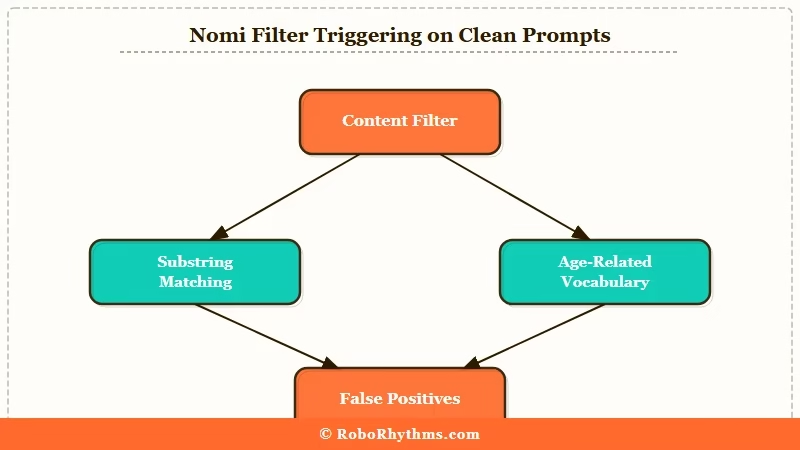
The Nomi team has documented this as expected behavior. The official knowledge base notes that the filter exists to prevent misuse, and that false positives will happen as a tradeoff for tighter coverage on the actual restricted categories.
The recent uptick is not a software bug. It is the filter list expanding in late March and April 2026 to cover edge cases the team had been letting through. From what I have seen in the Reddit threads, the most-reported false positives cluster around three vocabulary regions.
The first region is anything mentioning a child, a baby, or a young person. “Baby boy,” “little girl,” “school uniform,” and “young woman” all trigger the filter even when the broader prompt is unambiguously adult and consensual. The filter cannot tell the difference between a wholesome family scene and an actual policy violation.
The second region is fame-adjacent vocabulary. Mentioning a profession associated with named celebrities, a famous brand, or a cosplay reference can trip the filter. “Wearing a Marvel costume” or “in the style of a popular K-pop group” gets flagged on the celebrity-impersonation rule.
The third region is anatomical neutral terms used in non-explicit contexts. Words that appear in both medical and explicit usage are over-triggered. The filter cannot disambiguate intent from context.
Why It Matters for Your Workflow
It matters because the filter is currently blocking image generation that the policy itself permits, and there is no in-app way to appeal a single error. You either rephrase, format around it, or escalate to support, and each path has tradeoffs.
For paying users, this is a quality-of-service issue worth tracking. The Nomi+ tier is sold partly on image generation reliability, and false positives on neutral prompts erode that.
For free users, the friction adds up over a session. Each blocked generation burns time. The user thread that surfaced this morning had someone counting four false positives in a single roleplay session before they figured out the underscore workaround.
For new users, the error is confusing because the message does not name the disallowed term. You only know the filter blocked you. You have to guess which word triggered it.
| Symptom | Likely cause | Fix |
|---|---|---|
| Red error on a prompt mentioning a baby or child in a clean context | Filter substring-matching on age-related words | Add an underscore to the phrase, e.g. “ababyboy”, or rephrase to “small child” |
| Error on a prompt naming a celebrity-style outfit or character | Celebrity impersonation filter triggered | Replace the named reference with a generic descriptor of the look |
| Error on neutral anatomical or medical vocabulary | Filter over-matching on words shared with explicit usage | Rephrase using clinical or fully indirect language |
| Error on a school, uniform, or classroom scene | Age-context filter flagging the setting | Move the scene to an adult professional or casual setting in the prompt |
| Error you cannot decode at all after rephrasing | Genuine filter ambiguity, not a user error | Email support@nomi.ai with the exact prompt for review |
What To Do About It Right Now
The fastest fix is the underscore trick: replace spaces inside the suspected trigger phrase with underscores so the filter substring match misses it.
This is a known workaround the community surfaced and confirmed in multiple threads.
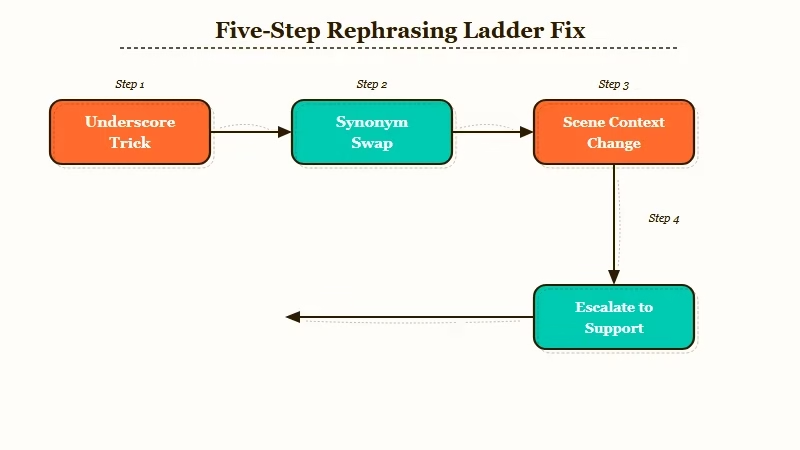
If that does not work, work through the rephrasing ladder in this order. Each step is more invasive than the last, so stop as soon as one of them clears the prompt.
- Add an underscore inside the suspected trigger phrase (“ababyboy”, “school_uniform”)
- Replace the trigger phrase with a synonym (“small child” instead of “baby boy”, “casual outfit” instead of “school uniform”)
- Remove the modifier entirely if the prompt still works without it
- Move the entire scene context away from the trigger region (change setting, change activity, change descriptor)
- Email support@nomi.ai with the exact prompt and ask for the false positive to be reviewed
For step 5, include a screenshot of the error, paste the exact prompt, and explain why you believe it is clean. The support team has been responsive in past cases I have read about. Turnaround is typically two to three business days.
If you find yourself hitting false positives constantly enough that the workarounds become unworkable, the practical alternative is to switch the image generation portion of your workflow to a different platform while keeping Nomi for chat. Nectar AI has a less aggressive filter on similar prompts, which makes it the closest functional substitute for users who hit the Nomi wall regularly.
The other option is to wait. Nomi has a track record of recalibrating the filter when false positive complaints reach a critical mass. The Nomi memory issues from earlier this month followed a similar pattern, where user pushback led to a quiet adjustment within two weeks.
The current filter expansion has been in place for about a week. If the pattern holds, expect a recalibration in the next ten days. Whether you wait or workaround depends on how much your active sessions are being disrupted right now.
Frequently Asked Questions
Will Nomi tell me which word triggered the disallowed term error?
Nomi does not name the trigger word in the error message. The filter is intentionally opaque on the specific match to prevent users from gaming the system. You have to guess based on the categories the filter targets: age-related, celebrity-related, or anatomically neutral words used in shared usage with explicit terms.
Does the underscore trick always work?
The underscore trick works for substring-match filter triggers but not for semantic-match triggers. If the filter is using a more sophisticated layer that catches the meaning of “baby_boy” alongside “baby boy”, the underscore will not help. Rephrasing is the more reliable path.
Is this happening because Nomi is becoming more strict overall?
The filter expansion is targeted at three high-risk categories the team has been tightening since late March 2026. The chat side of Nomi is not getting more restrictive in the same way. This is specifically an image generation filter change.
Can I roll back to an older version of the Nomi filter?
You cannot. The filter is server-side and applied uniformly across all users on all plans. The Nomi+ tier does not bypass it.
How do I report a false positive officially?
Email support@nomi.ai with three things: the exact prompt that was blocked, a screenshot of the error, and a one-line explanation of why you believe the prompt is clean. The team has historically been responsive on individual false positives and has used the reports to recalibrate the filter.
Is there a way to test a prompt before generating to avoid wasting a credit?
There is no preview API or sandbox for the filter. You only know the prompt is clean by attempting to generate. The credit is not consumed when the filter blocks the prompt before generation, so blocked attempts do not cost you anything.
