
TL;DR: An n8n AI agent built right combines the AI Agent node, a memory store, two or three tool nodes, and an error branch. The fragile builds skip the error branch and use thinking-token-leaking models. This walkthrough shows the agent I use in production for support email triage, in under 30 minutes from a clean canvas.
The n8n AI agent node is one of the most-searched n8n features and one of the most under-documented. The build instructions in this piece assume n8n 2.73 or later, which is when the AI Agent node and its memory subsystem hit the configuration shape current tutorials still describe.
Most tutorials show the happy path: drop the node on the canvas, point it at OpenAI, type a prompt, watch it work in the demo data. Then it dies the moment a real email arrives with an emoji in the subject line.
I run an n8n AI agent for customer support email triage on a small client account. It tags incoming emails, drafts a first-pass reply, and escalates anything outside its confidence band to a human. I built the first version in 30 minutes; I spent the next two days fixing the things the demos do not show you.
This is the version that works. I am going to walk through the build, the model choice, the tools to attach, how to set memory so the agent does not forget the last message you sent it, and what to do when the structured output parser silently fails.
What Is the n8n AI Agent Node, Really
The n8n AI Agent node is a wrapper around a chosen LLM that gives it tools, memory, and structured output, all driven by the workflow’s input.
It is built on top of LangChain’s agent abstraction, so the runtime is doing tool selection, ReAct-style reasoning loops, and JSON output parsing on every run.
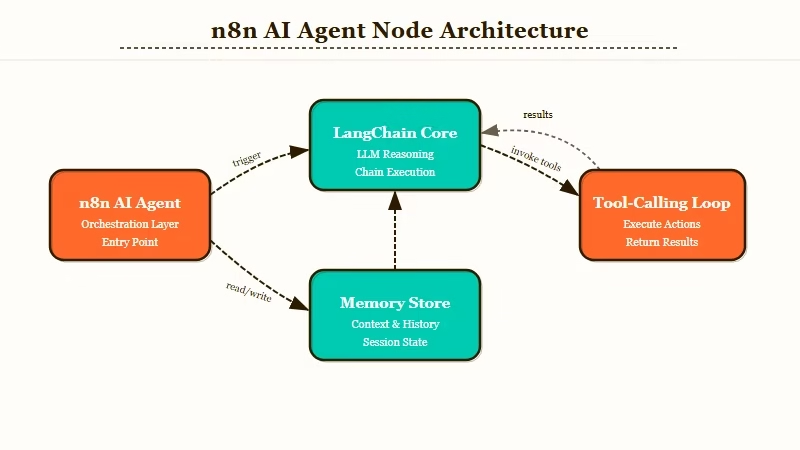
You configure the prompt, the model, the tools, the memory, and the output schema. n8n handles the loop.
Where it is not magic: the AI Agent node assumes the model returns clean JSON when an output parser is attached. Some models (notably the local Ollama models that emit thinking tokens) wrap the JSON in a <think>...</think> block, which the parser cannot handle, and the run silently produces an empty object.
The fix is not in the agent node. The fix is in either the model choice or a small Code node between the agent output and the parser. I get into both fixes below.
What is a Tool node: A Tool node in n8n is any node you connect to the AI Agent’s “Tool” input that the agent can call by name during its reasoning loop, like a function call.
The agent itself is one node, but a working agent in production needs at least three more: a memory store, one or two tool nodes, and an error-branch node. The full n8n review covers the platform basics if you have not used it before.
How to Pick the Right Model for an n8n AI Agent
The right model for an n8n AI agent depends on whether you need tool calling, how much you care about cost per run, and whether you can tolerate thinking-token leakage.
From what I have seen, GPT-5.5-mini and Claude Sonnet 4.6 are the two reliable picks for most production agents. Local models like Qwen3.5 work but require a JSON-cleanup step.
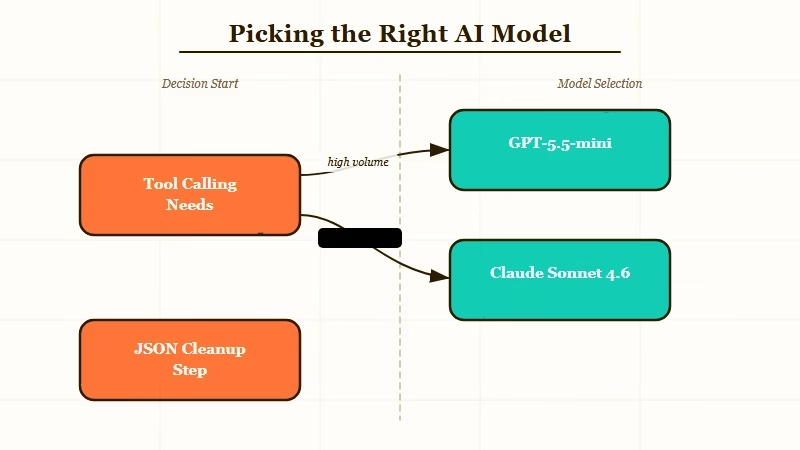
The model decision affects everything downstream: tool selection accuracy, JSON output reliability, latency, and whether the agent finishes its loop instead of hallucinating a tool call. Here is how I rank the realistic options:
| Model | Tool calling | JSON output | Cost per run / fit |
|---|---|---|---|
| GPT-5.5-mini | Strong, native | Clean | $0.01 to $0.04, default for production |
| Claude Sonnet 4.6 | Strong, native | Clean | $0.02 to $0.06, long context and multi-tool |
| Claude Haiku 4.5 | Solid for simple cases | Clean | $0.005 to $0.02, high-volume triage |
| GPT-5.5 (full) | Strong | Clean | $0.10 to $0.40, complex reasoning at low volume |
| Local Qwen3.5 via Ollama | Decent | Needs cleanup | $0 on own hardware, privacy-sensitive workflows |
The models with thinking tokens are the ones that bite you. If you connect a structured output parser to an Ollama-served model that emits <think> blocks, the agent run looks fine in the canvas but the JSON parser quietly returns an empty object. There is an Apr 30 r/n8n thread about this exact failure mode and the fix is below.
I would default to GPT-5.5-mini for almost every agent build that does not need long context. The cost per run is low enough that even a 500-runs-per-day agent costs under $10/month. For multi-tool agents that need to chain three or four tools per loop, Claude Sonnet 4.6 is what I would use.
How to Set Up Tools the Agent Will Reach For
Tool setup is the second-biggest reason production agents fail. Each tool needs a clear name, a precise description, and parameters the model can match to user intent.
The agent decides which tool to call based on the description text alone, so vague descriptions produce vague tool calls.
For the support triage agent, I attach exactly three tools: a Gmail Search tool to find prior conversations from the same sender, an Airtable lookup tool to check customer status, and an HTTP Request tool to log triage decisions to a Slack channel. Three is usually the right number; more than five and the agent starts confusing them.
The most important field is the Tool description, not the name. The model picks the tool by reading the description, not the name. Here is the difference:
Vague: “Searches Gmail for previous emails.”
Specific: “Use this tool when you need to find the most recent five emails from the sender of the current message. Input: the sender’s email address. Returns: subject, date, and snippet for each prior email. Use this BEFORE drafting a reply if the sender has previous correspondence in the inbox.”
The specific version tells the model when to call the tool, what to pass in, what comes back, and where it fits in the agent’s reasoning. The vague version means the model will sometimes call the tool, sometimes not, and you cannot debug why.
Here is the order I would set up tools in for a fresh agent:
- Drop the AI Agent node on the canvas and connect it to your trigger (webhook, IMAP, Gmail trigger, whatever).
- Add a Window Buffer Memory node and connect it to the agent’s Memory input. Set the context length to 5 messages for triage agents, 20 for conversational agents.
- Add the first tool node, write a specific description, and connect it to the agent’s Tool input.
- Test the agent with a single real input before adding a second tool. If it does not work with one tool, two will not save it.
- Add tools two and three only after tool one is working in production. Each new tool roughly doubles the test surface.
- Attach a structured output parser only when downstream nodes need a specific JSON shape. For free-text replies, skip the parser entirely.
The structured output parser is the source of most “agent works in canvas, fails in production” complaints. If the parser is not strictly necessary, leave it off. Free-form text is robust; strict JSON is fragile.
How to Handle Memory Without Burning Tokens
Memory in an n8n AI agent is a separate node connected to the agent’s Memory input, and the choice of memory type determines whether the agent remembers context across runs or only within a single run.
Window Buffer Memory is the right default for most cases.
The four memory types n8n exposes are Window Buffer Memory, Conversation Buffer Memory (full history), Vector Store Memory, and Postgres Memory. Each has a different cost and use case, and picking the wrong one is how you end up with $200 monthly OpenAI bills.
From what I have seen, Window Buffer with a length of 5 to 10 is the right setting for almost every triage or routing agent. It is cheap, it is fast, and the agent does not need to remember conversations from three weeks ago to do its job today.
Vector Store Memory (typically backed by Qdrant or Pinecone) is for true long-term agents that need to retrieve from a knowledge base across months, and Postgres Memory is for multi-user agents where each user gets their own memory thread.
The trap is using Conversation Buffer Memory for a high-volume agent. Every run sends the entire conversation history to the model, which means token cost grows linearly with every interaction. A 500-run-per-day agent on full conversation memory hit me with a $400 OpenAI bill the month I tried it as a default.
A second cost lever is chaining. Splitting one big agent call into a sequential pair (a cheap classification step followed by a more expensive generation step) routinely cuts API spend 30 to 50 percent for high-volume workflows, because the expensive call only runs on the inputs that actually need it.
Here is how I think about memory cost vs benefit:
| Memory type | Token cost per run | Use case |
|---|---|---|
| Window Buffer (5 messages) | Low, fixed | Triage, classification, single-turn agents |
| Window Buffer (20 messages) | Medium, fixed | Conversational support bots |
| Conversation Buffer | High, grows | Demo only, never production |
| Vector Store Memory | Low to medium | Long-term agents, personal assistants |
| Postgres Memory | Low, fixed per user | Multi-user agents with isolation |
If you want a more deterministic setup that avoids LLM agent loops entirely, the deterministic n8n approach is worth reading before you commit to an agent. Sometimes a chain of cheap nodes is the right answer.
How to Catch the Errors That Will Break Your Agent in Week Two
The single biggest week-two failure for n8n AI agents is unhandled tool errors that crash the whole workflow run. The fix is an error branch and an idempotency key on every tool call. Without these, one rate-limited Gmail call kills the entire workflow.
There are five failure modes I have hit in production. Here is how to handle each one. First, the prompt I would use to sanity-check an agent build before promoting it to production:
Before: “Run the agent on three demo emails, see them tag correctly, ship to production.”
After: “Run the agent on the last 100 real emails from your inbox via Manual trigger plus a Read Binary File node. Check that every run completed without an error path firing. Look at the agent’s intermediate steps for any tool call that timed out. Only ship after a clean 100-run sample.”
The five failures and the fix for each:
- Thinking token leakage from local models. Symptom: the structured output parser returns empty objects when used with Ollama or other thinking-token models. Fix: insert a Code node between the agent output and the parser that strips
<think>...</think>blocks before parsing. The Code node is six lines of JS:return [{json: {...$json, output: $json.output.replace(/<think>[\s\S]*?<\/think>/g, '').trim()}}]; - Gmail rate limit (429). Symptom: the Gmail tool returns a 429 partway through a high-volume run. Fix: add a Wait node with exponential backoff in the error branch. Cap retries at 3 and route to a Slack alert if the cap is hit.
- Hallucinated tool call. Symptom: the agent invents a tool name that does not exist. Fix: tighten the system prompt to list the exact tool names available. Add a fallback “no matching tool” branch that logs the input for human review.
- Memory key collision in multi-user agents. Symptom: User A sees user B’s conversation context. Fix: switch from Window Buffer to Postgres Memory and pass the user ID as the session key.
- Output parser strict mode rejection. Symptom: the agent returns valid JSON but with an extra field, and the parser rejects the whole run. Fix: switch to non-strict mode in the parser configuration, or remove the parser and use a downstream Code node for shape enforcement.
- Provider outage with no fallback. Symptom: OpenAI or Anthropic returns a 5xx for ten minutes and every queued workflow fails. Fix: build a graceful-degradation branch in the agent’s error path that retries the failed call against the other provider with a slightly tuned system prompt. The AI Agent node is provider-agnostic, so the cost is one extra Chat Model node and a 2-second budget on the failover path.
The Apr 30 r/n8n thread on thinking-token leakage from Ollama is the canonical example of failure mode 1. I have seen the same issue with DeepSeek-distilled local models. The Code node fix takes two minutes and saves a week of confused debugging.
If you want to skip the agent build entirely and use a more managed platform, Make.com handles AI agents with a slightly less flexible but more reliable runtime.
For custom agent stacks where you control every layer, Dynamiq is the path I would look at next. The Pew Research on AI adoption shows the demand is real, and the build pipeline is finally solid enough to ride it.
How to Test and Deploy Your n8n AI Agent
Testing an n8n AI agent is not the same as testing a regular workflow. You need fixture data, a way to inspect the agent’s intermediate reasoning, and a rollback plan. The canvas Test Workflow button is for hello-world checks, not production validation.
For a real test pass, I run three layers. The first is the canvas test with hand-curated inputs that hit each tool path.
The second is a Manual trigger run over 100 real historical inputs. The third is a 24-hour shadow deployment where the agent runs in parallel with the existing process and logs decisions without taking action.
The OpenAI Agent Builder tutorial covers a similar pattern for OpenAI’s hosted agent runtime, and the test discipline is the same regardless of where you run the agent. Three layers of validation, then ship.
The deploy step itself is straightforward in n8n. A single n8n instance in standard mode handles around 100 concurrent workflow executions; if you expect more, switch to queue mode with Redis and worker instances, which scales to roughly 72 requests per second at under 3-second latency on a C5.large and up to 220 executions per second at peak.
Activate the workflow, watch the Executions tab for the first hour, and have an emergency Deactivate macro one click away. If the agent starts returning empty outputs at 30 runs in, kill the run and check the model temperature, the memory store, and the tool descriptions in that order.
The version of the support triage agent I am running has handled around 4,000 emails over the last six weeks with two human-handled escalations and zero workflow crashes. That is the bar to hit before you call the agent done.
Frequently Asked Questions
Is the n8n AI Agent node free to use?
The n8n AI Agent node itself is free on both the self-hosted Community edition and n8n Cloud. You pay separately for the LLM API calls (OpenAI, Anthropic, or your own Ollama instance). Cloud workflow execution counts apply normally.
What model should I use for an n8n AI agent?
GPT-5.5-mini for most production agents under high volume. Claude Sonnet 4.6 for multi-tool or long-context agents. Avoid full GPT-5.5 unless you genuinely need its reasoning depth, since the cost per run jumps 10x.
Why does my n8n AI agent return empty output with an Ollama model?
The model is emitting thinking tokens (<think>...</think> blocks) that the n8n structured output parser cannot handle. Insert a Code node between the agent output and the parser to strip thinking blocks before parsing.
How is the n8n AI Agent different from the Basic LLM Chain?
The AI Agent node has tool calling, memory, and a reasoning loop. The Basic LLM Chain is a single-prompt, single-response wrapper. Pick the agent for anything that needs to take action; pick the chain for pure text generation.
Can I run an n8n AI agent on Cloud or only self-hosted?
Both. The AI Agent node works identically on self-hosted Community, self-hosted Enterprise, and n8n Cloud. The only practical difference is local model support, which requires Ollama running on the same network as your n8n instance.
How do I prevent token costs from running away on a high-volume agent?
Use Window Buffer Memory with a length of 5 to 10 instead of Conversation Buffer Memory. Pick a smaller model (GPT-5.5-mini or Claude Haiku 4.5) for triage agents. Cap the agent’s max iterations at 5.
