
Bottom Line: Kling AI is worth it for creators who need video clips longer than 16 seconds with convincing physical motion. The Standard plan at $10/month covers casual use cases. Skip it if you need fast iteration or accurate human anatomy rendering, both are consistent weak points, and the credit system punishes experimentation.
Kling AI showed up in mid-2024 and immediately stood out for one reason: clip length. While every competitor was generating 4 to 16 seconds of video, Kling was producing 3-minute clips. That difference was real, and it created a use case nothing else could match at the price.
I spent time with Kling AI 3.0, which is the current version available in 2026. The motion physics is genuinely impressive for the price point. What the promotional materials skip over is a credit system that punishes iteration hard, a failed-generation rate around 30 to 40 percent on the free tier, and generation times that can hit 15 minutes per clip.
Here is the honest breakdown.
What Is Kling AI and How Does It Work
Kling AI is a text-to-video and image-to-video generation platform made by Kuaishou Technology, the Chinese company behind the Kwai short-video app.
Kling launched globally in mid-2024 and reached version 3.0 in 2026. The platform generates video from written prompts or static images, supports clips up to 3 minutes long at 1080p, and includes camera motion controls for push, pull, pan, and orbit movements. Kuaishou built it as a direct competitor to OpenAI’s Sora and Runway’s Gen-3 Alpha.
One thing worth flagging up front: Kling AI is built by a Chinese technology company. User-uploaded content is processed on Kuaishou’s servers. For most content creators this is not a concern. For anyone in defense, legal, or medical fields, read the privacy policy before uploading sensitive material.
Kling AI Pricing in 2026
Kling AI has four tiers from free to $64.99 per month, with credits as the purchase currency that determines how much you can actually generate.
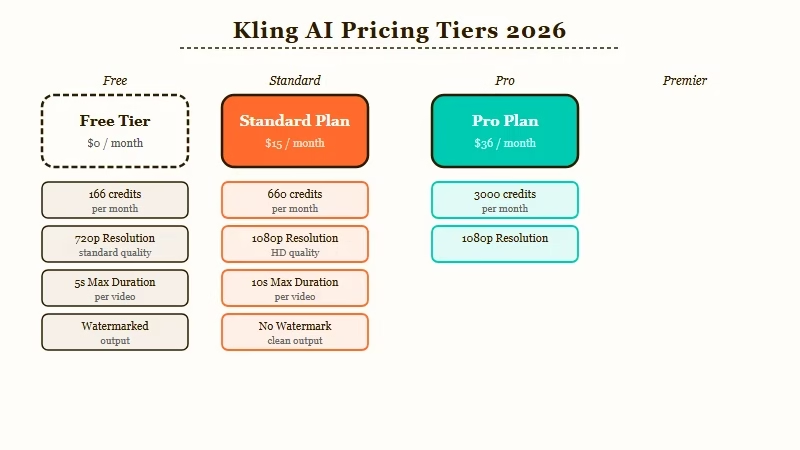
Here is the full pricing breakdown:
| Plan | Monthly Price | Credits/Month | Max Clip Length | Resolution |
|---|---|---|---|---|
| Free | $0 | 66/day (daily reset) | 5 seconds | 720p |
| Standard | $10/month | 660 | 3 minutes | 1080p |
| Pro | $25.99/month | 3,000 | 3 minutes | 1080p |
| Premier | $64.99/month | 8,000 | 3 minutes | 1080p |
Annual billing saves roughly 20 percent across paid tiers. The credit math matters more than the tier label. A 5-second clip costs around 10 credits. A 3-minute clip at 1080p in Professional mode costs 35 to 50 credits.
The Pro plan’s 3,000 monthly credits works out to roughly 60 to 85 usable 3-minute clips per month, but only if every generation succeeds.
The problem: failed generations consume credits on the free tier without automatic refunds. Multiple users report a 30 to 40 percent failure rate during peak hours, which means effective credit value is meaningfully lower than advertised.
This is the top complaint across Trustpilot reviews for Kling AI, where the platform currently averages 2.8 out of 5 stars.
What Kling AI Does Well
Kling AI’s strongest capability is physical motion rendering, fluid dynamics, fabric movement, and environmental effects that hold up under close inspection.
Water, smoke, and cloth behave more convincingly in Kling than in most competitors at this price range. From what I have seen in side-by-side tests across the AI video creation community, Kling consistently outperforms Runway Gen-3 Alpha on environmental and abstract motion at equivalent prompt quality.
Image-to-video is the feature worth prioritizing for product shots and travel content. Feed Kling a high-quality still and it generates motion that respects the original framing better than text-only prompts. The subject stays consistent across the clip in a way that feels intentional rather than random.
Camera motion controls work reliably. Specifying push-in, pull-out, pan, or orbit movements produces results that follow the instructions with reasonable fidelity. This matters when you need footage that looks composed rather than algorithmically generated.
The 3-minute clip ceiling is the main reason creators move from Runway to Kling. For scene-length footage, establishing shots, or anything requiring continuous motion beyond 16 seconds, Kling is one of the few consumer-priced tools that delivers. Earlier RR coverage in the Kling AI vs HeyGen comparison and the Kling vs Higgsfield breakdown covers the motion quality tradeoffs in detail.
Where Kling AI Falls Short
Kling AI’s main failure modes are generation speed, human anatomy accuracy, and a credit system that penalizes experimentation.
Generation speed is slow. Expect 5 to 15 minutes per clip depending on the plan and server load. Runway generates in under 2 minutes for equivalent clips. For creators testing many prompt variations before settling on a final cut, Kling’s queue times make the iteration process frustrating and expensive.
Human anatomy breaks in predictable places. Hands and fingers lose digit count and placement accuracy in close-up shots. This is an industry-wide problem in AI video, but Kling’s longer clips give the artifact more screen time to become noticeable.
The credit system is the consistent complaint from paying users. One Reddit thread described Pro plan pricing as “brutal for iterations”, with the cost per 15-second test killing the experimentation flow. The subscription cancellation process also draws recurring Trustpilot complaints about transparency.
There is no native audio sync. All Kling output is silent video. Adding music or speech sync requires post-production work and separate tools.
How Kling AI Compares to Runway and Sora
For longer clips and realistic physical motion, Kling AI leads. For generation speed and human character detail, Runway Gen-3 Alpha and Sora have the edge.
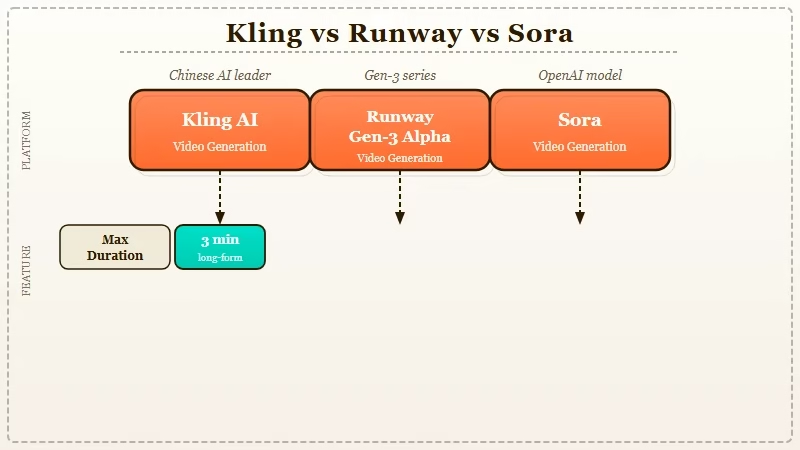
Here is a direct comparison across what matters most for video creators:
| Feature | Kling AI 3.0 | Runway Gen-3 Alpha | Sora |
|---|---|---|---|
| Max clip length | 3 minutes | 16 seconds | 20 seconds |
| Generation speed | 5-15 minutes | Under 2 minutes | Variable |
| Physical motion | Excellent | Good | Very good |
| Human anatomy | Fair | Good | Good |
| Entry pricing | $10/month | $12/month | $20/month |
| Failed generations | Common on free tier | Rare | Rare |
| Image-to-video | Yes | Yes | Limited |
The comparison above is for AI video generation specifically. If you’re building talking-head or presenter content with lip sync, HeyGen is a different category entirely, it handles avatar video and audio sync natively in a way Kling, Runway, and Sora do not. The two tools solve different problems.
For creators building automated AI content pipelines, the AI employee with MCP guide shows how video generation tools fit into larger automated workflows.
Kling AI Pros and Cons
Here is the structured breakdown of what Kling AI 3.0 gets right and where it consistently falls short.
Pros:
- Longest clip duration at consumer pricing, up to 3 minutes vs 16 seconds for most competitors
- Realistic physical motion, fluid, fabric, fire, and environmental effects outperform Runway at equivalent prompts
- Image-to-video preserves original composition better than text-only prompts
- Camera motion controls follow push, pull, pan, and orbit instructions reliably
- Free tier resets daily and provides genuine testing access before committing to a plan
- Pro plan credit volume (3,000/month) is sufficient for moderate-volume content production
Cons:
- Generation speed is slow, 5 to 15 minutes per clip is the real-world range across all plans
- Human hand and finger rendering breaks under scrutiny, especially in close-up shots
- Credit system punishes iteration, failed generations consume credits and are not automatically refunded
- Trustpilot average of 2.8 out of 5 reflects consistent user frustration with billing and cancellation
- No native audio sync, all generated video is silent and requires post-production for sound
- Chinese data hosting raises concerns for certain professional and regulated-industry use cases
Kling AI Verdict
Kling AI is worth paying for if you need longer clips with strong physical motion. It is the wrong tool for fast iteration workflows or human-character-heavy video.
Use Kling AI if:
- You need continuous footage longer than 16 seconds without custom production costs
- Your content focuses on nature, environments, product shots, or abstract visuals
- You are comfortable planning around 10-minute generation times per clip
- Image-to-video from high-quality stills is a core part of your workflow
Skip Kling AI if:
- Your workflow depends on fast iteration across many prompt variations
- You are generating close-up human-character video where hand accuracy matters
- Credit transparency and reliable generation success are non-negotiable for your pipeline
- You need audio sync as a first-party feature rather than a post-production task
For most casual creators, the Standard plan at $10/month is the right entry point. Start with Kling AI’s free tier first, the daily credit reset gives you enough room to decide whether the style fits your use case before paying anything.
Frequently Asked Questions
The most common questions about Kling AI cover pricing, generation time, and how it compares to Runway.
Is Kling AI free to use?
Kling AI has a free tier with 66 daily credits that reset each day. It is limited to 5-second clips at standard resolution. For 3-minute 1080p video, you need the Standard plan at $10/month or the Pro plan at $25.99/month.
How long does Kling AI take to generate a video?
Kling AI generation typically takes 5 to 15 minutes per clip depending on server load and clip length. Shorter clips (under 10 seconds) generate faster. Plan for 10 minutes as a working baseline at the Pro tier during peak hours.
Is Kling AI better than Runway?
For clip length and physical motion realism, Kling AI leads. For speed, human character detail, and generation reliability, Runway Gen-3 Alpha is stronger. Under 30 videos per month, Kling’s credit pricing is competitive. Above 50 videos monthly, Runway’s unlimited plan becomes better value.
Does Kling AI work for commercial projects?
Kling AI paid plans include commercial use rights. Verify the current terms at the Kling AI website before using generated content in a paid campaign or client deliverable. Free tier commercial rights are more restricted.
What happens when a Kling AI generation fails?
On the free tier, failed generations consume credits without automatic refund. This is the most frequent Trustpilot complaint. Paid tier users report better, though not perfect, credit recovery on failed generations at the Standard and Pro tiers.
