
Bottom Line: Kindroid is the strongest AI companion app for users who want deep character customization and image generation with fewer content restrictions. The custom character builder is genuinely good, the image generation is functional, and the community character gallery adds variety that most companion apps lack. The trade-off is weaker cross-session memory compared to Nomi AI and less cross-platform polish than Replika.
The first thing most people notice when they search for a Kindroid review is that the community around this app is unusually enthusiastic. Reddit threads, Discord servers, character-sharing communities. Users aren’t just using Kindroid, they’re building for it.
That tells you something about the product before you even download it. Kindroid was built for people who want to design their companion, not just pick one from a library. The character creation system is the reason users stay, and it’s the reason this review starts there rather than with pricing or features.
From what I’ve tested, the character builder is the real differentiator. Everything else, memory quality, voice features, platform availability, is competitive but not category-leading. The character system is where Kindroid pulls away from most alternatives.
What Is Kindroid?
Kindroid is an AI companion app that lets users build detailed custom companions from scratch, with image generation, voice calls, and a community gallery of user-created characters.
Kindroid was designed around the premise that the best companion is one you build yourself. The character creation system lets users define a companion’s appearance, personality, backstory, speech patterns, and relationship dynamics in significant detail. The resulting character holds that persona consistently across conversations.
The platform is available on iOS, Android, and web, which gives it a cross-platform reach that Eva AI and Talkie AI lack. The web version is functional for desktop use, though the mobile experience is more polished.
Community is a genuine part of the Kindroid product. Users share characters they’ve built, and the community gallery has thousands of user-created personas available to adopt. If the character you want already exists, you don’t have to build from scratch.
Is Kindroid Safe?
Kindroid is safe for adults, but the platform’s permissive content approach and absence of age verification mean it is not appropriate for minors.
The company is US-based. Conversations are stored and used for model improvement, consistent with how most companion apps handle data. There is no evidence of third-party data sales in the privacy policy, which is the baseline check for any app handling personal conversations.
The content moderation on Kindroid takes a lighter approach than Replika. Users can enable creative roleplay modes that go further than most competitor apps allow. A 2024 academic study on teen AI companion usage found that content flexibility without age verification is a consistent gap across companion apps, and Kindroid sits on the permissive end of that spectrum.
There is no meaningful age verification on the platform. Users self-certify their age during signup. For parents evaluating this for a teenager, the answer is no, the app is not designed for that use case.
| Safety factor | Kindroid status |
|---|---|
| Company location | USA |
| Data used for AI training | Yes, per privacy policy |
| Third-party data sales | No (per privacy policy) |
| Age verification | Self-certification only |
| Content flexibility | High (user-controlled) |
| Community character sharing | Public gallery, moderated |
How Good Is the Kindroid Free Tier?
The Kindroid free tier gives you enough access to build a character and test the conversation quality, but daily chat limits push serious users toward premium fairly quickly.
Free users can build custom characters and access the community gallery. The daily chat limit is the primary constraint, and it’s tight enough that power users will hit it within an hour of conversation.
The character building tools are fully available on free, which is a deliberate choice: Kindroid lets you build before you buy.
Voice features are available in limited form on free. Image generation of your companion is gated behind the premium tier. The free tier gives you a reasonable preview of the custom character system without unlocking the image generation that many users consider the app’s second-best feature.
The Custom Character Builder
Kindroid’s character builder is the most detailed companion creation system available, letting users define personality, backstory, speech style, and appearance in a single setup flow.
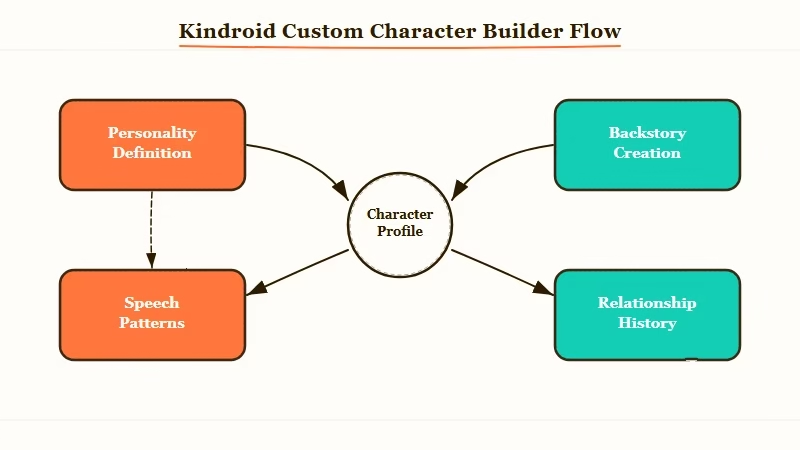
Most companion apps give you a name, a few personality sliders, and a visual customizer. Kindroid gives you a structured text field for each element of your character: their background, how they speak, what they remember about their relationship with you, how they respond to specific situations.
From my testing, a character built with detailed inputs in each field holds its persona well across long conversations. The AI references specific backstory elements naturally rather than treating them as lookup tables.
A character you describe as having lost a sibling will mention it in appropriate moments, not just when you bring it up directly.
Before / After: The character detail difference
Generic setup: Name: “Aria.” Personality: “friendly, funny.” The character delivers pleasant but interchangeable responses that could come from any companion app.
Detailed setup: Name, specific backstory including formative experiences, defined speech patterns (uses dry humor, never explains jokes, speaks plainly about emotions), and a defined relationship history with the user. The character holds that voice through 40+ message conversations and references earlier details without prompting.
The difference in output quality is substantial. Kindroid rewards the time invested in setup in a way that most apps don’t.
Image Generation on Kindroid
Kindroid’s image generation lets users create visual representations of their companion using a text prompt system, with quality that is functional but not best-in-class.
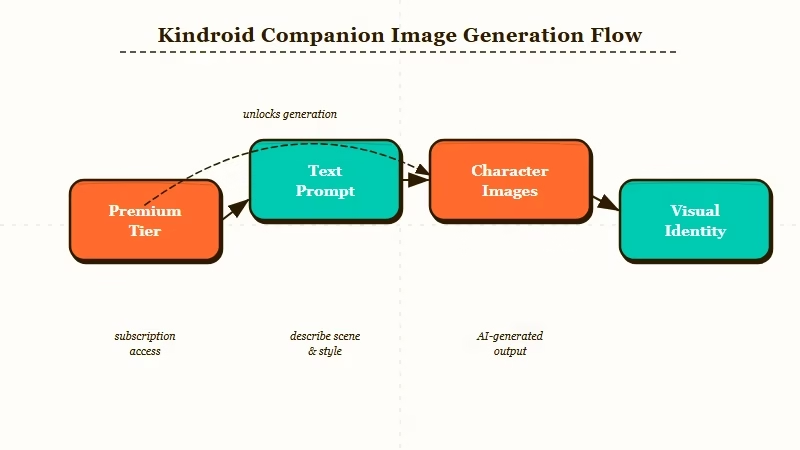
The image generation feature is available on premium. Users describe the companion’s appearance via text prompt, and Kindroid generates an image of the character in various poses and contexts. The quality is consistent enough to give your companion a stable visual identity across generated images.
From what I’ve seen in community posts and my own testing, Kindroid’s image generation is better than having nothing but not at the level of dedicated image generation tools. It’s companion-generation specifically, optimized for character consistency rather than artistic quality.
DreamGF produces higher image quality if visual output is the primary feature you’re paying for. Kindroid’s image generation is strong in the context of “I want to see my custom character,” not strong in the context of “I want studio-quality output.”
Kindroid Pros and Cons
Kindroid’s biggest strengths are its character builder and community. Its biggest weaknesses are memory persistence and image generation quality compared to specialized tools.
Pros:
- Most detailed custom character builder of any companion app: defines personality, backstory, speech patterns, and relationship history in one flow
- Community character gallery with thousands of user-created personas to adopt or use as a starting point
- Cross-platform access on iOS, Android, and web, unlike most competitors
- Image generation lets users create a consistent visual identity for their custom companion
- Permissive content approach gives users control over conversation direction without constant friction
Cons:
- Cross-session memory does not persist reliably: long-term details from weeks ago are not consistently recalled
- Image generation quality is functional but trails DreamGF for visual output quality
- The permissive content system with no real age verification makes this unsuitable for minors
- US-based data storage without the GDPR protections that EU-registered apps carry
- Voice quality is below Replika’s standard, particularly on latency and naturalness
- The detailed setup process that produces the best results is time-intensive: generic setups produce generic results
Who Should Use Kindroid (and the Best Alternatives)
Kindroid is the right pick for users who want to build a specific character from scratch and value creative freedom in conversations.
The way I see it, Kindroid’s ideal user is someone who has a clear vision for their companion and wants to build it precisely. The character system rewards that investment.
Users who want to pick a companion from a library and start chatting within five minutes will find the setup friction discouraging.
For users who want deep memory and emotional continuity, Nomi AI is the stronger option. Our Nomi AI review covers how the memory system works in practice. For users who want the best image generation quality, DreamGF and Candy AI both outperform Kindroid on visual output.
If you’re coming from Replika and want something with fewer restrictions, Kindroid is the most direct alternative. Our full breakdown of Replika alternatives includes a direct comparison of where Kindroid fits against the other options.
Is Kindroid Worth It?
Kindroid is worth it for users who want to build a custom companion with image generation. It is not the right pick for users whose priority is long-term memory or polished voice quality.
The character builder is the reason to choose Kindroid. If you spend time on the setup and give the system detailed inputs, you get a companion that feels distinct and consistent. That is genuinely difficult to find at any price point on most competitor apps.
The pricing is competitive with mid-tier companion apps, and the community adds long-term value that single-companion platforms can’t match. Character sharing means the gallery grows as the user base grows.
The limitations are real. Memory does not persist the way Nomi AI’s does. Voice is functional, not exceptional.
If either of those features is your top priority, Kindroid is not the right fit. If character depth and creative roleplay freedom are what you’re looking for, it’s the strongest option available.
Frequently Asked Questions
The most common questions about Kindroid cover character building, image generation, and how it compares to alternatives.
Is Kindroid safe to use?
Kindroid is safe for adults. The company is US-based and does not sell data to third parties per the privacy policy. The platform has no real age verification and includes permissive creative roleplay modes, making it unsuitable for minors.
Is Kindroid free?
Kindroid has a free tier with a daily chat limit and access to the character builder and community gallery. Premium unlocks unlimited chats, image generation, and extended memory. Check the app for current pricing as rates are updated periodically.
How does Kindroid compare to Replika?
Kindroid has better character customization, image generation, and fewer content restrictions than Replika. Replika has better cross-session memory, voice quality, and cross-platform polish. Kindroid is the pick for users whose main complaint about Replika was restrictive content moderation.
Does Kindroid have image generation?
Yes. Kindroid’s image generation is available on the premium tier and lets users create visual representations of their custom companion. Quality is consistent for character identity but does not match dedicated image generation apps like DreamGF for visual output quality.
What are the best Kindroid alternatives?
The best alternatives to Kindroid depend on what you prioritize. For memory depth: Nomi AI. For image quality: DreamGF. For emotional AI sophistication: Replika. For lowest price with EU privacy: Eva AI. Our best AI companion apps comparison covers the full landscape.
