
What’s Changed: The Janitor AI Write For Me button keeps disappearing on the mobile app and mobile site, and most people assume it was removed. It was not. A content-visibility switch on the website hides it on mobile even for harmless chats, and a two-minute settings change brings it back for most users.
The Janitor AI Write For Me button has a habit of vanishing on mobile, and the timing makes it feel like a feature removal. One day the slash menu offers to draft your reply, the next day the option is gone and every bot starts acting strangely.
The disappearance is real, but the feature was never removed. It still exists in the current app, and the thing hiding it is almost always a setting that lives on the website rather than in the app you are staring at.
This guide covers where the button went, the setting that controls it, the session bugs that produce the same symptom, and what I would do if none of the standard fixes land. Plan for two minutes if it is the toggle, ten if it is your login.
What Happened to Write For Me on Janitor AI
Write For Me is still a current Janitor AI feature, added to the official app in version 1.4.0 on March 4, 2026, and reachable through the slash button above the keyboard. Nothing in the release notes since then removes it.
The slash menu is the part most people find by accident. Tapping “/” above the keyboard opens quick actions including Write for me, which drafts a reply in your voice, and Write from scratch, which hands the pen to the model entirely. The same update added a full-screen editor for longer messages.
Reports of the button going missing spiked in June 2026, and they came with a second symptom: bots sending an odd notice message no matter what users typed. That pairing matters for diagnosis. In my experience a removed feature goes quietly, while a permissions mismatch between the account and the app produces exactly this kind of error chatter.
The platform’s status page showed no outage while those reports rolled in. When the servers are fine and one feature is missing for some users but not others, the cause is nearly always account-level, and that is exactly what this turned out to be.
Why the Mobile App Hides Write For Me
The mobile app ships in a restricted Safe Mode to satisfy Apple and Google store rules, and the switch that lifts it also controls whether Write For Me appears. The gate catches completely harmless chats too, which is why it feels like a bug.
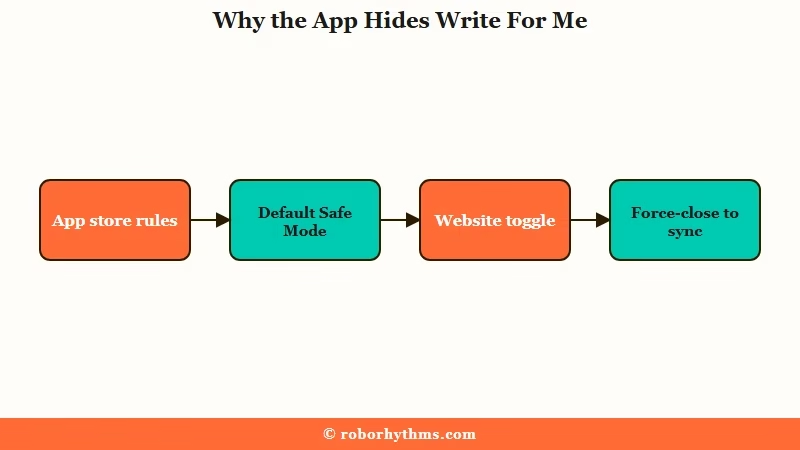
App stores police user-generated content far harder than the open web. Apple’s App Review Guidelines hold chat apps to user-generated-content rules by name and tightened AI-app requirements again in late 2025, per TechCrunch. Janitor AI’s answer was a default Safe Mode baked into the mobile app.
Safe Mode is deeper than a content filter. The help documentation describes the model itself as tuned to generate only filtered output until you opt out through the website, so generation features behave differently, not just search results. The same compliance posture is why image uploads are blocked in the app and why only Discord and X links are tappable there.
Here is what Safe Mode touches, and what flipping the switch changes:
| Area | In default Safe Mode | After the toggle | Where it is controlled |
|---|---|---|---|
| Writing tools | Write For Me can disappear from the slash menu | Slash menu shows the full set of quick actions | Website settings only |
| Discovery | Filtered characters stay unsearchable | Full catalog appears in search | Website settings only |
| Model output | Model tuned to produce filtered responses | Standard generation behavior returns | Website settings only |
| Links and media | Only Discord and X links clickable, image uploads blocked | Unchanged, store rules keep these locked in the app | Not user-controllable |
The gate even fires inside harmless conversations, which still strikes me as the strangest design choice in the whole system. Users with squeaky-clean chats lose the writing assistant because their account never opted out of Safe Mode. The toggle works as a master key for mobile features rather than a content preference.
How Do You Get Write For Me Back
The fix lives at janitorai.com in a browser, not inside the app, because the controlling setting cannot be changed from the app at all. The way I would run it, start to finish:
- Open janitorai.com in a phone or desktop browser and log into the same account the app uses.
- Tap your profile and open Settings, then find the switch that allows unrestricted content on mobile. It is the only toggle with “Mobile” in its label.
- Flip it on and confirm the page saves the change.
- Force-close the Janitor AI app completely by swiping it away from recent apps, then reopen it. The app only re-reads permissions on a fresh launch.
- Open any chat and tap the “/” button above the keyboard. Write for me should be back in the quick actions.
Step 4 is the one people skip. The app caches your permission state, so the toggle appears to do nothing until the app restarts, and half the “the fix didn’t work” complaints trace back to that.
Before: You hunt through the app’s own settings for a writing-tools option, find nothing, and conclude the feature was removed in an update.
After: You flip the mobile content switch on the website, force-close and reopen the app, and the slash menu lists Write for me again, exactly where version 1.4.0 put it.
In my experience the toggle-plus-restart combination resolves the bulk of cases on the spot. If your button is still missing after that, the problem has moved down a layer, into your login session.
What if the Toggle Does Not Fix It
The remaining cases are session problems, where the mobile app or browser is not holding a valid login, so the platform treats you as a restricted or anonymous user.
Users hitting the June wave described exactly this: the mobile site would accept their password and then act as if nothing happened.
Modern AI platforms expire login tokens aggressively, and a phone that misses a token refresh gets silently demoted. Safari’s Prevent Cross-Site Tracking setting also blocks the cookie handshake Google and Apple sign-ins rely on, which is why a login can succeed on screen and fail in practice.
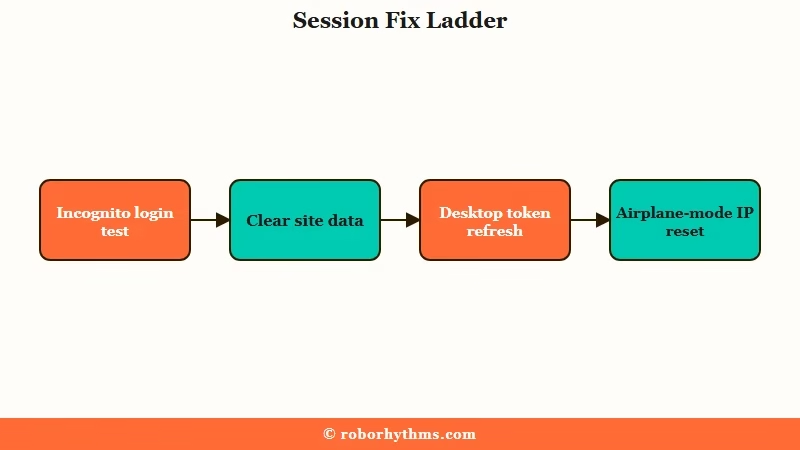
Here is the diagnostic ladder I would follow when the toggle alone does not bring the button back:
| Symptom | Likely cause | Fix |
|---|---|---|
| Login succeeds but does not register | Browser blocking the sign-in cookie handshake | Try a private or incognito window; on iPhone, turn off Prevent Cross-Site Tracking for the session |
| Fix works in incognito only | Stale cookies and cached site data | Log out, clear the browser’s site data for janitorai.com, log back in |
| App stuck on old permissions | Cached session token that never refreshed | Log in on a desktop browser, then force-close and relaunch the app |
| Site loads half-broken on Android | Mobile CSS failing to load, button present but invisible | Hard-refresh, clear cache, or switch browsers before assuming the feature is gone |
| Nothing loads right on mobile data | Carrier IP flagged by the security layer | Toggle airplane mode for ten seconds to pull a fresh IP, or switch between Wi-Fi and data |
The desktop trick earns its place on that list. Logging in on a computer forces a fresh token rotation on the account, and the mobile app frequently picks the healthy session up on its next launch. It feels unrelated and works anyway.
Two boundaries worth drawing before you burn an hour. If you cannot log in anywhere and your profile looks wrong, that is the separate mass logout and profile bug territory. If bots will not respond at all across devices, run the Janitor AI status checklist first, because no settings change fixes a platform incident.
Is the App Worth the Settings Maze
The website remains the full-featured version of Janitor AI, and the app is a store-compliant subset that borrows its permissions from the site. Knowing that changes how you use both.
Every restriction in this article flows one direction: the app inherits what the website allows, never the reverse. Version 1.6.0 added age verification for select regions in April 2026, which stacks a second gate on top of the content toggle for some users. Region by region, two accounts can see different features on identical phones.
What I would recommend is treating the app as the convenient reader and the browser as the control room. Do your settings work, character management, and anything that misbehaves on the website. If something breaks beyond this article’s scope, the broader general Janitor AI fixes guide covers the rest of the stack.
Where to Go if the Mobile Walls Keep Winning
If you are tired of features that appear and disappear based on store politics, the structural alternative is a platform built around its own app rather than squeezed into one. That is a legitimate reason to switch, not an overreaction.
Janitor AI’s mobile experience is a compliance negotiation, and users absorb the friction. Some people are happy to flip a toggle once and move on. Others lose the writing assistant monthly to session bugs and start resenting the maintenance.
Candy AI is the cleaner escape for the second group. It runs the same experience on web and mobile without a Safe Mode split, and its reply-suggestion tools stay put because there is no store-mandated feature gate to trip over. You design one companion and the settings follow the account everywhere.
Nectar AI is the alternative I would point at heavy roleplay writers specifically. Its persistent cross-session memory means the drafting help builds on what your story already established, which is the thing Write For Me users miss most when the button vanishes mid-arc.
Frequently Asked Questions
Where is the Write For Me button on the Janitor AI app?
Tap the “/” slash button directly above the keyboard in any chat. The quick-actions menu it opens has held Write for me and Write from scratch since version 1.4.0 shipped in March 2026.
Why is Write For Me missing even though my chat is harmless?
The mobile content switch on the website acts as a master gate for mobile features, including the writing tools. Until your account opts out of the app’s default Safe Mode, the button can stay hidden in every chat, harmless or not.
Can I change the mobile content setting inside the app?
No. The toggle only exists in your settings on janitorai.com in a browser. After flipping it, force-close the app and reopen it, because permissions only sync on a fresh launch.
Why does the mobile site ignore my login?
A blocked cookie handshake or an expired session token usually swallows the login. Test in an incognito window first; if that works, clear the site data in your normal browser, or log in on a desktop to force a token refresh.
Did Janitor AI remove Write For Me?
No. The June 2026 disappearance wave traced to the content-visibility gate and session bugs, while the status page showed normal uptime. The feature remains in the current app version behind the slash button.
Quick Takeaways
- Write For Me is not removed: a website-side content switch hides it on mobile, even in completely harmless chats.
- The fix takes two minutes: flip the mobile content toggle at janitorai.com in a browser, then force-close and reopen the app.
- Still missing after the toggle means a session problem: test in incognito, clear site data, or log in on desktop to force a token refresh.
- The app is a store-compliant subset of the website, so do settings work in the browser and treat the app as the reader.
- If the feature roulette wears you out, Candy AI skips the Safe Mode split entirely and Nectar AI keeps long-story drafting anchored in persistent memory.
