
What’s Changed: The Janitor AI queue is back, and on the evening of October 19, 2026 it covered the entire website. It is a waiting room that lets people in a few at a time when traffic spikes, and it means the site is up and your account is fine. Leaving the page open is what gets you in, while closing it or clearing cookies sends you to the back.
Janitor AI queue screens have come and gone since early 2025, but this one did not stop at the front door.
On the evening of Monday, October 19, the homepage and individual character pages all answered with the same “You’re in line” screen and an estimated wait.
Janitor’s own status page did not help. At 10:29 PM Eastern, with the queue still running, it read All Systems Operational.
I don’t mind a queue as much as a crash, but the rules behind this one are not obvious, and two of the most common fixes put you at the back of the line.
This guide covers what the screen is, why the estimate jumps, what kicks you out of a chat, and the few things that get you in sooner.
What is Cloudflare Waiting Room: A traffic tool from the web company Cloudflare that holds visitors on a waiting page and lets them into a busy site in order.

What Is the Janitor AI Queue?
The Janitor AI queue is a Cloudflare Waiting Room that holds visitors at the door and lets them into janitorai.com a few at a time when traffic spikes.
Your account has not been banned, and the site has not gone down.
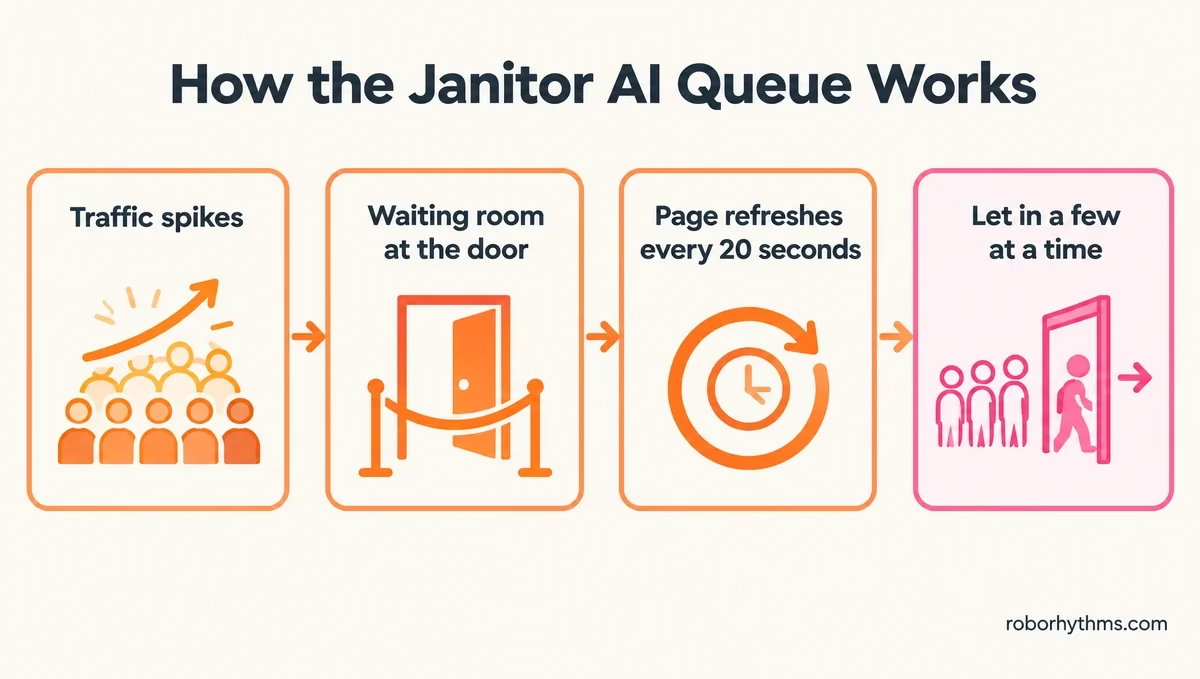
The page reads “You’re in line” and explains that “traffic is high right now, so we’re letting people in slowly to keep things stable.” It tells you to keep the page open or chat in the app, shows an estimated wait, and reloads itself every 20 seconds.
The waiting page also hands your browser a cookie whose name starts with __cfwaitingroom, which is Cloudflare’s marker for a place in its waiting room. Janitor has used the same tool before: in January 2025 the team warned of “a temporary Cloudflare queue” in its post on Reddit.
This time the gate sits in front of the entire site. The homepage and individual character pages returned the same waiting screen, so a bookmark or a direct bot link is no way around it. The part that bothers me is that the page never says this, so nothing stops you from wasting time hunting for a back door.
The first fix is the dull one: leave that tab open and let it reload on its own. If the wait is eating your evening, Nectar AI is a character chat app you can keep open in another tab while the line clears.
Its free tier stops at 15 messages a day, so it covers a short wait better than a whole night.
How Long Is the Janitor AI Queue?
The Janitor AI queue can take a few minutes or a few hours, and the estimate on the page is a live guess that can rise while you wait.
Cloudflare recalculates it on every 20-second refresh from how many people are ahead of you and how fast people are leaving the site.
At 10:30 PM Eastern on October 19 the page showed an estimated wait of 5 minutes. That same evening, a reply in one Reddit thread described three hours in line, with the estimate moving from 20 minutes to 5 and back up to 20.
The number can be wildly off in both directions. In January 2025, a reply under Janitor’s announcement watched the estimate fall from 10 days to 7 days, then 6 hours, 45 minutes and 2 minutes before getting in.
I treat the figure like a weather forecast, a rough read that changes every time the page reloads.
Why Does the Janitor AI Queue Estimate Go Up?
The Janitor AI queue estimate goes up when fewer people leave the site, because Cloudflare works it out from the people ahead of you and the rate at which others get in.
If people inside stay longer, the line moves slower and the number climbs.
Cloudflare’s own FAQ says it plainly: “Estimated wait times may increase if the rate of users leaving your site decreases.” In Cloudflare’s default first-in, first-out mode, arrivals are grouped into one-minute buckets, and when many people in a bucket give up, the line waits for their places to expire before it moves on.
Abandoned tabs keep their place for 5 minutes after their last refresh, which is why a crowd of people who gave up can stall everyone behind them.
A rising estimate is the system working as designed, so there is nothing to fix on your end.
How Do You Get Through the Janitor AI Queue Faster?
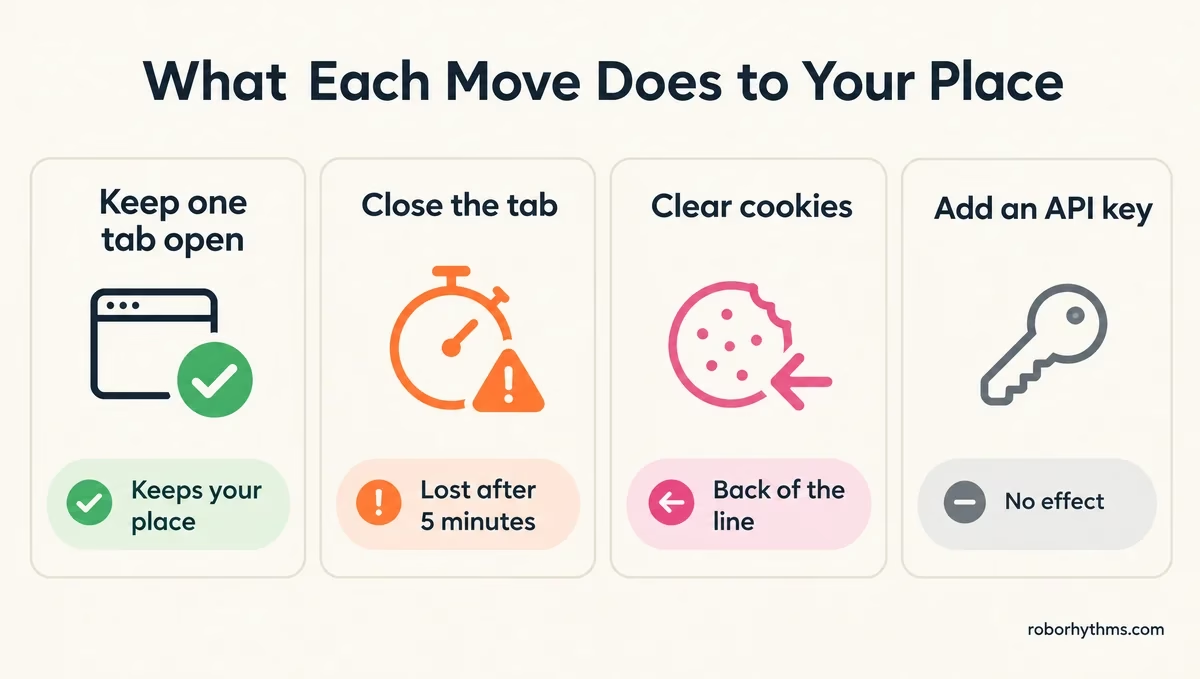
The fastest way through the Janitor AI queue is to leave one tab open and let it refresh on its own, because closing it, clearing cookies or switching browsers sends you to the back.
Nothing you do in the browser jumps the line, but several common moves lose your place.
Here is the order I go in when the line shows up:
- Keep one Janitor tab open and leave it alone. It reloads every 20 seconds, and Cloudflare says a manual refresh has no effect on your position.
- Do not close that tab. A closed tab keeps its place for 5 minutes after its last refresh, and after that the spot is gone.
- Do not clear cookies, switch to a private window or open Janitor in another browser. A request with no waiting room cookie counts as a brand new visitor, and Cloudflare’s documentation says that places the user at the end of the queue.
- Leave cookies switched on. With cookies blocked, Cloudflare will not let you through until the queue switches off.
- Come back outside US evening hours if you can wait, since the October 19 wave was already running by 6:45 PM Eastern.
- Open the Janitor app if you only want to chat, which is what the queue page itself suggests.
Before: Close the tab, clear the cache, then reopen Janitor in a new window to “reset” the queue.
After: Leave the original tab open, let it reload every 20 seconds, and do something else until it lets you in.
The table below sums up what each move does to your place in line.
| What you try | What it does to your place | Where that comes from |
|---|---|---|
| Manual refresh | No effect on your position | Cloudflare FAQ |
| Closing the tab | Held for 5 minutes, then lost | Cloudflare FAQ |
| Clearing cookies or a private window | Back of the line as a new visitor | Cloudflare documentation |
| Switching models or adding an API key | Nothing, the gate comes before any chat loads | Queue page on the homepage and bot pages |
| Paying for Janitor+ | No queue perk is listed | Janitor’s subscription FAQ |
Does Janitor+ Skip the Janitor AI Queue?
Janitor+ does not list any way to skip the Janitor AI queue.
Janitor’s subscription FAQ lists 5x more context, “priority access for faster replies”, monthly swipes with its best models, a golden username and comment react emojis.
That priority applies to replies once you are inside. On October 19, a paying Janitor+ member was shut out by the queue like everyone else.
If you are weighing the plan for other reasons, whether Janitor+ is worth it comes down to memory and swipes.
Can an API Key Get You Past the Janitor AI Queue?
An API key or a different model cannot get you past the Janitor AI queue, because the waiting room sits in front of the entire website.
Model and proxy settings live inside Janitor, so they never load while you are still in line.
That tip belongs to a different problem, slow replies once you are already in, which the slow-reply fixes cover.
If you have waited an hour and the estimate keeps climbing, that is where I’d stop and spend the evening on Candy AI instead. Its free tier is only five messages, so treat it as a paid backup for nights when Janitor stays jammed.
Why Does Janitor AI Have a Queue Now?
Janitor AI has a queue now because more people want in at once than its servers can handle, and the waiting room keeps the site up instead of letting it crash.
Janitor’s page says only that traffic is high.
The October 19 wave was already running by 6:45 PM Eastern on a Monday and was still on at 10:30 PM Eastern, the busy evening stretch for US users.
It also landed a week after Character AI filed for Chapter 11 bankruptcy protection to sell the company and its assets, as The Verge reported.
My read is that the bankruptcy news pushed Character AI regulars to try other apps, and Janitor’s evening peak did the rest. In one subreddit thread, a commenter puts the strain down to “the influx of users jumping ship” from a bigger chatbot platform after recent news, though Janitor has not confirmed it. What the filing means for Character AI chats is a separate story.
The queue is not new either, and Janitor ran it repeatedly in early 2025.
One version even put a small game on the waiting page, and the opening post in a thread about it reads “I keep trying to click and it just doesn’t work.” The October 2026 page is plain text with no game.
Is Janitor AI Down When You See the Queue?
Janitor AI is not down when you see the queue, because the waiting page is the site answering you and counting you in.
An outage looks different, and Janitor’s status page will not show the queue at all.
The queue was still running at 10:29 PM Eastern on October 19, and the status page gave no sign of it. Janitor’s status page read All Systems Operational and listed no reports in the past seven days.
The status page’s latest incident report is from November 24, 2025, when the site went down for 26 minutes. It only logs outages, so a working waiting room never shows up there.
The firewall page worries me more than the queue, because it comes with no estimate and no line to wait in. Use this table to tell the screens apart.
| What you see | What it means | What to do |
|---|---|---|
| “You’re in line” with an estimated wait | The waiting room is on and the site is up | Keep the tab open and let it reload |
| “Access Restricted” and “blocked by our firewall” | Janitor’s firewall blocked your connection, which is not the queue | Follow Janitor’s Reddit or Discord, as the page suggests |
| An error page or nothing loading at all | A real outage | Read the guide on when Janitor AI is down |
| You get in, but replies crawl | Server load on replies, not the queue | Work through the Janitor AI slow-reply fixes |
Does the Janitor AI Queue Delete Your Chats?
The Janitor AI queue blocks new page loads, and the real risk is work that has not reached Janitor yet, such as a reply you are typing or a bot you have not saved.
Being thrown out of an open chat is the queue taking you back to the door.
That kick matches two settings Cloudflare documents. A visitor stays active only while their browser keeps making requests to the site within a set number of minutes.
An optional setting sends even active visitors to the back of the queue once a fixed time is up, and Janitor has not said which one it uses.
In January 2025, a creator lost a bot they had spent an hour and a half writing when they hit upload during the queue. While the line is on, I copy anything longer than a paragraph into a notes app before I press send or save.
Does the Janitor AI App Skip the Queue?
The Janitor AI app is the way around the website queue that Janitor itself suggests, since the queue page tells you to chat in the app while you wait.
It comes with one catch: the app starts in Safe Mode.
The official app is free on iOS and Android and is still in beta, according to Janitor’s help center.
Janitor says those two store listings are its only official apps, and fake Janitor apps do exist, so install from the links on Janitor’s own pages.
Safe Mode hides NSFW bots, keeps replies safe for work and blocks some explicit words. It lifts once you switch on “Enable NSFW for App” in your Settings on the website and restart the app.
That switch lives on the site behind the queue, so I flip it the moment I get through, and the app is ready the next time the line shows up.
Quick Takeaways
- The Janitor AI queue is a Cloudflare waiting room that gates the whole site while traffic is high.
- The estimate updates every 20 seconds and rises when fewer people leave, so a jump is normal.
- Keep one tab open, since closing it, clearing cookies or switching browsers puts you at the back.
- Janitor+ and API keys do not skip the line, and Janitor’s status page will not show the queue.
- The app is Janitor’s own suggestion while you wait, so switch on Enable NSFW for App once you get in.
