
What’s Changed: If your Janitor AI proxy stopped working or keeps throwing a network error, the cause is almost never your connection. Nine times out of ten it is a zero balance, a key that does not match the proxy URL, or a settings cache that never refreshed. This guide walks through every cause in the order worth checking.
A Janitor AI proxy not working is the most common reason a chat suddenly goes silent, and the error you get back is usually misleading. The app shows a generic network error, so you blame your wifi, restart the router, swap browsers, and nothing changes. The real fault is sitting one layer down, in the link between Janitor AI and whatever model provider you connected.
Here is the part that catches almost everyone. That network error is often an HTTP 402, a billing signal, wearing a connection-fault costume. When a DeepSeek account burns through its free tokens or an OpenRouter balance hits zero, the request fails and Janitor reports it as a vague network problem instead of saying the account is empty.
A proxy that connects can still choke on long chats for a separate reason, which is the Janitor AI proxy prompt length limit that trims or rejects oversized context.
I have worked through every version of this, from a key pasted with a stray space to a provider whose servers were offline. The fixes are not hard once you know which layer broke. This guide maps each symptom to its real cause, gives you a five-minute fix sequence, and shows the exact settings that connect a proxy on the first try.
Why Is Your Janitor AI Proxy Not Working
A Janitor AI proxy stops working when one of three layers breaks: your provider account has run out of credit, your proxy URL and API key belong to different providers, or Janitor cached an old setting and never refreshed.
Everything else is a variation on those three.
The way I see it, most people troubleshoot in the wrong order. They reach for the router and the VPN first because the word “network” is right there in the error, when the thing that broke is the account or the config you set up days ago.
What is a proxy in Janitor AI: It is the bridge that passes your chat to an outside model like DeepSeek or one routed through OpenRouter, since Janitor AI does not run a strong model of its own for most users.
Three fields make that bridge work, and they have to agree with each other. The proxy URL, the API key, and the model name all have to belong to the same provider.
Mixing a DeepSeek key with an OpenRouter URL is the single most common cause of a “network error”, and it returns a 401 under the hood every time.
What That Network Error Really Means
A Janitor AI network error is most often a payment problem, not a connection problem.
The clearest tell is timing. If chats worked fine yesterday and died today with no settings change, check your provider balance before you touch anything else.
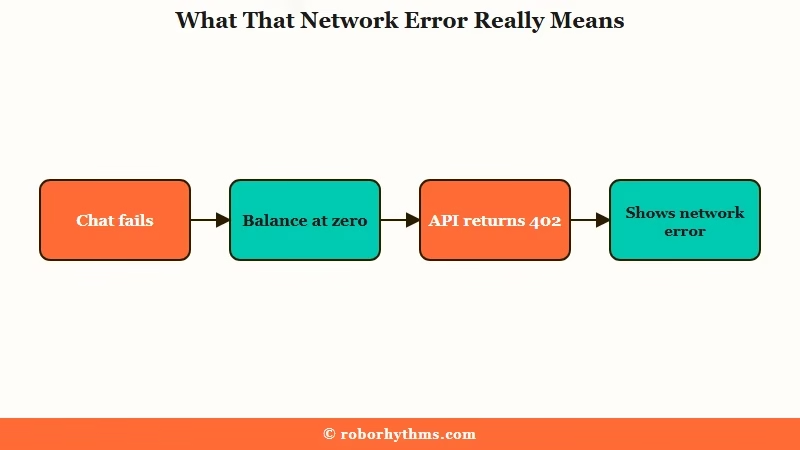
New DeepSeek accounts get 5 million free tokens, which feels endless until a few long roleplay sessions drain it. Once the balance reads zero, the API answers with a 402 Payment Required, and Janitor flattens that into a plain network error. Adding a few dollars of credit fixes it in seconds, which is maddening only because the error never pointed you there.
OpenRouter has its own trap on the free side. Accounts holding less than 10 dollars of lifetime credit are capped at 50 messages a day, and crossing that line throws a persistent 429 that resets only at 12:00 AM UTC, which is 7pm Eastern or 5pm Pacific.
From my testing, the cruelest detail is that failed messages still count, so spamming the regenerate button on a broken bot can torch the whole daily allowance in minutes.
One more thing worth knowing. Putting 10 dollars or more into OpenRouter once lifts that daily cap from 50 to 1,000 messages, which is the cheapest upgrade in this whole hobby. If you keep slamming into the wall every evening, that top-up is the fix, not another round of proxy error 429 troubleshooting.
Every Janitor AI Proxy Error Code and What It Means
Each proxy error points to a specific layer: 401 is a bad or mismatched key, 402 is no credit, 404 is a wrong model name, 429 is a rate limit, and 500 or 503 is the provider being down.
Reading the code instead of the word “error” cuts your fix time in half.
Here is how I map every code I run into. Janitor often hides these behind its generic message, so it helps to open the browser console or your provider dashboard to see the real status.
| Error code | What it means | Real cause | Quick fix |
|---|---|---|---|
| 401 | Unauthorized | Wrong key, a stray space in the key, or a key from a different provider than the URL | Re-paste the key clean and match it to the right proxy URL |
| 402 | Payment required | Free tokens exhausted or balance at zero, shown as a network error | Add a few dollars of credit to the provider |
| 404 | Model not found | Model name mistyped or retired, like an old DeepSeek alias | Copy the exact current model ID from the provider catalog |
| 429 | Too many requests | Daily cap hit, more than 10 messages a minute, or a privacy toggle off | Wait for the UTC reset, slow down, or top up to lift the cap |
| 500 or 503 | Server error or no instances | The provider servers are down, overloaded, or restarting | Wait a few minutes or switch to another model |
For a fast triage without the console, this symptom table covers what most people see on screen.
| Symptom | Likely cause | Fix |
|---|---|---|
| Network error, worked yesterday | Provider balance hit zero (402) | Add credit to DeepSeek or OpenRouter |
| Network error right after setup | Key and proxy URL from different providers | Match all three fields to one provider |
| Stuck at a daily wall every evening | OpenRouter 50 message free cap | Top up 10 dollars for 1,000 a day |
| Replies have visible reasoning text | Using a reasoning model through Chutes | Switch to a standard chat model |
| Worked, then froze mid long chat | Token overflow on a huge conversation | Lower context size or trim chat memory |
How to Fix a Janitor AI Proxy That Will Not Connect
The fastest fix is the double-refresh: open your API settings, click Save even if nothing changed, then hard refresh the whole page, which clears roughly 40% of proxy errors.
Janitor caches old settings in memory, so a test run against a stale state lies to you.
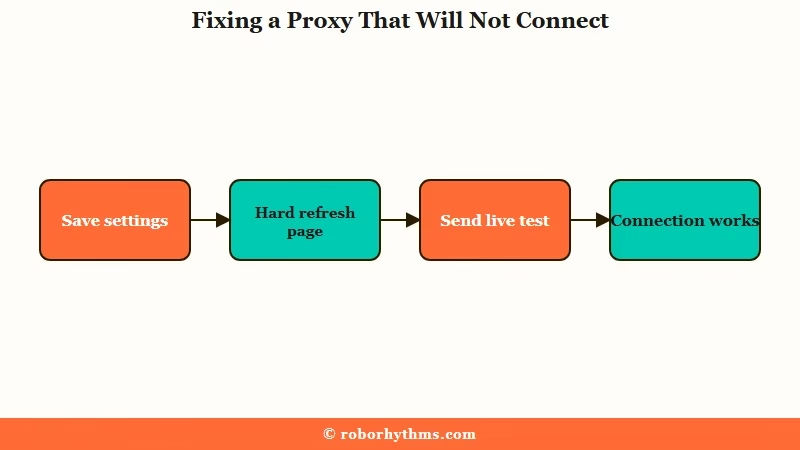
From what I have seen, the order you try things in matters as much as the fixes themselves. Here is the sequence I walk through before I assume anything is seriously broken.
- Open your API settings, click Save Settings even with no change, then hard refresh with Ctrl+Shift+R.
- Ignore the built-in Check Key or Test button. It is buggy and throws false network errors even on a valid setup. Send a real one-line test message instead.
- Confirm your provider balance is above zero, since a 402 hides as a network error.
- Re-paste your API key into a plain text box first to strip invisible spaces, then back into Janitor.
- Open the chat in an incognito window to rule out a browser extension or ad blocker.
That Check Key button deserves its own warning. It is the verification tool most people trust, and it is the one that lies most often, so the genuine test is always a saved setting plus a refresh plus a real message.
When the connection still refuses to start, the problem is usually a mismatched config rather than a broken account. This is the difference between a setup that fails and one that connects on the first message.
Before: Proxy URL pointed at OpenRouter, API key copied from a DeepSeek dashboard, model name typed as
deepseek-chat. Result is a 401 that surfaces as a network error.After: Proxy URL set to
https://openrouter.ai/api/v1/chat/completions, an OpenRouter key that starts withsk-or-v1-, model set todeepseek/deepseek-chat-v3-0324:free. Result is a clean reply on the first try.
The model name trips people more than anything else. Older tutorials still tell you to use deepseek-chat or deepseek-reasoner, and those legacy aliases are scheduled to retire on July 24, 2026, after which they return a hard 404. If you are wiring DeepSeek up from scratch, the full DeepSeek setup walkthrough has the current IDs and exact fields.
When the Proxy Is Set Up Right and Still Fails
If your settings are correct and the proxy still fails, the cause is outside your config: a provider outage, a regional age check, a browser that is too old, or a VPN or firewall blocking the route.
These are the cases that feel impossible, and I have chased every one of them because nothing you change on your end seems to move the needle.
Start with the provider. A 500 error, a message reading “exhausted all available targets”, or an ErrorUpstreamFault:True all mean the model servers themselves are down, not you.
When Chutes throws a wall of failures at once, it is almost always server side, and the Chutes failed to fetch fix covers how to tell an outage from a config slip. If the whole site feels dead rather than just one model, the is Janitor AI down checklist is the faster place to start.
Region is the sneaky one. Age-verification laws have tightened fast, and platforms now gate access in several countries. Australia began enforcing age rules on social platforms in December 2025 with penalties reaching AUD 49.5 million, around 33 million dollars, per NPR’s reporting on the rollout.
Janitor AI added a one-time k-ID age check for users in regions like Australia and Brazil in early 2026, and an unfinished check there can read as a connection failure rather than an age gate.
A few smaller culprits round out the list. Janitor needs a reasonably current browser, Chrome 92 or Firefox 91 at minimum, so a stale install can break the connection on its own.
A VPN can cause the error or cure it, so toggle it both ways, and on Windows the built-in firewall or antivirus sometimes blocks the site outright and produces a failed to fetch. If your replies suddenly arrive wrapped in visible reasoning text, you are on a reasoning model like DeepSeek R1 through Chutes, and switching to a standard chat model gives you clean output again.
When You Are Done Fighting With Proxies
If the constant key swaps, top-ups, and daily resets are wearing you down, a hosted companion that needs no proxy at all is the cleaner path.
Proxy setup is the tax Janitor charges for free roleplay, and not everyone wants to keep paying it in time.
I still think Janitor is worth the hassle if you love building characters and tuning your own models. The control is the whole point. The trouble is that the control comes bundled with API keys, balance checks, model IDs that expire, and a rate limit that resets on a clock in another timezone.
For people who would rather open a tab and start talking, a companion that needs no proxy removes the entire failure chain this article is about.
Candy AI hosts the model itself, remembers your conversations between sessions, and has a usable free tier, so there is no key to paste and nothing to top up before a scene works. It is a different trade, less tinkering for more reliability, and which side you want depends on how much you enjoy the setup.
Frequently Asked Questions
Why does Janitor AI say network error when my internet is fine?
A network error in Janitor AI is usually a 402 payment signal, not a connection fault. When your DeepSeek free tokens run out or your OpenRouter balance hits zero, the failed call shows as a generic network error. Check your provider balance first.
How do I fix a 429 error on Janitor AI?
A 429 means you hit a rate limit. On OpenRouter’s free tier that is the 50 message daily cap, which resets at 12:00 AM UTC. Wait for the reset, send fewer than 10 messages a minute, or add 10 dollars of credit to lift the cap to 1,000 a day.
What proxy URL should I use for DeepSeek on Janitor AI?
For DeepSeek through OpenRouter, use https://openrouter.ai/api/v1/chat/completions with an OpenRouter key and a current model ID. For the Chutes route, the URL is https://llm.chutes.ai/v1/chat/completions and the key must start with cpk_. The three fields have to match one provider.
Why does my Janitor AI proxy stop working mid conversation?
Long chats can overflow the model’s context window, often past several hundred messages, and the reply just stops generating. Lower the context size in Generation Settings or trim your chat memory. This is separate from a rate limit or a billing block.
Is the Check Key button on Janitor AI reliable?
No, the Check Key or Test button is known to be buggy and returns false network errors even when your setup is valid. The real test is to save your settings, hard refresh the page, then send a short live message. Trust the message, not the button.
Do failed messages count against my Janitor AI limit?
Yes, on OpenRouter’s free tier every failed message and retry counts toward the 50 a day cap. Spamming the regenerate button on a broken bot can burn your entire daily allowance in minutes, so stop and fix the cause before retrying.
Quick Takeaways
- A Janitor AI network error is most often a 402 billing problem, so check your provider balance before blaming your connection.
- Match the proxy URL, API key, and model name to one provider, since mixing them throws a hidden 401.
- The double-refresh, save then hard reload, clears about 40% of proxy errors on its own.
- Retire any old
deepseek-chatordeepseek-reasonermodel name before July 24, 2026, when those aliases stop working.
- If the setup tax is not worth it, a hosted companion with no proxy removes the whole failure chain.
