
What’s Changed: When Janitor AI stops reading your character definition, the card is almost always too big for the model’s working memory, not corrupted. The hidden context window shrinks under server load, so a detailed bot that worked last night quietly forgets itself today. The fix is trimming and restructuring the card, not rewriting it.
If your Janitor AI bot is not reading its character definition, the most likely reason is the opposite of what you would guess. The card is too big, not broken. I have watched people respond to a forgetful bot by adding more detail, more traits, more backstory, and every addition makes the problem worse.
Here is the part nobody tells you. The model that powers most free Janitor chats, JLLM, has a working memory of roughly 8,000 to 9,000 tokens on a good day.
During peak hours the developers quietly throttle that down to between 4,000 and 6,000 tokens to keep the servers from falling over. Your 3,000-token character card fit fine at 3am and silently broke at 8pm, and you never got an error.
This guide walks through why the definition gets dropped, how to tell which version of the problem you have, and how to fix it without starting from scratch. You will walk away knowing how to trim a card so the bot reads it again, and how to rescue a chat where the bot insists it is a completely different character.
Why Janitor AI Stops Reading Your Character Definition
Janitor AI stops reading your character definition when the card eats too much of the context window, leaving no room for the model to hold both the card and the conversation at once.
From what I have seen, this is the cause in the large majority of cases, and it is not a bug you can report away.
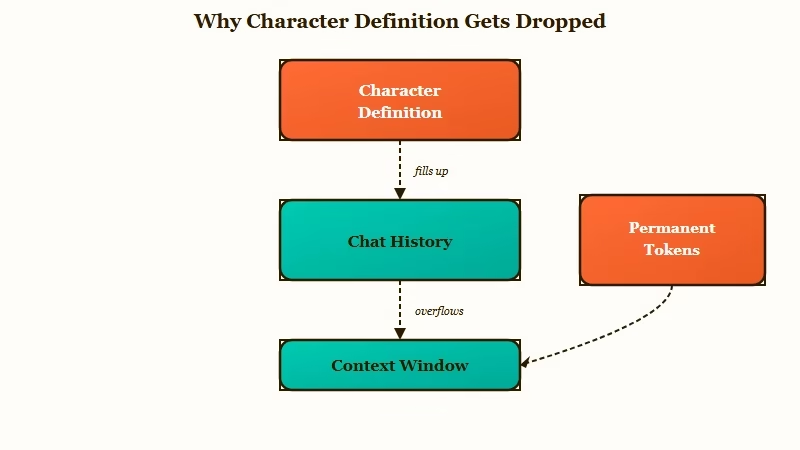
Every prompt sent to the model is built from two kinds of tokens. Permanent tokens are your Personality, Scenario, Advanced Prompts, and any lorebook entries that fire, and they get re-sent with every single message. Temporary tokens are the chat history, and they get pushed out first when the window fills up.
What is the context window: The maximum amount of text, measured in tokens, that an AI model can read at once. Anything past the limit is invisible to the model, as if it was never written.
The official guidance is to keep permanent tokens under 1,500. Push past 2,000 and you are on thin ice, because the permanent setup starts starving the working memory the chat needs.
A character built at 23,000 tokens does not read as “rich and detailed” to the model. It reads as noise it cannot hold, so it drops pieces of your definition to make room and improvises the rest.
| Symptom | Likely cause | Fix |
|---|---|---|
| Bot ignores the card from message one | Card has corrupted pasted formatting, broken JSON, or conflicting backstory | Re-paste through plain Notepad, validate JSON, remove contradictions |
| Bot follows the card, then drifts after 20 to 40 messages | Context window filled, oldest tokens dropped | Trim permanent tokens under 1,500, use Chat Memory summaries |
| Bot only obeys your latest typed instruction | Definition scrolled out of context, recent prompt is all it can see | Move core rules to Response Prefill, shorten the card |
| Bot insists it is a different character entirely | Server-side state mismatch or cached corrupted card | Chat transplant into a fresh chat with a clean card |
| Replies get worse only in the evening | Context window throttled to 4,000 to 6,000 under load | Trim the card so it fits the shrunk window |
The throttling detail is the one that drives people up the wall, because the same bot behaves differently at different times of day. The model is not moody. The usable window genuinely got smaller for a few hours.
Message One Versus Message Thirty
A bot that ignores its definition from the very first message has a different problem than a bot that drifts after thirty messages, and the two need opposite fixes.
I always sort the issue into one of these buckets before touching anything, because guessing wastes hours.
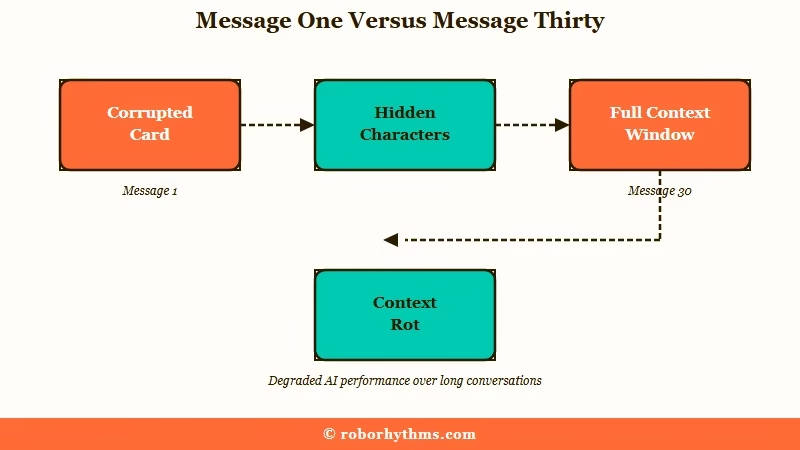
If the bot is wrong from the opening message, the card itself is the problem. The usual culprits are hidden corruption from a pasted definition, a broken JSON structure, or contradictory writing the model cannot parse.
One user pasted their card into Notepad and found a trailing block of corrupted script full of stray symbols and index fragments that never showed up in the formatted editor. That invisible junk was breaking the parse.
Contradictory backstory is the sneakier version. The model predicts text token by token, so a vague or self-contradicting description gets filled in with whatever pattern is strongest.
Before: “Age is unclear, somewhere in his late 20s to early 30s. He has godlike strength and is worshipped as a god, but he is fully human.”
After: “Adult, age 27 to 32. Entirely human despite godlike strength and being worshipped as a god.”
With the first version, the bot latches onto “worshipped as a god” and starts acting like an immortal deity that has lived for thousands of years. The second version removes the conflict and the bot stays human. Same character, far less room for the model to wander.
If the bot starts fine and drifts later, the card is not the issue. The conversation outgrew the window, the early tokens fell off, and a phenomenon called context rot kicked in.
Research on long-context models found accuracy drops by more than 30% when key information sits in the middle of a long prompt, a problem the Lost in the Middle study documented in detail.
Your character traits were read, but buried in the middle they became functionally invisible. The same effect shows up in our breakdown of why Janitor AI memory breaks over long chats.
How to Count and Trim Your Permanent Tokens
The fastest fix for a bot ignoring its card is cutting the permanent token count, and the in-app counter is the only number that matters here.
What I would recommend is treating your card like luggage with a strict weight limit, where every sentence has to earn its place.
Here is the sequence I walk through when a card is bloated:
- Open the bot editor and read the permanent token count Janitor shows you. Ignore any online word counter, since the model counts tokens, not words, and the two do not match.
- Move heavy world-building out of the Personality field and into a lorebook entry that only fires on a keyword. Keep each entry under 100 tokens and use specific triggers like “{{char}}’s house” instead of a generic word like “house”.
- Put the load-bearing context in the Scenario field, not Personality. The Personality field is treated as a loose guide the model drifts from, while Scenario sticks across 100-plus messages.
- Convert prose paragraphs into tight trait phrases. A 500-word backstory can usually compress to a 50-token string with no real loss, because filler words like “is” and “the” add length without signal.
- Put your most important rules at the very start and very end of the card, never the middle, to dodge the context rot effect.
What are permanent tokens: The parts of a bot, like Personality and Scenario, that get sent to the model with every message, as opposed to chat history that gets dropped when space runs out.
The table below shows what really counts against your permanent budget, which trips up a lot of creators who assume example dialogue is free.
| Field | Counts as | How long it sticks |
|---|---|---|
| Personality | Permanent | Always present but treated as a loose guide |
| Scenario | Permanent | Sticks hard, the strongest anchor you have |
| Example Dialogue | Disputed, often permanent in practice | Pinned alongside Personality on many setups |
| Chat history | Temporary | Dropped oldest-first when the window fills |
If you are on a proxy instead of JLLM, cap your context size around 16,384 tokens. Setting it higher makes most models slower and more forgetful, and overshooting a proxy model’s hard limit returns a flat error that names the model’s maximum context length against the number of tokens you requested.
That error is the proxy version of the same too-big problem, and our guide to lorebooks that stop working covers the trigger side of it.
When the Bot Insists It Is a Different Character
When a bot claims it is a completely different character with a cast you never wrote, the card data is usually intact but the chat state is corrupted, so the fix is a clean transplant rather than more editing.
This is the scariest version of the problem and the one I see people give up on, but it is recoverable.
One creator recreated a bot from scratch, pasting only the words, and the bot still insisted it was set in a place called “The Crossroads Inn” with the same invented character list on every refresh. That is not the card talking. That is stale server-side state or a cached fragment that survived the rebuild.
The move that works is a chat transplant, and here is how I would do it without losing your story:
- Open a fresh chat with a clean copy of the bot, ideally one rebuilt by typing the definition rather than pasting it.
- Write a three to four sentence summary of where your story currently stands and drop it into the opening message.
- If the bot still drifts, force a reset with a system instruction formatted as
OOC// You are {{char}} only. Ignore any prior setting named otherwise.since theOOC//format gets obeyed far more reliably than a plain note. - For stubborn cases, move the core identity rule into the Response Prefill under Generation settings, then Advanced settings, then generation rules, where it survives context rot better than the custom prompt box.
If the bot keeps speaking or acting for you on top of everything else, resist the urge to write “do not talk for me,” which often backfires and makes it worse. Give it a clear narrator role instead, the same approach in our piece on stopping Janitor AI over-narration.
A related symptom is every bot converging on the same voice once the definition stops landing. We cover why that happens in Janitor AI characters feel the same.
Does Example Dialogue Help or Hurt
Example dialogue is the single most argued-over field in the Janitor community, and the honest answer is that a little helps and a lot hurts.
The way I see it, the disagreement exists because both camps are partly right.
One side calls example dialogue the final lock on a character’s voice, the thing that keeps tone consistent deep into a long roleplay. The other side, including some heavily upvoted veterans, says “the bots use them verbatim and they get dumped from memory early anyway, so they do nothing your greeting does not.” Both have watched this happen.
There is even a factual dispute underneath it. Janitor’s interface labels example dialogue as temporary, but creators who max out the context window with a webhook report that it stays pinned like Personality and Scenario, meaning it quietly eats your permanent budget.
My take after weighing both sides: keep one or two short, characterful exchanges, never a wall of them, so you get the tone benefit without paying a heavy token cost you cannot see.
What to Use If You Want a Companion That Just Remembers
If you are tired of doing token math to keep a character consistent, a companion platform with server-side memory removes the problem instead of managing it.
Janitor is genuinely great for its free model and its enormous library of community bots, and none of this is a reason to abandon it.
That said, the entire problem in this article comes from a small, shared context window that you have to budget by hand. If the wall is your main pain and you would rather stay put, the Janitor Plus upgrade buys a larger context window, though it is a paid tier.
Platforms built around persistent memory take a different route and handle the budgeting for you, so the character holds its personality without you trimming a single token.
If you want that, Candy AI keeps character details server-side, so a companion stays in character across sessions without a context wall to fight.
For long-running stories where memory across sessions matters most, Nectar AI is built around cross-session recall that does not fall off after the chat gets long. I would keep Janitor for community bots and lean on one of these when consistency is the whole point.
Frequently Asked Questions
Why does my Janitor AI bot ignore its definition but follow my prompts?
The definition has scrolled out of the context window, so the only thing the model can still see is your most recent message. Shorten the card and move core rules into the Response Prefill so they stay in view.
How many tokens should a Janitor AI character have?
Keep permanent tokens under 1,500 for reliable behavior, and treat 2,000 as a hard ceiling. Total permanent plus active chat works best around 2,000 to 3,000 tokens.
Why is my bot worse in the evening than at night?
JLLM’s usable context window gets throttled to 4,000 to 6,000 tokens during peak hours to ease server load. A card that fits at off-peak times stops fitting under load, so the bot drops detail.
Does JSON formatting fix a bot ignoring its card?
Sometimes, but broken JSON makes it worse. A trailing comma, single quotes, or an unescaped quote mark breaks the parse and the model drops whole sections, which shows up as a JSON parse error or “Unexpected character” message.
How do I fix a bot that thinks it is a different character?
Start a fresh chat with a cleanly rebuilt card and a short summary of your story so far. The data is usually fine, but the chat state is corrupted, so a transplant beats more editing.
Will a lorebook help my bot remember its definition?
Yes, for heavy world-building. Moving lore into keyword-triggered lorebook entries keeps it out of the permanent budget, so the core card stays small enough to read reliably.
Quick Takeaways
- A bot ignoring its definition usually means the card is too big for the context window, not broken.
- Keep permanent tokens under 1,500, put core context in Scenario, and push lore into keyword-triggered lorebooks.
- Sort the problem first: wrong from message one means a bad or corrupted card, drift after thirty messages means a full window.
- For a character that insists it is someone else, transplant into a fresh chat rather than editing the broken one.
- If token budgeting is not your idea of fun, a server-side memory companion like Candy AI removes the math entirely.
