
What’s Changed: Janitor AI memory stops working when your chat outgrows the model’s context window, and on the free JLLM that window quietly drifts between 5,000 and 9,000 tokens depending on the day. The bot is fine. The fix starts with a token budget, and this guide walks through the exact sequence.
Janitor AI memory not working is the complaint behind a steady stream of frustrated posts, and it lands the same way every time. The bot that tracked your story perfectly for thirty messages suddenly forgets a name, a location, or the entire opening scene.
New users hit it fastest. One recent post described a bot forgetting the first chat after only four messages on default settings, and every useful reply pointed at the same invisible culprit.
That culprit is the context window, and the way Janitor AI manages it explains nearly every memory failure on the site. There is also a detail almost nobody mentions: the free model’s memory ceiling is not even a fixed number.
The rest of this guide covers why your bot forgets, how to audit the token budget behind it, and which fixes hold up past the 1,000-message mark.
Why Is Janitor AI Memory Not Working
Janitor AI memory not working is almost always token overflow: the conversation has outgrown the model’s context window, so the oldest messages silently drop out of what the bot can read before each reply.
What is a context window: The fixed amount of text, measured in tokens, that a model can read at one time when it generates its next reply.
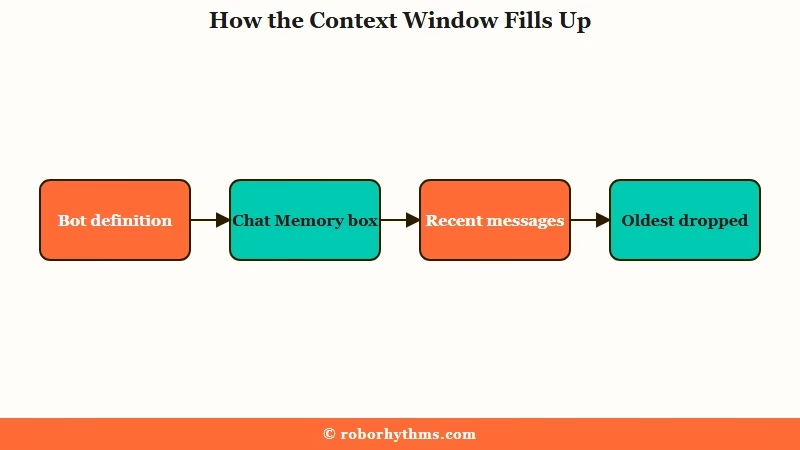
Every time you hit send, Janitor AI assembles a package for the model. That package always includes the bot’s personality, the scenario, your persona, anything in the Chat Memory box, and any custom prompt. Those are the permanent tokens, and they ride along with every single message.
Whatever space remains goes to your recent chat history. Those are the impermanent tokens, and they get evicted oldest-first the moment the package would exceed the limit. Your opening scene is always the first thing on the chopping block.
Here is how the layers stack up:
| Memory layer | What it holds | Sent every turn? | When space runs out |
|---|---|---|---|
| Bot definition | Personality, scenario, appearance | Yes, permanent | Never dropped, but can crowd out everything else |
| Chat Memory box | Your hand-written plot summary | Yes, permanent | Never dropped, counts against the same budget |
| Recent messages | The live conversation | Newest kept | Oldest messages evicted first |
| Example dialogues | Sample lines that set the bot’s voice | No, temporary | Among the first content deleted in long chats |
| Lorebook entries | World facts behind trigger words | Only when triggered | Capped at 6 entries firing at once |
The row that surprises people is example dialogues. Creators pour hours into sample lines that define a character’s voice, yet those lines are classified as temporary and get deleted once a chat runs long. That is why a bot can lose its own way of talking even while the plot stays on track.
The other quiet detail sits in the free model itself. JLLM’s working limit hovers around 9,000 tokens, but community testing has caught it drifting as low as 5,000 on heavy days. The way I see it, that moving floor is the single best explanation for the classic mystery of memory that worked fine yesterday and broke today on the same bot.
Why the Free Model Forgets So Much Faster
JLLM, the free default model, works inside roughly 5,000 to 9,000 tokens of context, while proxy models like DeepSeek get up to Janitor AI’s site-wide cap of 128,000 tokens, which is the entire difference in felt memory.
Run the math on that small window and the four-message amnesia case stops being mysterious. A heavyweight bot can carry 5,000 permanent tokens of definition before the first message is sent. Add a persona and a custom prompt and the package leaves almost no room for actual conversation, so the story starts falling out of context nearly immediately.
There is a harder failure mode past that. When permanent tokens climb toward 8,500, community testing found the bot can stop reading parts of its own definition, which is why an overloaded character suddenly ignores its personality and Janitor AI’s message limits start feeling random.
The platform has also experimented here before. One memory-handling update that trimmed processing to the last 10 messages was reverted within hours after user backlash, which tells you how sensitive this system is.
Proxy users are not exempt, just better resourced. A bigger window only delays eviction, and stuffing 100,000 tokens of history into a model is no guarantee the model reads it all with equal attention.
Research out of Stanford documented the pattern formally. In the Lost in the Middle study, models recalled information at the start and end of long contexts far better than anything buried in the middle.
That research matches what long-form roleplayers keep rediscovering. Models weight the newest 10 or so messages heavily, older context fades into low-priority reference material, and a tight 300-token summary often beats 80,000 tokens of raw scrollback. I’d argue the most counterintuitive rule on the platform is that a smaller, well-managed context produces steadier memory than a maxed-out one left to rot.
What to Do About It
The fix is a token audit followed by disciplined Chat Memory use: keep bots under 2,000 permanent tokens on the free model, hold your summary under 1,000 tokens, and move static world facts into a lorebook.
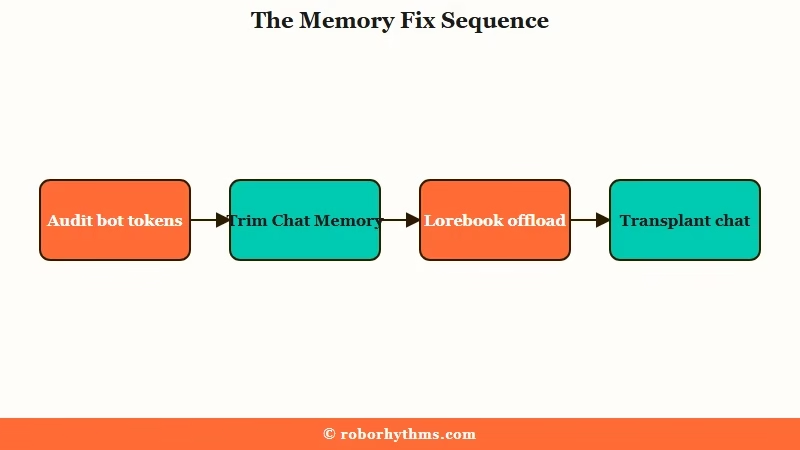
Start with the quick-reference table, then work the numbered sequence below it.
| Symptom | Likely cause | Fix |
|---|---|---|
| Bot forgets within 4 to 10 messages | Bot definition too heavy for JLLM’s window | Pick bots under 2,000 permanent tokens or switch to a proxy |
| Memory fine yesterday, broken today | JLLM’s limit drifting between 5,000 and 9,000 | Trim permanent tokens so the worst-case floor still fits |
| Bot ignores its own personality | Permanent tokens near the 8,500 breaking point | Cut definition bloat, offload lore to a lorebook |
| Early scenes vanish in long chats | Oldest messages evicted from context | Summarize milestones into Chat Memory every 20 replies |
| Bot loses its speech style late in a chat | Example dialogues are temporary tokens | Bake voice rules into the personality field instead |
| Long proxy chat gets confused and repetitive | Context size set far past the useful range | Drop to 16,384 and lean on summaries |
My rule of thumb: treat the first three steps as mandatory and the rest as escalation.
- Audit the bot’s tokens before you blame the model. Open the bot’s page and check its permanent token count. On JLLM, anything over 2,000 permanent tokens is going to forget fast, no matter what you do downstream.
- Write Chat Memory like a cheat sheet. Record plot milestones, relationship status, and active goals in plain sentences. Skip decorative headers and brackets, they spend tokens without helping the model, and keep the whole box under 1,000 tokens.
- Move static world facts into a lorebook. Lorebook entries only enter context when their trigger words appear, so they store deep lore at near-zero standing cost. One creator cut a bot from 1,012 permanent tokens to 529 this way. Two cautions: only 6 entries can fire at once, and entries read best at 1 to 3 sentences. If yours misfire, the Janitor AI lorebook guide covers the trigger settings that silently block them.
- Set context size deliberately on proxies. A setting of 16,384 is the sweet spot between recall and coherence for most DeepSeek setups. Pushing the slider to the max routinely degrades recall.
- Use an OOC summary command before things degrade. An OOC (out of character) note lets you talk to the model directly without advancing the scene. Pause the roleplay and ask it to compress its own history, then paste the result into Chat Memory and delete the OOC exchange from the chat. The wording power users keep pinned to a clipboard:
(OOC: pause the roleplay and give me a brief point by point summary of the roleplay so far (using parentheses to capture details). Minimize token use to the bare minimum, and maintain the order of events)- Transplant the chat when it is too far gone. If the bot is confused beyond saving, start a fresh chat with the same character and paste your summary into the new Chat Memory box before the first message.
What is a context transplant: Restarting a degraded roleplay in a fresh chat, carrying over a compressed summary of past events so the story continues with clean context.
A degraded long chat also tends to loop phrases, and context bloat is one of the usual suspects there. The fixes in stop Janitor AI repeating itself pair well with this sequence.
How Do 2,000-Message Roleplays Keep Their Memory
Long roleplays survive on a structured Chat Memory system: a current-status block at the top, compact NPC sheets, unresolved plot points, and an archive that gets progressively compressed as the story ages.
The players who ride a single story past 2,000 messages maintain four sections inside Chat Memory, in a deliberate order, because the model follows whatever sits highest most consistently. Current status first, then NPC relationship sheets, then unresolved plot threads, then archives.
The archive section is where the compression discipline lives. Fresh events get a sentence each, and once an arc is several weeks old, the whole stretch gets merged into one short paragraph that keeps only load-bearing facts. Updating every 20 replies or so keeps the workload trivial.
Word choice matters more than most people expect at this scale. Token counters price words differently, so a summary written in short, common words physically stores more story: the word gorgeous costs 3 tokens where beautiful costs 2, and those savings compound across a 1,000-token box.
Before: “Week 1: We met at the lantern festival and talked for hours about the war, his missing brother, and the silver necklace his mother left him, then walked to the river and promised to meet again.”
After: “STATUS: Day 12, traveling north together. BOND: trusts {{user}}, defensive about the necklace. OPEN: brother missing at the front, festival debt unpaid.”
The first version costs about 45 tokens and reads like a diary the model skims. The second costs about 30, and every line is an instruction the model can act on. If your bot follows the summary but still steers scenes badly, that is a prompt problem rather than a memory one, and prompt fixes for Janitor roleplay covers that side.
What surprised me most is how little raw context size matters compared to summary hygiene. Players holding 200,000-token stories together on a 32K window with a tidy 3,000-token memory block consistently report better recall than max-context users with no system.
Forgetting and deleting are not the same failure. A bot that no longer recalls your earlier scene is a memory problem, while chat text that has physically left the thread points at something else and has its own recovery steps.
When the Better Fix Is a Platform That Remembers
If the upkeep is the dealbreaker, the honest alternative is a companion platform with built-in long-term memory, and that is where Candy AI and Nectar AI earn a look.
Everything above works, and Janitor AI rewards the effort with unmatched control over bots and models. The trade is that you become the memory system: summarizing every 20 replies, pruning tokens, transplanting chats. Some people enjoy that maintenance loop. Plenty of people quietly do not.
If you want the long-running relationship without the spreadsheet energy, Candy AI is the polished pick, with companion memory handled server-side and characters that reference past conversations without being told to. It is the option I’d point most ex-Janitor users to first.
For memory specifically, Nectar AI is the specialist: persistent memory runs automatically across sessions, so the bot recalls last week’s scene with zero Chat Memory housekeeping. Pair either with the habits above and the forgetting problem mostly disappears as a category.
Frequently Asked Questions
How do I increase Janitor AI’s memory?
You cannot raise JLLM’s window, so the real options are reduction and structure. Use bots under 2,000 permanent tokens, keep a sub-1,000-token Chat Memory summary, and offload lore to a lorebook. On a proxy model, set context size around 16,384 rather than maxing it.
Does Chat Memory count toward my token limit?
Yes. Chat Memory is part of the permanent tokens sent with every message, so an overstuffed memory box crowds out live conversation. Keep it under 1,000 tokens and prune finished arcs into one-line archive entries.
Do rerolls count toward Janitor AI memory?
Only the reply you keep enters the chat history, so rerolling does not stack hidden tokens. On the Chutes proxy, rerolls are also billed lightly, counting as a tenth of a message against daily request allowances.
What context size should I set for DeepSeek on Janitor AI?
Start at 16,384. It balances recall and coherence for most roleplays, and Janitor caps usable context at 128,000 regardless of what the model supports. Raise it gradually for sprawling stories, and rely on Chat Memory summaries past 32K instead of raw context.
Why does my bot suddenly act out of character in long chats?
Two mechanics collide: example dialogues that defined its voice are temporary and get evicted, and definitions near the 8,500-token breaking point stop being read reliably. Move voice rules into the personality field and cut permanent token bloat.
How many messages can Janitor AI remember?
There is no fixed message count, because the limit is measured in tokens rather than turns. In practice a heavy bot can start dropping details within 4 to 10 messages, while a lean one on the same window holds a scene for far longer. On the free JLLM the working ceiling sits near 9,000 tokens, and community testing has caught it drifting lower on heavy days, so the same bot can hold a long chat one day and lose the thread the next.
A heavy bot definition spends that budget before your conversation even starts. Whatever the permanent block leaves over is what your recent messages get. Trimming a bloated definition is the fastest way to buy back remembered turns on the free model, though switching to a proxy raises the ceiling far more.
Why does Janitor AI keep forgetting details?
Details drop out when the package sent to the model would exceed the context window, and the oldest messages are evicted first. Within that chat history the opening scene goes first, so early plot points are usually the first casualties.
Example dialogues are the other common loss. They are classified as temporary, so the sample lines that set a bot’s voice get deleted in long chats even while the plot itself survives.
Quick Takeaways
- Janitor AI memory failures are token overflow, and on JLLM the ceiling drifts between 5,000 and 9,000 tokens day to day.
- Keep bots under 2,000 permanent tokens and Chat Memory under 1,000, because both ride along with every single message.
- Lorebooks store deep lore at near-zero standing cost, with a 6-entry trigger cap to design around.
- Update a structured Chat Memory block every 20 replies, then transplant the chat with your summary once recall degrades.
- If manual memory upkeep is the dealbreaker, Nectar AI’s automatic persistent memory or Candy AI’s managed companions remove the chore entirely.
