
What’s Changed: Janitor AI logged a wave of users out mid-chat and showed “profile not found” when they tried to log back in. This is an authentication outage, not a ban or a deleted account. The fix is to wait a few minutes and retry, and your data is almost certainly fine.
If Janitor AI just kicked you out and now says “profile not found,” take a breath. You are not banned, your account is not deleted, and you did nothing wrong.
A wave of users hit this exact issue at the same time, logged out in the middle of chats and then blocked at the login screen. The panic is real: people came to the subreddit convinced their accounts were gone. They are not.
What you are seeing is a temporary authentication outage, and it clears on its own. This piece explains what happened, why your data is safe, and the exact steps to get back in without making things worse.
What’s Happening With Janitor AI Right Now
Janitor AI is having an authentication outage that logs users out mid-session and returns “profile not found” on login. It is server-side, not account-side.
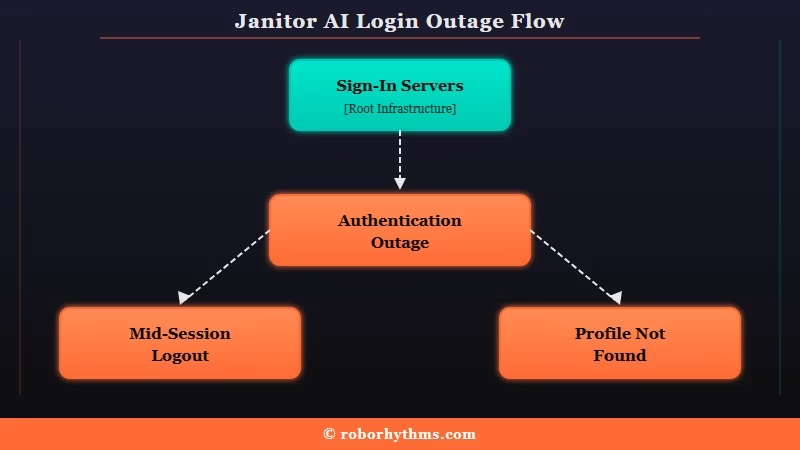
The pattern is consistent across reports: people get logged out in the middle of a chat, not after sitting idle, then the login screen says the profile cannot be found.
One user put it plainly: “it logged me out mid-chat so I know it wasn’t inactivity.” That detail matters, because it rules out a normal session timeout.
Monitoring trackers logged a cluster of outage reports for Janitor AI in a single 24-hour window, all centered on login and “profile not found” errors. The most likely cause is a hiccup on the authentication servers, either Google’s sign-in layer or Janitor AI’s own, which is exactly the kind of thing that resolves without you touching a setting.
From what I have seen, this is landing right as Janitor pushes another UI change, and bugs tend to spike around those rollouts. The AI companion space is mainstream enough now that an outage like this rattles a lot of people at once, with TechCrunch on AI app growth showing how fast usage has climbed.
Why It Matters and Whether Your Account Is Safe
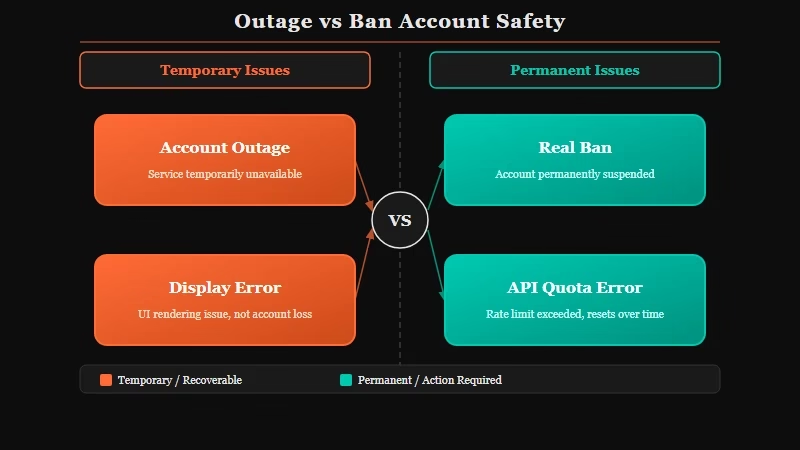
Your account and chats are safe; “profile not found” during an outage is a display error, not a deletion. The difference between an outage and a ban is easy to spot once you know the signs.
The reason this one stings, from what I have seen, is the wording. “Profile not found” reads like your account was wiped, which is why so many users assumed a ban.
In an outage, the server simply cannot verify your session for a moment, so it cannot load your profile, and it shows that scary message instead of a calm “try again.”
Here is how to tell an outage from an actual ban so you stop panicking.
| Symptom | Likely cause | What it means |
|---|---|---|
| Logged out mid-chat, “profile not found” on login, many users at once | Authentication outage | Temporary, data is safe, wait it out |
| Errors like 502, 1033, or “invalid response from upstream server” | Server-side outage | Not your fault, retry later |
| “You cannot interact with this account” on one creator’s bots | Creator-level block | Only affects that creator, not your account |
| 403 or “reached your quota” tied to your own API key | API or terms issue | Account-level, check your provider |
If your symptom is in the top two rows, you are looking at an outage, full stop. The community subreddit and the official status page are the fastest way to confirm everyone else is seeing it too.
What to Do About It
Wait a few minutes and retry first, then clear cache and cookies if it persists. Do not delete your account or change settings in a panic.
Here is the sequence I would run, in order, before assuming anything is wrong with your account:
- Wait 5 to 15 minutes and retry the login. Most auth outages clear on their own, and several users reported getting back in after about five attempts.
- Hard refresh the page, then clear your browser cookies and cached files and restart the browser.
- Try an incognito window or a different browser like Firefox or Edge to rule out an extension blocking the login.
- Toggle your network, switching from Wi-Fi to mobile data or back, to rule out an ISP or DNS issue.
- Check the r/JanitorAI_Official subreddit or the official status page to confirm it is a site-wide outage.
Before: You see “profile not found,” assume you are banned, and rush to make a brand new account.
After: You recognize the mass-outage signs, wait ten minutes, retry, and your original account loads with every chat still there.
What you should not do is panic-delete anything, change your email, or spam new accounts. None of that helps an auth outage and it can create real problems on an account that was fine all along.
If the site is still misbehaving after it comes back, the broader Janitor AI not working fixes guide covers the deeper troubleshooting, and the Janitor AI slow response fix helps if it returns sluggish.
If you would rather not sit through the downtime, it is reasonable to keep a backup companion ready. Nectar AI is the alternative I point most people to for stability and memory, and if you want a broader shortlist, the guide to the best AI companion apps lays out solid options.
Frequently Asked Questions
Did Janitor AI ban me or delete my account?
Almost certainly not. A mass “profile not found” wave that logs many users out at once is an authentication outage, not a ban. Your account and chats are intact and return once the servers recover.
Why does Janitor AI say “profile not found” after logging me out?
During an authentication outage, the server cannot verify your session, so it fails to load your profile and shows “profile not found.” It is a display error from the outage, not a sign your profile was removed.
How long does a Janitor AI outage last?
Most authentication outages clear within a few minutes to an hour. Several users reported getting back in after roughly five login attempts spread over a short window.
How do I tell an outage from a ban on Janitor AI?
An outage hits many users at once with login and “profile not found” or 502-type errors. A ban or block is usually account-specific, like “you cannot interact with this account” on one creator’s bots or a quota error tied to your own API key.
What should I do while Janitor AI is down?
Wait and retry, clear your cache and cookies, and check the subreddit or status page. Avoid deleting your account or making new ones. Keep a backup companion app handy if you do not want to wait.
Quick Takeaways
- The Janitor AI logout and “profile not found” wave is an authentication outage, not a ban or deletion.
- Getting logged out mid-chat, not after idling, is the tell that it is server-side, not your session.
- Wait and retry first; many users got back in after about five attempts over a short window.
- Clear cache and cookies, try incognito or another browser, and toggle your network if it persists.
- Do not panic-delete your account; keep a backup companion like Nectar AI ready if you would rather not wait.

Crazy artist