
What’s Changed: Janitor AI’s new UI update rebuilt the chat engine, and that rebuild removed the draggable scrollbar and made long chats snap back to the first message. The team has confirmed it is a known bug with no fix date yet. For now you are left with a handful of workarounds that get you back to the bottom of your chat.
If Janitor AI keeps scrolling to top every time you tap the screen, you have not broken a setting and you are not doing anything wrong. The new UI update quietly swapped out the entire chat system, and the scroll behavior went with it.
The clearest clue sits in Janitor’s own app release notes. The 2.0 update describes a rebuilt chat system with new loading states and smoother pagination, which is developer-speak for ripping out the old message list and dropping in a faster one. When you rebuild how thousands of messages get drawn on screen, scroll position is one of the first things to break.
What matters more is the cause. A team member confirmed in a pinned update that the scroll issue is acknowledged, that it is not an easy fix, and that there is no ETA. So this guide splits in two, the plain reason it happens and the platform-by-platform tricks that get you to the bottom of your chat today.
Expect to walk away knowing the one in-app toggle most people miss, the desktop shortcut that jumps you anywhere in a chat, and the mobile moves that stop the snap mid-reply.
Why Janitor AI Keeps Scrolling to Top
Janitor AI keeps scrolling to top because the new UI rebuilt its chat around a virtualized message list, and that system loses your scroll position whenever it reloads messages, refreshes, or redraws the page.
The snap is a side effect of the rebuild, not a setting you forgot to flip.
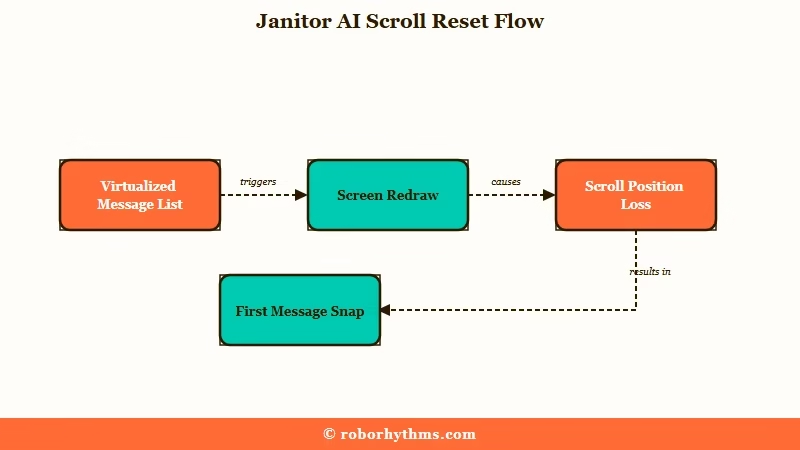
What is virtual scrolling: A technique where an app draws only the messages currently on screen instead of all of them, swapping them in and out as you scroll to save memory.
The trigger is almost always a redraw. Tapping the screen while the bot is typing, refreshing the page, or opening a chat in a tab that went inactive all force the window back to the very first message. The old quick-jump arrow that used to drop you at the latest reply is either gone or misfires.
There is a real engineering reason behind it. When an app uses virtual scrolling and cannot measure the height of each message correctly, every new block of streaming text shifts the layout and throws the viewport off. Older mobile browsers make it worse, since some have a long-standing habit of snapping to the top whenever new content loads in.
What surprised me is how many people assume this is deliberate. It is not a new “feature” Janitor added on purpose but a side effect of the rebuilt rendering engine struggling to keep its place. The official changelog backs that up by listing chat rendering and pagination as things the team reworked.
What Happened to the Scrollbar and Skip Button
The draggable scrollbar was removed in the redesign, and the quick skip-to-bottom arrow either vanished or now misfires, so reaching recent messages in a long chat means repeated swiping.
Desktop users lost the most here.
On Chrome, the grabbable bar on the right side of the chat is just gone after the update. I used to flick it to the bottom of a long roleplay in one motion, and now the only option is the mouse wheel. Several users report that spinning the wheel sometimes drops them into a loop that repeats the same ten messages and refuses to let them reach older history.
A stranger glitch shows up on some accounts: tiny scrollbars appear directly on the individual messages instead of the page. They make the screen zap around erratically, and people end up refreshing the whole page just to read one full bot reply.
The skip-to-bottom button is not much of a safety net either. On very long chats, pressing it can occasionally spit out a garbled wall of text that will not clear until you reload.
The way I see it, the navigation tools broke at the same time as the scroll position, which is why the whole thing feels so disorienting.
Why It Matters for Long Roleplays
The scroll bug bites hardest in long chats, where it can trap the window several messages from the bottom and make streaming replies impossible to read as they generate.
Casual users barely notice it. Heavy roleplayers feel it constantly.
Janitor AI pulls in well over 100 million visits a month according to Similarweb, so when the scroll breaks, an enormous number of people hit it at once. That scale is also why fixes are slow: a rendering change that helps one device can hurt another.
One detail that stood out to me involves chat length. At least one user found their mobile chat got stuck roughly eight messages from the bottom and refused to move, and the common thread was an enormous history sitting north of 50,000 messages. The heavier your chat, the harder the new engine works to place the scrollbar, and the more often it fails.
There is a second daily annoyance on top of the snapping. The chat input box now expands upward over the previous message while you type, so you lose sight of the bot’s last post right when you want to reference it.
None of this stops the roleplay outright, but it adds friction to something that used to be smooth, and that wears on you fast. If your replies are also crawling in, the separate Janitor AI slow response problem often shows up in the same sessions.
How to Stop Janitor AI From Scrolling to the Top
You can blunt the scroll problems with the in-app autoscroll toggle, a desktop console shortcut, and a few mobile gestures, though none of them fully repairs the rebuilt engine yet.
Treat these as relief, not a cure.
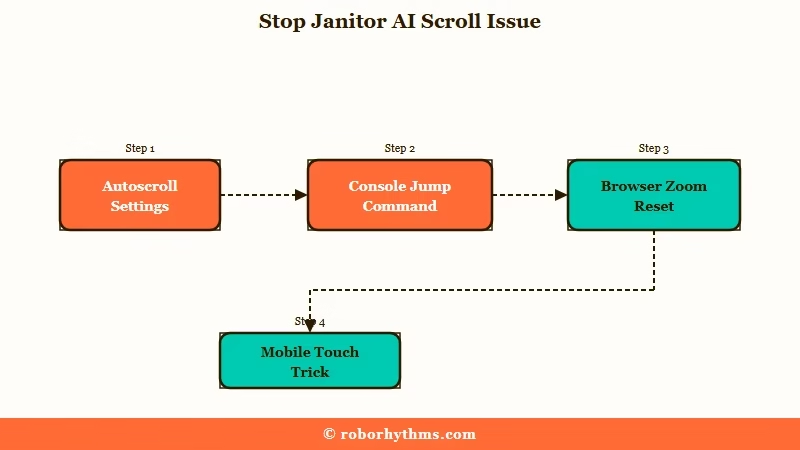
Here is the quick map of what breaks and what helps before the step-by-step:
| Symptom | Likely cause | Fix to try first |
|---|---|---|
| Chat snaps to the first message on tap or refresh | Virtualized list loses scroll position on redraw | Avoid tapping mid-reply, use the console jump on desktop |
| Screen yanks to the bottom on every streamed line | Autoscroll setting is on | Turn off Enable Autoscroll in Customize, Options |
| No draggable scrollbar on desktop | Scrollbar removed in the redesign | Use the mouse wheel or the console snippet |
| Mobile chat stuck a few messages up | Long history plus zoom rendering quirk | Set browser zoom to 90, 67, or 50 percent |
| Everything tiny and locked, cannot scroll | Browser switched to Desktop site mode | Toggle Desktop site off in the browser menu |
The autoscroll toggle is the single most overlooked fix, so I would start there before any of the gymnastics below.
The In-App Autoscroll Toggle Most People Miss
The setting that stops the page yanking to the bottom on every line lives deeper than people expect. I would walk through it first because it is the only official switch for any of this.
- Open a chat and tap the Customize menu.
- Go into Options.
- Find Enable Autoscroll and toggle it off.
One honest caveat: a chunk of users report the chat keeps auto-scrolling even with the toggle off. If that is you, the engine is overriding the setting, and you are stuck with the manual tricks below until the next patch.
I have also seen people turn off text streaming to escape the scroll, which works, but be careful: a few models on OpenRouter need streaming on or they throw an error and stop replying.
The Desktop Fix That Jumps You Anywhere
On a computer, the fastest relief is a one-line console command that drops you straight to the top of a chat without a risky refresh. This is the workaround I reach for on long histories.
Open the browser console with Ctrl+Shift+J on Chrome, paste this in, and hit enter:
document.querySelector('main').firstChild.scrollTo(0,0);If the console feels like too much, zooming your browser out to around 67 percent shrinks the chat enough that the scroll usually behaves, then you can bump it back up to read.
Mobile App and Mobile Web Moves
Phones get their own set of tricks, and they are more about timing than settings. What I would try depends on whether the snap happens mid-reply or you are just plain stuck.
Before: the chat snaps to the top the instant the bot starts typing, so you lose the reply.
After: press send, then pull the text upward a little once while the bot types. That single tug disconnects the message from the auto-scroller and the page holds still.
On mobile web, holding one finger on the screen before the bot’s thinking bubble appears does much the same thing. If your chat is stuck a few messages up, change your mobile browser zoom to exactly 90, 67, or 50 percent, which has freed long chats for a lot of users.
And if everything suddenly looks tiny and you cannot scroll at all, your browser flipped into Desktop site mode by accident, so open the three-dot menu and toggle Desktop site off.
Here is how the fixes break down by device:
| Platform | Best fix | Backup move |
|---|---|---|
| Desktop Chrome | Console snippet to jump to top | Zoom out to 67 percent, use mouse wheel |
| iOS or Android app | Pull text up once after pressing send | Switch to the website if the app freezes |
| Mobile web | Hold a finger before the thinking bubble | Set zoom to 90, 67, or 50 percent |
Is the Scroll Bug Permanent or Getting Fixed
The scroll behavior is an acknowledged bug, not a permanent feature, and Janitor’s team has said a fix is in progress with no set timeline.
I want to stress that, because the silence between updates makes people assume the worst.
In an official update, a team member wrote that they had confirmation the issue is actively under work, that it is not an easy fix, and that it will take significant time with no ETA. The app changelog supports that, since it lists rebuilt chat rendering and smoother long-chat loading as things the team is reworking version by version.
There is genuine disagreement in the community about what to even do. Some users swear the website is broken and the app is the safe haven, while others say their app is completely broken and the website is the only thing that still works.
The honest read is that behavior is inconsistent across devices, so it is worth testing both rather than trusting one blanket recommendation. The new look itself is covered in the Janitor AI new UI breakdown, if you want the full rundown.
What to Use If the Interface Stays Broken
If the broken scrolling is wrecking your sessions, the cleanest alternatives are purpose-built companion apps with stable, modern chat interfaces, and the two I would point people to are Candy AI and Nectar AI.
Neither carries the rebuilt-engine baggage Janitor is working through right now.
For a smooth chat that just holds its place while a reply streams in, Candy AI is the one I would try first. The interface is built for fictional roleplay and conversation without the scroll chaos, so reading a long reply does not turn into a finger workout.
If your real frustration is losing the thread of a long story, Nectar AI leans hard on memory and keeps continuity across long sessions. I would treat both as a backup you can run alongside Janitor rather than a full goodbye, especially while the scroll fix is still cooking.
If memory is the deeper issue for you, the Janitor AI memory problem breakdown is worth a read too.
Frequently Asked Questions
Why does Janitor AI keep jumping to the first message?
Janitor AI jumps to the first message because the new UI uses a virtualized chat list that loses your scroll position whenever it redraws, refreshes, or reloads messages. Tapping the screen while the bot types is the most common trigger.
How do I turn off autoscroll on Janitor AI?
Open a chat, tap Customize, go to Options, and toggle off Enable Autoscroll. It stops the page yanking to the bottom on every line, though some users report the setting fails to take effect until a future patch.
Did Janitor AI remove the scrollbar?
Yes, the redesign removed the draggable scrollbar on desktop browsers like Chrome, so you can no longer click and drag to scroll. You are left with the mouse wheel or a console command that jumps you to the top.
Why won’t my Janitor AI chat scroll down on mobile?
Long chats, especially those with tens of thousands of messages, can get stuck a few messages from the bottom. Setting your mobile browser zoom to 90, 67, or 50 percent has unstuck the chat for many users.
Is the Janitor AI scroll bug going to be fixed?
Janitor’s team has confirmed the scroll bug is acknowledged and actively under work, but it is a hard fix with no ETA. The app changelog shows the chat engine is being reworked across updates, so expect gradual improvement rather than one big patch.
Quick Takeaways
- The new UI rebuilt Janitor’s chat engine, and the scroll-to-top snap plus the missing scrollbar are side effects of that rebuild, not settings you broke.
- Turn off Enable Autoscroll in Customize, Options first, since it is the only official switch and the one most people miss.
- On desktop, the console snippet jumps you to the top instantly, and on mobile, pulling the text up once after sending stops the mid-reply snap.
- The team has called it a hard fix with no ETA, so if the interface keeps ruining long chats, a stable alternative like Candy AI is worth keeping on hand.
