
What’s Changed: Many 2025 guides still send Chutes users on Janitor AI to model names and free limits that no longer exist. As of September 25, 2026 Chutes lists 14 models and says it has no free tier, and the fix for a failed fetch depends on which error code you see.
The “Janitor AI failed to fetch” error on the Chutes proxy covers at least six different problems under one message. Each one has a different cause and a different fix, and the generic “clear your cache” advice that most guides lead with solves maybe one of them.
Chutes answers “Infrastructure is at maximum capacity” when the model you picked has no room, so your Janitor AI session can fail while both status pages show green.
I have mapped every error code Chutes throws at Janitor AI users, what triggers each one, and the fastest path back to a working chat. If you are staring at a failed fetch right now, find your error code below. If you connect through OpenRouter or DeepSeek instead, the Janitor AI proxy error guide covers those codes.
What Each Chutes Error Code Means on Janitor AI
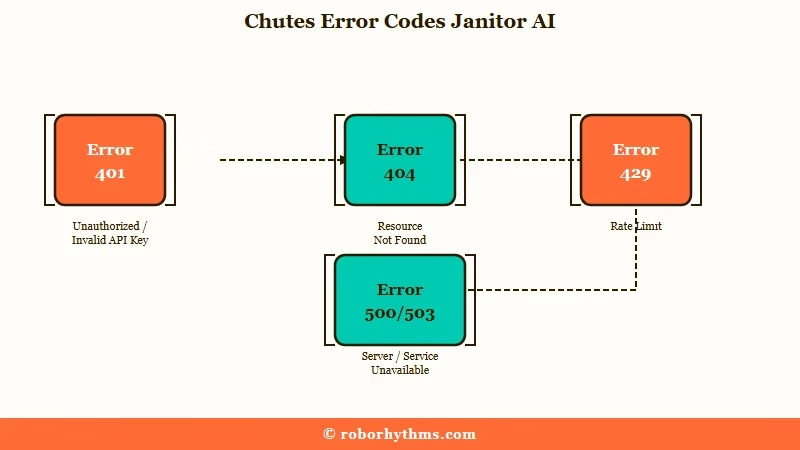
Each error code points to a different layer of the connection chain, and fixing the wrong layer wastes time.
The most common error is a plain “Failed to Fetch” with no code attached. This happens when your browser cannot establish a stable connection with the AI model servers due to API timeouts or network interruptions. It is the vaguest error and the one most often caused by ad-blockers, VPNs, or stale browser cache.
If you would rather not run a proxy at all, Candy AI needs no API key, and its paid plans include unlimited text chat from $3.99 a month billed yearly, or $13.99 for a single month.
The codes that do show up tell you exactly where the break is. Here is the full map.
| Error Code | Message | What Broke | Your Fix |
|---|---|---|---|
| 401 | Invalid Token | API key wrong or has invisible characters | Regenerate key on Chutes, must start with cpk_ |
| 402 | Requires more credits | Chutes account balance empty | Top up your balance in the Chutes app |
| 404 | Model not found | Model name misspelled in settings | Copy the exact name from the model’s API tab on Chutes, such as deepseek-ai/DeepSeek-V3.2-TEE |
| 404 | No matching cord found | API URL is wrong | Set to https://llm.chutes.ai/v1/chat/completions |
| 429 | Infrastructure at maximum capacity | That model’s instances are full | Wait 5-10 minutes, retry |
| 429 | Rate-limited upstream | OpenRouter’s wording when the host serving that model is rate limiting it or at capacity | Switch to a less busy model or try off-peak hours |
| 500 | Exhausted all available targets | Chutes servers down | Nothing you can do, wait for provider fix |
| 503 | No instances available yet | Model restarting or overloaded | Wait a few minutes for the model to come back |
How to Fix the Most Common Chutes Fetch Failures
The fix sequence matters because each step eliminates a different failure layer, and doing them out of order wastes time.
Most Chutes fetch failures come down to three things: a misconfigured API URL, a stale browser session, or peak-hour congestion. Here is the order I would walk through.
- Run Janitor’s own reset first: open your proxy config and check it says Active, click Save Settings even if nothing changed, refresh the whole page, then click Test.
- Verify your API URL is exactly https://llm.chutes.ai/v1/chat/completions with no trailing slash or missing path segment. The “No matching cord found” 404 error is a common misconfiguration and an easy one to miss because one wrong character triggers it.
- Check that your API key starts with cpk_ and has no invisible spaces at the beginning or end. Paste it into a plain text editor first to strip formatting. A 401 error means this is the problem.
- Clear your browser cache and cookies for janitorai.com specifically, not a full browser wipe. Disable any VPN or ad-blocker temporarily. The plain “Failed to Fetch” with no error code is almost always this layer.
- If you see a 429 error, check https://status.chutes.ai/ for current server load. A 429 that says “Infrastructure is at maximum capacity” means the model you picked has no spare capacity right now, so try a less busy model from Chutes’ list or wait for off-peak.
- For persistent failures after the earlier steps, you can try https://api.lorebary.com/chutes as the proxy URL, a free pass-through that sends your request on to Chutes using your own key (see what Lorebary is). Refresh the chat page completely after changing the URL. It still reaches the same Chutes model, so it will not clear a 429 or a 503 from a model that is full or restarting.
Before: Your API URL is set to https://llm.chutes.ai/v1/ and you get “No matching cord found” on every message.
After: You append chat/completions to get https://llm.chutes.ai/v1/chat/completions and messages go through immediately.
Why Chutes Errors Happen Even When the Status Page Says Everything Is Fine
The status page covers Chutes as a whole, but a 429 comes from the single model you picked, and that model can fill up while everything else runs normally.
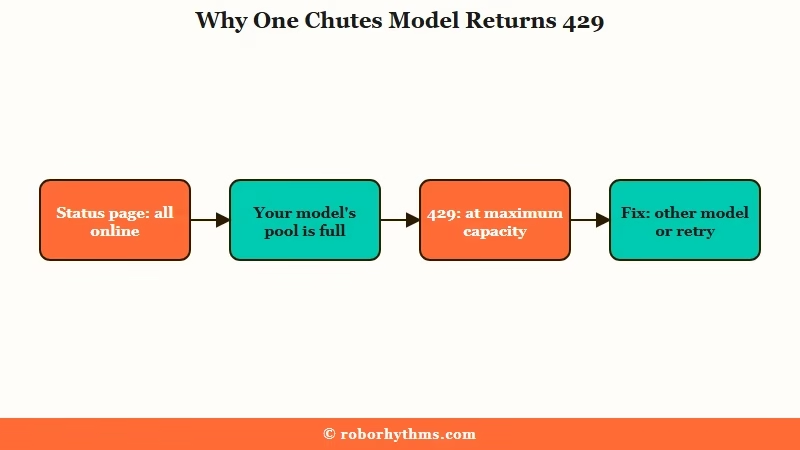
The most frustrating failure mode is when both services are technically online but your messages fail anyway. Each model on Chutes runs on its own pool of instances, which is why its 503 error names a chute ID, and a busy model can fill up while the platform as a whole stays healthy.
Priority has played a part before. In July 2025 OpenRouter told users that Chutes had added rate limits to the free DeepSeek V3 model “to ensure stability for their paying customers”, as RPwithAI reported. Chutes now requires a top-up before first use, so anyone on their own Chutes key is a paying customer, and a 429 there points at capacity for the model you picked.
For context, Chutes’ pricing page says it does “not offer a free tier at this time”, and its Plus ($10 a month) and Pro ($20) plans bundle a daily request quota. Janitor AI draws over 100 million monthly visits according to Similarweb, so even a small share of that traffic can fill a popular model.
The DeepSeek V4 setup guide covers the model configuration side in more detail. For the broader question of whether Janitor AI’s model quality is worth the proxy hassle, that comparison helps frame the decision.
When to Stop Fighting Chutes and Switch Proxies
If you are spending more time fixing your proxy than chatting, the Chutes path is not saving you anything.
If you are hitting 500 or 503 errors consistently, the problem is on Chutes’ infrastructure side and no client-side fix will help. That includes Lorebary, which forwards your request to the same Chutes model.
OpenRouter is the main alternative proxy path. Its free models allow 50 requests a day, or 1,000 after a one-time purchase of 10 credits, and on paid models it retries other hosts automatically when one is busy. The Janitor AI alternatives breakdown covers platforms that skip the proxy setup entirely.
If the proxy game is wearing you down, platforms like Nectar AI handle model routing server-side with no user configuration required. CrushOn AI is another option with built-in model switching that skips the entire BYOK setup.
Example scenario: You have been using Chutes with DeepSeek-V3.2-TEE for two weeks with no issues. One afternoon every message returns “429 Infrastructure at maximum capacity,” while status.chutes.ai shows green, because that one model is full. The fix is to pick a different model from Chutes’ list, or wait a few minutes and retry the same one.
Quick Takeaways
- “Failed to fetch” on Chutes is at least six different errors, each with a different fix mapped in the error code table above
- A 429 on Chutes means the model you picked is out of capacity, which can happen even when both services show green on their status pages
- A wrong API URL is a common misconfiguration: it must be exactly https://llm.chutes.ai/v1/chat/completions
- Lorebary (https://api.lorebary.com/chutes) passes your request through to the same Chutes model, so it cannot fix a 429 from a model that is full
- If proxy setup is more trouble than it is worth, Nectar AI and CrushOn AI skip BYOK entirely
