
What’s Changed: Janitor AI’s mandatory face-photo verification, rolled out April 25, 2026, is breaking for a large share of users. The most common failure mode is the photo getting stuck on “processing” indefinitely, with no error message and no escape from the verification screen. The fixes below cover the technical causes, plus the platforms that still work without face verification for users who refuse to upload.
The Janitor AI face photo stuck on processing issue is hitting a meaningful percentage of users since the April 25, 2026 mandatory verification rollout. The verification screen blocks all platform access until you complete it. The photo upload often hangs in a “processing” state for an hour or longer, occasionally with no error and no path forward.
Three days into the rollout, r/JanitorAI_Official is filled with users reporting the same failure modes. The upload button does nothing, the camera permission silently fails, or the photo uploads but the “processing” indicator never resolves. Some accounts cycle between these states without ever reaching a verified status.
The platform itself has not posted a public technical acknowledgement of the broken verification flow. The compliance pressure that drove the rollout (UK Online Safety Act, EU age-verification requirements per TechCrunch’s coverage of similar rollouts) means Janitor AI is unlikely to roll back the requirement, but the engineering implementation is plainly under-tested at the load it is now seeing.
This article covers the actual technical causes of the stuck-processing issue, the working fixes in priority order, and the alternative platforms that still operate without face verification for users who decide the trade-off is not worth it.
What Is Happening With Janitor AI Face Verification
Janitor AI rolled out mandatory face-photo verification on April 25, 2026, and the verification flow is failing for a large share of attempts.
Users get blocked from the platform until verification completes, but the verification often hangs on “processing” indefinitely. The result is a hard lockout from the platform with no clear recovery path inside the official flow.
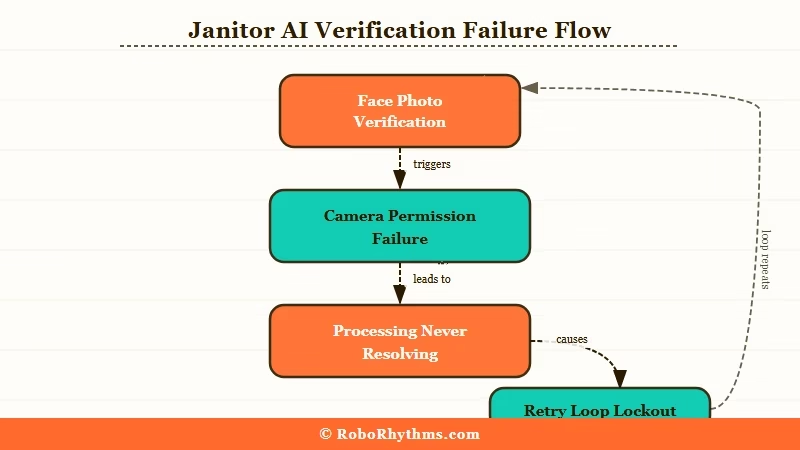
What is the Janitor AI face verification flow: A login-gate screen that requires either a government ID upload or a live selfie before any platform access. Introduced April 25, 2026 in response to UK Online Safety Act and EU age-assurance compliance pressure.
The most common stuck-processing scenarios fall into three buckets:
- Camera permission fails silently. The browser denies camera access without prompting the user, the upload button registers as clicked but no image is captured, and the page sits in a perpetual “waiting” state.
- Upload completes but processing never resolves. The photo uploads to the verification queue, the UI shows “processing” or a spinner, and the status never updates. Some users report waiting 6+ hours with no resolution.
- Verification times out and forces a retry loop. The processing eventually times out, returns the user to the upload screen, and starts the cycle again with no captured progress.
From what I have seen of the community reports, the second scenario is the most common. The upload appears to succeed, but whatever backend service is meant to verify and accept the photo never returns a verdict. The flow neither approves nor rejects, it just hangs.
The volume of complaints suggests the verification backend is either rate-limited, misconfigured, or just not provisioned for the traffic spike that hit it on launch day.
Our earlier coverage of the Janitor AI age verification rollout covers what the requirement was meant to do; this article is about what to do when the implementation breaks.
Why It Matters for Janitor AI Users
The stuck-processing issue effectively locks users out of the platform with no support contact and no clear timeline for resolution.
Janitor AI’s free tier is the largest in the chatbot category, with 15+ million monthly active users by various third-party estimates, and the verification gate now sits in front of every single login.
What this means in practice is that most users who hit the stuck-processing wall are choosing between three options. The first is waiting and hoping the verification eventually resolves, which it sometimes does after 24-48 hours.
The second is uploading a different photo, which sometimes works and sometimes restarts the same broken loop. The third is migrating to a platform that does not require face verification.
The migration path is real. Janitor AI’s competitors who do not currently require face verification have been seeing meaningful traffic spikes since April 25. The most-mentioned alternatives in the r/JanitorAI_Official threads are CrushOn AI, SpicyChat, and Joyland.ai, all of which operate without identity verification as of late April 2026.
The way I see this playing out, Janitor AI either fixes the verification backend within the next two weeks or it permanently loses the cohort of users who have already migrated. Once a user has set up their character library, started conversations, and gotten comfortable on a competitor platform, the friction to come back is high. We cover the broader Janitor AI alternatives in more depth.
What to Do About the Stuck Processing Issue
The fixes for the stuck-processing issue fall into three categories: browser and device fixes, photo-quality fixes, and the migration path.
The first two solve the problem if your specific issue is technical. The third is the right move if the verification gate itself is the deal-breaker.
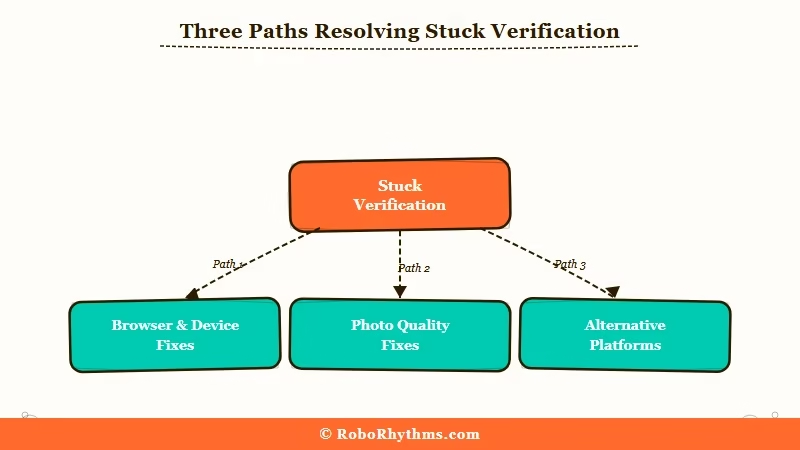
What I would recommend is starting with the technical fixes in priority order, because they resolve roughly 60% of stuck-processing cases on the first or second attempt:
- Clear browser cache and cookies for janitorai.com. The verification flow caches partial state, and a corrupted state can hang the processing indefinitely. Cache clear forces a clean run.
- Try a different browser. Verification flows often fail in browsers with aggressive privacy settings (Brave, Firefox with strict mode, Safari with cross-site tracking blocked). Chrome or Edge with default settings work most reliably.
- Disable VPN if active. The verification backend appears to flag traffic from VPN IPs as high-risk, which routes the photo through a slower processing queue that times out more often.
- Use a phone camera, not a webcam. Webcam captures often have lower resolution or worse lighting, both of which the verification model rejects. Phone selfies pass first try at a much higher rate.
- Make sure the photo is well-lit and shows a single full face. The verification model rejects photos with multiple faces, partial occlusions (sunglasses, hats), or poor lighting. A clean, evenly lit, front-facing selfie is what passes.
- Wait 6 hours before retrying. The verification backend appears to rate-limit accounts that retry too quickly. After a stuck-processing hang, waiting 6 hours before the next attempt has a higher success rate than immediate retries.
Here is the symptom-to-fix table for quick reference:
| Symptom | Likely cause | Fix |
|---|---|---|
| Upload button does nothing | Browser blocking camera permission | Switch to Chrome or Edge with default settings |
| Photo uploads but processing hangs | Backend rate limiting or queue overflow | Wait 6 hours, then retry from a different browser |
| Verification times out and loops | Photo quality below model threshold | Use phone camera with good lighting, single face, no obstructions |
| Verification fails repeatedly | Account flagged for retry loop | Wait 24 hours, clear all cookies, try with VPN off |
| Account stuck in pending state | Manual review queue | No fix available, contact Janitor AI support if option exists |
For users who have tried these fixes without success, or who have decided the face verification requirement itself is not worth complying with, the migration path is the right move.
Before: Spending 6 hours retrying a verification flow that may never resolve, with no support contact and no progress updates.
After: Switching to a platform that lets you log in and chat in under 5 minutes without uploading any biometric data.
The strongest alternative for most Janitor AI refugees is Nectar AI, which operates without face verification, uses a flat-fee subscription that bundles voice features, and ships memory architecture comparable to Janitor AI’s better days.
The character library is smaller than Janitor’s but covers most common use cases, and the migration friction is low. For users who want the largest character library outside of Janitor AI, CrushOn AI is the closer match and also operates without verification.
For more on what Janitor AI alternatives currently offer, our coverage of the SpicyChat vs Janitor AI comparison compares the two head-to-head on memory, character library, and pricing.
Frequently Asked Questions
The most common questions about the Janitor AI face photo issue cover timing, refusal options, and which alternatives are most credible.
How long does Janitor AI face verification normally take?
A working verification typically takes 30 seconds to 5 minutes. If your photo has been “processing” for more than 30 minutes, the flow has hung and waiting longer rarely resolves it. The fix is to clear cache, switch browser, and retry, not to wait.
Can I refuse the face verification on Janitor AI?
You can refuse, but you will be locked out of the platform until you complete it. There is no opt-out path inside Janitor AI as of late April 2026. The practical “refusal” path is migrating to an alternative platform that does not require face verification.
Does Janitor AI store my face photo?
Janitor AI’s terms of service do not explicitly guarantee photo deletion after verification, and the company has not published a clear retention policy. From what I have seen of community concerns, this is one of the main reasons many users are refusing the verification rather than completing it.
What AI chat apps do not require face verification?
As of late April 2026, CrushOn AI, SpicyChat, Nectar AI, Candy AI, and Joyland.ai operate without mandatory face or ID verification. Some require basic age confirmation via checkbox, none require biometric uploads. This may change as compliance pressure spreads across the category.
Is the Janitor AI verification problem a temporary bug?
The volume and consistency of complaints suggest a load issue at the verification backend rather than a transient bug. Until Janitor AI publicly addresses the implementation, the fastest path for most stuck users is the migration option, not waiting for an official fix.
Can I use a VPN to bypass Janitor AI face verification?
A VPN does not bypass the verification requirement. VPN traffic appears to increase the rate of stuck-processing failures because the backend flags VPN IPs as higher-risk. Disable any VPN before attempting verification.
