
What’s Changed: Since 9 September 2026, a Janitor AI message that fails to save is rolled back and your draft returns to the reply box, according to Janitor’s changelog. Before that fix, a failed send could look delivered and then vanish on reload. Messages written in roughly the three hours before a crash are still queued rather than deleted, and they reappear once the database finishes resyncing.
A Janitor AI chat not saving is the kind of failure that feels personal. You finish a long reply, the page hangs, and when it loads again the scene has jumped backward to a point before the last three exchanges happened.
The first assumption almost everyone makes is that they got banned. That is what people say out loud in the middle of an outage, and it is almost never what happened.
The second assumption is that the messages are gone for good. That one is wrong more often than it is right, and the reason why is the single most useful thing to know when this hits you.
There is a real distinction between a chat that rolled back and a chat that never saved, and the recovery path is completely different for each.
This guide covers how to tell which one you are in, what to do in the first sixty seconds, and how to stop the next outage from taking anything at all.
Why Is My Janitor AI Chat Not Saving Right Now
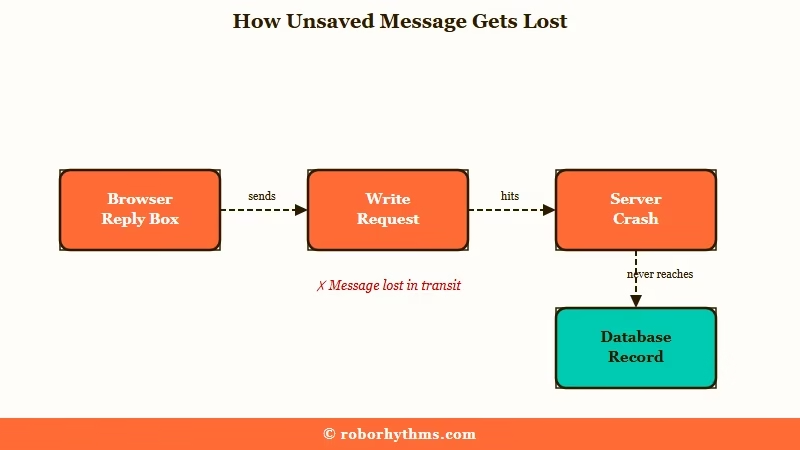
A Janitor AI chat stops saving when the write to the server fails mid-request, usually during a backend crash, a rate-limited proxy call, or a rejected oversized message.
Your reply lives in browser memory until the send succeeds. If the request never completes, the database never learns the message existed.
That is what the “failed to save message” error means, whether it shows up alone or next to a “network error”. Janitor’s changelog for 9 September 2026 describes messages that never reached its servers yet showed as a normal sent bubble, cleared what you typed, then vanished on reload. Janitor says that is now fixed on web and in the app, so a failed save rolls the message back and returns your draft to the box.
What is a resync: The process where a database catches up on queued writes after a rollback, restoring records that were accepted but not yet visible.
The failure that produces the biggest losses is the backend rollback. When a deployment breaks something, the fix is to revert the servers to an earlier state, and every write in the gap gets held in a queue instead of appearing in your chat.
One documented rollback traced back to a storage change meant to speed up response times on JLLM, the language model Janitor runs in-house for free users. It broke how messages were written and forced an emergency revert.
What I find genuinely surprising is how little insulation sits between those deployments and you.
Community reports describe development happening locally with no staging server and no automated unit tests, which means updates go straight to production and the site itself becomes the test environment.
That is the structural reason this keeps recurring rather than being fixed once.
Then there are the quieter failures that have nothing to do with an outage. Sending or editing anything past 10,240 characters trips a hard validation error reading message must be shorter than or equal to 10240 characters, and long-form writers hit this without realising there is a cap at all.
| Symptom | Likely cause | What to do |
|---|---|---|
| Chat jumped back several exchanges, site was down | Backend rollback, writes queued | Wait for resync, do not rewrite yet |
| Chat loads completely empty, site is up | Client sync lag | Send a message, then refresh |
| “Failed to save message”, or a sent message that vanished on reload | Janitor never stored the message, because the connection dropped or the server failed to save it | Resend it; since 9 September 2026 a failed save returns your draft to the box. If the resend fails too, copy your text and stop until the site recovers |
there was an error processing your request [unk] | Backend or proxy failure, cause masked | Check status, retry in a few minutes |
Your latest message was too large | Over the 10,240 character cap | Split the message and resend |
| Only one bot’s chats vanished, others fine | Creator deleted or privated the bot | Not an outage, chat is unrecoverable |
An error occurred when deleting a message | A bug from Janitor’s 4 August 2026 chat database migration, on messages sent after the switch | Janitor rolled out a fix that day; reload and try the delete again |
Will My Missing Janitor AI Messages Come Back on Their Own
In a rollback, yes. Chats created in a window of roughly three hours before the downtime are held and restored once the servers finish resyncing.
Staff communication during a past rollback was explicit that the data was safe and would return in the condition it was last modified.
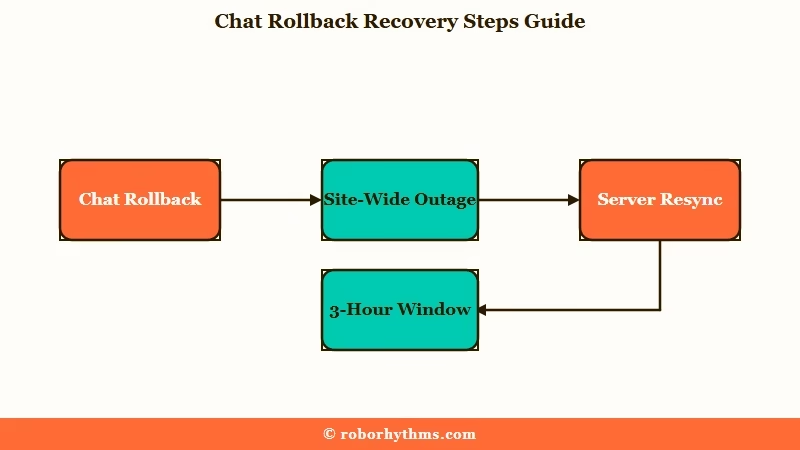
That three-hour figure is the most reassuring number in this whole topic and almost nobody repeats it. During the outage itself, users are told the site is down, and nothing tells them their last hour of writing is sitting in a queue rather than a bin.
The official position is less clean than that staff reassurance suggests, so treat the reassurance as conditional. The help documentation states plainly that if the problem persists, staff “may not be able to recover the missing data,” and that chats lost during server migrations “cannot be restored.”
Both statements are true about different events. A rollback restores; a migration can drop records permanently. The old chats people find missing from 2023 and 2024 fall into a third bucket entirely, an unfinished database migration that had not yet moved them into the primary store.
Waiting times range from a few minutes for a small glitch to several hours when a full resync is involved. Recorded outages have run 33, 50, and 51 minutes, and around 66 percent of outage reports describe the site being completely unreachable rather than just slow.
If Janitor AI is down across both web and app at once, expect the longer end of that range.
Should I Refresh the Page or Leave It Alone
Refresh only when the chat has already loaded empty. Never refresh while you still have unsent text on screen.
This is the one piece of advice where the official guidance and the community’s hard-won habit point in opposite directions, and both are right about different moments.
The help documentation tells you to send a message in the affected chat and then refresh, which forces the client to resynchronise with the server. That works, and it works often, for the specific case where the history failed to load on the client side.
The community advice runs the other way. Users who kept their progress through a crash consistently report that they did not reload the page or navigate home, and the reason is mechanical rather than superstitious. Refreshing destroys the browser’s unsaved input buffer, so any text you had not successfully sent dies with the page.
My read is that the two camps are answering different questions. The documentation is answering “my chat looks empty,” and the community is answering “my chat is frozen and I have a paragraph on screen.”
Sort out which one you are in before touching anything.
What Do I Do the Moment the Site Freezes Mid Reply
Secure your text before you touch the page. Everything else can wait. The people who lose the most are the ones whose first reflex is the refresh key.
There is a genuinely clever move going around for this, and it deserves more attention than it gets. Rather than reloading the dead tab, you duplicate it.
The copy fetches fresh state from the server while the original keeps its stale rendering intact, so you can read your unsaved text from the old tab and paste it into the new one.
Before: Site freezes, you hit F5, the page reloads to an earlier state, and the two long replies you had on screen are gone with nothing to paste back.
After: Site freezes, you select your reply text and copy it, duplicate the tab, compare the two, and paste your text back into whichever tab is still talking to the server.
The sequence I would run, in order:
- Select and copy any text sitting in your reply box, before anything else. Ctrl+A inside the box, then Ctrl+C.
- Paste it somewhere outside the browser. A notes app or an open document, not another browser tab.
- Duplicate the tab rather than refreshing it. Right click the tab and choose Duplicate, or Ctrl+click the reload button in some browsers.
- Compare the two tabs. If the duplicate shows fewer messages, the missing ones are queued rather than deleted.
- Wait for the resync before rewriting anything. Rewriting a scene that is about to restore itself creates two versions of the same beat.
- Avoid starting a fresh chat with the same character while you wait, because the two sessions can collide once the server catches up.
Mobile makes every one of these steps harder, which is why mobile users lose more. Switching apps to check something can be enough for the operating system to reclaim memory and clear your input, and the app hides real error detail behind a generic [unk] popup that tells you nothing about whether it was a rate limit or a dead backend.
Does a Missing Chat Mean I Was Banned
No. A rollback or a missing chat is server-wide and has nothing to do with your account.
The panic is universal enough to say plainly, because during any outage the subreddit fills with people convinced they personally got nuked.
The tells are specific. An actual account restriction shows you a message saying you cannot interact with that account, which is unambiguous and does not look like a blank chat.
A single character vanishing while your other chats sit there untouched is a different thing again. That is the creator deleting or making the bot private, which returns a 404 or a “Deleted or Privated” status, and no amount of waiting brings it back.
This is the case worth separating from a genuine outage, and it overlaps with the broader pattern of Janitor AI messages disappearing for reasons that have nothing to do with downtime.
If everything is missing at once and other people are posting about it, you are looking at infrastructure, not moderation.
Why Is the Official Status Page Not Telling Me Anything
Because it lags the actual outage by hours.
Independent monitoring service StatusGator grades Janitor AI’s status page accuracy a D, documenting an average 2 to 4 hour delay between real outages and official acknowledgement, with several multi-hour failures never acknowledged at all.
I would treat the status page as a lagging record rather than a live signal. During the incident it will frequently show green while the site is unreachable for everyone.
What people use instead is each other. The subreddit fills within minutes of a real outage, and the volume of near-identical “is it just me” posts is a faster and more accurate signal than any dashboard the platform runs.
How Do I Back Up Janitor AI Chats Before the Next Outage
There is no native export, so every backup method is a workaround.
This is the part I would act on first, because the recovery advice above only helps after something has already gone wrong.
The methods split by how much effort you want to spend and how much you want to preserve. A quick manual copy takes thirty seconds and covers the story text; the scripted tools take real setup and give you structured data you can move elsewhere.
| Method | Effort | What you get | Catch |
|---|---|---|---|
| Manual copy paste | 30 seconds | Plain text of the whole scroll | Zoom out to about 30 percent first, or you only capture what rendered |
| DevTools JSON grab | 5 minutes, once | Full structured message list from the server payload | Needs a browser inspector and a little patience |
| JAIPA archive tool | Real setup | Automated logs, V3 character cards, deleted character recovery | Python tool, so you need to be comfortable running scripts |
| Firefox scraper add-on | 2 minutes | An Extract button inside the chat page | Requires an active proxy, it silently does nothing on default JLLM |
That last row catches people out constantly, so it gets its own paragraph. The scraper builds its interface by sending a dummy message through your proxy, which means on a default JLLM connection the button never appears and it looks like the add-on is broken.
For the DevTools route, open your browser’s inspector to the Network tab, reload the chat page, filter the requests for json, and copy the message list out of the server response.
It sounds fiddly and it takes one attempt to learn, after which it is the fastest complete backup available without installing anything.
Does Janitor Plus or a Proxy Protect My Chats
Neither one protects your chats from a rollback. Both are unrelated to how your messages are stored.
I would rather say this bluntly than let anyone buy a subscription hoping it insures their stories.
Janitor Plus runs $12.99 a month, and Janitor’s subscription FAQ lists what it adds: 5x more context, priority access for faster replies and monthly swipes on its best models.
None of those touch how your messages are stored. The Janitor Plus value breakdown is a separate question from data safety.
A proxy is even further from the problem. Reverse proxies route your prompt to a different model provider, so during a platform outage they fail with the same masked there was an error processing your request [unk] error and cannot prevent a rollback on Janitor’s own database.
Proxy users get their own distinct failure modes, which is why Janitor AI proxy failures are worth diagnosing separately from a site-wide outage.
Paying more does not move your chat history anywhere safer. It sits in the same database, exposed to the same deployments that broke it last time.
Why Does the Bot Sound Wrong After the Site Comes Back
A crash mid-generation can truncate the prompt buffer, so the model comes back with less context than it had.
This is the complaint that follows every outage, usually phrased as the bot suddenly getting stupid or dropping character.
The underlying constraint is that JLLM works with a context budget of roughly 8,000 to 9,000 tokens. Past 25 to 30 messages, the earliest turns fall outside the active window regardless of outages, and a crash that leaves half-generated turns in the history eats into that budget with content that carries no story value.
What I would do first is prune the broken turns. Delete any half-generated or duplicated replies the crash left behind, because they occupy context space while contributing nothing the model can use.
After that, re-anchor the character manually rather than hoping it settles. A short summary of where the scene now stands, dropped into chat memory, does more to restore the voice than twenty swipes trying to get a good reply out of a starved context.
A memory setting can also make a bot forget older messages with no outage at all. After a chat memory test leaked to every user in August 2026, Janitor added a “memory replaces old messages” toggle to the chat memory panel that stays off unless you turn it on, and while it is on, the messages your saved memory covers stop being sent with the prompt.
A related bug cleared memory when people deleted messages it covered, and Janitor restored memory on about 15,000 chats on 20 August 2026. If a bot keeps losing the thread after that, the fixes for Janitor AI memory not working go further than this page does.
What to Use If You Cannot Afford to Lose Another Story
If chat persistence is the thing you care most about, a platform with server-side memory and no rollback exposure is the honest answer.
I am not going to pretend the workarounds above are equivalent to a system that just does not lose your conversation.
Take the loss seriously, because there is real research behind it. A peer-reviewed study on experiences of AI companion loss in the Journal of Social and Personal Relationships documented users grieving the disappearance of an AI companion in terms comparable to other significant losses, which is a long way from the “it is only a chatbot” framing.
For readers who want persistent memory without the archive rituals, Candy AI keeps conversation state server-side and does not ask you to run a scraper to feel safe about last week’s scene. It is the closest thing to a set-and-forget option in this category.
If your priority is rebuilding a specific character rather than starting fresh, Nectar AI is the one I would point you at, since its character setup is built for porting an existing persona over rather than making you invent a new one.
Whatever you land on, keep a copy of the stories that matter. The archiving habit is cheap, and the thirty seconds it costs is the only thing standing between the next deployment and a scene you cannot get back.
Frequently Asked Questions
How long should I wait before assuming my chat is gone?
Give it several hours before writing anything off. Small client-side glitches clear in minutes, but a full database resync after a rollback can take hours. If the chat is still missing the next day, it is likely a genuine loss rather than a queue.
Can Janitor AI staff restore my missing chat?
Usually not. The official documentation states staff may not be able to recover missing data, and chats lost during server migrations cannot be restored at all. Rollback losses restore automatically without staff involvement, so there is nothing to request.
Does a chat rolling back mean I was banned?
No. Rollbacks are server-wide and affect everyone at once. A real restriction shows an explicit message saying you cannot interact with that account, and a single missing bot usually means the creator deleted or privated it.
Is it safe to keep roleplaying during an outage window?
Better not to. New messages written during a resync can collide with restored ones once the server catches up. Keep writing in a separate document instead, then paste it back in when the chat is stable.
Does Janitor Plus keep my chats safe?
No. The $12.99 subscription adds 5x more context, priority replies and monthly swipes on Janitor’s best models. None of that changes how or where your chat history is stored, so a rollback hits paying users identically.
What is the fastest way to back up a long chat?
Zoom your browser out to roughly 30 percent, select all, and paste unformatted into a document. It captures the full scroll in about thirty seconds and needs no tools, which makes it the one people keep doing.
Quick Takeaways
- Messages written in roughly the three hours before a rollback are queued, not deleted, and return once the servers resync.
- Refresh only if the chat loaded empty, and never while unsent text is still on screen.
- Duplicate the tab instead of reloading it, so you can copy your unsaved reply out of the stale copy.
- Janitor Plus and proxies do nothing for data safety, so do not buy either as insurance.
- Back up anything you would be upset to lose, since there is no native export and no guarantee staff can help.
