
What’s Changed: Janitor AI’s automod has grown much more aggressive, and it now blocks plenty of harmless chats, images, and bots. The reason labels you see, like “implied violent harm,” are the classifier’s guess at your content, not the actual rule you broke. Most false flags clear with a small rephrase, a quick image edit, or a support ticket.
If you have ever watched Janitor AI reject a photo of a bee for “implied violent harm,” you already know the automod flagging problem has gotten out of hand.
The filter blocks clean chats, tags ordinary bot greetings as spam, and hands back reason labels that read like a bad joke.
You are not imagining it, and you did nothing wrong. Janitor AI passed 15 million users in 2026 and ranks among the most-visited consumer AI apps by traffic, per Andreessen Horowitz’s Top 100 Gen AI Apps list. At that scale, its automated moderation runs on everything at once, and the false positives pile up fast.
Here is what I want to get across. I will explain the one mechanism that makes these flags look so random, walk through what trips the filter on images, chats, and bots, and give you a fix order that clears most false flags without a support ticket.
Why Janitor AI Automod Keeps Flagging Safe Content
Janitor AI automod flags safe content because its classifiers scan every image, message, and bot definition in real time, and the reason label you see is the model’s best guess at what it detected, not the policy you broke.
That gap is the whole story.
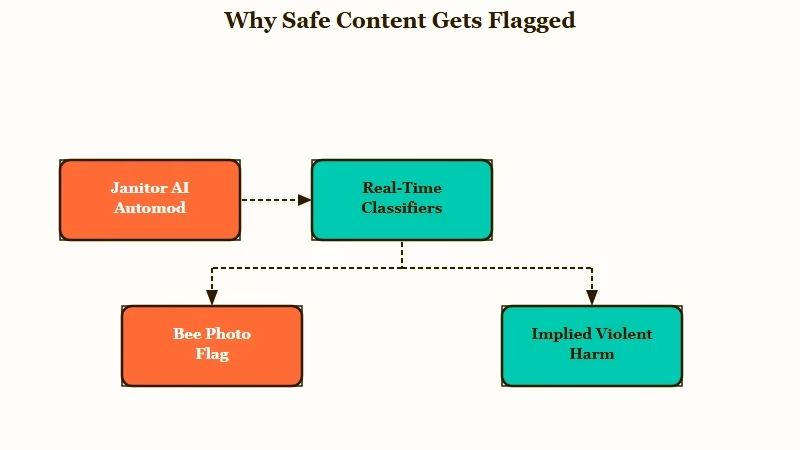
What is automod: Automod is Janitor AI’s automated moderation layer that scans content with AI classifiers and blocks anything it scores as a policy risk, with no human in the loop.
When you upload a bee photo and get “implied violent harm,” the vision model has mis-captioned the image. It thinks it sees something harmful, and the platform surfaces that caption to you as if it were the rule you tripped.
The label is a decoy. Decaying buildings get read as “building gore,” and a joke in a bot greeting gets read as “spam” for the same reason.
The way I read it, this single detail explains almost every “why does it flag the most random things” complaint. Once you stop reading the label as a real accusation and start treating it as a wrong guess, you know what to change, which is what the model sees, not what you meant.
One narrow version of this, a single blocked word inside a bot definition, is covered in the unadulterated automod block breakdown.
What Triggers a Flag on Images, Chats, and Bots
A Janitor AI flag comes from one of three separate systems, each with its own trigger: a vision classifier for images, a text classifier for chats and bot definitions, and a community filter for reviews and comments. Knowing which one hit you decides the fix.
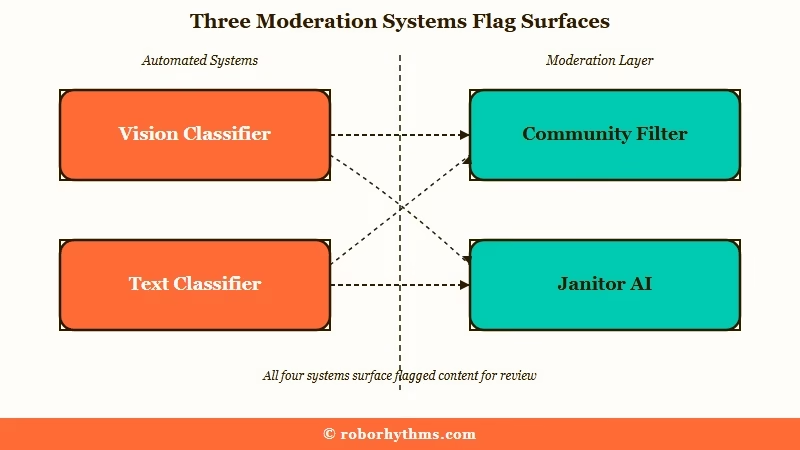
The image classifier is the twitchiest of the three. It over-reads ambiguous shapes, so insects, wounds in artwork, dark backgrounds, and old buildings all draw flags.
The text classifier that scans bot definitions and greetings misreads casual phrasing, and creators report jokes getting tagged as “spam” or “scam.” The third system, the community filter on reviews and comments, throws a 403 error on words it does not like.
Here is how the three surfaces compare, and where to look first when something gets blocked.
| Moderation surface | What it scans | Common false flag | First fix |
|---|---|---|---|
| Vision classifier | Avatars and uploaded images | Bee photo tagged “implied violent harm” | Crop or edit the image, then retry |
| Text classifier | Chats and bot definitions | Joke greeting tagged “spam” or “scam” | Rephrase the flagged line |
| Community filter | Reviews and comments | 403 error on words like “lmao” | Drop the word, split long reviews |
I would not treat these as one problem. The bee-photo flag and the spam-greeting flag feel identical from the outside, but they come from different models and need different fixes.
| What you see | Likely cause | Fix |
|---|---|---|
| “Implied violent harm” on an image | Vision model mis-captioned the picture | Crop, remove the misread object, re-upload later |
| Bot tagged “spam” or “scam” | Text filter read the greeting as promotion | Rephrase to in-character narration |
| 403 error on a review | Community filter blocked a word | Rephrase, then split into a reply |
| Chat refusal on a benign action | Hidden safety prompt confused the model | Reroll, use positive phrasing in the bot |
Do These False Flags Hurt Your Account
A false flag does not hurt your account standing, as long as you did not choose the violating content yourself, because Janitor AI moderates on user intent rather than on whatever the AI generates on its own.
This is the part that calms most people down.
If the model writes something against the rules on its own, or decides your persona is a minor with no prompting from you, you are not the one on the hook.
The moderation team looks at the choices you actively make. When the bot goes somewhere it should not, delete the message or reroll it and move on, the same way you would handle any unexpected Janitor AI error.
The way I see it, this is the most misunderstood rule on the platform. People see a scary label, assume they are one flag away from a ban, then start self-censoring perfectly benign roleplay. A single automod block on a harmless chat is noise, not a strike.
How to Fix a Janitor AI Flag Step by Step
The fastest fix for a Janitor AI false flag is to change what the classifier sees, so edit the image, rephrase the text, or split the review first, and only open a support ticket when a retry fails. Most flags clear in under a minute.
An image flag clears the majority of the time with a small edit, so here is the order I would run through first:
- For a blocked image, crop it, remove or reposition the object the model misread, or re-upload it a few minutes later.
- For a bot definition or greeting tagged as spam or scam, rephrase the line that reads like promotion or a link drop.
- For a review or comment hitting a 403, drop the strong words, and split a long review into a main comment plus a self-reply.
- If none of that works, raise a support ticket through the help desk for a human review, or appeal an image in the Discord flagged-images channel.
There is one trap worth calling out in bot definitions. If your character keeps speaking or acting for you, do not add a line like “Do NOT speak for the user.”
Before: “Do NOT speak for {{user}}, never control {{user}}, do not narrate {{user}}’s actions”
After: “Stay in your own character’s point of view and let {{user}} drive their own choices”
Negative commands make the model fixate on the forbidden action, the same way “do not think of a pink elephant” backfires. Positive, direct phrasing works better and keeps the definition clean.
Why Harmless Words Trigger a 403 the Team Says Does Not Exist
Janitor AI’s community has logged a specific set of harmless words that trigger a 403 error on reviews, yet an official moderator has stated the filter has no fixed trigger words and is still being tuned. Both things appear to be true at once.
Users have recorded everyday words getting reviews blocked, including “idiot,” “feral,” “damn,” “hell,” and “lmao,” along with milder profanity.
A Janitor moderator responded that the filter “does not include any specific trigger words and is in the process of fine-tuning.” What that tells me is the block logic is dynamic, so the word that fails today may pass next week, and the reverse.
In practice, do not trust any fixed workaround word list you find in a forum. Rephrase around whatever gets blocked in the moment, keep reviews short, and post the rest as a reply if the character limit eats your text.
If this feels like part of a wider tightening, the Janitor AI censorship breakdown covers the bigger picture.
What to Use When the Filter Ruins Your Roleplay
If the automod is blocking ordinary creative roleplay faster than you can write it, a managed companion platform with cleaner moderation is the practical escape, because it filters for real safety without the nonsensical false positives.
Janitor is worth keeping for its bot library, but you do not have to fight the filter every session.
I usually point frustrated users to Candy AI first. It handles fictional content and heavier themes with far fewer random blocks, and it will not reject a photo of a bee or tag a joke as a scam. The moderation is tuned for genuine safety lines, not for shape-guessing an avatar.
If you want a platform with fewer content restrictions and a big character catalog, CrushOn AI is the other one I would try. Both keep the parts of Janitor people like, the open roleplay and the deep characters, without the automod tax.
If your issue is the site failing rather than the filter, start with Janitor AI not working instead.
Frequently Asked Questions
Why did Janitor AI flag my image for implied violent harm?
Janitor AI’s vision classifier mis-captioned your image and showed you its wrong guess as the reason. The picture is not a real violation. Crop it, remove the misread object, or re-upload it a few minutes later.
Why is my bot greeting getting flagged as spam or scam?
The text classifier reads promotional-sounding phrasing, link drops, or certain jokes as spam. Rephrase the greeting to sound like in-character narration instead of an announcement, then resubmit. A stuck bot needs a support ticket for manual review.
Does a Janitor AI automod flag get my account banned?
No. A single false flag on benign content does not affect your standing. Janitor moderates on the choices you make, not on content the AI generates on its own, so delete or reroll a bad AI message and keep going.
What words trigger the 403 error on Janitor AI reviews?
There is no fixed public list, and moderators say the filter is still being tuned. Users report words like “idiot,” “feral,” and “lmao” getting blocked. Rephrase around whatever fails and split long reviews into replies.
How do I appeal a Janitor AI false flag?
Raise a support ticket through the Janitor AI help desk for a human review, or appeal a blocked image in the platform’s Discord flagged-images channel. Include what was flagged and a short note on why it is benign.
Quick Takeaways
- The reason label on a Janitor AI flag is the classifier’s guess at your content, not the rule you broke.
- Three separate systems flag content: a vision model for images, a text model for chats and bots, and a community filter for reviews.
- A false flag on benign content does not hurt your account, since moderation follows your intent, not the AI’s output.
- Fix order matters: edit the image or rephrase the text first, then open a support ticket only if a retry fails.
- If the filter keeps blocking ordinary roleplay, a cleaner-moderated platform like Candy AI is the low-friction alternative.
