
What’s Changed: The Janitor AI advanced generation settings disappeared from JLLM after the July UI redesign, and the panel with temperature and the sliders is missing. It is a confirmed bug, not a Janitor Plus paywall, and the controls still live under the Proxy tab. Your most reliable lever right now is the custom prompt, since the token limiter has been broken on JLLM for months.
If you opened Janitor AI this week and found the advanced generation settings gone, you are not imagining it.
The Janitor AI advanced generation settings panel, the one with temperature, Top K, Top P, and the repetition penalty slider, vanished from JLLM after the site pushed a new interface.
The timing set off a small war on the subreddit. The redesign landed the same week Janitor announced its new paid tier, so half the community decided the sliders had been ripped out and locked behind the subscription. The other half, including people who had already paid, said that was nonsense.
I have gone through the threads, the help docs, and what the developers said on Discord, and the short version is calmer than the panic suggests. The settings were not sold off. They broke.
Here is where they went, why the paywall story falls apart, and the workarounds that give you back control over length, repetition, and memory while the fix ships.
Where Did Janitor AI’s Advanced Generation Settings Go
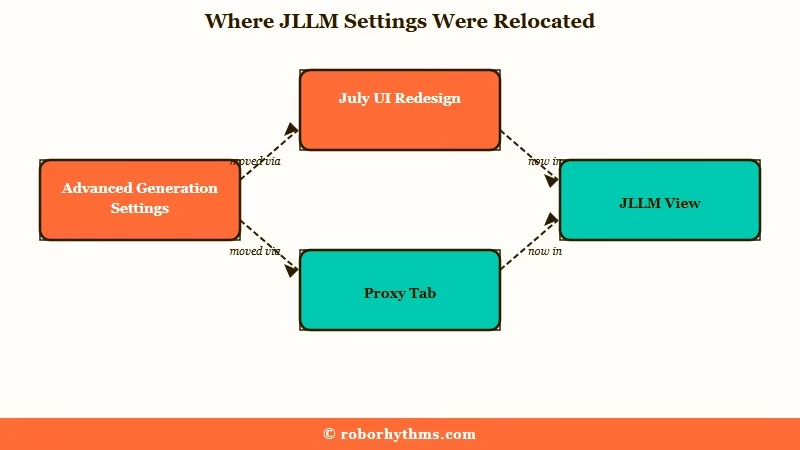
The advanced generation settings were not deleted, they were left visible only under the Proxy tab after the UI redesign hid them from the default JLLM view.
So the sliders you relied on are still on the page, just not where they used to be.
What is JLLM: JanitorLLM is Janitor AI’s own built-in language model, the free default that runs your chats when you have not connected an external proxy or API.
Open a chat, go into the settings, and switch to the Proxy tab. The old Advanced Settings menu with temperature and the rest is sitting there.
Several users report that adjusting them there still applies to JLLM behind the scenes, though this is the one point the community genuinely disagrees on.
One person insists “they are in the proxy tab, it might not say JLLM advanced settings, but trust me it is,” while another swears the proxy values do nothing for the native model.
The honest answer is that it is worth a try, but I would not bet a scene on it. If you want a change you can count on, the custom prompt is the control that still works exactly as before.
This mess arrived bundled with the broader Janitor AI interface overhaul, which is why so many regulars felt lost overnight.
Is This a Janitor Plus Paywall or Just a Bug
The missing settings are a confirmed UI bug. Paying Janitor Plus subscribers lost them too, which rules out the paywall theory the community jumped to.
The rumor spread fast because the money angle is easy to believe. The settings went missing right as the $12.99 a month Janitor Plus tier launched, so “they paywalled the sliders” wrote itself. Then subscribers started replying with the same complaint: “I have Janitor Plus and I still do not have it.”
The correction came straight from users relaying the official Discord, where developers said the removal was a mistake that will be fixed. The way I see it, that reads as a rushed release, not a money grab.
It landed one day after the team had to roll back a different unpopular change to the persona screen, which points to a botched push rather than a calculated feature grab. AI companion apps have pushed into the ranks of the most-used AI applications worldwide, so the demand is real (Statista tracks the leaders here).
Janitor’s own traffic climbed roughly 26% month over month in early 2026 per Similarweb’s audience data, and a platform growing that fast breaking its own panel is clumsy, not greedy.
Which Settings Survived and Which Ones Broke
Custom prompts still work, the sliders are hidden under the Proxy tab, and the Max Tokens limiter has been broken on JLLM since long before this update.
Knowing which control to reach for saves you from chasing a setting that would not have helped anyway.
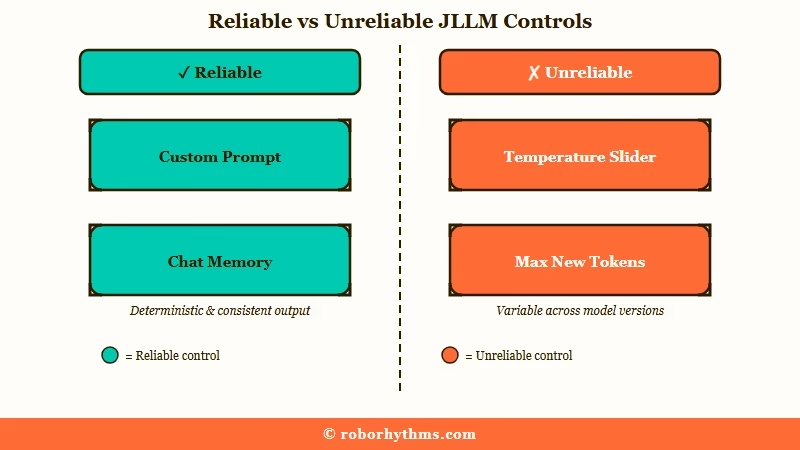
Here is what I would keep in mind before you go hunting for a slider that may not respond.
| Setting | Status on JLLM Now | Where to Find It | Reliable Workaround |
|---|---|---|---|
| Temperature | Hidden from JLLM view | Proxy tab, may not bind to JLLM | Steer tone with prompt directives |
| Top K and Top P | Hidden from JLLM view | Proxy tab | Leave them, let phrasing do the work |
| Repetition Penalty | Hidden from JLLM view | Proxy tab | Reroll plus the continue line below |
| Max New Tokens | Present but bugged, ignores your cap | api settings, generation settings | Set length in the custom prompt |
| Custom Prompt | Working normally | Chat or persona prompt box | This is your main lever now |
| Chat Memory | Improved by the update | Floating sidebar on desktop | Watch the live token counter |
The Max New Tokens row is the one that surprises people. A site moderator flagged months ago that JLLM ignores the limiter, so setting it to 200 or even 10 still produced 550 token replies. The setting you are mourning was not doing its job before it disappeared.
Here is the fast version if you just want the symptom matched to a fix.
| Symptom | Likely cause | Fix |
|---|---|---|
| Sliders gone on JLLM | UI redesign bug, dev confirmed | Open the Proxy tab or wait for the patch |
| Replies far too long | Max new tokens ignored on JLLM | Add a length cap in the custom prompt |
| Bot repeats itself | No repetition penalty slider | One star, reroll, add the continue line |
| Font resets to plain text | Save bug in the new UI | Reopen the customize menu |
| Settings look Plus only | Paywall rumor | It is a bug, subscribers lost them too |
How Do I Change Response Length Without the Sliders
You control response length through a custom prompt instruction now, because the Max Tokens setting has never worked reliably on JLLM.
A single clear line in your prompt does more than the broken slider ever did.
I have found this is the cleanest fix in the whole mess. Instead of fighting a token counter that ignores you, tell the model in plain language how long a reply should be, and put it near the end of the custom prompt where JLLM weights it more heavily. If a line there changes nothing at all, check the reasons a custom prompt gets ignored first.
Before: setting Max New Tokens to 200 in generation settings and still getting 550-word walls of text every turn.
After: a custom prompt line that reads “Keep replies to two short paragraphs, under 120 words, and end on an action or a question for the user.”
If your bot swings the other way and gives you clipped one-liners, flip the instruction: ask for 300 to 400 words with description and internal thought.
This is the same lever behind fixing a bot that gives too much narration, just aimed at length instead of style.
Action-heavy scenes suffer most when the sliders are gone, since they need shorter beats than the defaults produce. Our guide to writing Janitor AI fight scenes covers the prompt-side workarounds.
How Do I Stop the Bot Repeating Itself Now
Without the repetition penalty slider, you break a looping bot by rating the message, rerolling, and dropping a continue instruction into the chat.
It takes three seconds and works more often than the slider did.
Repetition is the pain that hits hardest once the penalty control is gone, so here is the sequence I would run before doing anything drastic.
- Rate the repetitive message one star. This is not just venting, it flags the bad generation to the developers who are actively tracking JLLM quality.
- Reroll the response to force a fresh generation.
- Before you reroll, type CONTINUE STORY FROM WHERE USER LEFT OFF at the bottom of your message. One user found this specific phrasing snaps JLLM out of a loop when nothing else does.
- If it still loops, trim your Chat Memory. Bloated memory pushes the model toward recycling the same lines, so cutting it often restores variety.
None of this is as clean as nudging a slider from 1.0 to 1.2. It does hold you over until the panel comes back, and for a lot of chats it works better than the penalty ever did.
What the Update Got Right
The redesign quietly upgraded Chat Memory into a pinned floating sidebar that counts your tokens live, which is a real win buried under the complaints.
Almost nobody is talking about it because the color scheme and the missing sliders sucked up all the oxygen.
On desktop you can now pop Chat Memory out as a floating window that stays open while you roleplay. No more diving into a menu every time you want to log a plot point, and the panel tallies exactly how many tokens your memory is using in real time.
That token counter matters more than it sounds, and it is the piece of this redesign I am glad they shipped. Memory eats your context budget, and seeing the number lets you decide what to keep permanent and what to cut before the model starts forgetting the early scene.
If you have wrestled with Janitor AI message limits, this is the first tool the platform has given you to manage it without guesswork.
One small caveat from the same update is a font bug that resets your text styling on refresh, and the quick fix is reopening the customize menu, which makes it stick again.
When to Stop Fighting the UI and Switch
If you need dependable control over length, creativity, and memory today, a proxy model or a purpose-built companion app gives you every setting up front instead of hidden behind a bug.
There is a point where waiting for a patch costs you more than moving on.
The way I see it, you have two exits. The first keeps you on Janitor: connect an external model like DeepSeek through the Proxy tab, which is unaffected by the JLLM bug and exposes all the generation settings the way they used to work.
Our DeepSeek proxy setup walkthrough covers the wiring, and if the connection stalls, the Janitor proxy troubleshooting guide sorts the common errors.
The second exit is a companion platform that puts every control in front of you by default. Candy AI exposes memory, personality, and response style without a proxy, an API key, or a settings panel that disappears on update day. For a warmer, more story-first alternative, Nectar AI is the one I would point roleplay-heavy users toward.
Neither is a knock on JLLM when it works. It is just that a free model with a half-finished interface is a rough place to be when you want your controls to stay put.
Frequently Asked Questions
Where did Janitor AI’s advanced settings go?
They moved under the Proxy tab after the UI redesign hid them from the JLLM view. The sliders are still on the page, and developers have said the removal from the default view is a bug they will fix.
Are the advanced settings locked behind Janitor Plus?
No. Janitor Plus subscribers reported the same missing settings, which rules out a paywall. It is a UI bug tied to the redesign, not a paid feature.
Are the JLLM sliders gone for good?
No. Per users relaying the official Discord, the team confirmed the disappearance was unintentional and a fix is coming. Treat the Proxy tab and custom prompt as stopgaps until then.
How do I make Janitor AI replies shorter now?
Add a length instruction to your custom prompt, such as “keep replies under 120 words.” The Max Tokens setting has been bugged on JLLM for months and ignores your cap, so the prompt is the reliable route.
Do proxy and API users still have their settings?
Yes. The bug only affects the native JLLM view. If you run an external model through the Proxy tab, your full generation settings are untouched.
Quick Takeaways
- The missing Janitor AI advanced generation settings are a confirmed UI bug, not a Janitor Plus paywall, since subscribers lost them too.
- The sliders still live under the Proxy tab, but the custom prompt is the only control that reliably affects JLLM right now.
- Do not trust Max New Tokens for length, it has ignored the cap on JLLM for months, use a custom prompt instruction instead.
- Break repetition by rating the message one star, rerolling, and adding CONTINUE STORY FROM WHERE USER LEFT OFF.
- If you need controls that stay put, run DeepSeek through a proxy or move to a companion app like Candy AI that exposes every setting by default.
