
What’s Changed: Zeta AI is reasonably safe for an adult, with four catches. Bot creators cannot read your chats but zeta’s filters do, private drafts can get you banned, chargebacks have cost people their accounts and some free-tier ads are scams. The app runs a filtered Safe Mode by default and an adults-only Unlimited Mode behind age verification, and on 18 August 2026 it restricted Unlimited Mode for some plots.
Search for whether Zeta AI is safe, and nearly everything that comes back is written for parents who found the app on a kid’s phone.
That leaves the people searching hardest with nothing, because the reader I keep seeing ask this is an adult who left Character AI and wants to know what they are walking into.
Parents with that question will find companion apps and minors more useful than this piece.
The honest answer has almost nothing to do with the things those articles worry about. Zeta’s real risks sit in its moderation system, its payment handling and its ads, and none of them shows up in a parent’s guide.
The app also moved underneath everyone in the middle of August 2026, so a lot of the advice floating around is now describing a version of Zeta that no longer exists.
This piece covers what changed, who can see your conversations, what gets accounts banned, and what to do if the tightening keeps going.
Is Zeta AI Safe After the Age Rating Drop
Zeta AI is still safe to use in the ordinary sense. Its content rating fell from 17+ to 13+ on Apple’s App Store in mid-August 2026, and that change came bundled with a much more aggressive content filter.
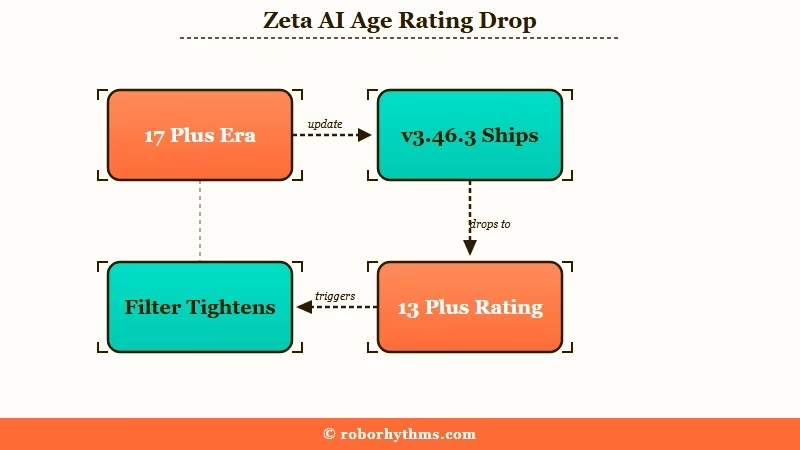
The version that carried the change, 3.46.3, went live on 14 August 2026. Users noticed within a day and were not quiet about it.
The drop matters because the rating moved down while the app’s own content descriptors stayed put. That signals a platform trying to widen its audience faster than it is changing what the product does.
The change looks commercial to me rather than safety-driven, and the timing supports that. Nothing about the underlying model got safer that week, only the filter got louder. The community reaction was blunt, with the top thread on the subject titled “17+ App down to 13+ now” and flaired “wtf zeta”.
Does Zeta AI Have a Filter?
Yes. Every zeta chat runs under what its help center calls mandatory “AI-based monitoring (filtering)”, and the default Safe Mode prohibits explicit adult content. Beside Safe Mode, zeta offers an adults-only Unlimited Mode with “more relaxed safety standards”, open only to users 18 or older who complete age verification.
Unlimited Mode is not a no-filter switch. Zeta’s Usage Policy judges US content against the PG-13 rating and says “expressions at the R-rating level are permitted on a limited basis in Unlimited Mode.” Its Terms still ban content that is “excessively graphic or salacious” even there.
Zeta’s own help center has not caught up. One popular FAQ still answers requests for “an 18+ service” by saying zeta aims to be “a platform that all age groups, including minors, can use with peace of mind.” I found no English page explaining how a US user verifies their age.
Why Do Apple and Google Rate Zeta Differently
The same app carries four different minimum ages depending on where you look, ranging from 13 on Apple to 17 on Google Play, with Zeta’s own contract saying 13 and its public statements saying 15.
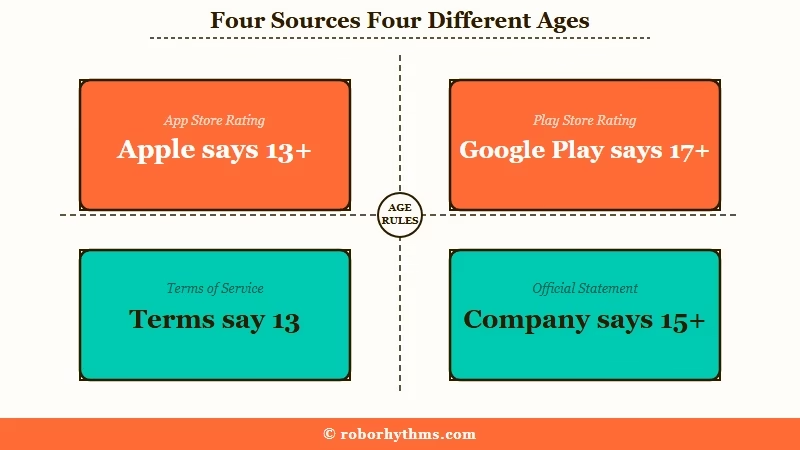
No other write-up on Zeta collects these in one place, and together they are the clearest available signal about how settled the app’s content policy is.
| Source | Minimum age | What it says about content | Where it comes from |
|---|---|---|---|
| Apple App Store | 13+ | Rated 13+ “with content restrictions” and lists “Age Assurance” as an in-app control, with “Sexual Content or Nudity” and “Mature or Suggestive Themes” listed as Infrequent | Store listing, lowered from 17+ in August 2026 |
| Google Play | Mature 17+ | “Diverse Content: Discretion Advised”, plus “Users Interact” | Store listing, unchanged, 5M+ downloads |
| Zeta’s Terms of Service | 13 | Under 13 barred outright, 13 to 18 needs a guardian to agree on your behalf | Section 2.4 of the published terms |
| Scatter Lab’s public position | 15 | Company says it applies a stricter internal 15+ standard and bans under-14s | Statements to Korean press |
What is Scatter Lab: The South Korean company behind zeta. It also built Luda, an earlier chatbot that was shut down in 2021 after a data scandal.
A four-way split like that is not a rounding error, and it is the first thing I check when judging whether a platform’s content policy has settled. It means the company itself has not decided what zeta is, and every filter swing you feel as a user comes out of that unresolved question.
There is one more wrinkle worth knowing before you rely on any of those numbers. Apple’s older ratings API still reports the app as 12+, because that field predates the 13+ tier Apple introduced, so you will see both figures quoted around the web.
Who Can Read Your Zeta AI Chats
Bot creators cannot read your conversations, and zeta’s systems check all of them. Those are two different questions, and most of the reassurance circulating online answers only the first one.
On the creator side the answer is genuinely clean. Zeta’s help center says that unless you publish them yourself, “your gameplay is not shared with third parties, including the character creators”, and a zeta representative said the same in the community.
The company’s own access is a separate matter. Zeta’s terms reserve the right to “review, screen, or remove” user content at any time. The same help-center answer says “AI-based monitoring (filtering) is applied as a mandatory measure” to check compliance with its rules.
Human review is narrower. The help center says “the zeta operations team does not individually view your conversations.” The Usage Policy adds that “staff with limited authority may review content to the minimum extent required” where safe operation needs it.
Zeta’s Terms also say it uses “both automated systems and human review to identify illegal content.” My read is that this is a normal trust-and-safety setup rather than anything sinister, and it is still worth knowing before you type something you would not want a stranger reading.
What is Private Mode: A feature that clones a character to your account so it survives the creator editing or deleting it. It is a preservation tool, not a privacy setting.
Private Mode confuses people constantly, and the name is doing the damage. Chats with a cloned character are still screened like any other chat. Free accounts get one private character.
Moderation here is also not purely automated. A platform representative has said harmful characters get handled by interns working through them by hand, which is a fragile arrangement for an app this size.
What Happens to Your Chats If You Delete Your Account
Deleting your zeta account removes or de-identifies your personal information, but any conversation data already absorbed into model training stays absorbed.
The policy is unusually direct about the limit. It states that conversation data incorporated into training before deletion “may not be fully removable from trained models”, which is the honest version of a caveat most apps bury.
Your data also travels further than the app itself. Zeta shares information with vendors covering cloud infrastructure, AI model providers, analytics, payment processing, customer support, security, and data labeling, and it may be transferred to the United States, South Korea, or Singapore.
I treat a zeta chat as recorded by default and plan around that, which is the same rule I carry to any companion app. If the training and data-retention side is your main concern, the zeta alternatives guide goes deeper on the opt-out and its limits than there is room for here.
Can You Get Banned on Zeta AI for a Private Character
Yes, and this catches people out more than any other rule on the platform. Zeta’s automated sweeps run against private, unpublished character drafts, so you can lose creation access for a character nobody else ever saw.
Reported penalties run from 24-hour and 48-hour creation bans up to permanent account closure. The trigger is often a dark or violent character description written for personal use and never made public.
The assumption that private means exempt is the single most expensive misunderstanding in the community right now. I have stopped treating unpublished drafts as a safe space on this app, and the ban reports are consistent enough that I would not test it.
Here is the practical difference in how a character description lands:
Before: “Psychopath mafia enforcer, extremely violent, tortures anyone who crosses him, graphic detail encouraged.”
After: “Mafia enforcer with a reputation for cruelty. Cold, calculating, and feared by his own crew. Prefers intimidation to violence and rarely explains himself.”
The second version supports the same story. It carries the menace in characterisation rather than in instructions to the model, and it does not hand the classifier a list of terms to catch.
Is It Safe to Pay for Zeta Pass
Payment is where zeta’s real risk concentrates, and it is the part no other coverage of this app examines. Users who disputed charges through their bank or Google report permanent bans, and zeta’s Terms list “refund abuse” among patterns that can end an account “without prior notice”.
One user reported roughly $2,100 in disputed transactions and lost the account permanently, with the block extending to their device signature so a fresh account did not restore access.
Zeta Pass runs $14.99 a month, and separate reports describe the subscription failing to apply for up to two weeks while support tickets went unanswered.
That combination deserves care. A billing system that can fail to deliver what you paid for, alongside a policy that treats a chargeback as grounds for permanent removal, puts the user in a genuinely bad spot.
There is a second money-adjacent issue on the free tier, where some ads open a fake bank or virus warning in front of an audience that skews young.
| Symptom | Likely cause | What to do |
|---|---|---|
| Chat blocked on mild wording | Post-update filter sweep, not an account flag | Rephrase around the flagged term, do not repeat-send |
| 24 or 48 hour creation ban | Automated sweep hit a private character draft | Wait it out, then soften the description before retrying |
| Zeta Pass paid but not applied | Known subscription delivery bug | Keep the store receipt, contact support, do not file a chargeback yet |
| Browser jumps to a bank warning page | Scamware ad in the free tier | Close the tab without tapping, keep Play Protect scanning on, never enter details |
| Account locked after a refund request | Treated as refund abuse under zeta’s Terms | Appeal through support, expect the device block to persist |
The chargeback line in that table is the one I would take most seriously. Disputing through your bank feels like the safe move and is the action most likely to end your account outright, so exhaust zeta’s own support first and keep every receipt.
Are the Ads on Zeta AI Safe
Zeta’s free tier runs third-party ads, and some of them are scams. Users report ads that fake a virus or bank-account warning, open Chrome by themselves and push an app install, so treat any alarm that appears inside an ad as fake and close it without tapping.
I read the newest 700 one-star reviews of zeta on Google Play, dated 28 June to 13 September 2026. Of those, 191 mention ads, and at least 14 describe a fake virus, security or bank-account warning, some with a “Scan” or “Fix now” button.
One reviewer on 28 August said Google Chrome “opened out of nowhere with ‘Your device may be compromised'”, styled like Android with a Scan button. Another, whose review 16 people marked helpful, said some ads “can’t be closed, they open up apps on your phone, try to install malware”.
Zeta says it does not choose these ads itself, since they “are provided through an external ad network.” Scatter Lab’s App Store privacy label lists “Third-Party Advertising” among the uses of its data, the category an app declares when it shows other companies’ ads. A bad creative can reach any app that runs them.
The warnings themselves are a known con. The FTC’s guide to tech support scams says they “often start with a bogus warning,” such as “a fake pop-up warning that looks like it’s from a well-known company.” Google’s Chrome help for Android tells users to beware of “warnings about viruses or infected devices.”
Never tap a “Scan” or “Fix now” button, or an install prompt, inside an ad, and never type bank details into a page an ad opened. If Chrome opens on its own, close the tab, then check that Play Protect’s “Scan apps with Play Protect” setting is on, one of the steps Google’s help page gives.
Reporting is harder than it should be, and a review with 26 helpful votes complains of ads “with no ways to report them”. Zeta’s help page on unpleasant ads admits “some ads may slip through” its filters and asks users to send customer support a screenshot.
Zeta says it will then act “so that ads from that app are not displayed in the future.” Its steps start with tapping the ad, which I would skip for a fake warning: screenshot the warning as it appears and note the time.
Paying switches the ads off. Zeta’s help page on ads says viewing them is the price of the free version and that a zeta pass subscription gives “a comfortable, ad-free experience”.
The App Store prices the pass at $14.99 with a $2.79 one-day pass beside it. Reviewers say new accounts get an ad-free trial and the ads arrive once it ends, so a quiet start tells you little about the free tier.
How Do You Use Zeta AI More Safely
The practical safety measures on zeta are about protecting your account and your card, since the app now handles content filtering aggressively on its own.
I run through a short sequence before committing anything real to this platform, and it takes about five minutes:
- Pay through the app store rather than any in-app web checkout, so refunds route through Apple or Google instead of zeta’s own dispute handling.
- Screenshot the receipt for any Zeta Pass or Pieces purchase, since the delivery bug has cost people weeks. Pieces are zeta’s in-app currency, sold from $1.99 for 200 up to $139.99 for 10,000, and spent on the higher model tiers.
- Close any page an ad opens without tapping inside it, and keep Google Play Protect’s app scanning switched on.
- Keep character descriptions suggestive rather than instructional, including in private drafts that the sweeps still read.
- Assume every conversation is screenable and keep genuinely private material off the platform entirely.
- Export or clone anything you care about into Private Mode before a filter wave takes the original.
None of this makes zeta a high-risk app. It is a normal set of precautions for a young platform that is changing policy faster than it is documenting it, and the same logic drives chatbot privacy settings generally.
For the regulatory backdrop, South Korea’s National Assembly summoned Scatter Lab’s chief executive as a witness in October 2025 over gaps in the app’s protection of minors.
The company’s earlier Luda chatbot was shut down inside three weeks in 2021 and fined 103 million won. Even so, the Korea Communications Commission cited Scatter Lab as a positive example in its March 2025 generative AI guidelines.
Scale explains why regulators are paying attention at all. The Korea Herald reported that Korean users average roughly two hours and forty-six minutes a day in the app, ahead of YouTube, TikTok, and Instagram locally. Around 87% of users are in their teens or twenties.
What Should Adults Use Instead if Zeta Keeps Tightening
If zeta’s filters pushed it past what you signed up for, try its adults-only Unlimited Mode first. If age verification or its R-rated ceiling still blocks you, an app built for adults is the better fit.
The community’s first reaction to the August rating drop was to look elsewhere. One of the most upvoted responses to the change put it as “tired of adults not having adult spaces”, and the thread filled with people asking each other for recommendations.
I would not switch over a single filter wave, since platforms tighten and loosen constantly. The app already runs a looser Unlimited Mode for verified adults beside its filtered default, though four days after the rating drop it restricted that mode for some plots.
For an adult who wants a companion app that is built for adults and says so, Candy AI is the one I point people to first. Its content position has stayed put for years rather than shifting with each release.
If your attachment is to anime-styled characters, the calculation is different. Moving apps means rebuilding the character sheet from scratch either way, and Nectar AI handles that particular migration better than most.
Zeta is not uniquely unsafe. Every companion app trains on something and moderates something, so the comparison worth making is against the apps you would otherwise use. On that test Janitor AI’s safety profile comes out different in ways that may suit you better.
Quick Takeaways
- Zeta’s real risks are billing, moderation and scam ads in the free tier, none of which the parent-focused coverage examines.
- Bot creators cannot read your chats, but zeta can screen them, and Private Mode does not change that.
- Automated sweeps ban people for private, unpublished character drafts, so soften descriptions everywhere.
- Never open a bank chargeback against zeta before exhausting support, because it has cost users their accounts permanently.
- Treat any virus or bank warning inside a zeta ad as a scam, and close it without tapping.
- Zeta runs a filtered Safe Mode by default and an adults-only Unlimited Mode behind age verification, while iOS rates it 13+ and Google Play 17+.
