
The Short Answer: When SpicyChat looks down, it often is not a full server crash. The three usual culprits are an authentication glitch that logs you out while the site stays up, a regional Cloudflare block, or your own ad-blocker breaking the login. Your chats are auto-saved on the server, so a blank page does not lose them. Check the real status before you give up.
If you are wondering whether SpicyChat is down right now, the honest answer is that it might not be. A blank page or a login that will not go through feels like a total outage, but a lot of the time the servers are running fine and something smaller is in the way.
That distinction matters because the fix is completely different depending on the cause. A real outage means you wait. A problem on your end means you can be back in a couple of minutes.
The other thing worth saying up front: your chats are almost certainly fine. SpicyChat saves conversations to your account on the server, so a crash or a cache clear does not wipe your history.
I will walk through how to tell a real outage from a you-side problem, the usual causes, the fixes for each, and where to go if the downtime keeps happening.

Is SpicyChat Down for Everyone or Just You?
To tell if SpicyChat is down for everyone or just you, check an outage tool like Down for Everyone or Just Me, then the SpicyChat Discord for official word, and try a different network. If it loads for others, the problem is on your end.
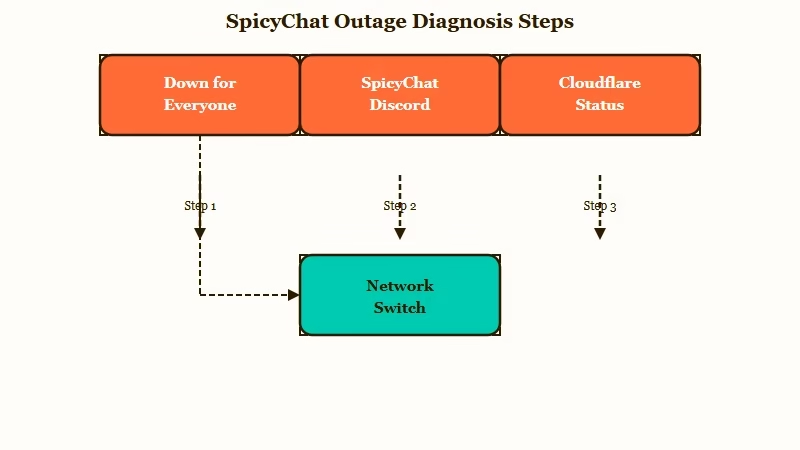
The way I approach it, you want to rule out the biggest question first: is this global or local? A quick check on a monitoring site tells you whether the whole platform is dark or whether it is only you staring at a broken page.
What is a CDN: A content delivery network is the layer of servers that routes a site to you from a nearby location, so a regional fault can block you while the site keeps working elsewhere.
The Discord server is the fastest source of real answers, since the moderation team is active around the clock and posts when something breaks. Reddit threads on r/SpicyChatAI fill in the gaps when users in one region go down while others stay online. Here is the diagnostic order I would run.
| Check | Where to look | What it tells you |
|---|---|---|
| Is it down for everyone | downforeveryoneorjustme.com | If it loads for others, the problem is on your end |
| Official status | The SpicyChat Discord, mods active 24/7 | Real-time announcements and known issues |
| Infrastructure level | A Cloudflare status check | Whether a broader Cloudflare outage is behind it |
| Your own connection | Switch to mobile data or another network | Rules out your ISP or router |
SpicyChat pulls millions of visits a month according to Similarweb traffic data, so when it genuinely goes down, a lot of people notice at once and the Discord lights up fast.
If the channels are quiet, that is a strong sign the problem is local to you. The same first-check logic applies to sibling platforms, which is why our Janitor AI outage guide follows the same steps.
What Are the Most Common Reasons SpicyChat Goes Down?
SpicyChat goes down most often because of an authentication-system failure, a botched feature update, a regional Cloudflare or CDN fault, or routine maintenance. Developers have publicly confirmed the first two as real outage causes.
The authentication failures are the sneaky ones. Users get logged out, bounced to a third-party login domain called kinde.com, and hit a 403 Forbidden when they try to sign back in.
The strange part is that the chat servers can be perfectly healthy while the login layer is the only thing broken.
Botched updates are the other confirmed cause. During one outage a SpicyChat developer said they had rolled the site back to a previous stable version after a new update caused blank pages and hiccups. When a fresh feature ships and the site turns into a white screen an hour later, that is usually what happened.
Then there is the infrastructure layer. SpicyChat runs on Cloudflare, so a bad gateway error often points to a regional routing problem rather than a dead server.
What I have seen is that these regional drops hit some countries while leaving others untouched, which is why two people can disagree about whether the site is even down.
The same confusion shows up whenever people check whether Character AI is down, where a regional fault can look like a global outage.
Why Does SpicyChat Break When the Servers Are Up?
SpicyChat frequently breaks even when the servers are up because of three you-side culprits: an ad-blocker like AdGuard breaking the login script, a regional CDN block a VPN can clear, or a stale browser cache. None of these are a real outage.
This is the reframe that saves the most wasted afternoons. A completely broken-looking site is often just a local conflict, and the biggest offender is a strict ad-blocker. One documented case had AdGuard for Mac breaking the login entirely, where turning the filter off signed the user in and turning it back on logged them straight out.
A regional block is the second hidden cause. If a bad gateway follows you around but others report the site is fine, your route to the Cloudflare edge is the problem, and hopping to another region with a VPN usually clears it. A stale cache is the third, which is why a blank page can vanish the moment you open an incognito window.
Before: SpicyChat shows a blank page, so you assume the servers crashed and close the tab for the day.
After: You check an outage tool, see it loads fine for everyone else, disable AdGuard for the site, and you are logged straight back in.
The point is to test whether it is really down before you give up. If a bot has also been acting forgetful lately, that is a separate issue covered in our SpicyChat memory fix, not an outage.
How Do You Fix SpicyChat When It Won’t Load?
To fix SpicyChat when it will not load, work from least to most disruptive: refresh, clear your cache, try incognito or another browser, disable your ad-blocker, hop regions with a VPN, then wait it out if the whole platform is down.
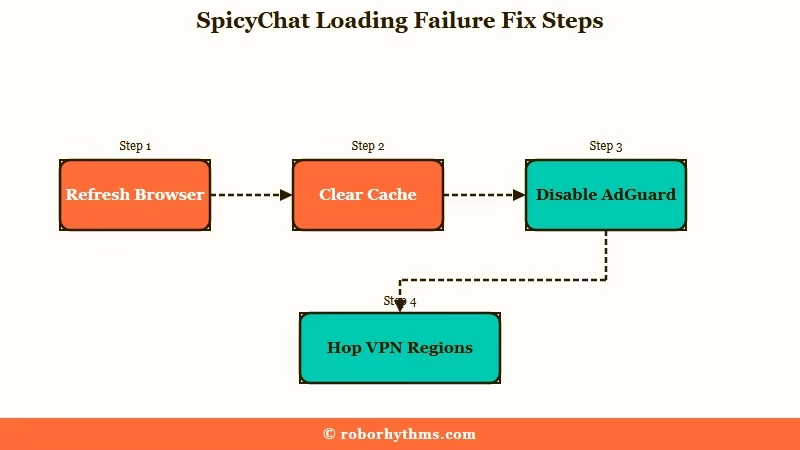
From what I have seen, the cause is local more often than people expect, so the early steps clear most cases in under a minute. Here is the sequence I would run in order:
- Hard refresh the page and give it 10 to 15 seconds to load before assuming the worst.
- Clear your browser cache, or open the site in an incognito window to bypass the cache entirely.
- Switch to a different browser, such as Firefox or Chrome, to rule out an extension conflict.
- Disable AdGuard or any strict ad-blocker for spicychat.ai, since these are known to break the login.
- Turn on a VPN and hop to another region to clear a regional CDN or bad gateway error.
- If the Discord confirms a platform-wide outage, stop troubleshooting and wait, because the fix is on their end.
The table below maps the symptom you are seeing to the likely cause and the fix, so you can jump straight to the right step.
| Symptom | Likely cause | Fix |
|---|---|---|
| Blank white page or endless spinner | Botched update or a stale browser cache | Clear cache, try incognito or another browser |
| Bad gateway error | Regional CDN or Cloudflare routing fault | Hop to another region with a VPN |
| Logged out with a 403 at a kinde.com page | Authentication-system glitch on their side | Wait it out, the site is up but login is not |
| Signed out every time you try to log in | An ad-blocker breaking the login script | Disable AdGuard or your ad-blocker for the site |
Are Your SpicyChat Chats Safe During an Outage?
Your SpicyChat chats are safe during an outage because conversations are auto-saved to your account on the server, not in your browser. Clearing your cache will not delete them. The real risk is a creator bot being removed, so back up bots you rely on.
This is the fear I most want to put to rest. SpicyChat’s own documentation says conversations are automatically saved so you can focus on your chats without worrying about losing them.
Because that storage is server-side, clearing your cache or getting a blank page does not touch your history, which is exactly why cache clearing is safe to recommend as a fix.
There is one honest caveat. While your chats are safe, bots are a different story: a user who built a backup service warned that SpicyChat sometimes removes bots for its own reasons. Your conversation stays, but the character behind it can vanish if the creator or moderation pulls it.
The catch is that there is no native export button. Developers have confirmed you cannot officially export SpicyChat chats, so to keep a local copy people use the PrintFriendly Chrome extension, a community Tampermonkey script, or press F12 and copy the chat container.
The platform XoulAI shut down with only 48 hours notice, so backing up anything you would hate to lose is a smart habit in this corner of the internet.
What Should You Use When SpicyChat Keeps Going Down?
If SpicyChat keeps going down and the downtime is breaking your immersion, the practical move is a managed companion app that runs on stable infrastructure with no self-hosting or regional gaps. That way an outage on one platform does not end your evening.
What I would recommend depends on how often it happens. If SpicyChat is usually fine and you hit the occasional blip, wait it out, because your chats are safe and most outages clear quickly.
If the drops are constant and you are tired of the guessing game, Candy AI runs as a managed platform with strong uptime, so there is no ad-blocker conflict or regional CDN roulette to babysit.
For a companion that holds onto long-running context between sessions, Nectar AI is the one I would keep as a backup, since persistent memory means you can pick a story back up cleanly after any interruption.
Neither is meant to replace SpicyChat entirely, but having a reliable second option means a single outage never leaves you stuck.
For a wider set of picks, our SpicyChat alternatives roundup breaks down who each one suits. For the full picture of what SpicyChat gets right and wrong day to day, see our SpicyChat AI review.
Frequently Asked Questions
How do I know if SpicyChat is down or if it is just me?
Check an outage tool like Down for Everyone or Just Me, then the SpicyChat Discord for official announcements. If the site loads for others and the Discord is quiet, the problem is on your end, usually an ad-blocker, cache, or regional block.
How long do SpicyChat outages usually last?
It varies widely. Routine maintenance and minor glitches often clear in a few minutes to a couple of hours. Authentication failures or regional blocks have kept some users out for several hours, and in rare regional cases, reports have stretched to a few days.
Will I lose my chat history if SpicyChat crashes?
No. SpicyChat auto-saves conversations to your account on the server, so a crash, blank page, or cache clear does not delete your chats. Your history should be waiting when the site comes back online.
Why does SpicyChat keep logging me out with a 403 error?
That 403 at a kinde.com page points to an authentication-system issue on SpicyChat’s side, not your account. The site is usually up while the login layer is broken. Waiting it out is the fix. An active ad-blocker can also cause the same logout loop.
Why is the SpicyChat mobile app not working?
SpicyChat has no official iOS App Store app, and Android is a direct APK download. If an old App Store version stopped working, it was removed. Use your mobile browser and add the site to your home screen for an app-like experience.
Quick Takeaways
- A blank page or failed login usually is not a full outage, so check Down for Everyone or Just Me and the Discord before giving up.
- The three hidden culprits are an ad-blocker breaking the login, a regional Cloudflare block, and a stale cache, all fixable on your end.
- A 403 at a kinde.com page is an authentication glitch on their side, so waiting it out is the fix, not reinstalling anything.
- Your chats are auto-saved server-side and survive a cache clear, but bots can be removed, so back up any you rely on.
- If the downtime is constant, a managed app like Candy AI keeps you online when SpicyChat drops.
