
What’s Changed: PolyBuzz is not banned, but its iPhone app has disappeared from Apple’s App Store. As of October 17, 2026, Apple’s own app lookup returns nothing for PolyBuzz in any of 17 storefronts, while the website and the Android app keep working. If PolyBuzz is already on your iPhone, keep it installed.
Is PolyBuzz banned? No. The service is still running, but its iPhone app vanished from Apple’s App Store in mid-October 2026, and that gap set off this week’s ban questions.
An archived copy of the listing shows it live on October 4. On October 15, one member posted that they “can’t find the app in the Apple Store again.”
On October 17, Apple’s US app lookup returned nothing for PolyBuzz. The same lookup came back empty for the UK, Canada, Australia, Japan and 12 other storefronts.
I care less about the rumour than about what it means for your characters and your subscription, because those are the parts you can lose.
Below is what still works, what to do if you pay through Apple, how an account ban differs from a platform ban, and whether the app is likely to return.
Is PolyBuzz Banned or Just Off the App Store?
PolyBuzz is not banned, and only the iPhone app is affected: the App Store listing is gone, while the website and the Android app keep working.
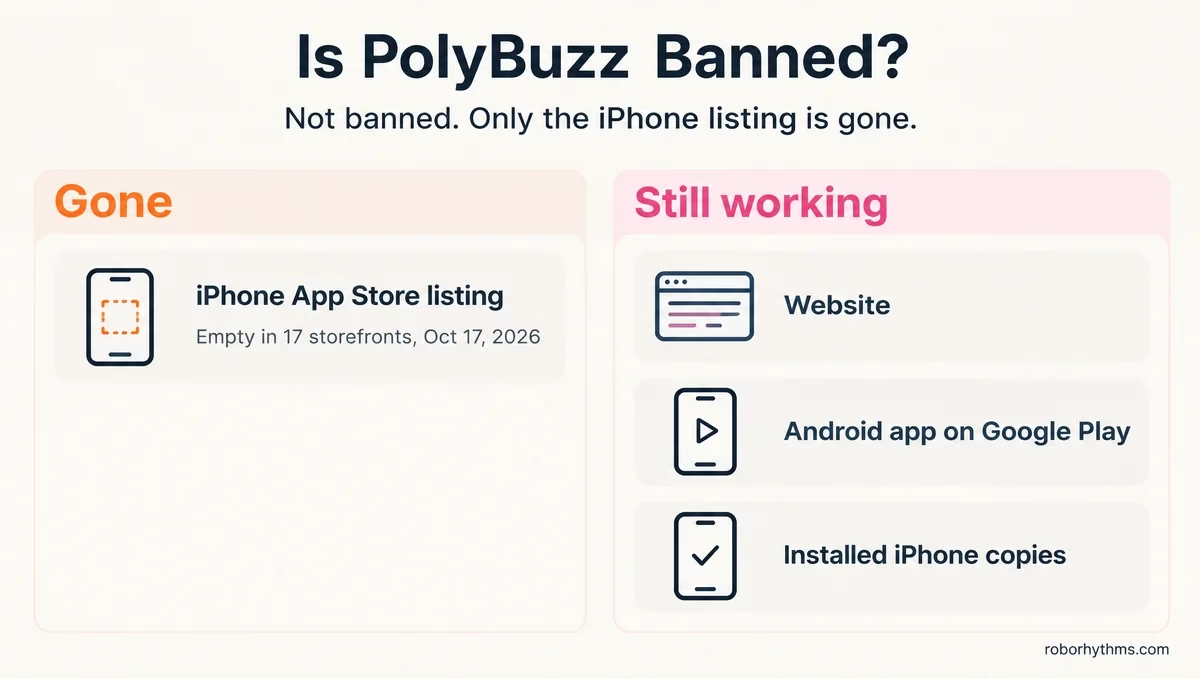
The Android app is still on Google Play in the US, rated Mature 17+, with more than 50 million downloads and an update dated September 21, 2026.
The website at polybuzz.ai loads normally too, so the service itself has not shut down.
What changed is the iPhone storefront. The US listing page now returns a “not found” error, and Apple’s lookup returns nothing for the same app ID in 16 other storefronts, from Germany to Brazil.
The word “banned” gets used for several different things, and sorting out which one you face is the first thing I do.
| What you see | What it means | What to do |
|---|---|---|
| PolyBuzz is missing from App Store search | The iPhone listing is gone | Keep the installed app, or use the website or Android |
| The installed iPhone app still opens | Installed copies keep running | Do not delete it |
| Your account says suspended or banned | An account ban, not a platform ban | Read the notice and contact support |
| A character shows a violation or vanished | A moderation action on one bot | See the section on bans below |
| Nothing loads on web or Android either | An outage, not a ban | Wait and try again later |
Why Did PolyBuzz Disappear From the App Store?
Nobody has said why: as of October 17, there is no public explanation from Apple or PolyBuzz for the missing listing.
In one thread, the poster notes that Android and the website still work and that nobody knows whether Apple removed the app or PolyBuzz pulled it.
A reply there says nothing official has appeared, and that a review issue, a metadata change or a temporary account problem can each lead to an Apple removal.
Apple does remove AI companion apps outright. It pulled Botify AI and Photify AI, and their developer, Ex-Human, says Apple’s notice cited only “dishonest or fraudulent activity” when it sued Apple over it in April 2026.
AppleInsider ties that removal to an MIT Technology Review investigation into Botify bots that claimed to be under 18. PolyBuzz has been given no reason at all, so I am not assuming its case is the same.
My read is that a store review problem is likelier than a permanent ban. PolyBuzz shipped a Google Play update in September, its website runs as usual, and Chai, another big companion app, is still listed on the App Store with an update from October 7.
Treat that as an inference until Apple or PolyBuzz says more.
Can You Still Use PolyBuzz on iPhone, Android and the Web?
You can still use PolyBuzz on the web and on Android, and an iPhone that already has the app keeps running it.
In the first thread about the missing listing, one member says they are still using the app and that Apple took the monthly payment that morning.
Apple subscriptions renew until you cancel them, and that member’s charge suggests the missing listing has not changed that.
Members disagree on reinstalling. One reply in that thread says a deleted copy should still be in your purchase history, while a member in another thread believes a deleted copy cannot be reinstalled. Deleting the app is a gamble I would not take.
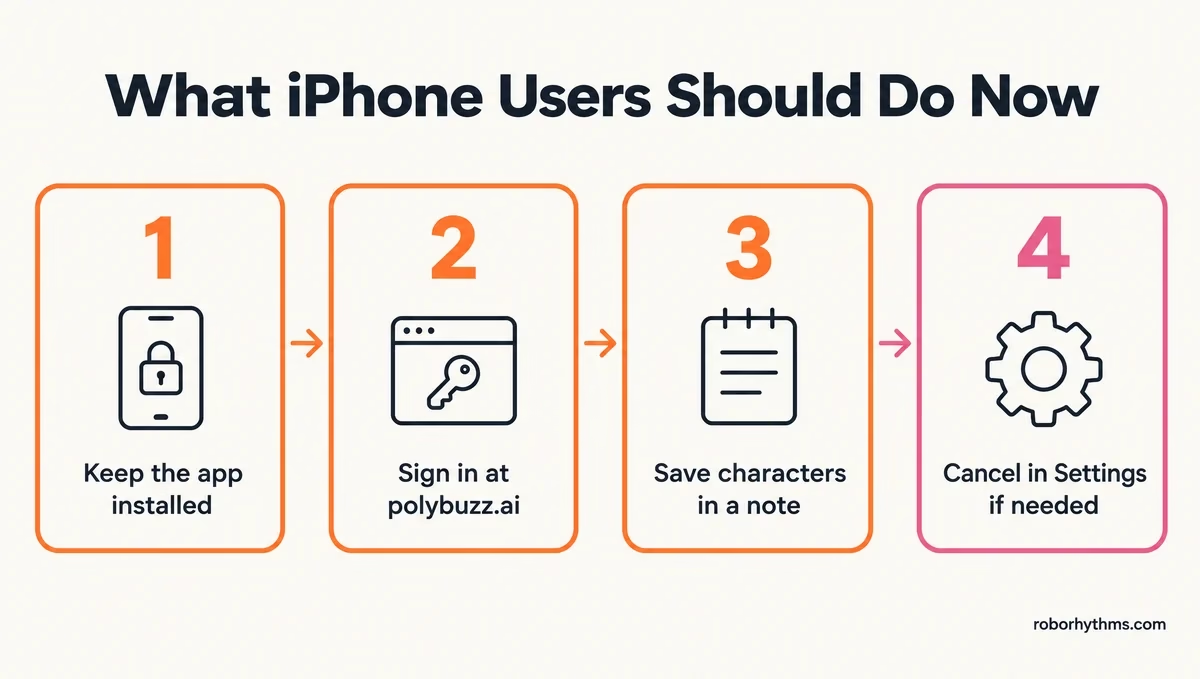
These are the steps I take with any app that drops off the store:
- Leave PolyBuzz installed, and do not offload it (the iPhone option that removes an app but keeps its data).
- Sign in at polybuzz.ai with the login you use in the app, and check that your characters are there.
- Copy the characters and personas you care about into a note, including the description and greeting.
- If you pay through Apple and want to stop, open Settings, tap your name, tap Subscriptions, then cancel PolyBuzz, per Apple’s cancellation guide.
Here is what step 3 looks like for one character.
Before: trusting the app to keep a character you spent weeks shaping, with nothing saved anywhere else.
After: a note titled with the character’s name, holding its description, its greeting, two or three lines of example dialogue and your persona text, so you can rebuild it on the web or anywhere else.
Why Do PolyBuzz Accounts and Characters Get Banned?
PolyBuzz’s bans hit accounts and characters: its terms let it suspend an account over a false birthdate or a rule break, and its moderation flags individual bots.
PolyBuzz’s Terms of Use, last updated June 1, 2026, deny service to anyone under 18. If the birthdate you gave turns out to be false, PolyBuzz can suspend your access temporarily or permanently.
It can also terminate an account “for any or no reason,” including when it believes you broke the terms.
Characters get flagged separately. A bot can be marked as a violation or pulled while your account stays fine, and the guide to how PolyBuzz works explains the violation labels and what they block.
The broad termination clause bothers me, because it means an account ban needs no specific reason. If yours was banned, the notice in the app may be the only explanation you get, so screenshot it before you contact support.
How Old Do You Have to Be to Use PolyBuzz?
PolyBuzz is for adults only: its terms set the minimum age at 18, and Google Play rates the app Mature 17+.
A policy update posted to r/polybuzz in December 2025 moved under-18 accounts into a read-only Viewing Mode. The change started on December 31, 2025 in select regions and was set to expand from there, using behavioral signals and outside age-check vendors.
In the UK, the terms require age verification under the Online Safety Act. The compliance policy breakdown covers what adults see when the system blurs a chat and how verification changes it.
I think the age rules explain a lot of the “banned” talk. A teen locked into Viewing Mode, or an adult flagged by mistake, can easily read the lockout as the whole app shutting down.
Will PolyBuzz Come Back to the App Store?
PolyBuzz may come back, but nobody can promise a date: Talkie Lab returned about two weeks after pausing iOS downloads, while Botify AI is still missing months after Apple pulled it.
Members in the first thread say PolyBuzz has dropped off the App Store before and came back within days or weeks.
Talkie Lab followed that path in 2026, stopping new iOS downloads in late August and returning on September 14, as the Talkie troubleshooting guide records.
Botify AI shows the other outcome. Apple pulled it before Ex-Human sued in April 2026, and as of October 17 it still does not appear in App Store search.
I would give it a few weeks before deciding anything, since the website and Android keep your account reachable in the meantime.
If you would rather not wait, the list of apps like PolyBuzz sorts the options by the reason you want to leave.
Quick Takeaways
- PolyBuzz is not banned, but Apple’s lookup finds no PolyBuzz iPhone app in any of 17 storefronts as of October 17.
- The website and the Android app on Google Play still work, and installed iPhone copies keep running.
- Do not delete the iPhone app, because reports disagree on whether it can be reinstalled.
- Apple subscriptions keep renewing until you cancel them in Settings under Subscriptions.
- Save your characters and personas in a note now, then wait a few weeks before deciding whether to move.
