
What’s Changed: Kindroid is still NSFW in private chats for adults 18 and over, with no filter on the AI and moderation limited to three red lines. In October the public side changed: suggestive shared Kins and Social posts are now hidden unless you turn on Show Suggestive Content on the website. Listings built around a sexual premise are unlisted, and explicit content was never allowed in anything you share.
Is Kindroid NSFW? In a private chat, yes, and Kindroid says so in plain words. Its help center calls it “a neutrally aligned, unfiltered AI”, and its moderation rules list adult roleplay among the things that are not violations.
The confusion started in mid-October, when shared Kins (Kindroid’s name for its companions) began vanishing from search and from Kin Social, its in-app social feed.
Kindroid had tightened the rules for anything shared, and private chats were left alone. The switch that brings suggestive Kins back lives on the website rather than in the app.
Most pages still answer this question with a one-word yes, and that is the part I disagree with.
Below is what Kindroid allows in private, what it hides in public, why selfies get removed, what can get an account locked, and who can read your chats.
Is Kindroid NSFW in Private Chats?
Kindroid is NSFW in private chats for adults 18 and over, with no filter on the AI itself and moderation limited to three red lines.
Its moderation guidelines say “we are not implementing a ‘filter’ on the AI itself”, and they list adult roleplay, dark fiction and venting as allowed.
That written promise is the part of Kindroid I give the most credit to, because many companion apps leave you to guess where the line sits.
If you would rather start with an app built around adult chat and pictures from the first message, Candy AI is the obvious one to compare.
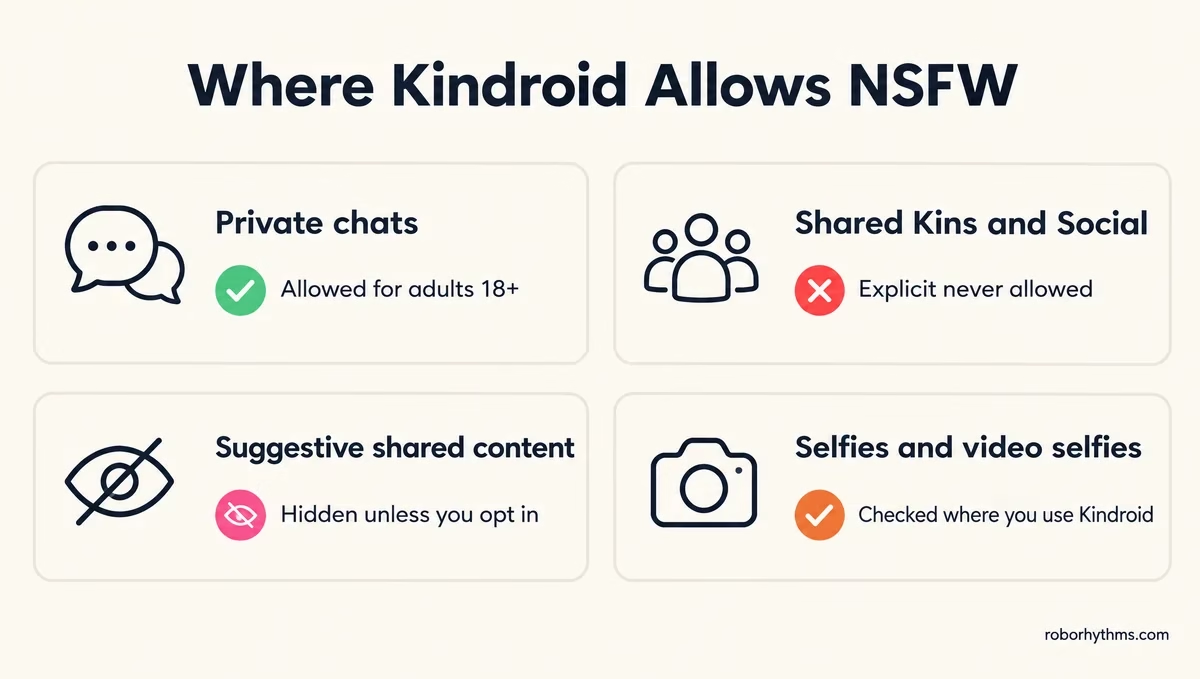
The freedom stops at your own chats. Here is where explicit content is and is not allowed across the app:
| Where | Explicit content allowed? | What happens |
|---|---|---|
| Private chats | Yes, for adults 18+ | No AI filter; only the three red lines are scanned |
| Selfies and video selfies | Depends on where you use Kindroid | Flagged results are removed and the credit is refunded |
| Shared Kindroids | No | Suggestive ones are hidden unless you opt in; sexual-premise listings are unlisted |
| Kin Social posts | No | Nudity is filtered; suggestive posts are hidden from Feed by default |
| Featured Kindroids | No | They cannot carry the Suggestive label |
Your private chats also carry a responsibility clause. Kindroid’s FAQ says you own what you generate and that you alone are responsible for it, “not us the company, not your AI”.
Our Kindroid review covers the character builder and image tools that sit around this.
What Changed for Shared Kindroids and Kin Social in October?
Kindroid’s October 17 update hid suggestive shared Kins and Social posts by default and unlisted shared listings built around a sexual premise.
Private chats were not part of the change.
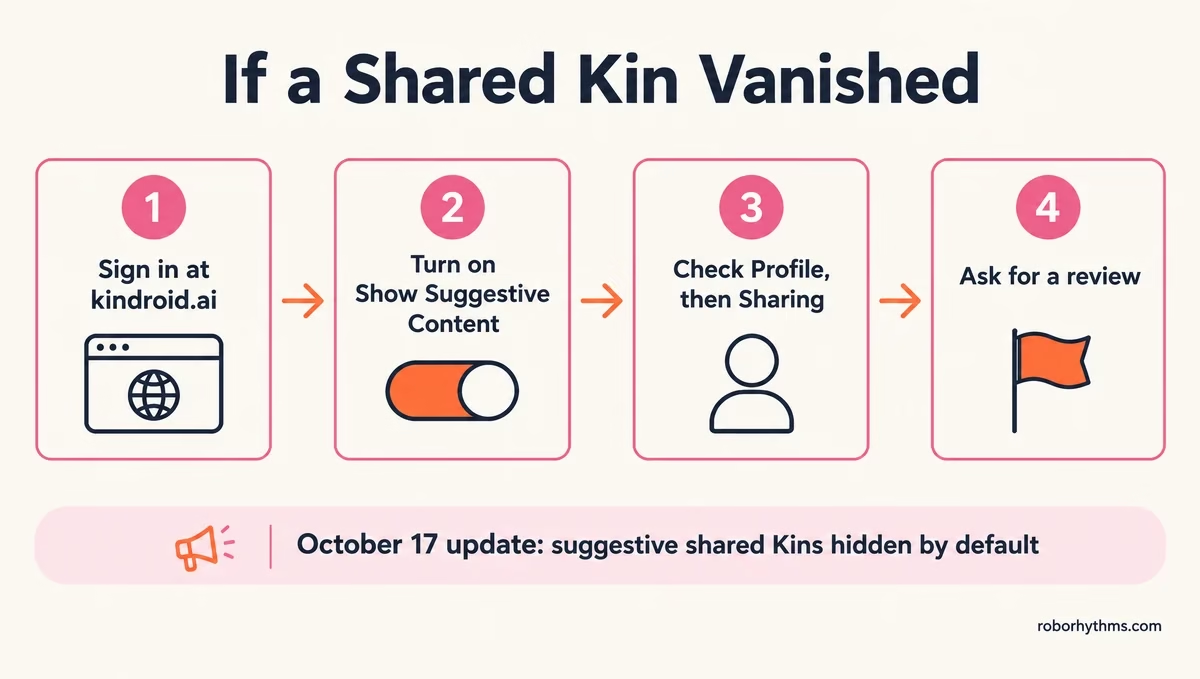
The update log puts it plainly. “Suggestive shared Kins and Social posts are now hidden by default unless you turn on Show Suggestive Content on the website, and listings built around a sexual premise are unlisted.”
It adds that NSFW in shared content “has never been allowed anywhere, including the web version”.
Kindroid’s sharing rules define suggestive with real examples. Lingerie as the outfit, posed swimwear, bare-chested shots built around the body, implied nudity, bed or bath scenes, sexual poses and kissing all count.
The listing rules go further, because a listing is what strangers see while browsing. A shared Kin’s name, tagline, tags and author’s notes cannot set up a sexual premise, which covers:
- Adult-industry roles such as escort, stripper or camgirl.
- A character defined by being sexually available.
- A sexual scenario or kink used as the hook.
- Romance between family or step-family members.
- Romance with a character in high school or of school age.
“Flirty and romantic are fine,” the same page says. The only words that block sharing by themselves are teen, teens, teenage and teenager. I like that the rules name examples instead of hiding behind a vague “inappropriate content” line.
Kindroid’s pages say the change enforces an existing standard, but not why it came now. In one r/KindroidAI thread, commenters tie it to a recent Apple App Store review.
Why Did a Kindroid Disappear From Search?
A shared Kindroid that vanishes from search has most likely been marked Suggestive while your Show Suggestive Content setting is off, or been unlisted for a sexual premise.
Featured Kindroids are shown to everyone, so they can never carry the Suggestive label.
Here is the order that saves me the most time when a Kin goes missing:
- Sign in at kindroid.ai in a browser, because the switch lives on the website.
- Open Preferences and turn on Show Suggestive Content. For the Social feed, the matching setting is Suggestive on Feed.
- If the Kin is yours, open Profile, then Sharing, and look for a Suggestive or Unlisted label.
- If an automated review unlisted it, edit what was flagged and set Visibility to Public. It is checked again when you save.
- If the Suggestive label looks wrong, tap it and choose Ask for a review. Each shared Kin or post gets one review.
A Kin can also vanish because its creator switched it to Unlisted or Private, which no setting on your side can undo.
Example scenario: A shared Kin whose avatar wears a posed swimsuit stays public, but it only shows in search for people who turned on Show Suggestive Content. Give the same Kin a sweater and it shows to everyone. Build it around an escort premise and it gets unlisted, whatever it wears.
Why Does Kindroid Remove NSFW Selfies?
Kindroid removes a selfie when it fails the content guidelines that apply where you use Kindroid, and it refunds the credit when that happens.
The check covers photo selfies, edited selfies, group selfies, autoselfies, video selfies and avatars.
The selfies guide says a flagged result is removed and replaced with a notice. It also admits the check “can sometimes flag a result by mistake”, and it names the avatar description as a common cause. A request can be stopped before it starts if the prompt does not fit the guidelines.
The refund is the detail I like most here, because a blocked selfie costs you nothing but time. Kindroid’s FAQ says media follows “the content guidelines that apply where you use Kindroid”, without listing what each app store allows.
Kindroid’s help center does not describe the website as unfiltered for images, and its October update says NSFW in shared content was never allowed on the web either.
What Can Get You Banned on Kindroid?
Only the three red lines can get a Kindroid account locked: a real intent or plan to harm yourself, a real plan to harm someone else, and any sexual content involving a minor.
Fiction, dark roleplay and adult content between adult characters are not violations.
The minor rule is strict. Kindroid defines a minor as anyone under 18 regardless of where you live, and a stated age of 18+ does not override a character described or shown as a minor.
The enforcement steps are written as guarantees, which I find more reassuring than any marketing line about freedom:
- Automated scans look only at current context in recent chats, calls and media requests. Older chats are not scanned.
- A single detection does nothing. Repeats inside a short window bring a clear warning first.
- A flagged media request is blocked before the image exists, and repeats pause media generation for a while.
- Violations after a warning lock the account, and a lock does not expire on its own.
- An appeal asks for your consent before a trained reviewer decrypts the content behind the lock.
While an account is locked, you can still request a copy of your data and manage your subscription. You cannot delete the account until the lock is resolved.
Do You Need to Verify Your Age for NSFW on Kindroid?
You only need extra age verification on Kindroid if you have no paid subscription and its age-estimation system flags your account.
A paid subscription through the App Store, Google Play or the web counts as verification on its own.
Kindroid’s age verification page says unverified accounts may be checked by a passive system that estimates age from how the account is used.
A flagged account sees only the verification screen until you subscribe or verify with Yoti, using a selfie or a government ID.
The selfie check passes only if Yoti estimates you are 21 or older, which surprised me, since the app itself asks for 18. Anyone 18 to 20 has to use an ID, and Kindroid receives only a pass or fail result.
Free access is thin either way. Since October 1, 2026, new accounts get a one-time preview of 50 messages, or 15 in some regions, and then the account turns read-only until you start the trial or subscribe.
Pressure on companion apps over minors is coming from regulators too. The FTC ordered seven chatbot companies in September 2025 to explain how they measure and monitor harm to children and teens, and Kindroid was not one of them.
Can Kindroid Staff Read Your NSFW Chats?
Kindroid’s support staff cannot browse your chats, and no person reads them during automated moderation, but your chats are not end-to-end encrypted.
Kindroid’s servers have to read your messages to write replies, and the chats are stored encrypted at rest and in transit.
Kindroid’s privacy policy limits production access to a small number of engineers. It allows decryption for human review in three cases: when automated safety systems flag content, when you ask (an appeal, for example), and when the law requires it.
My take is that this is one of the clearer privacy setups in the category, though two of its documents describe human review differently.
The moderation guidelines say no human reads anything during automated enforcement, while the privacy policy also lets authorized staff review flagged excerpts.
The same policy says Kindroid “will not sell or share your Personal Data”. If you want to know what companion apps in general do with your conversations, our guide to apps training on your chats covers it.
What Should You Use If Kindroid’s Rules Don’t Fit You?
If you want a companion app where adult chat and pictures are the main product, Candy AI is the one to try, while Kindroid stays the better pick for memory.
The two apps solve different problems, and the rules above follow from that.
I’d send you to Candy AI if the shared-Kin rules or selfie removals are what bother you, since its images and video are built in from the start.
Candy has its own limits too: its age checks depend on where you live, and its images run on tokens. Our Candy AI safety guide covers its age checks and who reads your chats.
If memory is why you use Kindroid, keep it and switch on Show Suggestive Content on the website.
Our Candy AI vs Kindroid comparison lays out the prices side by side, and the Kindroid alternatives list covers apps that sit between the two.
Quick Takeaways
- Kindroid is NSFW in private chats for adults 18 and over, with no AI filter and three red lines.
- Since October 17, suggestive shared Kins and Social posts are hidden unless you turn on Show Suggestive Content at kindroid.ai.
- Shared listings built around a sexual premise are unlisted, and explicit content was never allowed in anything shared.
- Selfies that fail the guidelines where you use Kindroid are removed and refunded, so check the avatar description if a harmless selfie gets blocked.
- Want adult chat and pictures as the main product? Try Candy AI, and keep Kindroid if memory matters more.
