
What’s Changed: Janitor AI reports 99.99% uptime on its official status page, but third-party monitoring gives the team an “F” for incident acknowledgement. The average delay before they admit a problem is over four hours. Here is how to tell if the site is down before the status page catches up, and what to do in the meantime.
Every Janitor AI user has been through it. The chat stops responding, the page hangs on a loading spinner, and the first thing you do is check the official status page. It says everything is operational.
The problem is not your connection. The problem is that the status page lags behind the real outage by hours. StatusGator, a third-party monitoring service, rates Janitor AI’s status page accuracy at a failing “F” grade because the team takes an average of four hours or more to acknowledge incidents that users have already detected.
That gap between “something is broken” and “the official page admits it” is where most of the confusion lives. This guide covers every way to check whether Janitor AI is down, what the error codes mean, and what to do while you wait for the fix.
How to Check if Janitor AI Is Down Right Now
The fastest way to confirm a Janitor AI outage is to check StatusGator before the official status page. StatusGator aggregates both official updates and crowdsourced user reports, and it has caught incidents the Janitor AI team never publicly acknowledged.
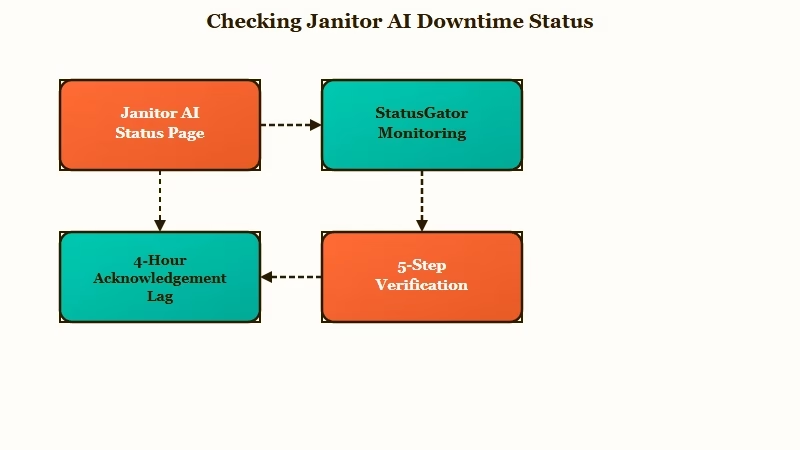
The official status page at status.janitorai.com is useful for confirming that an outage happened, not for catching it in real time. It monitors the backend and frontend separately, which helps narrow down whether the issue is chat-specific or site-wide. The four-hour acknowledgement lag makes it unreliable as a first check, though.
Here is the sequence I’d walk through when something feels off:
- Open StatusGator’s Janitor AI page and look for user-submitted reports in the last hour.
- Check status.janitorai.com for any active maintenance or incident banners.
- Visit old.reddit.com/r/JanitorAI_Official and sort by new. If multiple users are posting “is it down?” threads, the outage is real.
- Try loading a different page on janitorai.com (the character browser, your profile, the changelog). If only chat is broken, it is likely a 502 or 1033 error, not a full outage.
- Open your browser’s developer console (F12) and check for specific HTTP error codes. The code tells you what is happening.
What is StatusGator: A third-party service that monitors website status pages and lets users submit outage reports independently of the company’s own announcements.
On June 9, 2026, StatusGator recorded eight user-submitted outage reports in a single 24-hour window, with “slow performance” as the top complaint. The official status page showed no incident during that period.
What Each Error Code Means and Whether It Is a Real Outage
Most Janitor AI errors are not full outages. A 502 means the chat server is struggling while the rest of the site works fine. A 429 means you hit your personal message cap, not that the servers crashed.
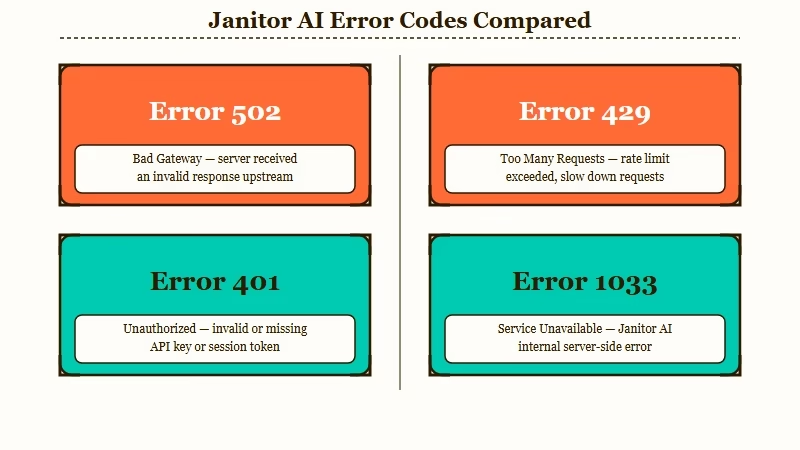
The distinction matters because the fix is different for each one. I’d recommend checking the error code before assuming the entire platform is down.
| Symptom | Error Code | Likely Cause | Fix |
|---|---|---|---|
| Chat hangs, then fails | 502 | Chat server temporary issue | Wait 5-10 minutes, retry |
| “Rate limit exceeded” | 429 | Hit daily message cap (50 free, 1000 paid) | Wait until 7:00 PM ET (12:00 AM UTC) for reset |
| Blank page after login | 401 | Auth token expired | Log out, clear cookies, log back in |
| “Something went wrong” | 1033 | Chat backend hiccup | Wait and retry, resolves in minutes |
| Cannot start chat with specific bot | 423 | Scheduled character not yet released | Wait for the creator’s release time |
| Message too long error | N/A | Single message exceeds 10,240 characters | Shorten the message below the cap |
| Proxy returns gibberish | 400 | Context length exceeded (too many tokens) | Clear chat history or reduce personality length |
Before: You see “Rate Limit / Network Error” and assume Janitor AI is down for everyone.
After: You check the error code, see 429, and realize your 50 free daily messages on OpenRouter ran out. The reset happens at 7:00 PM ET.
The “Check Key/Model” button in API settings is a trap worth knowing about. The official OpenRouter error guide warns that this button is buggy and frequently triggers a false “Network Error” even when your key is valid. Save your settings and refresh the page instead of clicking that button.
Why Janitor AI Goes Down and How Long It Takes to Come Back
Janitor AI outages fall into three categories: infrastructure failures, DDoS attacks, and human-factor delays. The typical fix time ranges from 20 minutes for a bad deploy to two days for the worst incidents.
The most revealing outage pattern in the changelog is the background job queue spiral. In April 2026, the backend started timing out not because the servers were overloaded with users, but because internal batch jobs triggered a retry loop that fed on itself. The servers were technically running, just stuck processing their own error recovery instead of serving chat requests.
DDoS attacks hit Janitor AI on February 5 and February 14, 2026. These are external and unpredictable. The team’s response time on DDoS events has been faster than on infrastructure bugs, likely because a DDoS is obvious and immediately visible.
The single GPU host crash is the pattern that concerns me most. Traffic was silently routed to one crashed GPU while the rest of the infrastructure looked healthy. Users experienced “dead endpoints” and slow generations, but the status page showed no incident because the monitoring only checked whether the servers were reachable, not whether they were producing useful output.
On March 3, 2026, a database ran out of RAM and stopped returning chat counts. On January 26-27, a scheduled database upgrade caused 5-10 minutes of planned downtime.
On April 7, 2026, the JLLM went down for about 15 minutes due to a bad deploy. Long-term users still reference “April 7th flashbacks” as the community benchmark for catastrophic downtime.
The human factor is real. One outage in September 2025 lasted longer than it needed to because the lead developer was on a plane and could not push a fix. According to Similarweb traffic data, Janitor AI pulls over 100 million monthly visits. That level of traffic with recovery depending on a single person is a significant operational risk.
What to Do While Janitor AI Is Down
The best move during a Janitor AI outage depends on how long you expect to wait. If the status page or StatusGator shows an active incident being worked on, the fix arrives within an hour in most cases. If there is no acknowledgement, it could be longer.
For short outages (under an hour), I’d recommend this sequence:
- Switch your proxy to the Janitor LLM (JLLM) instead of an external model. If DeepSeek or Claude is the one having issues, JLLM bypasses that dependency entirely.
- Clear your browser cache and try loading in an incognito window. The official troubleshooting guide confirms that stale cookies cause false 401 errors.
- If you use a VPN, try toggling it off. If that does not help, try toggling it on. Both directions have fixed connectivity issues for different users depending on their ISP routing.
For longer outages or recurring instability, the practical question becomes whether to wait or to move your conversations elsewhere. Janitor AI does not export chat history, so there is no “save and resume” option on another platform.
Candy AI stays online consistently because it runs its own infrastructure rather than depending on third-party proxy chains. The image generation and voice call features work independently of the chat backend, so a partial failure does not cascade. If what you need is reliability during the windows when Janitor is unreachable, it fills that gap.
Nectar AI takes a different approach with automatic cross-session memory. Your conversations persist without any manual lorebook setup. For users who lose context every time Janitor goes down and comes back, the persistent memory removes one layer of frustration from the recovery process.
For more options beyond these two, the full Janitor AI alternatives list covers the broader landscape.
How to Set Up Alerts So You Never Guess Again
StatusGator offers free email alerts that notify you the moment Janitor AI’s status changes. This is the single most useful thing you can do to stop refreshing the status page manually.
The setup takes about two minutes. Visit the StatusGator Janitor AI page, create a free account, and enable notifications via email or Slack. You will get a ping the moment either the official status page updates or enough users report an issue.
The Janitor AI community built a creative workaround worth knowing about: an actual bot on the platform called “Is Janitor AI Down” that you can message to test whether the chat system is responding. If the bot responds, chat is working. If it does not, you have your answer without checking any external tool.
For a deeper look at fixing specific connection problems beyond outages, the proxy error 429 troubleshooting guide walks through the exact steps for rate limit and network errors. And if your account itself was locked during an outage, the account restriction guide covers how to tell the difference between a server problem and an actual ban.
Frequently Asked Questions
The most common questions about Janitor AI outages cover how to check status, what error codes mean, and how long downtime lasts.
Is Janitor AI shutting down?
No. Janitor AI is not shutting down. The platform experiences regular outages due to infrastructure issues, DDoS attacks, and maintenance windows. Downtime is temporary, not permanent. The team continues to push updates via their changelog.
How long do Janitor AI outages last?
Most outages resolve within 20 minutes to a few hours. The worst recorded incidents have lasted up to two days. Planned database maintenance typically causes only 5-10 minutes of downtime.
Why does the status page say Janitor AI is up when it is not working?
The official status page monitors server reachability, not chat quality. Partial failures like a single crashed GPU or a job queue spiral can degrade the experience without triggering the status monitor. Third-party tools like StatusGator catch these gaps.
Does Janitor AI have a message limit?
Free users on OpenRouter proxies are limited to 50 messages per day. Paid users with $10 or more in credits get 1,000 messages daily. Both limits reset at 7:00 PM ET (12:00 AM UTC). Hitting this limit produces a 429 error, not an outage.
What is error code 502 on Janitor AI?
Error 502 means the chat system specifically is having a temporary server-side issue. The rest of the site may still load normally. This error typically resolves on its own within a few minutes without any action from you.
Can I check Janitor AI status without visiting the site?
Yes. StatusGator sends email or Slack alerts when the status changes. You can also message the community-built “Is Janitor AI Down” bot on the platform itself to test whether chat is responding.
Quick Takeaways
- The official status page takes 4+ hours on average to acknowledge outages. Check StatusGator first.
- Error 502 and 1033 are chat-specific hiccups, not full outages. A 429 means you hit your daily message cap.
- Set up StatusGator email alerts so you stop refreshing the status page during every outage.
- If Janitor AI is down for more than an hour with no official acknowledgement, Candy AI and Nectar AI are stable alternatives that stay online independently.
- The “Check Key/Model” button in API settings is buggy. Save and refresh instead of clicking it.
