
What’s Changed: Higgsfield’s official status page has posted no incident since it went up on October 12, 2026, including on November 2, when Higgsfield’s own changelog says every Kling generation was failing. A green status page does not mean your video will render. Check a crowd tracker, try a second model, and expect failed generations to return their credits automatically on most models.
Is Higgsfield down, or is your video just stuck in the queue? From the generation tile the two look the same, and the answer decides whether you wait, switch models or cancel.
Higgsfield is the image and video tool we pay for and use most days, so the credit figures on this page come from our own account.
I treat its official status page as the weakest of the four checks below, because it has shown 100% on every line since it launched.
This page covers the two-minute check that separates an outage from a local problem and what each stage of a stuck job means. It also covers the setting that skips the slow queue and what happens to your credits when a job fails.
Every figure carries a date, because Higgsfield changes its models and limits often.

Is Higgsfield Down Right Now or Is It Just You?
Higgsfield’s own status page is a weak guide to whether Higgsfield is down, because it has shown 100% uptime on every component since launch. Crowd trackers such as StatusGator and Instatus, plus a test on a second model, give the real answer.
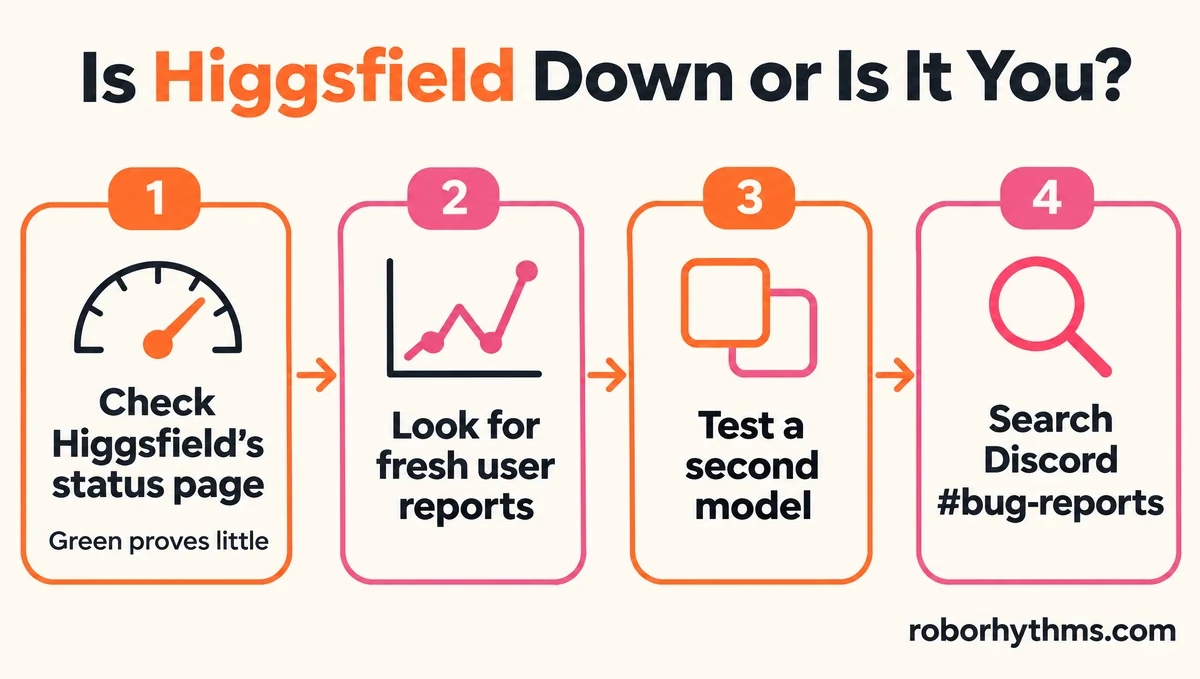
Here is the order I check in, and it takes about two minutes:
- Glance at status.higgsfield.ai. A red or yellow line there is real, but a green page proves little.
- Open StatusGator or Instatus. A fresh spike in user reports within the last hour means the problem is not on your side.
- Run one small image on a different model. If it finishes, the site is up and the trouble is one model or the video queue.
- Search the #bug-reports channel on Higgsfield’s Discord. Higgsfield’s help center says Discord works even when the website does not load, and an existing report has a Same issue button.
| Where to check | What it shows | What it misses |
|---|---|---|
| Higgsfield status page | Ten components, from the web app and video generation to billing and MCP, its connector for AI agents like Claude | Queue times, single models, and every outage so far, with no incident posted since October 12, 2026 |
| StatusGator | The official components plus user reports in the users’ own words | Which model failed, and it grades Higgsfield’s page F for slow acknowledgement |
| Instatus | Report spikes with a start time and length, 10 of them in the 90 days to November 27, 2026 | The cause, since every spike is marked “No update from Higgsfield AI” |
| Higgsfield changelog | Confirmed model failures, logged as Fix entries with refund notes | Anything still happening, because entries appear after the fix |
All four sources were checked on November 27, 2026.
Why Does the Higgsfield Status Page Say Everything Is Online?
The Higgsfield status page says everything is online because it tracks broad components only, and it has never posted an incident.
Its incident history reads “No incidents reported” for September, October and November 2026.
The page’s own data feed dates its creation to October 12, 2026, yet its 90-day uptime bars start on August 30. That puts 43 of the 100% days before the page existed.
The clearest case is November 2, 2026, when Higgsfield’s changelog says “Generations on all Kling models, including Kling 4.0, Kling 3.0, and Kling Motion Control, were failing.” The same day, Instatus listed a Higgsfield outage from 3 PM UTC that “lasted 13 h”. Higgsfield’s status page still shows Video Generation at 100% for November 2.
The page also has no line for queue time and none for any single model, so a two-hour wait or a dead Seedance model never turns it yellow.
StatusGator grades the page F for incident acknowledgement, the bottom of its scale, which StatusGator sets at an average delay of 4 hrs or more.
Why Is My Higgsfield Video Stuck on Processing?
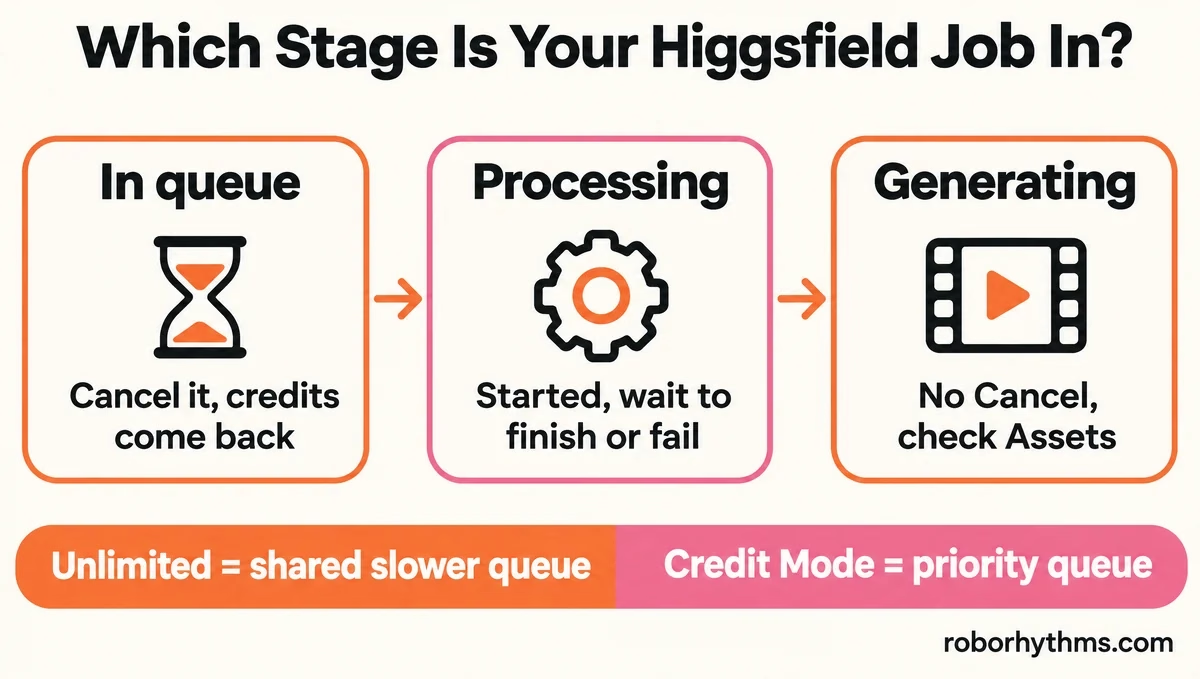
A Higgsfield video stuck on Processing has already started, so the Cancel button may no longer work. Unlimited and free jobs wait the longest, because they share a slower queue than jobs paid for with credits.
Start with a hard refresh: Ctrl+Shift+R on Windows, Cmd+Shift+R in Chrome on a Mac, or Cmd+Option+R in Safari. In its help article on stuck generations (updated November 20, 2026), Higgsfield says most stuck generations resolve on their own within a few minutes, and a hard refresh shows the tile’s real status.
What you can do next depends on the stage printed on the tile:
- In queue: hover over the tile in Assets and press Cancel in the top-right corner. The credits come back.
- Processing: the job has started, and Cancel may no longer apply. Give it time to finish or fail.
- Generating: there is no Cancel at this stage. Refresh Assets or open it in another browser, because the result may already be there.
I leave a Processing job alone until it ends one way or the other, because nothing I click at that stage changes the outcome. Higgsfield’s API documentation says the same thing in code terms: a request can be cancelled only before processing starts.
The long waits come from Higgsfield’s two queues. Section 10.6 of its Terms of Use says Unlimited models run on “a dedicated processing queue, separate from the priority queue used for credit-based generations.” Section 10.6 also says “Processing speed and parallel generation capacity are not guaranteed.”
That shared queue is where November’s worst waits came from. On November 15, a 9-second Seedance 2.5 clip sat on Processing for over 25 minutes, when the same clip had cleared processing in 5 to 6 minutes the day before. Replies in that r/HiggsfieldAI thread describe waits past 4 hours.
Two days earlier, each 6-second 720p clip took 65 to 75 minutes in the Unlimited queue for an Ultra subscriber on Reddit, with one job running at a time.
Higgsfield’s help center says the shared queue’s speed “depends on overall demand on the platform,” and that demand is large.
The company claimed 30 million users across 200 countries in August 2026, TechCrunch reported, and every Unlimited job from those accounts lands in the same line.
What is Credit Mode: Higgsfield’s name for generating with credits instead of an Unlimited allowance, which sends the job to the faster priority queue.
Does Turning Off Unlimited Make Higgsfield Faster?
Turning off Unlimited makes Higgsfield faster, because the job then runs in Credit Mode, which Higgsfield says uses the priority queue at maximum speed. The catch is that every Credit Mode job costs credits.
The switch is the Unlimited toggle in the generation panel. Higgsfield’s article on Unlimited models (updated August 28, 2026) says that with the toggle off “the generation deducts credits and runs in the priority queue at maximum speed.” Credit costs per model vary widely, and video burns through them fastest.
If my deadline is today, I switch the toggle off and pay the credits. A clip that would sit for an hour in the Unlimited line is worth the credits to me when someone is waiting on it.
Free accounts cannot make that trade. Higgsfield’s free-plan article (updated November 11, 2026) says the free plan has no monthly credits, runs one generation at a time and cannot buy Credit Packs. That leaves the free plan with no route into the priority queue.
If you need the faster line, a paid Higgsfield plan is the only way in, and its monthly credits are what Credit Mode spends.
Does Higgsfield Refund Credits When a Generation Fails?
Higgsfield refunds the credits for a failed generation automatically on most models, usually within a few minutes, and lists every charge and refund under Manage Account, then Usage. Grok is the exception, because its credits are deducted the moment a generation starts.
The automatic refund is the part of Higgsfield I trust most. On our own account, 5 of 474 generations between October 9 and November 10, 2026 failed, all of them GPT Image 2.5 Flare images, and each refund appeared 11 to 21 seconds after the charge. That came to 2.75 credits, and none of it needed a ticket.
The same rule covers filtered jobs. Higgsfield’s help article on NSFW flags (updated November 20, 2026) says credits for a flagged generation are returned automatically on most models, and the tile then shows Credits refunded.
Grok is the model to watch. Higgsfield’s stuck-or-failed article says Grok’s credits are “deducted the moment a generation starts,” so never assume a failed Grok job refunds itself, and check Usage before you retry.
Card charges and plan refunds follow separate rules, covered in plan refunds and cancellations.
What Should You Send Higgsfield Support About a Stuck Job?
Send Higgsfield support the generation ID, the model, the exact error and your browser and operating system, because those are the details its help center asks for.
The generation ID is the last part of the link when you open the job in Assets.
Higgsfield’s help center sends credit and account problems to a ticket in the #support channel on its Discord, where the team replies by direct message.
Its API documentation lists support@higgsfield.ai for account, billing and invoice questions.
Before: “My video is stuck again and I lost credits. Please fix it.”
After: “Generation ID [last part of the Assets link], Seedance 2.5, 9 seconds at 720p, stuck on Processing since 14:10 UTC on November 26 with no error shown. Chrome on Windows 11. The credits were charged and have not come back.”
The second message gives the team every detail its help center asks for, so nobody has to reply asking for the job ID.
What Do Higgsfield Error Messages Mean?
Most Higgsfield error messages mean a temporary fault, a full parallel-generation slot or a content filter, and each of those has a different fix.
I read the exact words on the tile before touching anything, because the fix changes with the message.
| What you see | What it usually means | What to do |
|---|---|---|
| “Something went wrong” or “Failed to fetch” | A temporary error, or a connection your browser blocked | Hard refresh and retry, then turn off a VPN or ad blocker if it repeats |
| “In queue” and not moving | The job is waiting for a free slot | Wait, or cancel it from the tile in Assets |
| “You’ve hit your limit of generations at the same time” | Your parallel limit is full, and a stuck job still holds a slot | Cancel a job that is still in queue, or let one finish |
| “NSFW” or “Protected content detected” | A safety or copyright filter flagged the job | Rewrite the prompt, or appeal through Higgsfield’s Trust page if the flag was wrong |
| “Failed, Credits refunded” | The job failed and the refund already went through | Retry, and confirm the refund under Manage Account, then Usage |
| “429 rate_limit_reached” | A usage limit on your account, for example on the MCP trial | Wait for the running job to finish, then resubmit |
Rows two to five follow the error table in Higgsfield’s stuck-or-failed article (updated November 20, 2026), which also lists “Something went wrong” as a temporary error.
The longer wording “Something went wrong: Failed to fetch” appeared in StatusGator’s user reports on November 26, 2026, and “Failed to fetch” is the browser message for a request to Higgsfield’s servers that never completed.
What If the Higgsfield Website Will Not Load at All?
When the Higgsfield website will not load, the cause is usually a browser extension, cached data or a VPN, according to Higgsfield’s help center, and its fix order takes a few minutes.
- Hard refresh the page.
- Open the site in an incognito or private window. If it loads there, an extension or cached data is the cause.
- Turn off extensions such as ad blockers, VPN add-ons, translators and password managers.
- Clear cache and cookies for higgsfield.ai, then sign in again.
- Try another browser or device, and turn off any VPN or proxy.
If the site fails in several browsers on several devices, report it in #bug-reports on Higgsfield’s Discord with the page URL and the exact error message.
That help article was updated on November 19, 2026.
Why Is Only One Higgsfield Model Not Working?
One Higgsfield model can fail while the others run, because Higgsfield sells models built by outside providers, and those providers have outages of their own.
To be fair to Higgsfield, its changelog is candid once a failure is fixed. It logged 12 “generation failures resolved” entries between June 24 and November 2, 2026, each one blamed on a provider-side issue, and 11 of the 12 say the credits for failed generations went back automatically.
Seedance appears in five of those entries and Kling in four, with GPT Image 2, Nano Banana Pro and Seedream in the rest.
MAGI-2, which Higgsfield added on November 24, stopped generating for about three and a half hours the next night, until a reply in r/HiggsfieldAI said it was back at 1:03 AM UTC on November 26.
Why Does Higgsfield Through Claude Return a 429 Error?
A 429 error from Higgsfield’s MCP connection means a usage limit refused the request.
Higgsfield’s API documentation describes a 429 as a full generation queue or an endpoint limit, and says a request refused for a full queue is neither created nor charged.
A 72-hour MCP trial used through Claude hit “429 rate_limit_reached” after about 46 images in roughly two and a half hours.
A reply in the same trial thread adds that MCP sometimes reports a failure while the image is already in Assets, so check Assets on the website before you resubmit.
MCP also changes what you pay. Higgsfield’s MCP article (updated November 18, 2026) says everything generated through MCP deducts credits, because Unlimited and free generations apply only on higgsfield.ai.
Setting up Higgsfield in Claude covers the connection itself.
Quick Takeaways
- Higgsfield’s status page has posted no incident since October 12, 2026, so check StatusGator or Instatus and test a second model before you call it down.
- Only a job still In queue can be cancelled for its credits; a job on Processing has already started.
- Unlimited and free jobs share a slower queue, and switching Unlimited off sends a job to the priority queue for credits.
- Failed and filtered generations refund automatically on most models, but Grok charges the moment a job starts.
- If a job stays stuck after a hard refresh, send support the generation ID, the model, the error and your browser.
