
What’s Changed: Grok is safe enough for adults who change a few settings, but it is not private by default. Your chats train xAI’s models until you switch that off, deleted chats can be kept past 30 days for legal or safety reasons, and xAI says some staff may read conversations. Teens should not use it: Common Sense Media rates Grok an unacceptable risk.
Is Grok safe to use? For an adult who treats it like a public search engine, mostly yes. For anyone who types personal details into it, or for a teenager, the answer is much shakier.
The company behind Grok, xAI, now signs its legal pages as SpaceXAI LLC, and its privacy policy, effective August 24, 2026, asks users not to include personal information in prompts at all. I take that request at face value. The same policy says deleted chats are removed within 30 days, unless they must be kept longer “for legal, compliance, or safety purposes.”
Grok is also huge, which raises the stakes. US Google Play lists more than 100 million downloads, and the app is rated Teen there.
The short version is to change a few settings, keep personal details out and keep teens off it. The reasons start with what happens to a chat you delete.
Is Grok Safe to Use?
Grok is safe to use for adults who keep personal details out of their chats and turn off model training, but it is not private by default and it is a poor fit for teenagers.
Grok is not malware or a scam. The risks are about data and content. Your chats feed training unless you opt out, shared links have leaked into Google before, and the image tools sat at the center of a deepfake scandal in early 2026.
The settings fix most of the privacy side, and I still treat Grok like a public forum. Anything I would not post under my own name stays out of it, because xAI’s own FAQ says a limited number of authorized staff “may review your conversations” for purposes that include improving the model.
If you mainly use Grok for companion chat rather than search, Candy AI is the companion app I point people to instead. It keeps your chats off a social network, though its own policy says messages may go to third-party AI providers, and its yearly plan costs $47.88.
Does Grok Keep Your Chats After You Delete Them?
Grok deletes removed chats within 30 days according to xAI’s policy, but the policy lets xAI keep them longer for legal, compliance or safety reasons.
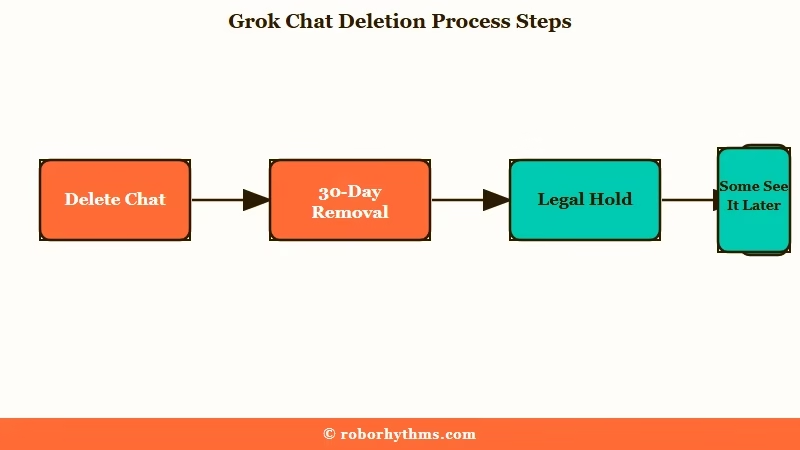
xAI’s policy applies the same 30-day rule to Private Chat. The X Help Center gives Grok on X the same window, “unless we have to keep them for security or legal reasons.”
What is Private Chat: Grok’s temporary mode, the ghost icon at the top right, which keeps a conversation out of your history and out of training, then deletes it within 30 days.
The written rule and some users’ experience do not line up. In an October 2026 r/grok thread, several people said chats they deleted more than 30 days earlier were still listed and recoverable, and one put it at 6+ months.
That does not prove xAI is breaking its policy, since a recoverable trash view could be a separate feature. It does mean I would not count on “delete” meaning “gone” inside a month. The safest habit is never to put anything in a Grok chat that you would need erased.
| What xAI says | Where it says it | What to keep in mind |
|---|---|---|
| Deleted chats are removed within 30 days | Privacy policy and X Help Center | Some users say deleted chats were still recoverable later |
| Private Chat is deleted within 30 days | Privacy policy and Consumer FAQ | Legal, compliance or safety needs can extend it |
| Staff may review conversations | Consumer FAQ | Keep personal details out of every chat |
Does Grok Train on Your Chats, and How Do You Stop It?
Grok uses your conversations to train xAI’s models unless you switch that off, and there are separate switches for the Grok app, grok.com and Grok on X.
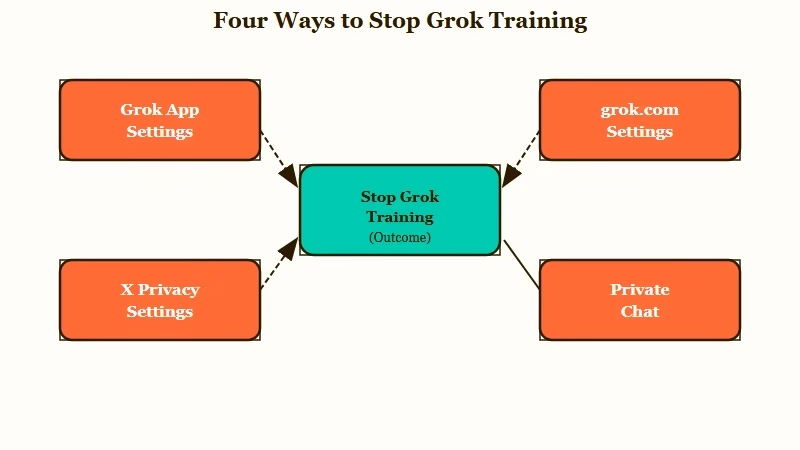
The xAI Consumer FAQ says turning training off covers new conversations, so chats from before the switch are not covered. It also says feedback you submit on a reply may still be used for training after you opt out. I would flag it to anyone who rates replies out of habit.
There is a bigger catch for people who never sign in. The FAQ says that in some regions outside the EU and UK, when you use Grok without logging in, “you won’t have the option to opt out of model training.”
| Where you use Grok | Setting to change | What it covers |
|---|---|---|
| Grok app | Settings, Data Controls, untick “Improve the model” | New conversations in the app |
| grok.com | Settings, Data, untick “Improve the Model” | New conversations on the website |
| Grok on X | Privacy and safety, Grok and Third-party Collaborators, untick data sharing | Your public X data and your Grok on X chats |
| Grok app or grok.com | Start a Private Chat with the ghost icon | That one conversation stays out of training |
The X switch sits under Settings, then Privacy and safety, then Data sharing and personalization, then Grok and Third-party Collaborators. Untick the box that allows “your public data as well as your interactions, inputs, and results with Grok and xAI” to be used for training. X also says a private account keeps your posts out of training.
Before: Grok left on default settings, rating replies, and using it while logged out.
After: “Improve the model” off in the app and on grok.com, the X data-sharing box unticked, sensitive questions asked in a Private Chat, and every session signed in.
Can Other People See Your Grok Chats and Imagine Images?
Other people can see a Grok chat only if you share it, but a shared link is public, and shared chats have ended up in Google before.
In August 2025, TechCrunch reported that Grok’s share button created links that Google, Bing and DuckDuckGo were indexing. Fortune counted more than 370,000 indexed chats, including medical and psychological questions, business details and at least one password.
The FAQ now describes sharing as creating “a public share link,” and you can remove old links at grok.com/share-links. As of October 6, 2026, Grok’s robots.txt, the file that tells search engines which pages to skip, blocks private chat pages but has no rule for shared ones. Robots.txt is not the only way to keep pages out of search, but I would treat every shared Grok link as public.
Grok Imagine has its own wrinkle. In a September 2026 thread, users found images and videos marked “Published” in their Imagine library that they never shared, some with training turned off. Check yours under Library, then the filter, then “show only” and Published, and delete anything that should not be there.
Imagine’s content rules are a separate topic, covered in our Grok Imagine moderation guide.
Is Grok Safe for Kids and Teens?
Grok is not safe for kids or teens, and Common Sense Media rates it an unacceptable risk for anyone under 18.
The Common Sense Media assessment, updated January 22, 2026, found that “the website performs no age verification” and that Grok produced harmful content even with Kids Mode turned on.
Its image generator produced sexualized content in Kids Mode too, and the report’s advice is blunt: “Parents should not allow teens to use this product.”
xAI’s own FAQ allows users from 13, and says teens aged 13 to 17 need a parent’s or guardian’s permission. US Google Play rates the app Teen. That label is far looser than the risk assessment’s verdict.
I side with the assessment here. A chatbot with a loosely filtered image tool and self-reported ages is the wrong place for a young teen. Our Grok age verification guide covers what the checks do and do not catch.
Why Are Regulators Investigating Grok?
Regulators are investigating Grok because its image tools were used to make sexualized deepfakes of real people, including content that may involve minors.
On January 26, 2026, the European Commission opened a formal investigation into X under the Digital Services Act. It will assess whether X properly handled the risks of putting Grok into X in the EU, including “manipulated sexually explicit images” and content that may amount to child sexual abuse material.
The deepfake wave also pushed US lawmakers, and our Grok Minnesota law explainer covers the state ban on nudification tools. The rule I give everyone is to never upload a photo of a real person you would not want edited.
Is Grok Safer Than ChatGPT?
Grok is not safer than ChatGPT: both offer a training switch and a temporary chat mode, and Grok’s tie to X and its deepfake record put it behind on safety.
Both had a share-link indexing scare in summer 2025. TechCrunch’s Grok report noted that ChatGPT users had raised the same alarm weeks earlier, and that OpenAI called its version a “short-lived experiment.”
Grok’s link to X is the big difference. Grok on X can train on your public posts as well as your chats, which is why I tell people on X to change that setting first.
The deepfake scandal and the risk rating for teens are also Grok-specific problems, so it comes off worse on safety even where the privacy settings look similar.
How Do You Use Grok More Safely?
You use Grok more safely by turning off training everywhere you use it, keeping personal details out of prompts and cleaning up anything you have shared.
This is the order I run through on any account I care about:
- Turn off “Improve the model” in the Grok app and on grok.com, and untick the data-sharing box on X.
- Use Private Chat for anything health, money or relationship related.
- Open grok.com/share-links and remove every link you no longer need.
- Check your Imagine library for files marked Published, and delete any you did not mean to share.
- Stay signed in, since logged-out users in some regions cannot opt out of training.
- Keep names, addresses, passwords and photos of real people out of your prompts.
Deleting your history is worth doing too, with one caveat. The 30-day clock and the legal exception both apply, so treat deletion as a cleanup step and keep anything sensitive out of Grok from the start.
Is Grok Worth Using if You Care About Privacy?
Grok is worth using for search and quick questions if you change its settings, but it is a weak choice for private or emotional conversations.
I will give xAI one real point: the Private Chat mode and the training switches are easy to find once you know where they are. My problem is the default, which shares by design and expects you to opt out across three different places.
For companion chat with fewer moving parts, Nectar AI is where I send people who want long, private-feeling stories. Its $34.99 Ultimate plan adds long-term memory and a 64K context window, and its free plan gives you 15 messages a day.
For a wider look at the settings that matter across apps, our chatbot privacy guide covers the rest.
Quick Takeaways
- Grok trains on your chats until you turn off “Improve the model,” and Grok on X needs its own opt-out.
- xAI deletes removed chats within 30 days but can keep them longer for legal or safety reasons.
- Shared Grok links are public, and more than 370,000 shared chats were indexed by search engines in 2025.
- Common Sense Media rates Grok an unacceptable risk for teens, so keep it away from anyone under 18.
- Stay signed in, use Private Chat for anything sensitive and remove old share links at grok.com/share-links.
