
What’s Changed: Grok Imagine’s free tier came back on August 21, 2026 at one video a day, and since September 5 some free accounts have been cut to nothing while others still generate. xAI’s own pricing page lists image generation as included on Free and video as excluded. Which one you get depends on your account, and a second account will not help.
“Is Grok Imagine free” gets a different answer depending on where you look. Google’s answer box says free access ended in March 2026.
xAI’s pricing page says image generation is included on the $0 plan, on the same screen where the Free plan card never mentions images at all.
The honest answer, and the one I give anyone who asks, is that it depends on which cohort your account landed in. Since August 21, 2026, free accounts have been getting one video and a couple of images a day.
Then, from September 5, some of those accounts started getting nothing, on the same day that other free accounts still rendered a 6-second clip.
This guide sorts out what free Grok accounts get as of September 7, 2026, why the tier keeps flipping, and how to check your own account in under two minutes.
It also covers the new limit that follows your IP address instead of your login, what SuperGrok Lite adds for $10, and what to use when free Grok Imagine hands you a paywall pop-up instead of a picture.
What is Grok Imagine: xAI’s image and video generator inside grok.com and the Grok apps, separate from text chat, with Image and Video modes and a paid ladder that runs from $10 to $300 a month.
Is Grok Imagine Free Right Now?
Grok Imagine is free for image generation and not for video generation, according to xAI’s own plan comparison as of September 7, 2026.
In practice a free account gets one video and two images a day, or a subscription pop-up, depending on the account.
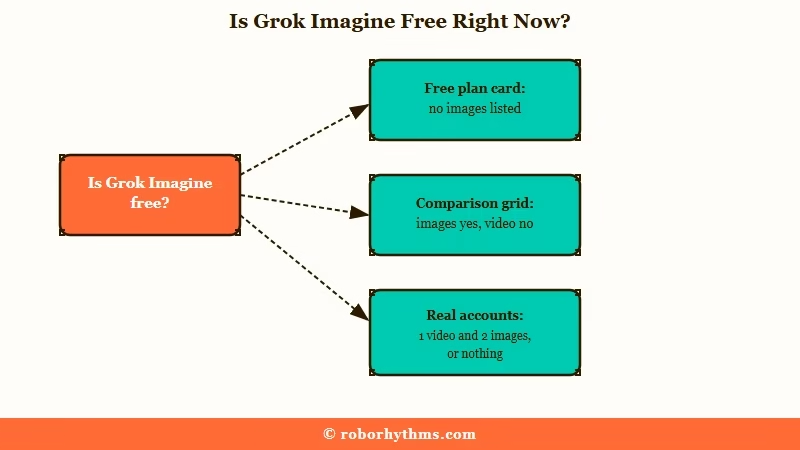
What bothers me is that xAI’s pricing page cannot agree with itself. The Free plan card at x.ai/pricing lists real-time search, Voice mode and connectors, and never mentions images. Scroll to the comparison grid on the same page and “Image generation (Imagine)” carries a tick in the Free column while “Video generation” carries a dash.
What is Quality 2.0: The Image 2.0 model xAI shipped on August 7, 2026 as Grok Imagine’s Quality Mode. The Speed setting beside it is the mode that predates Image 2.0.
The product page adds a third version. It calls Grok “free to try on the web and in the apps” and promises “text-to-video up to 15 seconds at 720p” without saying who gets it. Open grok.com/imagine signed out and the whole generator loads, Image and Video modes, Speed and Quality 2.0 toggles, template tiles, with no paywall in sight until you press submit.
Real accounts land in one of three states. In one r/grok thread from September 5, one person had gone from one video and four images a day, to one video and two images, to nothing, in about a week.
Another person in the same thread, on a single account “back on free for almost two weeks”, had made two image edits and a 6-second 480p video half an hour earlier.
On paper the answer is yes for images and no for video. In practice it is a coin flip. Google’s answer box, which cites a Facebook group post and a June blog to say free access “ended in March 2026”, describes a state that stopped being true on August 21.
Treat any page that hands you one flat answer with suspicion, this one included. The two-minute check below matters more than any summary.
If the pictures you want are of a character you chat with, Candy AI makes them inside that conversation, with images paid for in tokens.
Why Does Grok Imagine Free Access Keep Flipping?
Grok Imagine free access has flipped four times in thirteen months because xAI has treated it as a promotion, a liability and a cost line in turn, never as a stable product tier.
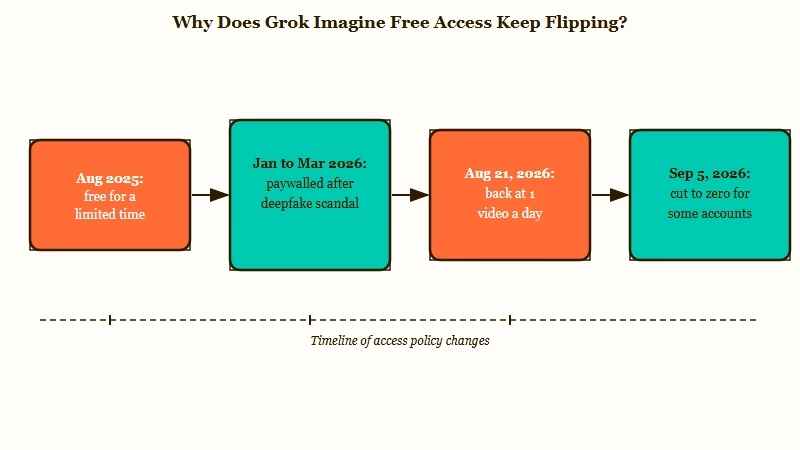
The launch itself was framed as temporary. On August 7, 2025 Elon Musk posted that video generation was “free to all US users” for “the next few days”, and a week later extended it “worldwide for a limited time”. Nobody who read those two posts should have planned around a permanent free tier.
Then came January. On January 9, 2026, xAI restricted image generation on X to paying subscribers after a wave of sexualised deepfakes of real people, and TechCrunch reported that the standalone Grok app was still letting anyone generate for free that same day.
The notice that greeted free users, per Fortune, read “Image generation and editing are currently limited to paying subscribers.”
Three days later, Ofcom, the UK communications regulator, opened a formal Online Safety Act investigation into X. Free generation on grok.com and the apps followed the X paywall out the door around March 19, 2026, and through April the open question on r/grok was whether it was gone for good.
| Date | What changed for free accounts | Where it is documented |
|---|---|---|
| Aug 7 and 14, 2025 | Video, then images and video, free “for a limited time” | Musk’s posts on X |
| Jan 9, 2026 | Image generation on X limited to paying subscribers | xAI statement, TechCrunch, Fortune |
| Mar 19, 2026 | Free image and video generation switched off on grok.com and the apps | Coverage and r/grok threads |
| Aug 7, 2026 | Image 2.0 arrives as the new Quality Mode | x.ai announcement |
| Aug 21, 2026 | Free tier returns at one video a day | r/grok |
| Sep 5 to 7, 2026 | Some free accounts cut to zero, others unchanged | r/grok |
I do not buy the compute-cost story on its own. At xAI’s API list prices, $0.04 per Image 2.0 picture and $0.08 per second of Video 1.5, a free 6-second clip is about 48 cents of list-price compute.
That is real money at scale, and still not a reason to flip a tier four times. The pattern fits a company using free access as a dial, open it to fill the funnel before a launch like Image 2.0, close it when regulators or GPUs get tight.
One point in xAI’s favour deserves saying. It brought free access back at all, when the easy move after January was to leave the paywall up for good.
What surprised me is that the API still lets developers pick the original image model by name, while the consumer site offers only a Speed or Quality 2.0 switch, so the company is not pretending the older model stopped existing.
How Do You Check What Your Free Grok Account Gets?
Checking your free Grok Imagine allowance takes one image prompt and one video prompt on the web version, and the result tells you which cohort your account is in before you waste a moderated attempt.
Here is the sequence I run on a free account before I trust any allowance number.
- Sign in on the web at grok.com/imagine with the account you plan to keep, not a spare one. The limit now tracks more than your login, which the next section covers.
- Leave the mode on Image and the toggle on Speed. If a SuperGrok pop-up appears the moment you submit, your account is in the paywalled cohort and nothing else on this list will change that today.
- If an image renders, note the count. Free accounts with access have been getting two to four images a day since late August.
- Switch to Video and submit one plain, safe prompt. Expect one video at most, and expect a moderated clip to consume it, because a blocked generation still counts against the allowance on every tier, which Grok Imagine wasted credits covers in detail.
- Wait a full day before judging the number. Free Chat and Voice limits “reset on their own schedule” per xAI’s FAQ, and the Imagine allowance has behaved the same way.
Two snapshots from one login show what the flip looks like from the inside.
Before: late August, one free account, no subscription. One video and four images a day, rendered without a pop-up.
After: the first week of September, the same account. One video and two images for a few days, then a SuperGrok upgrade prompt on every submit.
That example comes from the September 5 thread, and the person with the still-working account was in the same conversation. The gap between the two is the cohort xAI put you in, and no setting on your side changes it.
| Symptom | Likely cause | Fix |
|---|---|---|
| Upgrade pop-up on the first image prompt | Account is in the paywalled free cohort | Nothing on the free tier will change it; SuperGrok Lite at $10 or a different tool |
| Images work, video shows a pop-up | Free tier includes images but not video on xAI’s grid | Stay in Image mode, or pay for Lite to get video |
| One video a day, then “limit reached” | The one-per-day free video is spent, moderated or not | Wait for the reset and do not retry with a borderline prompt |
| “Limit reached” on a brand-new second account | Limits enforced per IP address or device | Use one account; a second one inherits the block |
| Output ignores the prompt or looks broken | Degraded generations on cut-down free accounts, per the same September 5 thread | Retry once at Speed; if it repeats, treat the allowance as spent |
| 480p option missing, 720p only | Resolution change rolling out account by account | Expect faster quota burn on paid tiers; check the plan page |
Why Does a Second Grok Account Hit the Limit on Its First Message?
A second Grok account hits the limit on its first message because xAI now appears to count usage per IP address or device rather than per login, so an unused account on the same connection inherits the block from the one you exhausted.
The second account was never a loophole I recommended, and it is now a trap. Since about September 1, people who used up a free allowance and switched to a spare account have been getting “limit reached” on the very first prompt, with the spare untouched for days.
The pattern runs through a September 6 thread and two smaller ones the same weekend, and the explanation that fits every case is that the limit follows the IP address.
xAI has not documented this. Its FAQ says free Chat and Voice limits are “separate from your weekly usage limit” and reset on their own schedule, and says nothing about how it identifies an account. The behaviour matches an anti-abuse counter keyed to the network rather than the login, and it explains the “message limit reached after two prompts” complaints that arrived the same week.
In another thread, one person deleted every spare account and found the surviving one still blocked more than a week later. That is the cost of the old workaround. Deleting the spares does not reset anything, because the counter was never attached to them.
The one route I will not walk through here is a VPN or a fresh device. Dodging an anti-abuse counter is the behaviour that gets an account flagged, and a flagged account is worse than a throttled one.
The Grok weekly usage limits page covers what the paid pools look like once you stop fighting the free one.
What Does SuperGrok Lite Add for $10 a Month?
SuperGrok Lite at $10 a month adds video generation, Expert mode and twice the chat length over Free, and xAI’s own card describes its image and video access as something to “try out”, which is the tier’s honest ceiling.
Lite is the tier I would pay for if video mattered to me, and only then. The plan card on grok.com/plans lists “Try out AI image & video creation” and “Increased limits at regular speed” alongside Expert mode and “2x longer conversations”.
The word “try” is doing a lot of work there, and it matches the 480p, 6-second clips Lite has delivered since it launched in late March 2026.
The $30 SuperGrok card is where the numbers get interesting. It promises “HD 720p, 30-second video”, while xAI’s own product page still says “text-to-video up to 15 seconds at 720p” on the same day.
One of those pages is stale, and the 15-second figure is the one I plan around until xAI fixes it.
| Plan | Price | Images | Video |
|---|---|---|---|
| Free | $0 | Included on the comparison grid, absent from the plan card; two to four a day on accounts with access | Excluded on the grid; one 480p clip a day on some accounts, none on others |
| SuperGrok Lite | $10 a month | “Try out AI image & video creation”, increased limits at regular speed | Included; 480p, 6-second clips since launch |
| SuperGrok | $30 a month | Included, with Quality 2.0 and higher usage from one weekly pool | 720p; 15 or 30 seconds depending on which xAI page you read |
| SuperGrok Plus | $100 a month | Included, “significantly higher usage” across Chat, Imagine, Voice and Build | 1080p, priority access at peak times |
| SuperGrok Heavy | $300 a month | Included, highest usage at the fastest speed | Everything in Plus, with X Premium+ bundled |
What is the shared weekly usage pool: Since June 2026, paid Grok plans draw Chat, Imagine, Voice and Build from one weekly allowance shown as a percentage, instead of separate daily caps per feature.
The catch on every paid tier is the pool. Video at 720p drains it fastest, and the 480p option has started disappearing from the video menu, with one SuperGrok account putting three 720p attempts at about 2% of a weekly allowance. That is roughly 150 attempts a week if nothing else touches the pool, and everything else does.
xAI’s FAQ says the opposite should happen, that “720p videos automatically fall back to 480p once you hit the 720p cap for your tier”. Either the fallback is broken for some accounts or the menu change is a rollout the FAQ has not caught up with. Neither reading makes the $30 tier look generous.
If you are weighing the $30 tier, is SuperGrok worth it runs the weekly-limit maths in full. My short version is that Lite buys back video, SuperGrok buys back resolution, and neither buys back the unlimited feeling of the 2025 launch, because that feeling was a promotion.
What Should You Use Instead When Free Grok Imagine Gives You Nothing?
The alternatives that work are a paid Grok tier if you only want Grok’s models, a third-party sandbox if you want the same models in small daily doses, or a companion app with built-in image generation if the point was pictures inside a conversation.
Start by knowing what the “free Grok Imagine” pages in search results are. fal.ai gives five image-to-video clips per 24 hours on Grok Imagine Video 1.5, and it requires a fal account, because it is fal’s sandbox on xAI’s API rather than xAI’s free tier. kie.ai, felo.ai and adskull.io sell the same models as credit packs, and adskull is one of the pages Google’s answer box cites when it tells you free access ended in March.
None of them changes what your grok.com account can do. For image and video on Grok’s own models without the weekly pool, Grok Imagine alternatives ranks the options that are worth the credits.
For image chat inside a companion, Candy AI is the one I hand people first. The pictures come from the character you are already talking to, on a token balance you can see before you spend it, rather than a daily allowance that changes without notice.
Nectar AI is the pick if you want the anime end of that range. Neither is a Grok replacement for text, and I will not pretend otherwise.
Grok’s chat model is the part that stays free with real limits, and Grok is no longer free covers where that free chat tier now ends. If you opened Imagine for a companion-style picture, switching removes the daily lottery. Grok’s own video model is a different case, and there Lite at $10 is the cheapest honest route back in.
Frequently Asked Questions
Is Grok Imagine free again?
Partly. Free accounts regained access on August 21, 2026 at one video a day, and since September 5 some of those accounts have been cut back to zero while others still generate. xAI’s plan grid lists image generation on Free and excludes video.
How many images can a free Grok account make per day?
Two to four images and at most one video a day, on the accounts that still have access, with the numbers dropping through the first week of September 2026. xAI does not publish a free allowance, so the count comes from live accounts.
Why does Grok say limit reached after one message on a new account?
Since early September 2026 the free limit has followed the IP address or device rather than the login. A spare account on the same connection inherits the block, and deleting the spares does not clear it.
Does a moderated Grok Imagine video still use my free allowance?
Yes. A blocked or moderated generation consumes the attempt on free and paid tiers alike, which is why one borderline prompt can end a free account’s video for the day.
Is SuperGrok Lite worth it just for Grok Imagine?
Only if you need video. Lite at $10 a month restores video generation in 480p, 6-second clips and adds Expert mode, but xAI’s own card calls its image and video access something to “try out”, and the weekly pool still applies.
Is the free Grok Imagine on fal.ai the same as xAI’s free tier?
No. fal.ai runs Grok Imagine Video 1.5 in its own sandbox, gives five clips per 24 hours to signed-in fal accounts, and has no effect on what your grok.com account can generate.
Quick Takeaways
- Grok Imagine is free for images and not for video on xAI’s own plan grid as of September 7, 2026, and real free accounts get one video and two images a day or nothing.
- The free tier has flipped four times since August 2025, so test your own account with one image and one video prompt before trusting any published number.
- A second account no longer resets the limit, because it now follows your IP address, so stay on one login and wait for the reset.
- SuperGrok Lite at $10 restores video and SuperGrok at $30 restores 720p, while the “free Grok Imagine” pages in search results are third-party sandboxes selling the same models.
