
TL;DR: An AI roleplay scenario generator creates a structured scene-opening prompt you paste directly into your platform of choice. The RoboRhythms generator is free, requires no account, and is optimized for Candy AI, CrushOn AI, Character.AI, SillyTavern, and NovelAI. This guide walks through the full 7-step process with a worked example, platform paste guide, and fixes for flat scenarios.
Most people try to describe their ideal roleplay scene in real time, typing as they go, and the result is a generic opener that the AI treats as small talk. From what I’ve seen, that’s the core problem: chat platforms are built for conversation, not for scene-setting.
A dedicated scenario generator solves this by handling the structural work upfront. You pick the genre, tone, character dynamic, and platform, and it builds a scene-setting prompt designed for that specific context. What you get is something you can paste directly and actually start a story.
The RoboRhythms AI Roleplay Scenario Generator is free and built specifically for popular platforms. This guide walks through how to use it, how to paste the output into each platform, and how to fix scenarios that fall flat.
According to Grand View Research, the AI roleplay and interactive fiction market was valued at $1.2 billion in 2026 and is projected to reach $8.92 billion by 2033. That growth reflects something I’ve noticed firsthand: people want deeper, more immersive interactions than what a generic chat interface can deliver.
What Makes a Scenario Generator Different from a Regular AI Chat
A scenario generator is a structured prompt-building tool, not a conversation interface. It collects your creative inputs (genre, tone, character dynamic) and assembles them into a formatted scene-setting block.
The output is designed to be copied and pasted, not continued in the same window.
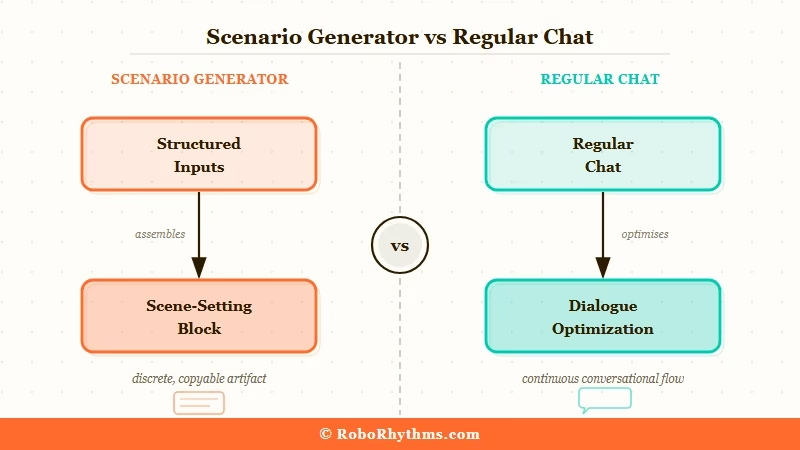
Regular chat platforms like Candy AI or CrushOn AI are built for back-and-forth dialogue. That’s exactly what they’re good at.
The problem is that starting a scene well requires setup: who the characters are, what the stakes are, what the emotional register should be. Typing this freehand usually produces something vague.
The way I see it, a scenario generator is a prewriting tool. You use it to build the foundation, then paste that into whichever platform you’re actually roleplaying on.
What is a scenario generator: A tool that takes structured inputs (genre, tone, character roles, setting) and produces a formatted scene-opening prompt optimized for a specific platform.
What You Need Before You Start
Effective use of a scenario generator requires four decisions upfront: genre, tone, character dynamic, and platform. Everything else can be improvised, but these four elements determine whether the output is usable.
Here’s what each one means in practice:
- Genre: The story type. Dark Fantasy, Romance, Sci-Fi, Mystery, and Slice of Life are common options. Genre sets the vocabulary and the stakes.
- Tone: The emotional register. Options like Dark and Intense, Playful and Flirty, or Serious and Grounded tell the generator how to frame the scene.
- Character dynamic: The relationship type. Enemies to Lovers, Mentor and Student, Rivals, or Strangers are standard options. This shapes how the characters address each other and what tension exists between them.
- Platform: Where you’ll paste the output. Different platforms handle roleplay differently. Candy AI works best with a short, specific opener. Character.AI benefits from more world context. SillyTavern handles structured system prompt blocks.
Making these four decisions before you open the generator means you spend 30 seconds selecting, not five minutes rewriting.
How to Use the RoboRhythms AI Roleplay Scenario Generator
The RoboRhythms scenario generator produces a platform-optimized scene opener in under 60 seconds using four inputs. No account required, no credits to manage.
From my experience, the fastest path is committing to your four decisions before you open the tool. Here’s the full process:
- Go to the RoboRhythms scenario generator
- Select your genre from the dropdown. For this walkthrough, I’ll use Dark Fantasy.
- Select your tone. I’m going with Dark and Intense.
- Select your character dynamic. I’ll choose Enemies to Lovers.
- Select your platform. I’ll select Candy AI.
- Click Generate Scenario.
- Copy the full output and paste it as your first message on Candy AI.
Here’s what the actual output looks like for that specific combination:
Input:
- Genre: Dark Fantasy
- Tone: Dark and Intense
- Dynamic: Enemies to Lovers
- Platform: Candy AI
Output (example):
You are Kael, a battle-hardened knight bound by an ancient curse to protect the one person you despise most: Seraphine, the sorceress who shattered your king’s court three years ago. You remember every act of betrayal. She stands before you now, wounded and out of options, asking for a truce. You have three days before the curse kills you both if you stay apart. You hate her. You need her. You haven’t decided which feeling is stronger.
That’s a complete scene opener. It establishes character identity, backstory, current stakes, and a built-in tension source. Pasting that into Candy AI gives the character enough context to respond in-register immediately.
Now compare that to writing the same opener freehand:
Without the generator: “You are a dark knight who has a complicated history with a sorceress.”
With the generator: The full output above.
The difference is not about creativity. The generator forces specificity that freehand writing tends to skip every time.
How to Paste Your Scenario into Any Roleplay Platform
Paste the generated scenario as your first message on most platforms, not into a system prompt field. Platform behavior varies, and getting this right determines how well the AI stays in register.
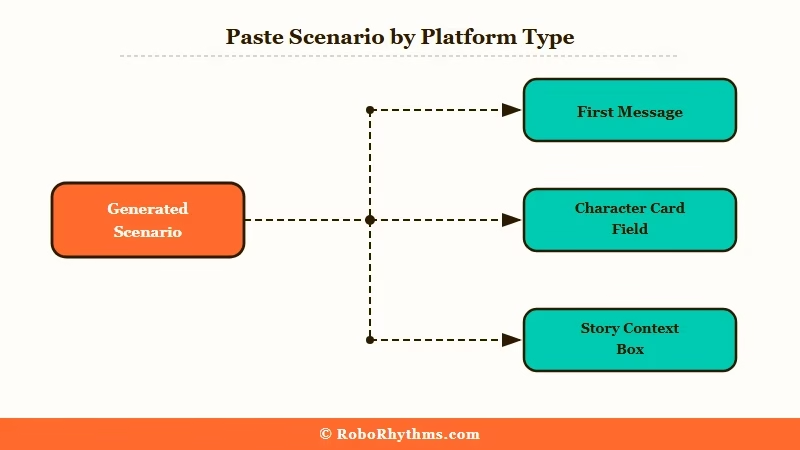
From what I’ve seen, where you paste matters almost as much as what you paste. Here’s how each major platform handles it:
| Platform | Where to paste | What to expect |
|---|---|---|
| Candy AI | First message in a new chat | Character responds in-role immediately with no calibration needed |
| CrushOn AI | First message or persona description field | Persona description field gives more persistence across sessions |
| Character.AI | First message (no system prompt access) | Character may need 1-2 exchanges to lock in fully |
| SillyTavern | Character Card “description” field or system prompt | Most consistent behavior across the session; best for long-form play |
| NovelAI | Story context box before the first lorebook entry | Use “Story” mode for best narrative output; responds well to scene-setting blocks |
For Candy AI and CrushOn AI, pasting as the first message is the fastest approach. The platform reads it as scene-setting and responds accordingly.
What I’ve noticed with Character.AI specifically: the first response sometimes hedges. If the AI breaks register in the first reply, send a short correction message: “Stay in character as described. Continue from where we left off.” That usually locks it back in within one exchange.
For a deeper look at which tools handle more complex scenarios best, the best AI roleplay scenario generators guide covers ranked performance across platforms.
How to Fix Flat or Repetitive Scenarios
A flat scenario almost always has one of three problems: vague stakes, missing character motivation, or no built-in tension source. Identifying which one applies takes about 30 seconds.
If the scenario feels generic, run back through the generator with tighter inputs. “Romance” as a genre produces different output than “Romance + Playful and Flirty + Childhood Friends Reunited.” The more specific the combination, the more specific the output.
Here’s a quick diagnostic to identify the problem:
- No stakes: The scenario describes a setting but not a problem. Fix: add a time pressure or a decision that must be made before the scene can continue.
- No motivation: The character has a role (knight, sorceress) but no reason to act. Fix: append a goal or a fear to the character description before pasting.
- No tension: Both characters want the same thing with nothing stopping them. Fix: choose an antagonistic or contrasting dynamic (Enemies to Lovers, Rivals, Opposites Attract) instead of a neutral one.
A fix I’ve seen work consistently: append one sentence after the pasted scenario before sending. Something like “You haven’t decided whether to trust her yet” gives the AI a clear emotional posture to work from. It costs you five seconds and changes the entire opening response.
If the AI keeps defaulting to filler phrases across multiple exchanges, that’s a separate issue from the scenario setup. See the guide to fixing repetitive AI chatbot roleplay for specific correction prompts.
When to Use a Generator vs. Writing Prompts Yourself
A scenario generator is the right tool for fast, immersive starts with common genres and standard character dynamics. Writing your own prompt is the right call when you need a very specific setting, lore detail, or character backstory that no template can anticipate.
From my testing, the generator handles roughly 80% of use cases well. Generic genre combinations, standard character dynamics, and platform-optimized formatting are all genuine strengths.
Where it falls short is highly unusual combinations: a cyberpunk medical thriller with a specific historical figure as the antagonist, or a slice-of-life scene referencing very specific cultural context.
Here’s the way I’d frame it as a quick decision guide:
| Use case | Best approach |
|---|---|
| First session with a new character | Generator: platform-optimized output |
| Common genres (Romance, Dark Fantasy, Sci-Fi) | Generator: handles these well |
| Returning to an established scenario | Write your own: you know the lore |
| Very specific or unusual settings | Write your own: generator won’t know the details |
| Testing a new platform’s response style | Generator: fast calibration tool |
If you’re using Candy AI and want a fast, well-structured opener for a common genre, the generator is typically better than what most people write freehand.
If you’ve already built out detailed character lore across multiple sessions, write the opener yourself and use the generator for inspiration on structure only.
For platforms that handle more unusual or specific scenarios, the guide to Janitor AI alternatives covers tools with more granular character customization.
Frequently Asked Questions
The most common questions about AI roleplay scenario generators cover setup, platform compatibility, and what to do when the output doesn’t match what you had in mind.
What is an AI roleplay scenario generator?
An AI roleplay scenario generator is a tool that takes structured inputs (genre, tone, character dynamic, platform) and produces a formatted scene-opening prompt. It’s a prewriting tool, not a chat interface. The output gets pasted into your actual roleplay platform as the first message to set the scene.
Do I need an account to use the RoboRhythms generator?
The RoboRhythms generator is free with no account required. Select your four inputs, click generate, and copy the output. There are no credits, subscriptions, or usage limits.
Which platforms work best with generated scenarios?
Candy AI and CrushOn AI produce the most immediate in-register responses when you paste a scenario as your first message. Character.AI works well but may need one correction exchange to lock in. SillyTavern gives the most control but requires pasting into the Character Card description field rather than the chat window.
Why does the AI break character after my scenario?
The most common cause is a scenario with no built-in tension or stakes. If the character has no reason to act or react, the AI defaults to filler dialogue.
Fix the scenario by adding a specific goal, threat, or unresolved decision, then re-paste. Appending one clarifying sentence (for example: “you haven’t decided whether to trust her yet”) often resolves this in one attempt.
Can I use the same scenario on multiple platforms?
Yes, but the phrasing may need adjustment. Candy AI responds well to shorter, emotionally direct openers.
Character.AI benefits from more world-building context. The generator’s platform selector handles most of this formatting automatically, so selecting your target platform before generating is the simplest solution.
Is there a difference between a scenario generator and a prompt generator?
Yes. A prompt generator produces a single instruction sentence for an AI model. A scenario generator produces a full scene-setting block with character identity, backstory, and current stakes.
The output is designed to function as a complete story opener rather than a setup instruction.
Quick Takeaways
These are the key points from this article.
Quick Takeaways
- A scenario generator builds the scene opener so you don’t have to. It’s a prewriting tool, not a chat interface.
- You need four inputs before starting: genre, tone, character dynamic, and platform. All four directly shape the output.
- The RoboRhythms generator is free, no account required, and optimized for Candy AI, CrushOn AI, Character.AI, SillyTavern, and NovelAI.
- Paste the output as your first message on most platforms. SillyTavern users should paste into the Character Card description field instead.
- Flat scenarios almost always have one of three issues: vague stakes, missing character motivation, or no built-in tension. All three are fixable by re-running with more specific inputs or appending one clarifying sentence before sending.
