
TL;DR: The root cause of agents repeating work is missing shared memory: each agent starts fresh with no knowledge of what others have already solved. Adding a lightweight shared solution store cuts duplicate work significantly. This tutorial walks through the pattern, the best tools, and a real build from r/AgentsOfAI this week.
If you’ve run more than one AI agent at a time, you’ve probably hit this wall. Agent A solves a problem at step 3 of its pipeline. Agent B hits the same problem at step 7 of its own run. Agent B has no idea Agent A already solved it, so it solves it from scratch.
Multiply that across ten agents in a workflow and you’re burning compute, time, and money on work that’s already been done. A developer on r/AgentsOfAI posted about this frustration this week and released an open-source tool called OpenHive to address it.
In my experience, this is one of the most underdiagnosed problems in multi-agent systems. Most agent tutorials cover what each individual agent does. Almost none cover what happens when agents need to coordinate around shared knowledge.

Why Do AI Agents Keep Repeating the Same Work?
AI agents repeat work because each agent starts with no memory of what sibling agents in the same system have already solved. This is not a bug in any specific framework. It is the default behavior of stateless agents that do not share a memory layer.
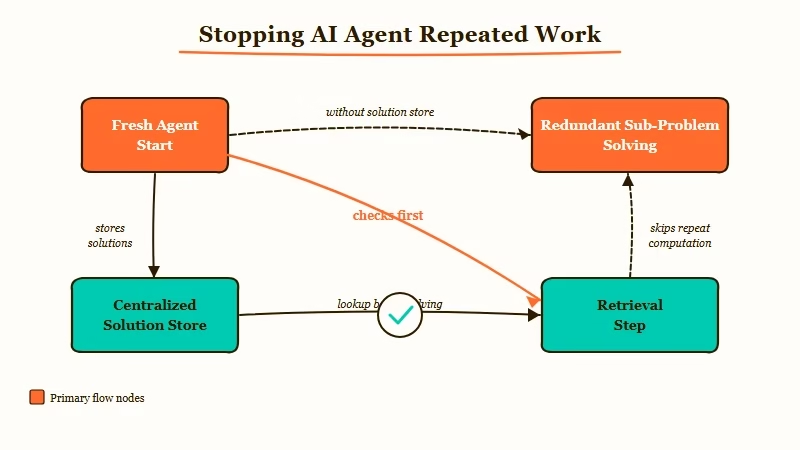
When you initialize an agent, its context window starts empty. It knows its current task and whatever you put in its system prompt. It does not know what its sibling agents have discovered unless you explicitly wire a shared store.
The failure mode compounds fast. I’ve built workflows where three separate research agents independently scraped the same data sources, reformatted the same output, and passed near-identical results downstream. Three separate LLM calls for work the first agent could have cached. That is not a workflow problem; it is a missing memory layer.
The standard advice is to bolt on a vector database or Redis cache after the fact. That’s correct in principle, but most approaches I’ve seen never actually make agents check the store before starting fresh work.
What Is a Shared Agent Memory Layer?
A shared agent memory layer is a centralized store where agents log solutions, retrieve prior results, and avoid repeating solved problems before starting new ones. It sits between your agents as a persistent knowledge base they all read from and write to.
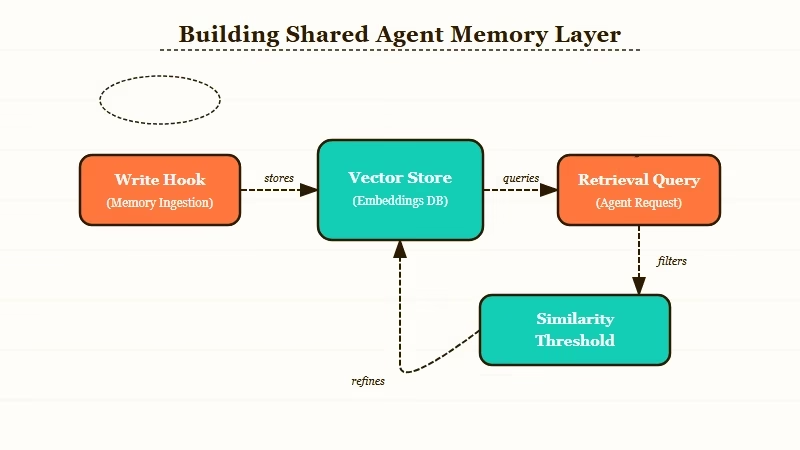
The basic pattern has four components:
- A solution store that persists results across agent runs
- A write hook that fires after any agent completes a sub-problem
- A retrieval step that fires before any agent begins a new sub-problem
- A similarity threshold that determines whether a cached result is close enough to reuse
The retrieval step is where most approaches fail. If agents are not checking the store before starting work, the store is just an archive.
Here’s how retrieval works in practice. Before an agent starts a task, it queries the shared store for semantically similar tasks that have already been solved. If the similarity score exceeds your threshold (typically 0.85 or above), it retrieves the cached solution and adapts it rather than running the full pipeline from scratch.
| Memory Pattern | When to Use | Complexity | Best Tool |
|---|---|---|---|
| Key-value cache | Exact same task repeats | Low | Redis, Upstash |
| Vector similarity | Similar but not identical tasks | Medium | Chroma, Pinecone, Qdrant |
| Graph store | Tasks with relationships and dependencies | High | Neo4j, LanceDB |
| Shared scratchpad | Single-session coordination only | Low | In-memory dict, SQLite |
From what I’ve seen across several production builds, most multi-agent use cases are best served by vector similarity. Key-value caches only help when tasks are literally identical, which is rare in practice.
How Do You Build a Shared Memory Layer for Your Agents?
Building a shared agent memory layer takes four steps: choose a store, add a retrieval step before each task, add a write hook after each task, and tune the similarity threshold. Most teams treat this as a multi-sprint project when the core pattern is a one-afternoon build.
Here is how I’d walk through it:
- Choose your store. ChromaDB is the right starting point for most teams: free, runs locally, and takes about ten minutes to set up. For production workloads with real volume, Pinecone handles scale better.
- Create a collection for agent solutions. Each document needs: the task description, the solution summary, which agent solved it, and a timestamp.
- Add the retrieval step first, before any agent does work. This is the step most tutorials skip. Before the agent runs its pipeline, it queries the collection with the current task as the search query. If a result comes back above the similarity threshold, it returns that result instead of running fresh.
- Add the write hook after each successful task completion. When the agent finishes, it stores the task-solution pair in the collection.
- Tune your threshold by reviewing which retrieved results are actually usable. A threshold too low surfaces irrelevant cached results. Too high and you miss tasks that should hit the cache.
Here’s what that retrieval step looks like in practice:
Without shared memory (current pattern):
def run_agent(task):
    # Starts from scratch every time, no matter what
    result = llm.complete(task)
    return result
With shared memory (recommended pattern):
from uuid import uuid4

def run_agent(task, collection):
    # Check shared store before doing any work
    results = collection.query(query_texts=[task], n_results=1)
    if results and results['distances'][0][0] < 0.15:  # ~0.85 similarity
        cached = results['documents'][0][0]
        return f"[CACHED] {cached}"

    # Only run fresh if no good cached result exists
    result = llm.complete(task)
    collection.add(
        documents=[result],
        metadatas=[{"task": task, "agent": "my_agent"}],
        ids=[str(uuid4())]
    )
    return result
The only structural change is the retrieval check at the top. Without it, the store is decoration.
Which Tools Work Best for Agent Memory in 2026?
The right tool depends on whether you need local development speed, production scale, or deep framework integration. Here is how the main options compare from what I’ve tested:
| Tool | Best For | Free Tier | Setup Time |
|---|---|---|---|
| ChromaDB | Local dev, small teams | Yes (unlimited local) | 10 min |
| Pinecone | Production at scale | Yes (1 index) | 30 min |
| Qdrant | Self-hosted production | Yes (Docker) | 45 min |
| Redis | Exact-match caching only | Yes (Redis Cloud) | 5 min |
Here is how the tools stack up against each other on framework compatibility.
| Tool | LangChain | LlamaIndex | Custom Agents |
|---|---|---|---|
| ChromaDB | Native | Native | Python SDK |
| Pinecone | Native | Native | REST API |
| Qdrant | Native | Native | Python SDK |
| Redis | Native | Plugin | Any |
If you’re using Dynamiq for custom multi-agent builds, it ships with built-in Pinecone and ChromaDB support as memory backends. You configure the shared store at the agent definition level rather than wiring retrieval hooks manually.
What Did the OpenHive Builder Actually Solve?
OpenHive repositions the shared store as the first step in every agent’s reasoning loop, not an optional layer bolted on after the pipeline is built. The developer described it as “a lightweight Stack Overflow for agents, focused on workflows and reusable outputs rather than Q&A.”
The key design decision is who decides to check the store. In most approaches, the agent code checks the store conditionally. OpenHive makes the store query unconditional: before any agent processes a task, the hive query fires automatically. This removes the “forgot to add the retrieval step” failure mode entirely.
From the community response in the r/AgentsOfAI thread, the two most common follow-up questions were about handling tasks that are similar but not identical (solved by vector embeddings and tunable thresholds) and whether storing partial solutions is useful (consensus: yes, especially for multi-step pipelines where sub-results compound).
The article on why AI agents fail in production covers several failure patterns that shared memory directly addresses, particularly the re-planning failure mode. The AI orchestration guide covers the trust boundary and planner-executor patterns that a shared memory layer integrates with.
According to research on multi-agent coordination from MIT, agents that share state and prior results outperform isolated agents on complex multi-step tasks by a significant margin. That is the core case for building this layer before you need it rather than after.
Frequently Asked Questions
Does shared memory work with any LLM framework?
Yes. The shared memory layer is framework-agnostic. ChromaDB and Pinecone both have Python SDKs that work independently of LangChain, LlamaIndex, or any other orchestration framework. The retrieval and write hooks are just function calls you add to your task handler.
How do you know when an agent should use a cached solution vs. run fresh?
Set a cosine similarity threshold between 0.80 and 0.90. A score above 0.85 typically means the cached task is close enough that the solution is reusable with minor adaptation. Below 0.75, run fresh. Tune by reviewing which retrieved results were actually used vs. discarded.
What happens if the shared memory store gets too large?
Add a TTL (time-to-live) to each stored solution. For most pipelines, solutions older than 7 to 30 days should be re-evaluated. ChromaDB supports metadata filters for date-based pruning. Pinecone supports TTL natively in its record structure.
Is shared agent memory the same as RAG?
They use the same underlying technology (vector embeddings and similarity search) but serve different purposes. RAG retrieves external reference documents to ground an LLM’s response. Shared agent memory retrieves past agent solutions to avoid redundant work. The retrieval mechanics are similar; the use case and what you store are different.
How much does shared agent memory add to latency?
A ChromaDB query on a local collection with fewer than 100,000 entries typically returns in under 20ms. Pinecone hosted queries run 50 to 150ms. For most agent pipelines, this is negligible compared to the LLM call itself, which is typically 500ms to 3 seconds.
Does storing partial or failed solutions help?
Yes. Storing partial completions with a “status: partial” metadata flag helps agents pick up mid-pipeline results. Storing failed attempts with failure reason metadata helps future agents skip known dead ends rather than repeating them.
