
TL;DR: AI agents connecting to Jira, Slack, or any external API will eventually pass sensitive data in a prompt unless you intercept it first. A sanitize-not-block middleware layer sitting between your agent and your APIs strips PII before it leaves your system. This tutorial shows exactly how to build one in Python, compatible with LangChain and CrewAI.
A builder posted something in r/LangChain last week that stopped me cold. They had built a CrewAI agent to read Jira tickets and post summaries to Slack. It worked perfectly.
Then they noticed their agent was copying employee SSNs, internal API credentials, and customer emails directly into Slack messages, because that data was sitting in the Jira ticket body and the agent was summarizing the whole thing.
The agent was not malfunctioning. It was doing exactly what it was told. This is the data security problem that almost no one building AI pipelines is thinking about.
From what I have seen in the AI builder community, most developers focus on what the LLM generates and miss the data that flows through the pipeline to get there. Fixing this is not complicated, but it requires one layer that most tutorials skip entirely.
The Problem Most AI Agent Tutorials Miss
The default trust model in AI agent frameworks passes raw context directly to the LLM, which means every piece of data your agent reads can end up in every API it writes to.
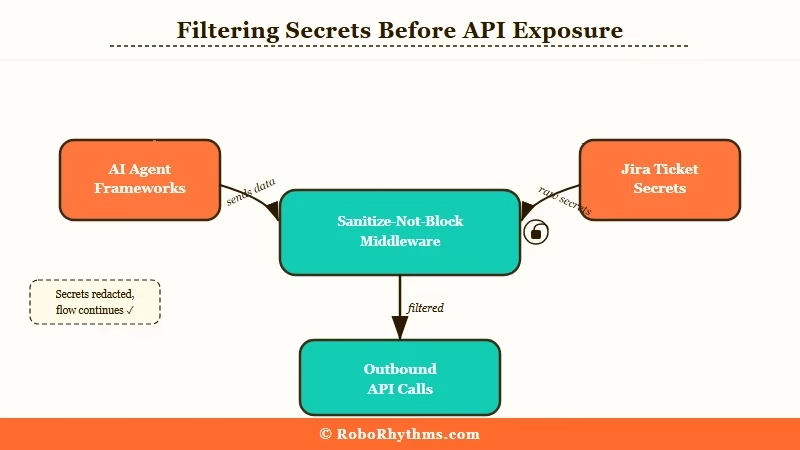
LangChain, CrewAI, and similar frameworks are built for capability, not compliance. There is no built-in PII scanner. There is no credential detector. When your agent reads a Jira ticket containing a client’s social security number and then writes a summary to Slack, that SSN can travel right along with it.
The naive fix is to add instructions in the system prompt: “do not include sensitive information in your output.” That does not work reliably. The OpenAI, Anthropic, and Google coalition against adversarial data extraction documented exactly how hard it is to enforce data handling rules at the model layer alone. Even frontier models with explicit safety training leak data when prompted correctly.
The correct fix is to not rely on the model’s judgment at all. You intercept at the infrastructure layer.
What the Sanitize-Not-Block Pattern Does
Sanitize-not-block means stripping sensitive patterns from outbound API calls rather than rejecting them. Your agent keeps running, and the sensitive data never leaves your infrastructure.
The instinct when developers first discover this problem is to add a hard block: if the outbound payload contains an SSN, throw an error. This produces a constant stream of false positives. A ticket legitimately referencing a client ID format, or a phone number in an address field, or a reference number that looks like a credit card will trigger it. Your team disables the scanner within a week.
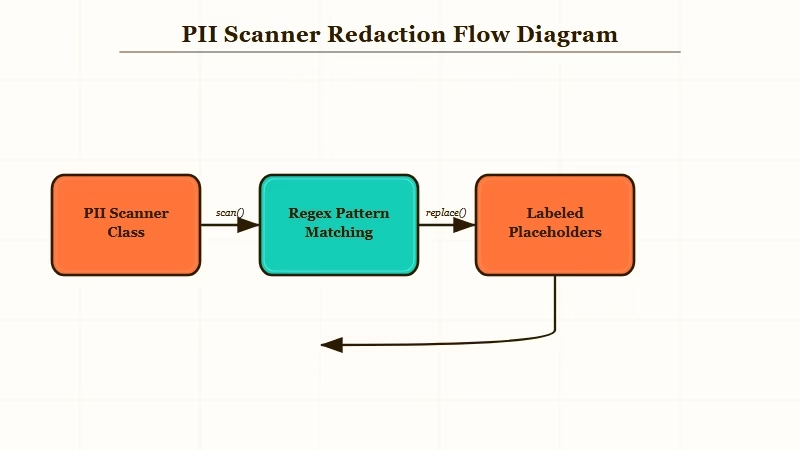
The approach that works: strip the sensitive pattern and replace it with a named placeholder. 847-29-3847 becomes [SSN REDACTED]. sk-live-abc123xyz becomes [API KEY REDACTED]. The downstream system gets a useful, actionable message. The sensitive data stays inside your system boundary.
Here is what the difference looks like in practice:
Without middleware (what gets sent to Slack):
POST /slack/messages
Body: "Jira ticket summary: Issue assigned to John Smith (SSN: 847-29-3847).
Customer API key: sk-live-abc123xyz. Please resolve by Friday."
With sanitize-not-block middleware:
POST /slack/messages
Body: "Jira ticket summary: Issue assigned to John Smith (SSN: [REDACTED]).
Customer API key: [API KEY REDACTED]. Please resolve by Friday."
The message is still useful. The sensitive data never crossed your system boundary.
How to Build the PII Scanner Layer
The core scanner is a Python class with named regex patterns. It takes raw text, strips every match, and returns the sanitized version plus a list of what it removed.
Here is the full scanner class:
import re

class PIIScanner:
    PATTERNS = {
        "SSN": r"\b\d{3}-\d{2}-\d{4}\b",
        "API_KEY": r"\b(sk-|pk-|ak-|Bearer )[a-zA-Z0-9]{20,}\b",
        "EMAIL": r"\b[A-Za-z0-9._%+\-]+@[A-Za-z0-9.\-]+\.[A-Z|a-z]{2,}\b",
        "PHONE": r"\b(\+\d{1,2}\s?)?\(?\d{3}\)?[\s.\-]?\d{3}[\s.\-]?\d{4}\b",
        "CREDIT_CARD": r"\b\d{4}[\s\-]?\d{4}[\s\-]?\d{4}[\s\-]?\d{4}\b",
    }

    def sanitize(self, text: str) -> tuple[str, list[str]]:
        """Returns sanitized text and a list of what was stripped."""
        findings = []
        result = text
        for label, pattern in self.PATTERNS.items():
            matches = re.findall(pattern, result)
            if matches:
                findings.append(f"{label}: {len(matches)} instance(s) removed")
                result = re.sub(pattern, f"[{label} REDACTED]", result)
        return result, findings
Save this as pii_scanner.py in your project root. It handles the five highest-risk categories out of the box. You can extend PATTERNS with any domain-specific format your data contains, including internal employee ID formats, case reference numbers, and anything with a predictable structure.
How to Hook Into LangChain and CrewAI Agents
Wrap every tool that writes to an external system. Reads do not need the scanner, but every write path does.
For LangChain, extend BaseTool and sanitize inside _run:
from langchain.tools import BaseTool
from pii_scanner import PIIScanner

class SafeSlackTool(BaseTool):
    name = "post_to_slack"
    description = "Posts a message to the team Slack channel"
    scanner: PIIScanner = PIIScanner()

    def _run(self, message: str) -> str:
        clean_message, findings = self.scanner.sanitize(message)
        if findings:
            self._log_audit(findings)
        return slack_client.chat_postMessage(
            channel="#team-updates",
            text=clean_message
        )["ok"]

    def _log_audit(self, findings: list[str]):
        print(f"[PII_SCANNER] Stripped from outbound Slack: {findings}")
For CrewAI, wrap your tool function directly:
from crewai import Tool
from pii_scanner import PIIScanner

_scanner = PIIScanner()

def safe_jira_comment(ticket_id: str, comment: str) -> str:
    clean_comment, findings = _scanner.sanitize(comment)
    if findings:
        log_audit_event(ticket_id=ticket_id, stripped=findings)
    return jira_client.add_comment(ticket_id, clean_comment)["id"]

jira_comment_tool = Tool(
    name="add_jira_comment",
    func=safe_jira_comment,
    description="Adds a comment to a Jira ticket"
)
Notice the pattern: the scanner wraps the write operation, not the LLM call. You do not need to intercept prompts. You intercept the moment before data leaves your system. If you are building more complex multi-agent pipelines, Dynamiq has data governance controls built in at the orchestration layer, and is worth evaluating if you are running production agents at scale.
Which Patterns to Prioritize for Your Stack
Start with the five universal patterns, then audit your input data sources to find any domain-specific formats that need a custom rule added.
Run this audit process before finalizing your pattern list:
- List every data source your agent reads from (Jira, CRM, database, email inbox, Salesforce, internal APIs).
- For each source, export a sample of 50 real records and manually scan for any field that looks like a reference number, credential, or personal identifier.
- For each custom format you find, write a named regex and test it against the sample. Your goal is zero false negatives and under 5% false positives.
- Add each validated pattern to
PIIScanner.PATTERNSwith a descriptive label. - Deploy to staging and run your agent against a real session before pushing to production.
Here is how common patterns map to the data sources where they appear most often:
| Pattern | Common sources | Risk level | Included by default |
|---|---|---|---|
| API keys and secrets | Ticket bodies, code comments, config references | Critical | Yes |
| SSNs | HR systems, benefits tickets, finance records | Critical | Yes |
| Email addresses | CRM, support systems, meeting notes | High | Yes |
| Phone numbers | CRM, HR, contact records | Medium | Yes |
| Credit card numbers | Billing, e-commerce, finance systems | Critical | Yes |
| Internal employee IDs | HRIS, payroll, Active Directory | Variable | Add if in scope |
| IP addresses | DevOps tickets, server logs, security incidents | Low-medium | Add if in scope |
The OWASP Top 10 for LLM Applications classifies this type of data leakage as LLM06 (Sensitive Information Disclosure). It is in the top 10 precisely because it catches teams who think LLM output safety and data pipeline safety are the same problem. They are not.
What Good Audit Logging Looks Like
Log what type of pattern was found and how many instances were stripped. Never log the matched value itself, because doing so recreates the exposure you were trying to prevent.
This is the step most developers skip. They add the scanner, it catches something, and they log the raw match to see what it caught. Now their log file contains the SSN they were protecting.
The correct logging pattern:
import logging
from datetime import datetime, timezone

def log_audit_event(ticket_id: str, stripped: list[str]):
    event = {
        "timestamp": datetime.now(timezone.utc).isoformat(),
        "context_id": ticket_id,
        "patterns_stripped": stripped,
        # Never log the matched value. Log only the type and count.
        # Wrong: "matched_value": "847-29-3847"
        # Right: "patterns_stripped": ["SSN: 1 instance(s) removed"]
    }
    logging.warning(f"[PII_AUDIT] {event}")
If you are running agents in production, write these events to a structured log aggregator rather than stdout. The type and count are enough to detect anomalies and satisfy most audit requirements. The actual values must never appear in your logs.
The national security angle on AI data handling is worth keeping in mind here. Anthropic’s concerns about AI safety and government use cases have specifically flagged the risk of AI systems handling sensitive data without adequate controls. The middleware pattern in this tutorial is the practical implementation of those concerns at the application layer.
When to Block Instead of Sanitize
Block instead of sanitize when the stripped payload is meaningless. If removing the sensitive data leaves the agent action pointless, a hard stop is cleaner than a degraded write.
There are scenarios where sanitizing does not make sense. If your agent is writing a report that is specifically about a set of customer SSNs for a compliance review, stripping those SSNs produces a useless document. Sending a document that says “[SSN REDACTED] [SSN REDACTED] [SSN REDACTED]” is worse than not sending anything.
Add a threshold check to your sanitizer for these cases:
def sanitize_or_block(self, text: str, block_threshold: int = 5) -> dict:
    clean_text, findings = self.sanitize(text)
    total_stripped = sum(
        int(f.split(": ")[1].split(" ")[0]) for f in findings
    )
    if total_stripped >= block_threshold:
        return {
            "action": "blocked",
            "reason": f"Too many sensitive patterns ({total_stripped}), manual review required",
            "findings": findings
        }
    return {
        "action": "sanitized",
        "clean_text": clean_text,
        "findings": findings
    }
Set the threshold based on what makes sense for your data. A ticket that has one incidental phone number is worth sanitizing and forwarding. A ticket that has 20 instances across five pattern types is probably a document that should not be summarized by an agent at all.
