
The most upvoted ad blocking tutorial in the Character AI community carries an update from its own author dated June 23, 2026: most of the methods it taught, including the iOS filter list many people relied on, have been patched.
Character AI, or c.ai as most of the community writes it, spent 2026 closing the workarounds people shared, and much of the advice still circulating stopped working months ago.
What follows is what still works in September 2026, split by where you chat. The browser and the app behave differently, and that is why most guides fail.
Why Character AI Started Showing Ads
Mid chat ads reached the free tier in February 2026 and were fully deployed by April 15. They pay for free access and show by default.
The triggers are predictable once you know them: starting a new chat, cloning a chat, switching chats, and refreshing after a lag. That last one is cruel, because a refresh reliably produces an ad, and if one loads while you are typing your unsent reply can be wiped.
The ads also come from more than one network rather than a single provider, so a blocklist that catches one can miss another.
Which Ad Blocking Methods Still Work
Browser blocking still works, and the app has a free official route of its own. No extension can run inside the app, but Charms buy an ad free pass there.
| Method | Where | Cost | Status in September 2026 |
|---|---|---|---|
| uBlock Origin | Firefox, Brave | Free | Works on the website. Blocked on Chrome and Edge |
| uBlock element picker | Firefox, Brave | Free | Needed for the c.ai+ banner that filters miss |
| Userscripts | Tampermonkey, Violentmonkey | Free | Strips c.ai+ banners and sidebar promos |
| Firefox for Android plus uBlock Origin | Android browser | Free | The main mobile route left |
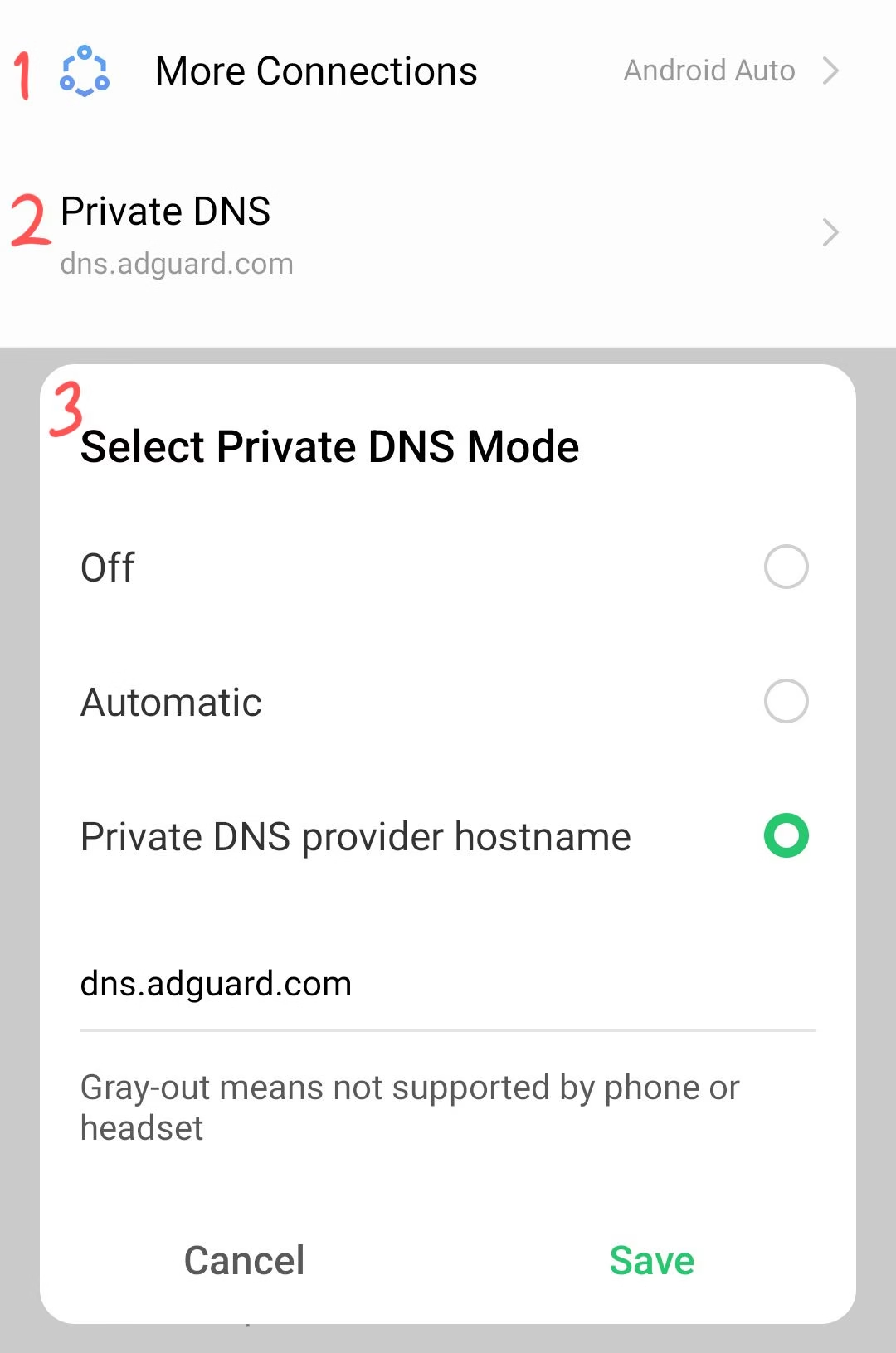
| Private DNS or AdGuard DNS | Android system wide | Free | Mostly closed off, reports conflict |
| Brave shields alone | Website | Free | Patched, ads returned after an update |
| Older APK downgrade | Android | Free | Patched, forced update screen and an API change |
| Charms ad free pass | iOS and Android app | Free, earned | Official. Community accounts describe roughly an hour per pass |
If working around ads on every device sounds like too much, starting over on Candy AI is the other route people take.
Blocking Ads in a Browser
Open c.ai in Firefox with uBlock Origin and the ad slots stop rendering. Which browser you use decides whether this works.
Chrome and Edge removed the WebRequest API that lets blockers intercept requests before they load, so uBlock Origin survives on Firefox and Brave and is gone from Chrome. Brave users switch it on under Settings, Extensions, Manifest v2 extensions.
One exception catches people out. uBlock Origin does not remove the c.ai+ promo banner, because it is served first party from Character AI’s own domain.
For that banner, use uBlock’s element picker to hide it, or run a userscript through Tampermonkey. AdNeutral targets the same first party surfaces with ready made rules, free and open source, and it installs on Chrome as well as Firefox. It leaves ad network ads to your real blocker, so on Chrome it clears the upsell banners but not the ad slots.
Blocking ads is separate from stopping the tracking that comes with them, which we cover in what an ad blocker changes on Character AI.
Blocking Ads on Your Phone
On Android the one route that still works is a browser that accepts extensions. Install Firefox for Android, add uBlock Origin from the add-ons list, and open c.ai there.
Setting a filtering DNS on your phone is the fix most guides lead with, including earlier versions of this one. For most people it stopped working.
An app can ignore your system DNS and resolve its own lookups over HTTPS, which would explain the drop off. One user reported ads still getting through despite a Raspberry Pi on their network, while another reader says a Pi-hole clears all but the c.ai+ banners.
The Ad Free Pass You Can Earn Inside the App
There is a free official route to switching ads off, and it lives in the app instead of the browser. Charms, the in-app currency you collect by using Character AI, can be spent on an ad free pass.
Character AI’s own Charms FAQ, last updated 17 June 2026, names three approved spends: “Imagine additional chat images or chats”, “Skip slow-mode”, and “Bypass ads”. Its December 2025 community update says the same under a heading reading “Charms for everyone”, listing “extra Imagine generations, slow-mode boosts, or skipping ads”.
Charms are earned, not bought. The FAQ lists the qualifying quests as daily log-in, enabling notifications, creating a persona, creating an intro video for a character, imagining a chat image, and posting to the feed.
Community accounts have described the Charms pass as covering the next hour of chatting, though the FAQ itself states no duration.
Three limits are worth knowing before counting on it. The pass is temporary rather than permanent, the FAQ says some Charm-enabled features “are limited during the beta phase”, and the same page reserves the right to “discontinue providing Charms” at any time.
Where it runs matters too. The December update puts Charms on iOS and Android “with web coming soon”, so as of that announcement it ran in the app and not in a browser, and Character AI has not published an update since.
The Web Version Still Shows Far Fewer Ads
Users who moved to the browser report a large difference, describing the website as showing occasional pop ups instead of constant interruptions. Character AI put ads on the website too in April 2026, so the gap is about volume, not absence.
On iPhone the browser route is the only blocking method left, since iOS allows neither sideloading nor app rollbacks, though Charms still buy an ad free pass inside the app. Open the site in Safari and add it to your home screen for an app like icon without the ad load.
What Going Ad Free Officially Costs
The paid route is c.ai+ at $9.99 per month or $94.99 per year, near $7.92 monthly on the annual plan. It removes ads and lifts several free tier frictions: faster responses, peak hour priority, unlimited voice calls, expanded memory and swipes.
There is a cheaper middle tier too, and it does not go as far. Character AI’s own comparison table rates ads as Full on free, Less on Lite and None on c.ai+, so what the c.ai Lite tier actually meters is worth reading before you pay for it to stop ads.
Charms are the other route, and they cost nothing beyond the quests that earn them. They buy the temporary pass covered above, while the subscription is what removes ads permanently.
The two systems overlap oddly. Character AI’s c.ai+ page lists “Bonus on every Charms pack” as a paid perk, yet the Charms FAQ says buying Charms is something you will “also be able to” do in future.
Whether it justifies the price depends on how much you would use, which we cover in our look at whether Character AI Plus is worth it.
Some readers work out that a year of c.ai+ costs more than they want to spend on chat, and move to a platform that runs no third-party ads, like Candy AI, which swaps them for its own upgrade prompts.
When It Is Worth Switching Instead
For some people the ads are the last item on a list that already includes memory limits and filtered replies, on a platform that used to feel smoother.
Look for platforms that hold context across a long conversation, and check what the free tier allows before you commit. Candy AI, for example, caps free users at 5 messages.
For a wider comparison we list Character AI alternatives and sites like Character AI with fewer restrictions. Ads are not the only recent change, as the removal of reading mode showed.
Frequently Asked Questions
Why does my Character AI have ads?
Ads fund the free tier and have run by default since February 2026. They come from more than one ad network, so a filter list that catches one can miss another.
Why won’t my ad blocker work on Character AI?
Three reasons. Chrome and Edge dropped the API uBlock Origin needs, the c.ai+ banner is served from Character AI’s own domain so normal filter lists miss it, and no extension can run inside the mobile app.
Can you remove Character AI ads for free?
Yes, on both surfaces. In a browser, Firefox or Brave with uBlock Origin stops the ad slots rendering. In the mobile app no extension can run, but Charms buy an ad free pass that community accounts describe as lasting an hour.
Does deleting app data still remove Character AI ads?
No. It briefly worked on Android by reverting to an older build, then a second update closed it, and downgraded versions now hit a forced update screen.
Do Charms actually turn off Character AI ads?
Yes. Character AI’s Charms FAQ lists “Bypass ads” as one of three approved spends, alongside extra Imagine images and skipping slow mode. You earn Charms through quests, and the FAQ describes purchasing them as a future option rather than a current one.
Is blocking ads illegal?
Using an ad blocker is legal for personal use. It may breach a platform’s terms of service, which is a matter between you and the service rather than a criminal one.
