
The Short Answer: To delete your Janitor AI account, open Settings, go to the Security tab, scroll to the bottom, click Delete Account, and confirm with the six-digit code emailed to you. Since August 13, 2026, that starts a 30-day restore window, so signing back in before it ends lets you restore the account, and after that the deletion is permanent. Cancel Janitor Plus and back up your bots first, because deleting the account does not stop App Store or Google Play billing.
If you are looking up how to delete your Janitor AI account, there is a billing trap to clear first. Deleting the account does not stop a Janitor Plus plan bought through the App Store or Google Play. People delete it, feel finished, then see another charge on the next billing date.
The deletion click is quick. What costs you is everything around it: the billing that keeps running, the bots you built and never saved, and the chat logs you assumed were erased the moment you left.
The order I would follow is short. Cancel the subscription, back up your bots and chats, delete the account, then know what happens during the 30 days after you confirm. I will also cover where to go if you are leaving because Janitor wore you down.
If you want a companion app with no proxy or API key to manage, Candy AI is the one I would try first. I cover it and Nectar AI near the end.
How Do You Delete Your Janitor AI Account?
To delete your Janitor AI account, open Settings, go to the Security tab, scroll to the bottom, click Delete Account, and confirm with the six-digit code sent to your email.
The whole thing runs off email verification, which is where most people get stuck.
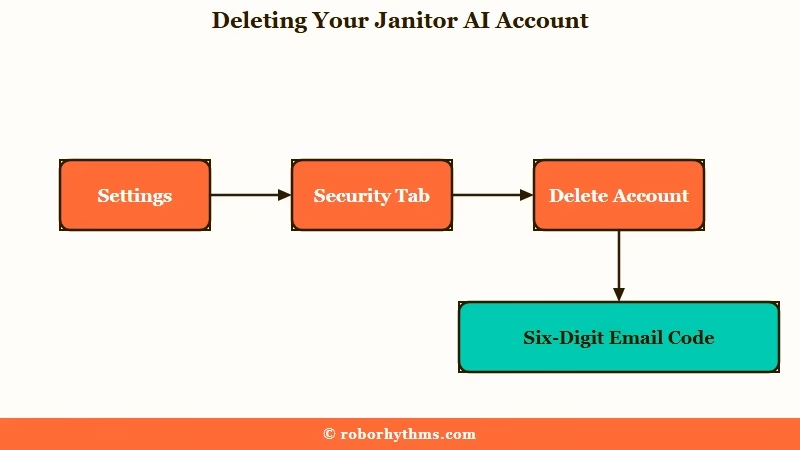
From what I have seen, the sequence trips people up less than the confirmation code does. The same path works on janitorai.com in a phone browser, which is how one user in r/JanitorAI_Official finally found the button. Here is the exact path:
- Log in and open your Settings from the profile menu.
- Click the Security tab.
- Scroll to the very bottom of the page.
- Click Delete account and follow the prompt.
- Enter the six-digit one-time code sent to your registered email to confirm.
There is one hard requirement that catches people out. You must have access to the email address tied to your account, because the confirmation code goes there and nowhere else.
If you signed up with a throwaway or temporary email you can no longer open, you are stuck, and Janitor support will not delete the account for you. Janitor’s deletion help page says staff cannot delete accounts by hand for privacy and security reasons, so a lost inbox means a lost off-ramp.
Changing the email first only helps while the old inbox still opens. The email change sits on the same Security tab, but Janitor asks you to confirm it from both the old and the new address.
If the six-digit code never arrives, Janitor’s code troubleshooting page lists the usual culprits. Check the spam, junk and promotions folders, clear a full inbox, unblock support@janitorai.com, or wait a few minutes. Another browser or device can also help, but support cannot send a code by hand because the process is fully automated.
Once the code goes through, the account is not erased on the spot. Janitor signs you out everywhere, hides your profile, sets your characters to private, and shows the date the deletion becomes final, 30 days later.
Why You Should Cancel Janitor Plus Before You Delete
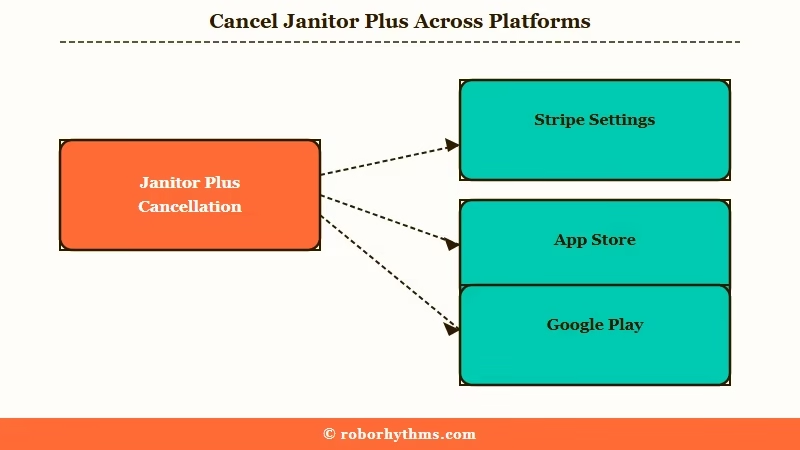
Canceling Janitor Plus and deleting your account are two separate actions, and if you subscribed through the App Store or Google Play, deleting the account does not stop the charge.
This is the most expensive mistake I see people make on the way out.
What is Janitor Plus: Janitor AI’s paid subscription, around $12.99 a month, which adds 5x more context, priority replies and a monthly allowance of swipes on its best models on top of the free tier.
The order matters because web subscriptions run through Stripe and cancel from inside your Janitor settings, while mobile subscriptions live in your app store account. Janitor’s subscription FAQ says app-based subscriptions cannot be canceled from the web, so wiping your Janitor account does nothing to a plan Apple or Google is billing.
Before: You subscribed to Janitor Plus inside the iPhone app, then deleted your account on the website and assumed the billing stopped.
After: The account is gone, but Apple keeps charging you every month because the subscription lives in your App Store account, and Janitor never had control over it.
So cancel in the right place first. The table below shows where each subscription type really lives. If you are still weighing whether the paid tier earned its keep, our Janitor Plus breakdown goes deeper on the features.
| Where you subscribed | How to cancel it | Does deleting the account stop it |
|---|---|---|
| Janitor website (Stripe) | Settings, then Billing, then Manage Subscription | Cancel here first to be safe |
| Apple App Store (iOS) | iPhone Settings, your name, then Subscriptions | No, you must cancel in the App Store |
| Google Play (Android) | Play Store, Payments, then Subscriptions | No, you must cancel in Google Play |
Canceling keeps your access until the end of the current billing period, then drops you to the free tier. That gives you a window to finish backing things up before anything locks.
If a charge still lands after you cancel, the same FAQ sends billing problems to billing@janitorai.com and says subscriptions are generally non-refundable unless Janitor’s terms or local law require a refund.
How Do You Back Up Your Bots and Chats First?
Janitor AI has no native download button, so back up chats with a browser extension and save your bot cards with a scraper or a manual copy of the definition before you delete.
Once the 30-day window closes, every character and roleplay goes with the account, and there is no export-on-exit option.
The way I see it, this is the step people regret skipping most. Losing a favorite bot you spent hours tuning stings more than any billing slip. Here is what I would grab first:
- Chats: install the JanitorAI Chat Downloader browser extension, which exports conversations to EPUB, TXT, Markdown, or SillyTavern JSONL so they open anywhere.
- Bots you created: use a card scraper like the JannyAI trick (editing the bot URL) or a tool such as sucker.severian.dev to pull the full character card.
- Anything you cannot scrape: open the bot editor and manually copy the personality, scenario, and greeting into a text file.
- Personas: copy each persona’s text the same way, since these vanish with the account too.
Do this while your account is still live and, ideally, while Janitor Plus is still active for the billing period. A deactivated account gives you nothing to export from until you restore it. Janitor’s privacy policy does offer a copy of the personal data it holds, but only on request to support@janitorai.com and depending on where you live.
What Happens to Your Bots, Chats, and Data After You Delete?
Deleting your Janitor AI account deactivates it for 30 days, with your profile hidden and your characters set to private, and then your posts, characters, personas and profile information are removed for good.
What Janitor keeps beyond that point matters if privacy is the reason you are leaving.
Janitor’s deletion help page, last updated May 16, 2026, still says deletion is permanent and cannot be recovered. It predates the restore window, which Janitor announced in its changelog on August 13, 2026, so the 30 days are real even though that page does not mention them.
The retention rules sit in Janitor’s privacy policy, last updated September 17, 2026. It counts chat logs as your content and keeps personal data only as long as it says it needs to, without naming a fixed number of days. It also says deleting an account does not immediately erase every record, and that your email address and sign-in provider details can stay in its deleted-account records.
If you want those leftovers gone too, the policy tells you to email support@janitorai.com and ask for the retained personal data to be deleted. Janitor says it will weigh any retention exceptions that apply when it handles that request.
People who chatted with your bots see them disappear too. Janitor’s deleted or private bots article says a bot its creator deleted or made private shows “Deleted or Privated” in their chat list, and its page returns a “Can not find this character” error.
Janitor does not say whether those users can still open the old conversation, so back up anything you care about rather than assume.
| Your data | What happens when you delete | Back up first? |
|---|---|---|
| Your created public bots | Set to private for 30 days, then deleted for good | Yes, scrape the card or copy the definition |
| Your personas and profile | Hidden for 30 days, then permanently removed | Yes, if you want to reuse them |
| Your private chat logs | Out of your reach, and the privacy policy names no fixed retention period | Yes, export with a downloader extension |
| Other users’ chats with your bots | Marked “Deleted or Privated” in their chat list | You cannot control this |
| Your email address | Can stay in Janitor’s deleted-account records | No, but you can ask support@janitorai.com to delete it |
Can You Undo It or Recover the Account Later?
Yes, for 30 days. Since August 13, 2026, deleting a Janitor AI account starts a 30-day countdown. Signing back in before it ends brings up a restore screen with the deletion date and options to restore or log out.
After day 30 there is nothing left to restore.
Janitor’s changelog entry reads “account deletion now has a 30-day restore window”, and the privacy policy describes the same grace period. During those 30 days the account is deactivated, and after them the deletion is permanent and cannot be undone.
The window does not change the billing advice, because a deactivated account still leaves an App Store or Google Play subscription running. If you might come back after the 30 days, cancel Janitor Plus and keep the account instead of deleting it. Janitor does not say whether a deleted account’s email can be reused, and its privacy policy says that address can stay in its deleted-account records.
Do You Need to Delete the Whole Account?
You do not need to delete the whole account to remove one bot, change your name or get around a broken connection, because each of those has a smaller fix.
Deleting makes sense when you are done with Janitor itself.
A bot you made can be set to private or deleted on its own, which the help center confirms when it explains why a bot vanishes from other users’ lists. If you only want a fresh identity, Janitor’s username FAQ lets you change your username once every 30 days from the Profile section of Settings.
Age verification is the one trigger with no workaround. Janitor’s age verification article dates the k-ID check to April 24, 2026 for Australia and Brazil and to June 15, 2026 for the UK, and it applies to anyone connecting from those countries.
The mobile app’s safe mode is easier to undo. It hides NSFW bots by default to meet App Store and Google Play rules, and Janitor’s app moderation FAQ says an “Enable NSFW for App” toggle in the web settings lifts it.
If your exit is really about broken connections, fixing Janitor AI proxy errors and the is Janitor AI down checklist are worth a look before you burn the account down.
What Should You Switch to if You Are Leaving?
If you are leaving Janitor AI because of the proxy setup, the downtime, and the billing traps, the simplest replacement is a managed companion app that runs without any of that overhead.
The whole appeal is not having to babysit a connection.
What I would recommend depends on why you are quitting. If the proxy juggling and outages are the dealbreaker, Candy AI runs as a managed platform with the chat models and image generation handled for you. There is no external API to wire up and nothing to keep online yourself.
It stays available without the free-tier connection roulette that makes Janitor feel like work.
If your priority is a companion that holds onto details across long conversations, check plan sizes before you pay. Janitor’s free tier keeps around 9k tokens of context, and Nectar AI only beats that from its $19.99 Pro plan with 16K of memory, while Premium at $9.99 lists 8K. Its $34.99 Ultimate plan lists 64K and adds long-term memory.
For a wider set of options mapped to different needs, our Janitor AI alternatives roundup breaks down who each one fits.
Quick Takeaways
- Cancel Janitor Plus in the right place first, since deleting your account does not stop App Store or Google Play billing.
- Back up bots with a card scraper and chats with a downloader extension, because nothing comes back once the 30-day restore window closes.
- The steps are Settings, Security, Delete Account, then a six-digit email code, and a lost inbox blocks you entirely.
- Deleting starts a 30-day restore window, so signing back in before it ends lets you restore everything, and after that the deletion is permanent.
- If proxy hassle and downtime pushed you out, a managed app like Candy AI removes the setup work that made Janitor feel like a chore.
