
TL;DR: Build a faceless YouTube channel with AI in roughly 24 minutes of real work per video using a $47 to $180 monthly stack. Pick a fast-monetizing niche (horror, finance, true crime, soundscapes), render with LongStories AI, narrate with ElevenLabs, and apply YouTube’s 2026 “altered or synthetic content” toggle correctly. Expect $200 to $2,000 monthly steady-state, not the $10K figures sold by gurus.
Most “how to build a faceless YouTube channel with AI” tutorials will get you demonetized in 2026. The reason is a quiet policy rename most creators missed.
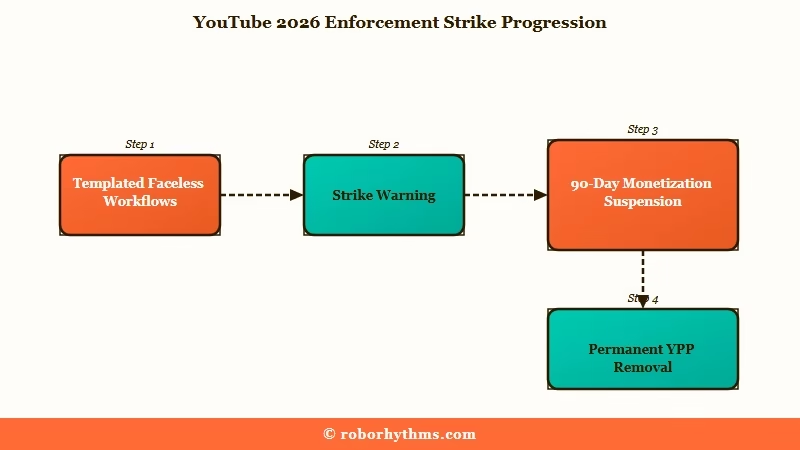
YouTube renamed its “repetitious content” guideline to “inauthentic content” earlier this year, broadening enforcement to any channel built on recycled clips, templated structures, or unattributed external scripts. That is exactly the workflow most beginner faceless-YouTube courses sell. The first violation is a warning; the third is permanent removal from the YouTube Partner Program.
This guide walks through the 2026-safe version of the workflow. The numbered steps below take roughly two hours total to produce five publish-ready videos, which works out to 24 minutes of actual work per video. I have laid out every tool by name, every price, and the exact AI-disclosure setting most tutorials skip.
Why Most Faceless YouTube Tutorials Will Get You Demonetized in 2026
Most faceless YouTube tutorials will get you demonetized because they teach the templated-clip workflow YouTube’s 2026 “inauthentic content” rule was written to penalize, while skipping the synthetic-content disclosure toggle entirely.
From what I have seen, the typical beginner course still teaches the 2023 playbook: pick a script from ChatGPT, splice royalty-free stock footage, add a TTS voice, repeat daily. That workflow is now structurally at risk.
The 2026 rename from “repetitious” to “inauthentic” specifically targets mass-produced templates, verbatim readings of external sources, and image slideshows without commentary.
The enforcement timeline is three strikes: warning + educational module, then 90-day monetization suspension, then permanent removal from the YouTube Partner Program. The official YouTube creator disclosure policy spells out the synthetic-content threshold in full.
What is “inauthentic content”: YouTube’s 2026 designation for channels built on recycled clips, templated structures, or unattributed external scripts. It replaces and broadens the earlier “repetitious content” rule.
The workaround is narrative-animation channels. The “altered or synthetic content” disclosure toggle does not apply to stylized AI animations, which carves out the exact workflow this guide teaches.
LongStories AI renders 10-minute narrative animation as a single piece with character-consistent visual style, which sidesteps both the inauthentic-content trap and the synthetic-disclosure requirement.
Step 1, Pick a Niche That Monetizes Fast
The fastest-monetizing faceless YouTube niches in 2026 are personal finance ($15-$22 CPM), AI and tech news ($12-$18 CPM), true crime ($8-$13 CPM), and soundscapes/meditation ($10.92 RPM at low competition).
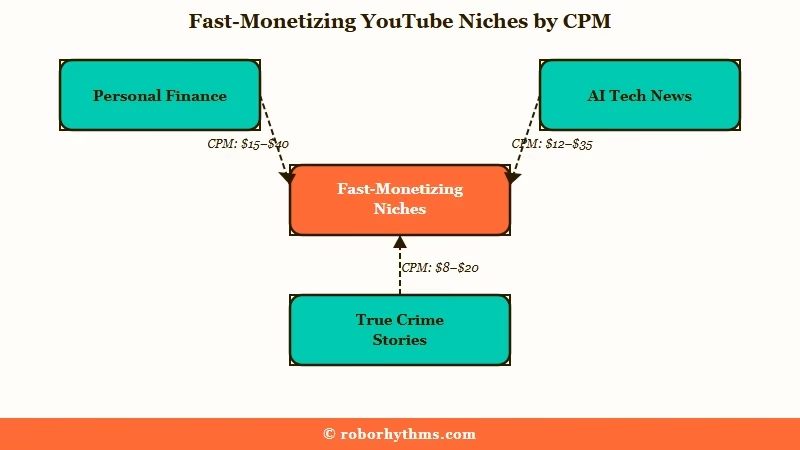
From my testing, niche choice is the single biggest determinant of how fast a channel hits the monetization threshold. Horror, finance, and true crime channels hit the 1,000 subscriber and 4,000 watch hour milestones roughly 40% faster than lifestyle or motivation content.
The shortlist worth considering, ranked by paid-monetization potential:
- Personal finance: $15-$22 CPM, medium competition. Targets buyers with high advertiser intent. Topics like “how to invest in index funds” or “credit card hacks” rank fast for AI-narrated explainer videos.
- AI and tech news: $12-$18 CPM, medium competition. The category I would lean into for a brand-new channel because the topic refresh rate is daily.
- True crime stories: $8-$13 CPM, medium competition. Emotional pull is the strongest in the category and watch time naturally extends to 10-15 minute deep dives.
- History documentaries: $6-$9 CPM, medium competition. Evergreen, with a single video earning views for years.
- Soundscapes and meditation: $10.92 RPM specifically, low competition. The differentiator is video length, 1 to 8 hours per piece, which compounds watch-hour accumulation.
What is CPM vs RPM: CPM is what advertisers pay per thousand ad impressions; RPM is what creators keep per thousand video views after YouTube’s cut. RPM is the number that hits your bank account.
What I would avoid for a faceless channel: lifestyle, motivation, and generic “top 10” listicles. These are saturated, slow to monetize, and increasingly flagged under the new inauthentic-content rule.
Step 2, Set Up the Workflow Stack
The 2026 faceless YouTube stack runs $47 to $180 monthly across three tiers, with the budget tier supporting 20-30 Shorts a month and the premium tier supporting full-length narrative videos.
I have laid out the three realistic tiers and what each one buys you. The choice depends on whether you are running Shorts at volume or full-length narrative videos.
| Tier | Monthly cost | Tools included | Best for |
|---|---|---|---|
| Budget | $47/month | Virvid base + free automation tools | High-volume Shorts (20 to 30 per month) |
| Mid-tier | $78/month | ChatGPT Plus, Virvid or Pictory, ElevenLabs Creator, Epidemic Sound | Mixed Shorts and 5-min videos |
| Premium (narrative) | $180/month | LongStories AI, ElevenLabs Pro, ChatGPT Plus, music license | Full-length narrative animation (10-min episodes) |
The premium tier swaps a clip-based generator for LongStories AI, which is the unlock for the narrative-animation carve-out from the inauthentic-content rule.
Step 3, Generate the Script
Generate the script with a structured prompt that names the niche, the target video length, the hook style, and the ad-break placement, then iterate three times before locking the final draft.
What I would recommend is a script-generation prompt that produces an outline first, then the full script in a second pass. The 20-minute script step in the 2-Hour Batch System assumes the prompt does most of the structural work for you.
Before: “Write a 5-minute script about the JP Morgan vault heist.”
After: “Write a 5-minute true-crime YouTube script about the JP Morgan vault heist. Open with a 15-second hook teasing the unsolved mystery. Build to a 30-second mid-roll ad break around the 2:30 mark. Use second-person ‘you’ framing for the listener. Include three specific dates and two named individuals. End on a hook for the next video in the series.”
The second prompt produces a script the AI can render directly. The first produces filler the AI will struggle to visualize.
Step 4, Render the Video With LongStories AI
Render the video with LongStories AI by defining a Universe first (character, visual style, narrator), then generating the full 10-minute video as a single render rather than stitched clips.
This is the core step that separates the 2026-safe workflow from the templated-clip workflow YouTube is now penalizing. The Universe feature lets you define a character and visual style once, then reuse both across every video on the account. You can get started at LongStories AI for $9 monthly.
The workflow:
- Open LongStories and create a new Universe. Name the narrator, define visual style (“dark, cinematic, moody documentary”), upload a reference image if needed.
- Paste the script from Step 3 into the generation form. Select Universe.
- Generate. Output is one 10-minute video file with the narrator and visual style consistent across every scene.
- Download the MP4 and move to narration in Step 5.
The full LongStories AI review covers the Universe workflow in detail with example outputs. For the broader category context, the LongStories silo pillar compares it against every other AI story tool.
Why this matters for the 2026 policy: Stylized AI animation is exempt from YouTube’s “altered or synthetic content” disclosure. A LongStories narrative-animation channel sidesteps the disclosure requirement entirely, which a stock-footage-plus-TTS workflow does not.
Step 5, Add Narration With ElevenLabs or Microsoft Personal Voice
Add narration with ElevenLabs at $22 monthly Creator tier for the best documented realism (MOS 4.5/5.0) or Microsoft Personal Voice for a 1-minute clone of your own voice if you prefer authenticity.
From what I have seen, two paths work in 2026 and the choice depends on whether you want an off-the-shelf voice or your own.
- ElevenLabs Creator tier ($22/month): 30-second voice cloning, 32+ languages, emotion control slider. The MOS (Mean Opinion Score) of 4.5/5.0 is the highest-documented realism in the category. Default pick for most faceless channels.
- Microsoft Azure Personal Voice (1-minute training data): Lower threshold than ElevenLabs for cloning your own voice. The MOS of 4.2/5.0 is slightly behind ElevenLabs but the voice is yours.
- OpenAI TTS ($15 per 1M characters, API): MOS 4.4/5.0 with natural prosody and human pacing. Useful if you are already in the ChatGPT API ecosystem.
- Google Cloud TTS (free tier + $4/1M characters): MOS 4.3/5.0 with 400+ voices across 40+ languages. Cheapest path if budget is the constraint.
LongStories AI also includes built-in narration. The reason I would still pair it with ElevenLabs is that the off-the-shelf LongStories voices are competent but not best-in-class on the MOS benchmark. For finance, true crime, or documentary channels where narrator authority matters, the ElevenLabs upgrade is worth $22.
Step 6, Captions, Thumbnails, and Metadata
Use Opus Clip or Submagic for captions, Canva or AI thumbnail tools for thumbnails, and TubeBuddy or VidIQ for metadata research, with thumbnail design as the single most important step in the workflow.
The thumbnail does more work than the title in 2026. From my testing, three rules separate thumbnails that earn the click from ones that do not:
- One face or one object, never both. Faceless channels can still feature a face on the thumbnail (a stock photo of the historical figure, the criminal, the CEO). Keep it singular.
- High-contrast color block. Yellow on dark blue, red on white. Mobile viewers scrolling at speed will not parse a busy gradient.
- Three-word maximum on the thumbnail text. Anything longer becomes unreadable at thumbnail size on a phone.
Captions are mandatory for Shorts where 80% of viewers watch with sound off. Opus Clip and Submagic both auto-generate captions with reasonable accuracy; the editing time per video is roughly 2 minutes.
Step 7, Publish With the Right AI Disclosure Toggle
Toggle the “altered or synthetic content” checkbox in YouTube Studio for any video using AI voiceovers, AI-generated images, deepfakes, or AI-written scripts forming the primary narrative, but skip it for stylized AI animations like the LongStories narrative output.
This is the step most tutorials get wrong. The disclosure is mandatory for the formats listed above, but specifically does NOT apply to stylized AI animations (or beauty filters). Most beginner courses skip the toggle entirely, which triggers the inauthentic-content review faster than necessary.
Example scenario: You publish a stock-footage-plus-ElevenLabs-TTS true-crime video without the synthetic-content toggle. YouTube flags the channel under the inauthentic-content rule because the TTS narration meets the synthetic-media threshold. First strike issued.
Better scenario: You publish a LongStories-narrative animation with ElevenLabs narration. The narration triggers the toggle (toggle ON for AI voiceover). The animation itself is stylized and exempt. You ship clean and the channel stays in good standing.
Step 8, Get to 1,000 Subscribers and 4,000 Watch Hours
Hit the YouTube Partner Program threshold via 1,000 subscribers and 4,000 watch hours (long-form path) or 1,000 subscribers and 10 million Shorts views in 90 days, with horror, finance, and true crime channels typically reaching it in 5-6 months versus 8-10 for lifestyle channels.
What I would expect for a consistent uploader on the workflow above:
- Months 1-2: 0-1,000 views per video. The algorithm has not picked up your channel yet.
- Months 3-4: 1,000-10,000 views per video. The first videos start ranking for their target keywords.
- Months 5-6: monetization threshold reached. The 1,000 subs and 4,000 watch hours come in together if the niche is right.
- Month 7+: $100-$500 monthly from ads, growing to $200-$2,000 monthly steady-state.
YouTube Shorts pay $50-$500 per million views, a 10x spread driven by niche CPM. The broader AI movie generator breakdown covers Showrunner as an alternative distribution path if you would rather skip YouTube entirely.
Copyright strikes remain the single biggest channel-killer. Use licensed music (Epidemic Sound, Artlist), generated visuals (LongStories AI), and original scripts (the AI-generated text counts as yours under current YouTube rules). The animated video generator breakdown covers the clip-based alternatives if you want to mix LongStories renders with shorter cinematic shots from Runway or Kling.
Frequently Asked Questions
How much does it really cost to run a faceless YouTube channel with AI?
The 2026 stack runs $47 monthly for budget Shorts-only, $78 monthly for mixed mid-tier, and $180 monthly for premium narrative-animation channels. The premium tier swaps a clip generator for LongStories AI ($9 monthly start) plus ElevenLabs Pro ($99) and music licensing.
How long until a faceless YouTube channel makes money?
Realistic monetization timeline is 5-6 months for fast-monetizing niches (horror, finance, true crime) and 8-10 months for slower ones (lifestyle, motivation). Earnings start at $100-$500 monthly at Month 7 and grow to $200-$2,000 monthly steady-state, not the $10K figures YouTube gurus sell.
Do I have to disclose that my channel uses AI?
Yes for AI voiceovers, AI-generated images, deepfakes, and AI-written scripts forming the primary narrative. Toggle the “altered or synthetic content” checkbox in YouTube Studio on every upload using these formats. Stylized AI animations (like LongStories narrative output) are exempt from the disclosure.
Can my channel get demonetized for being “too AI”?
Yes if the workflow violates YouTube’s 2026 “inauthentic content” rule (mass-produced templates, verbatim readings of external sources, image slideshows without commentary). The 3-strike enforcement is warning, then 90-day monetization suspension, then permanent removal from the Partner Program. Narrative-animation channels are structurally lower-risk than stock-footage compilation channels.
Which AI text-to-speech tool sounds the most real?
ElevenLabs is the documented realism leader at MOS (Mean Opinion Score) 4.5/5.0, with OpenAI TTS at 4.4 and Google Cloud TTS at 4.3 close behind. ElevenLabs Creator tier at $22 monthly includes 30-second voice cloning, which is the cheapest path to a custom narrator voice.
What is the best niche for a faceless AI YouTube channel in 2026?
The fastest-monetizing niches are personal finance ($15-$22 CPM), AI and tech news ($12-$18 CPM), true crime ($8-$13 CPM), and soundscapes/meditation ($10.92 RPM at low competition). Horror, finance, and true crime hit the YouTube Partner threshold roughly 40% faster than lifestyle content.
Quick Takeaways
- YouTube’s 2026 “inauthentic content” rule (renamed from “repetitious content”) penalizes the templated, recycled-clip faceless workflow most tutorials still teach, with 3-strike enforcement ending in permanent YPP removal.
- The 2026-safe workflow uses narrative animation (LongStories AI Universe-locked 10-minute renders), which is exempt from the “altered or synthetic content” disclosure that catches stock-footage-plus-TTS channels.
- Real production time is roughly 24 minutes per video on the 2-Hour Batch System (5 videos in 2 hours: 20-min scripts + 70-min video + 15-min thumbnails + 15-min scheduling).
- Niche choice is load-bearing: horror, finance, and true crime monetize 40% faster than lifestyle or motivation, with personal finance hitting $15-$22 CPM at the top of the documented range.
- Start the workflow with LongStories AI at $9 monthly as the render engine, layer ElevenLabs at $22 monthly for narration, and expect $200-$2,000 monthly steady-state by Month 7+ on a consistent upload cadence.
