
TL;DR: WRIT-FM is an open-source framework that uses Claude CLI to write DJ scripts, Kokoro TTS to synthesize speech, and Icecast2 to stream the result around the clock. Setup takes under 10 minutes on macOS or Linux. The stack runs on a Mac Mini, a Linux VPS, or any machine that can run Python 3.11+.
An r/AI_Agents post about WRIT-FM picked up 172 upvotes this week, and the reaction was mostly people going “wait, this is real?” It is. A fully automated internet radio station where Claude writes the DJ patter, a TTS engine speaks it, and Icecast broadcasts it to anyone who tunes in.
No live human. No pre-recorded DJ tracks. Just a Python process running a loop.
The project is open source at github.com/keltokhy/writ-fm. This guide walks through how the architecture works and how to get your own station running. If you have built anything similar with AI orchestration pipelines, the component model here will look familiar.
What Is WRIT-FM and How Does the Architecture Work?
WRIT-FM runs on three independent components: Claude CLI generates DJ scripts, a TTS engine converts text to audio, and Icecast2 streams the combined result. Each component handles one layer of the pipeline, which is what keeps the 24/7 loop stable when any one part briefly fails.
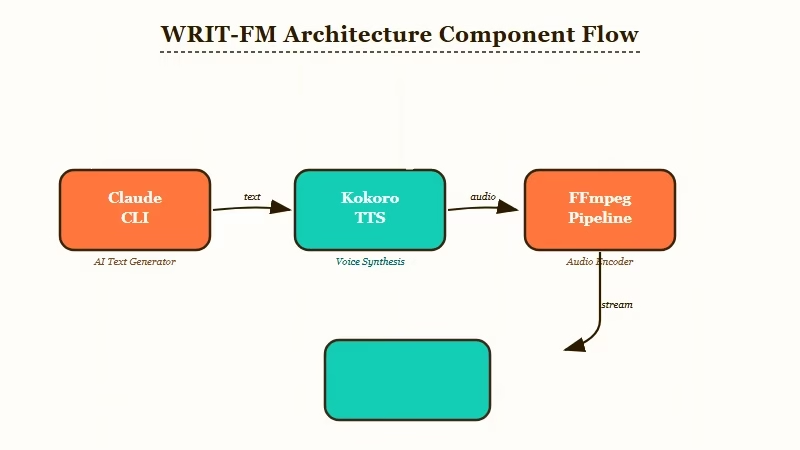
The streaming engine, stream_gapless.py, selects music based on the current time and show schedule. Between tracks, it calls Claude to generate a DJ segment, passes the text to the TTS engine, and pipes the resulting audio through ffmpeg into Icecast. No silence, no gaps.
The content generation layer runs in talk_generator.py. Claude writes nine types of spoken content: station IDs, song introductions, transitions, dedications, weather reports (intentionally strange), philosophical monologues, music history segments, late-night musings, and responses to listener messages.
The schedule layer manages 15 distinct shows on a weekly rotation. Jazz Archives on Monday, World Circuit on Tuesday, Club Liminal late Friday. Each show has its own personality tone, music energy profile, and DJ voice. The system swaps all three automatically based on time slot, with no manual input required.
What Do You Need Before You Start?
You need Python 3.11+, ffmpeg, Icecast2, Claude CLI authenticated with your Anthropic account, and at least one directory of audio files. The stack does not require a cloud server, but whatever machine you use needs to run continuously.
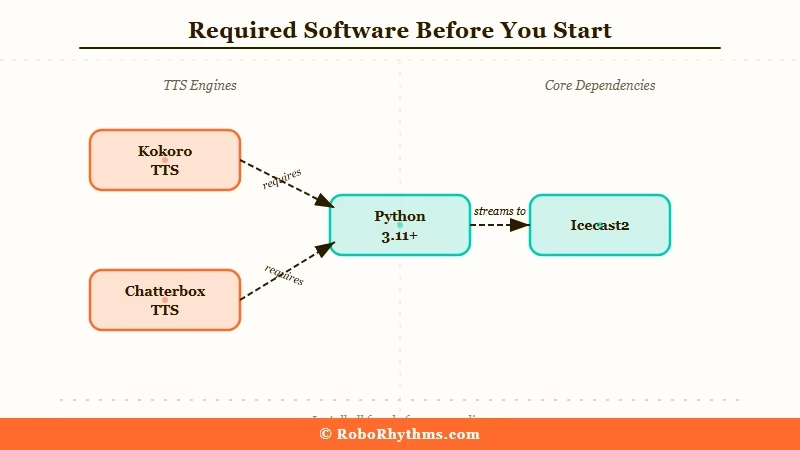
Hardware minimum: any machine with 2GB of RAM. Apple Silicon is recommended if you plan to use the Chatterbox TTS option, since the 4GB voice-cloning model benefits from GPU acceleration. For the lighter Kokoro TTS option, a Mac Mini or low-end VPS works fine.
Choose your TTS engine before installing anything:
| TTS option | Model size | Best for | Voice cloning |
|---|---|---|---|
| Kokoro | ~200MB | Quick setup, 28 preset voices | No |
| Chatterbox | ~4GB | Custom voice, Apple Silicon | Yes |
Most builders start with Kokoro. You can swap to Chatterbox later without changing anything else in the stack. The only trade-off is preset voices versus a cloned one.
You also need your own music files. WRIT-FM does not include tracks. Royalty-free sources like Free Music Archive work well, and the system organizes tracks by energy level inside the music/ directory.
How Do You Install and Configure the Streaming Engine?
Clone the repo, install the package manager, install system dependencies, copy the config files, add your music, and start Icecast. The full install runs under 10 minutes on a clean macOS or Linux machine.
Here are the steps in order:
- Clone the repo and install uv (the package manager WRIT-FM uses):
git clone https://github.com/keltokhy/writ-fm
cd writ-fm
pip install uv- Install system dependencies:
# macOS
brew install ffmpeg icecast

# Ubuntu/Debian
sudo apt install ffmpeg icecast2- Copy the example config files:
cp config.example.yaml config.yaml
cp persona.example.py persona.py- Add your music files to the
music/directory. Organize tracks by energy level using the folder structure documented in the repo README. - Start Icecast, then launch the streaming engine:
icecast -c /etc/icecast2/icecast.xml &
python stream_gapless.py
Your first track plays within 30 seconds. The first Claude-generated DJ segment adds another 10 to 20 seconds on top of that. Verify the stream is live at http://localhost:8000/status.xsl.
How Do You Set Up Your AI DJ With Claude?
Edit persona.py to define your DJ’s name, voice, and personality. Claude reads this file every generation cycle, so changes take effect on the next segment without restarting the stream.
Here is what a working persona.py looks like:
PERSONA = {
    "name": "Ray",
    "station": "WRIT-FM",
    "voice": "af_heart",
    "personality": "Late-night jazz host, dry wit, obsessed with weather patterns",
    "speaking_style": "Measured pace, pauses before punchlines, never shouts",
    "music_taste": "Pre-60s jazz, Brazilian bossa nova, ambient electronic"
}
The personality definition is the biggest lever on output quality. From what I’ve seen, vague personalities produce generic patter. Specific quirks produce something that sounds like an actual person. Give your DJ an obsession, a verbal tic, a recurring bit.
To verify Claude is generating correctly, run the talk generator standalone:
python talk_generator.py --type intro --show "Overnight Drift"You should see a DJ script printed to stdout. If you get a Claude authentication error, run claude auth login and follow the OAuth flow. This is the same authentication used in any other Claude CLI automation workflow.
How Do You Keep the Station Running Continuously?
Use operator.py in loop mode, backed by a cron job or systemd service. The operator handles health checks, show transitions, and content pre-generation. The cron job restarts it automatically after crashes or reboots.
The operator script is the watchdog that makes 24/7 operation stable:
python operator.py --loopAdd a cron entry to restart it if it ever dies:
*/5 * * * * pgrep -f operator.py || python /path/to/writ-fm/operator.py --loop &The operator pre-generates batches of DJ segments so there is always a buffer of ready-to-play content. If Claude CLI is briefly unavailable, the stream keeps going on buffered material. The default buffer holds roughly 30 minutes of pre-generated segments.
For a public-facing stream, run the stack on a VPS with a fixed IP and expose Icecast port 8000. Managed hosting that runs persistent Python processes works well here.
The kind of always-on environment you would use for OpenClaw production workloads applies equally to WRIT-FM. Claude API usage for DJ scripts runs under $5 per month with sensible segment frequency and batching.
Frequently Asked Questions
Does WRIT-FM work on Windows?
WRIT-FM is tested on macOS and Linux. On Windows, you need WSL2 with Ubuntu to get a compatible environment for Icecast2 and ffmpeg. Native Windows is not documented in the repo.
How much does the Claude API cost for a 24/7 station?
With batching and reasonable segment frequency, most stations use under $5 per month in Claude API credits. Kokoro TTS runs locally at zero additional cost.
Can I use a different AI model instead of Claude?
Yes. WRIT-FM supports Gemini CLI as an alternative. You swap the model flag in talk_generator.py. The personality prompt format works the same way with either model.
Do I need to provide my own music?
Yes. WRIT-FM does not include tracks. Organize royalty-free or personally licensed audio files by energy level in the music/ directory.
Can listeners tune in from outside my local network?
Yes, if you expose Icecast port 8000 through your firewall or router. For a persistent public stream, a VPS with a fixed IP is the reliable option.
